Geekzone: technology news, blogs, forums
Guest
Welcome Guest.
You haven't logged in yet. If you don't have an account you can register now.


D1NZ

194 posts

Master Geek
+1 received by user: 14


#248100 10-Mar-2019 15:24
Send private message


10/03/2019


Sunday morning called 2degree after the call extendsive test was done, the tech answered my call have done speed profile repush and also wrote an e-mail for Enable.


Following test was done after the call:-


2 different routers, one self build Xeon server and one EdgeRouter (EdgeRouter was test with old firmware and than update to new one with a reset and reconfiguration done).
With both router I have done tests on 4 different PCs with Windows 10 and one of the PC without any Windows 10 update for about 1 year or so, also one of the PC I test with USB boot Linux under Ubuntu.
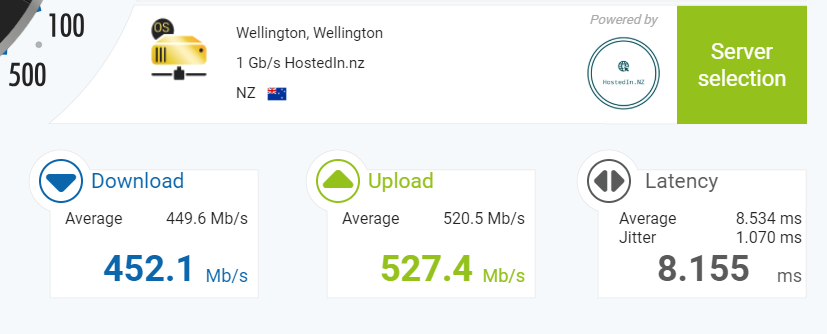
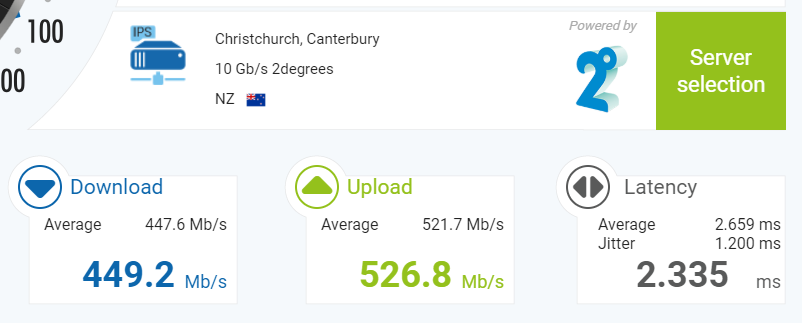
Speed results are all the same across all tests above, from Speedtest.net and www.nperf.com


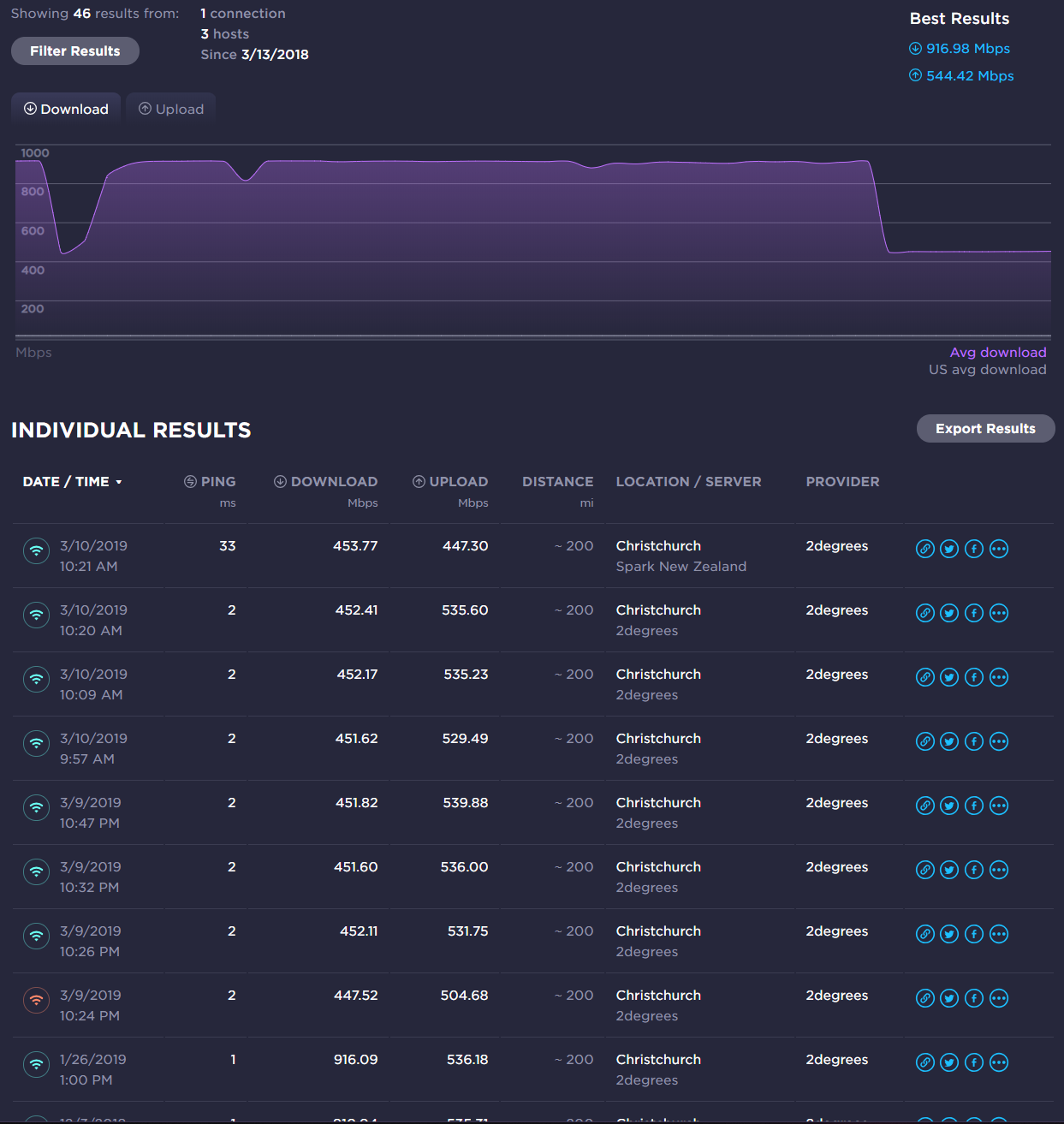
Called 2degree again in the afternoon, tech said Enable has replied with no problem with the network and maybe an congestion issues, personally do not think this is the case, all speedtest was consistent 450 down and 530 up even from different source. 


Before we ended the call tech said he will e-mail a check list that Enable usually want them to do with the Fritzbox but since I don't have one he will e-mail me and for me to run the check from my end.


CPU: Intel Xeon E3-1225 V2 @ 3.20Ghz
RAM: A-data ECC 4GB x 2 1600MHz
SSD: Samsung 840 Pro 120GB
Motherboard: Intel S1200KPR server board mini-ITX
NIC: Intel Ethernet Server Adapter I350-T2


View this topic in a long page with up to 500 replies per page Create new topic
 1 | 2 | 3 | 4 | 5 | 6
D1NZ

194 posts

Master Geek
+1 received by user: 14


  #2195116 10-Mar-2019 15:33
Send private message


CPU: Intel Xeon E3-1225 V2 @ 3.20Ghz
RAM: A-data ECC 4GB x 2 1600MHz
SSD: Samsung 840 Pro 120GB
Motherboard: Intel S1200KPR server board mini-ITX
NIC: Intel Ethernet Server Adapter I350-T2


michaelmurfy
meow
13579 posts

Uber Geek
+1 received by user: 10910

Moderator
ID Verified
Trusted
Lifetime subscriber

  #2195143 10-Mar-2019 16:15
Send private message

Please prove that you've done a test by booting Linux on the PC you could normally get Gigabit from and testing via the Edgerouter with PPPoE Offloading enabled. Ideally cabled straight to the Edgerouter itself (ONT --> Edgerouter --> PC) without any switches in the way.


I've got a guide in my signature if you need assistance with configuring the Edgerouter for this. Also what do you mean by "lag spikes?"? Got any information to back this up such as traceroutes or anything going to the game server? The in-game ping doesn't mean anything here.


You can't assume there is a problem based on Speedtests alone. You need to do additional testing yourself to confirm the issue isn't either with your home network or with your PC which in all your posts you've actually not proven yet. 2degrees can only provide very limited support if you're using anything other than a Fritz!Box so I honestly encourage getting one of those from them and testing with that.


Michael Murphy | https://murfy.nz
Referral Links: Quic Broadband (use R122101E7CV7Q for free setup)

Are you happy with what you get from Geekzone? Please consider supporting us by subscribing.
Opinions are my own and not the views of my employer.


D1NZ

194 posts

Master Geek
+1 received by user: 14


  #2195163 10-Mar-2019 17:11
Send private message

Just another update my MacBook Pro running OSX tests results are the same as all above tests that has been done, and make that 5 PCs now.


This MacBook has been doing 1Gbps no problem before.


Connected straight into pfSense box and EdgeRouter.


As for the lag spike no not just high ping, in games. more like packet dropped made the game completely freeze for few seconds..


it basically make all on line games unplayable.


Wow is the most affected atm.


CPU: Intel Xeon E3-1225 V2 @ 3.20Ghz
RAM: A-data ECC 4GB x 2 1600MHz
SSD: Samsung 840 Pro 120GB
Motherboard: Intel S1200KPR server board mini-ITX
NIC: Intel Ethernet Server Adapter I350-T2


Bluntj
584 posts

Ultimate Geek
+1 received by user: 284


  #2195191 10-Mar-2019 18:18
Send private message

D1NZ:


Just another update my MacBook Pro running OSX tests results are the same as all above tests that has been done, and make that 5 PCs now.


This MacBook has been doing 1Gbps no problem before.


Connected straight into pfSense box and EdgeRouter.


As for the lag spike no not just high ping, in games. more like packet dropped made the game completely freeze for few seconds..


it basically make all on line games unplayable.


Wow is the most affected atm.


Getting the same issues in wow.


I have been told in game it is due to a Microsoft update and is affecting a lot of online games. Cant substantiate this. Basically is disastrous during a raid with 20 odd people and making the game unplayable.  


Just found a forum article calling it a 2 degrees issue.


https://us.forums.blizzard.com/en/wow/t/2degrees-nz-high-latency-oceanic-server/118103


Interesting to see how this goes...


D1NZ

194 posts

Master Geek
+1 received by user: 14


  #2195206 10-Mar-2019 19:10
Send private message

Bluntj:


D1NZ:


Just another update my MacBook Pro running OSX tests results are the same as all above tests that has been done, and make that 5 PCs now.


This MacBook has been doing 1Gbps no problem before.


Connected straight into pfSense box and EdgeRouter.


As for the lag spike no not just high ping, in games. more like packet dropped made the game completely freeze for few seconds..


it basically make all on line games unplayable.


Wow is the most affected atm.


Getting the same issues in wow.


I have been told in game it is due to a Microsoft update and is affecting a lot of online games. Cant substantiate this. Basically is disastrous during a raid with 20 odd people and making the game unplayable.  


Just found a forum article calling it a 2 degrees issue.


https://us.forums.blizzard.com/en/wow/t/2degrees-nz-high-latency-oceanic-server/118103


Interesting to see how this goes...


Thanks for the info, also did reply on Blizzard's forum too.


Good to know I am not alone in this mess.


CPU: Intel Xeon E3-1225 V2 @ 3.20Ghz
RAM: A-data ECC 4GB x 2 1600MHz
SSD: Samsung 840 Pro 120GB
Motherboard: Intel S1200KPR server board mini-ITX
NIC: Intel Ethernet Server Adapter I350-T2


Bluntj
584 posts

Ultimate Geek
+1 received by user: 284


  #2195215 10-Mar-2019 19:23
Send private message

Im raiding now and the lag spikes are killing me.


Want to support Geekzone and browse the site without the ads? Subscribe to Geekzone now (monthly, annual and lifetime options).
sylekta
11 posts

Geek


  #2195222 10-Mar-2019 19:52
Send private message

Also getting lag spikes playing path of exile on 2degrees. Relevant support post @ poe https://www.pathofexile.com/forum/view-thread/2454286/page/1


winmtr data for the au poe server https://pastebin.com/8MhBp74C


edit: signed up for a vpn and its solved my issues till 2* get it sorted


Ramrodd
18 posts

Geek
+1 received by user: 1


  #2195224 10-Mar-2019 19:55
Send private message

Yes, its an issue along the routing path between here and Australia where the Oceanic wow servers are based.


Its like the 3rd hop in.  Hoping 2degrees come to the party and contact whomever administers that point and see if we can get this fixed.


If not, will probably be looking at switching ISP's as I have noticed it on Apex now as well.


michaelmurfy
meow
13579 posts

Uber Geek
+1 received by user: 10910

Moderator
ID Verified
Trusted
Lifetime subscriber

  #2195226 10-Mar-2019 20:04
Send private message

But still - despite what is asked you've posted no evidence that you've conducted these tests. Call me skeptical, but this reminds me of being in tech support and telling a customer to reboot their router (while I am watching the Radius logs and pinging their router) and them saying they've done it despite no drop of connection on my end. In the end, the problem was resolved by them rebooting their router instead of just "saying" that they had rebooted it when in-fact they were rebooting their PC instead.


Now, this is not what I am saying you're doing, but I do find it odd that you're unable to provide a screenshot of your computer booted into Linux as I've asked to do a Speedtest and on top of this both 2degrees support and Enable are unable to find a fault with your connection.


Please provide a screenshot of a test being done to both 2degrees Christchurch and Auckland, from Firefox, on Linux. Also provide a traceroute you've done to the game server you're paying off. Use the Edgerouter 4 (also make sure offloading is enabled - see here: https://help.ubnt.com/hc/en-us/articles/115006567467-EdgeRouter-Hardware-Offloading). To verify, paste the output (via SSH to your Edgerouter) of "show ubnt offload && show version" into your post.


Without this sort of information I don't see 2degrees taking your case seriously.


In regards to the issue with WoW / League of Legends / whatever game you're playing you're actually yet to state the game that is affected (you just state it is online gaming). Now, this is not at all helpful. Post a detailed post else I'm just locking this thread as I've actually asked you multiple times now (and not once you've listened to me). This isn't the first time Blizzard has had such issues and 9/10 times it isn't the ISP at fault here.


Michael Murphy | https://murfy.nz
Referral Links: Quic Broadband (use R122101E7CV7Q for free setup)

Are you happy with what you get from Geekzone? Please consider supporting us by subscribing.
Opinions are my own and not the views of my employer.


D1NZ

194 posts

Master Geek
+1 received by user: 14


  #2195227 10-Mar-2019 20:04
Send private message

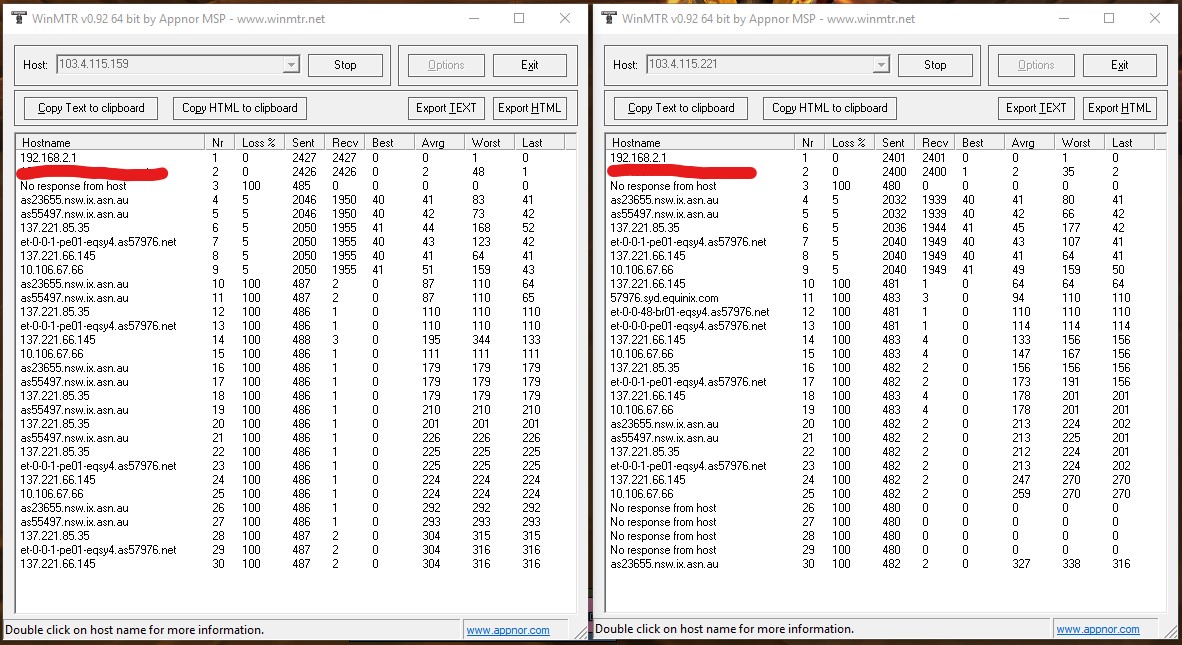
Like I was saying, it's not only Wow many other games are the same.


Few I play, Anthem, WoW, Division, Apex


Trace monitor did while in-game lagging like a bitch.


CPU: Intel Xeon E3-1225 V2 @ 3.20Ghz
RAM: A-data ECC 4GB x 2 1600MHz
SSD: Samsung 840 Pro 120GB
Motherboard: Intel S1200KPR server board mini-ITX
NIC: Intel Ethernet Server Adapter I350-T2


sylekta
11 posts

Geek


  #2195229 10-Mar-2019 20:09
Send private message

if you dont mind spending a couple bucks, sign up for a vpn, even a free trial. Solved my issues


Shop now at Mighty Ape (affiliate link).
D1NZ

194 posts

Master Geek
+1 received by user: 14


  #2195235 10-Mar-2019 20:11
Send private message

With those said, still not explained my speed drop from 930 (had since 1Gbps made available on 2degrees) to 450Mbps now.


CPU: Intel Xeon E3-1225 V2 @ 3.20Ghz
RAM: A-data ECC 4GB x 2 1600MHz
SSD: Samsung 840 Pro 120GB
Motherboard: Intel S1200KPR server board mini-ITX
NIC: Intel Ethernet Server Adapter I350-T2


michaelmurfy
meow
13579 posts

Uber Geek
+1 received by user: 10910

Moderator
ID Verified
Trusted
Lifetime subscriber

  #2195236 10-Mar-2019 20:13
Send private message

D1NZ:


With those said, still not explained my speed drop from 930 (had since 1Gbps made available on 2degrees) to 450Mbps now.


I have asked multiple times - refer to the above post. Next unhelpful post you provide, I'm simply locking this.


Michael Murphy | https://murfy.nz
Referral Links: Quic Broadband (use R122101E7CV7Q for free setup)

Are you happy with what you get from Geekzone? Please consider supporting us by subscribing.
Opinions are my own and not the views of my employer.


sylekta
11 posts

Geek


  #2195237 10-Mar-2019 20:17
Send private message

michaelmurfy:


D1NZ:


With those said, still not explained my speed drop from 930 (had since 1Gbps made available on 2degrees) to 450Mbps now.


I have asked multiple times - refer to the above post. Next unhelpful post you provide, I'm simply locking this.


whats your deal mate? this is a legitimate nationwide issue affecting lots of people


sorceror
163 posts

Master Geek
+1 received by user: 47


  #2195239 10-Mar-2019 20:25
Send private message

fine in auckland


 1 | 2 | 3 | 4 | 5 | 6
View this topic in a long page with up to 500 replies per page Create new topic


Geekzone Live »

Try automatic live updates from Geekzone directly in your browser, without refreshing the page, with Geekzone Live now.


Are you subscribed to our RSS feed? You can download the latest headlines and summaries from our stories directly to your computer or smartphone by using a feed reader.