Geekzone: technology news, blogs, forums
Guest
Welcome Guest.
You haven't logged in yet. If you don't have an account you can register now.


Mark

1653 posts

Uber Geek
+1 received by user: 555


#122103 24-Jun-2013 22:09
Send private message

I just got cut over to VDSL and I see no difference at all in speed (actually I've lost 2Mbit download)

I'm emailing Snap as well but as it's late i guess their techies are probably sleeping, so I'll see what you guys can see :-)

I'm pretty sure the rather high Line attenuation will have something to do with the issue :-(

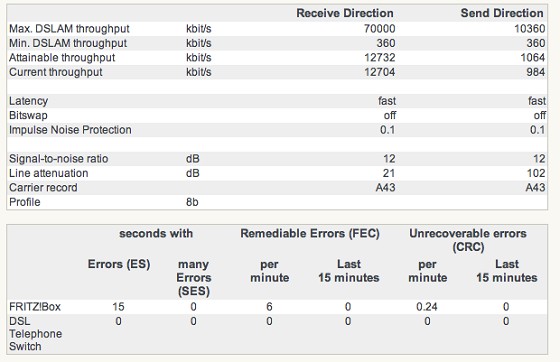
                        Receive Direction      Send Direction

Max. DSLAM throughput      kbit/s  70000            10360

Min. DSLAM throughput      kbit/s  360     360

Attainable throughput         kbit/s  12732            1064

Current throughput kbit/s  12704            984


Latency                       fast     fast

Bitswap                      off      off

Impulse Noise Protection                 0.1       0.1


Signal-to-noise ratio  dB       12       12

Line attenuation        dB       21       102

Carrier record                       A43     A43

Profile 8b                  


I've tried the usual stuff, Fritz box is plugged into the xDSL output of the Master Splitter, cable from the master splitter to the modem is about 60cm, there are no phone points wired up (I pulled the cable to them from the splitter) ... just outside phone line straight to master splitter. (I can take the splitter out of the equation relatively simply but I don't think it's the problem)

I got the same figures (give or take) when on ADSL with Xnet ... makes me wonder if there is a throttle from Xnet still on the line or something ?


Create new topic
PeterReader
6028 posts

Uber Geek
+1 received by user: 461

Trusted
Geekzone
Lifetime subscriber

  #843671 24-Jun-2013 22:09
Send private message

Hello... Our robot found some keywords in your post, so here is an automated reply with some important things to note regarding broadband speeds.


If you are posting regarding DSL speeds please check that


- you have reset your modem and router


- your PC (or other PCs in your LAN) is not downloading large files when you are testing


- you are not being throttled by your ISP due to going over the monthly cap


- your tests are always done on an ethernet connection to the router - do not use wireless for testing


- you read this topic and follow the instructions there.


Make sure you provide information for other users to help you. If you have not already done it, please EDIT your post and add this now:


- Your ISP and plan


- Type of connection (ADSL, ADSL2, VDSL)


- Your modem DSL stats (do not worry about posting Speedtest, we need sync rate, attenuation and noise margin)


- Your general location (or street)


- If you are rural or urban


- If you know your connection is to an exchange, cabinet or conklin


- If your connection is to a ULL or wholesale service


- If you have done an isolation test as per the link above


Most of the problems with speed are likely to be related to internal wiring issues. Read this discussion to find out more about this. Your ISP is not intentionally slowing you down today (unless you are on a managed plan). Also if this is the school holidays it's likely you will notice slower than usual speed due to more users online.


A master splitter is required for VDSL2 and in most cases will improve speeds on DSL connections. Regular disconnections can be a monitored alarm or a set top box trying to connect. If there's an alarm connected to your line even if you don't have an alarm contract it may still try to connect so it's worth checking.


I recommend you read these two blog posts:


- Is your premises phone wiring impacting your broadband performance? (very technical)


- Are you receiving a substandard ULL ADSL2+ connection from your ISP?


I am the Geekzone Robot and I am here to help. I am from the Internet. I do not interact. Do not expect other replies from me.


Referral links: Quic Broadband (free setup code: R587125ERQ6VE) | Samsung | AliExpress | Wise | Sharesies 


Support Geekzone by subscribing (browse ads-free), or making a one-off or recurring donation through PressPatron.


sidefx
3775 posts

Uber Geek
+1 received by user: 1295

Trusted

  #843678 24-Jun-2013 22:11
Send private message

Take a screenshot of the Fritzbox DSL and spectrum tabs and share those; it's easier than trying to keep the HTML formatting ;-)


"I was born not knowing and have had only a little time to change that here and there."         | Octopus Energy | Sharesies
              - Richard Feynman


Mark

1653 posts

Uber Geek
+1 received by user: 555


  #843680 24-Jun-2013 22:15
Send private message

DSL Stats


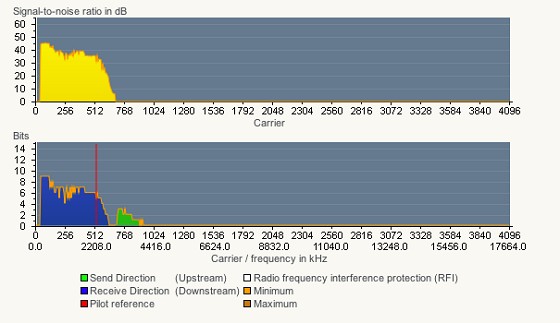
Spectrum


Mark

1653 posts

Uber Geek
+1 received by user: 555


  #843681 24-Jun-2013 22:16
Send private message

Sorry about that .. formatting got completely munched before :-)

HowickDota
427 posts

Ultimate Geek
+1 received by user: 72


  #843694 24-Jun-2013 22:25
Send private message

Images look broken from here

SCM

SCM
459 posts

Ultimate Geek
+1 received by user: 48


  #843741 25-Jun-2013 02:56
Send private message

The images are fine.

Seems most of the carrier bins have issues, I suspect you have a bad line back to the exchange/cabinet or a line that splits in to multiple lines..
Get Snap to open a job with Chorus, they might have to swap out your line on to another pair.


 Click to see full size


Shop now for Lenovo laptops and other devices (affiliate link).
sbiddle
30853 posts

Uber Geek
+1 received by user: 9996

Retired Mod
Trusted
Biddle Corp
Lifetime subscriber

  #843759 25-Jun-2013 07:38
Send private message

You attenuation is way to high and your bitloading graph is virtually empty. This indicates you're either well outside the VDSL2 coverage area of have a major wiring issue somewhere.

theEd
341 posts

Ultimate Geek
+1 received by user: 26

Trusted

  #843790 25-Jun-2013 09:02
Send private message

Is your master splitter VDSL-compatible? Could be worth bypassing it just to be sure.

But the Attenuation certainly seems to point to a line/wiring issue.

vexxxboy
4336 posts

Uber Geek
+1 received by user: 2072


  #843819 25-Jun-2013 09:47
Send private message

that looks exactly like my VDSL connection when i tried , right down to the graphs and i got Chorus out to check and my wiring was fine , same speeds at both the road and my jack point, it turned out that the problem was the wiring between the cabinet and my house and chorus wasnt going to dig up the streets just for me to fix it as the speeds were acceptable and our street is due for UFB this year.


Common sense is not as common as you think.


Mark

1653 posts

Uber Geek
+1 received by user: 555


  #845140 25-Jun-2013 17:27
Send private message

I'll take the filter out of the equation and see if anything changes .. doubt it will :-(

Mark

1653 posts

Uber Geek
+1 received by user: 555


  #845176 25-Jun-2013 18:38
Send private message


Ping results are nice though ..... as soon as I get freedom from children I'll see about taking out the master splitter.


Shop now for Lego sets and other gifts (affiliate link).
kyhwana2
2572 posts

Uber Geek
+1 received by user: 233


  #845185 25-Jun-2013 19:04
Send private message

Do you have a VDSL2 master filter installed? Have you waited a week with the modem connected/on the entire time? It takes VDSL2 up to a week to train itself to your line conditions.

stevehodge
393 posts

Ultimate Geek
+1 received by user: 52


  #845200 25-Jun-2013 19:16
Send private message

kyhwana2: Do you have a VDSL2 master filter installed? Have you waited a week with the modem connected/on the entire time? It takes VDSL2 up to a week to train itself to your line conditions.

DLM won't do much with that connection, doesn't matter how long you leave it.

Create new topic


Geekzone Live »

Try automatic live updates from Geekzone directly in your browser, without refreshing the page, with Geekzone Live now.


Are you subscribed to our RSS feed? You can download the latest headlines and summaries from our stories directly to your computer or smartphone by using a feed reader.