Geekzone: technology news, blogs, forums
Guest
Welcome Guest.
You haven't logged in yet. If you don't have an account you can register now.


DrDee

273 posts

Ultimate Geek
+1 received by user: 45


#128921 28-Aug-2013 14:09
Send private message

Well my installation was completed today and so far so good (100/50 unlimited).
One question I pose, My ping is outstanding, my download is great, my upload is dire? What am I doing wrong?

https://www.speedtest.net/my-result/2928468304

View this topic in a long page with up to 500 replies per page Create new topic
 1 | 2
PeterReader
6028 posts

Uber Geek
+1 received by user: 461

Trusted
Geekzone
Lifetime subscriber

  #885882 28-Aug-2013 14:09
Send private message

Hello... Our robot found some keywords in your post, so here is an automated reply with some important things to note regarding broadband speeds.


If you are posting regarding DSL speeds please check that


- you have reset your modem and router


- your PC (or other PCs in your LAN) is not downloading large files when you are testing


- you are not being throttled by your ISP due to going over the monthly cap


- your tests are always done on an ethernet connection to the router - do not use wireless for testing


- you read this topic and follow the instructions there.


Make sure you provide information for other users to help you. If you have not already done it, please EDIT your post and add this now:


- Your ISP and plan


- Type of connection (ADSL, ADSL2, VDSL)


- Your modem DSL stats (do not worry about posting Speedtest, we need sync rate, attenuation and noise margin)


- Your general location (or street)


- If you are rural or urban


- If you know your connection is to an exchange, cabinet or conklin


- If your connection is to a ULL or wholesale service


- If you have done an isolation test as per the link above


Most of the problems with speed are likely to be related to internal wiring issues. Read this discussion to find out more about this. Your ISP is not intentionally slowing you down today (unless you are on a managed plan). Also if this is the school holidays it's likely you will notice slower than usual speed due to more users online.


A master splitter is required for VDSL2 and in most cases will improve speeds on DSL connections. Regular disconnections can be a monitored alarm or a set top box trying to connect. If there's an alarm connected to your line even if you don't have an alarm contract it may still try to connect so it's worth checking.


I recommend you read these two blog posts:


- Is your premises phone wiring impacting your broadband performance? (very technical)


- Are you receiving a substandard ULL ADSL2+ connection from your ISP?


I am the Geekzone Robot and I am here to help. I am from the Internet. I do not interact. Do not expect other replies from me.


Referral links: Quic Broadband (free setup code: R587125ERQ6VE) | Samsung | AliExpress | Wise | Sharesies 


Support Geekzone by subscribing (browse ads-free), or making a one-off or recurring donation through PressPatron.


1080p
1332 posts

Uber Geek
+1 received by user: 152
Inactive user


  #885925 28-Aug-2013 15:13
Send private message

Your upstream is hardly 'dire' but have you tried a few tests?

wasabi2k
2102 posts

Uber Geek
+1 received by user: 860


  #885949 28-Aug-2013 16:04
Send private message

Have you tried other test servers?


xpd

xpd
Geek of Coastguard
14116 posts

Uber Geek
+1 received by user: 4574

Retired Mod
ID Verified
Trusted
Lifetime subscriber

  #885951 28-Aug-2013 16:06
Send private message

Are you running the test over wifi ?


XPD / Gavin


LinkTree


browned
636 posts

Ultimate Geek
+1 received by user: 36


  #885955 28-Aug-2013 16:11
Send private message

I would call 6% of expected upload speed pretty dire. I know you will never get the full 50Mb but you would expect to hover around 80-90% most days, especially to a speed test website.

Assuming you are not using a PC/tablet on wifi.

scorpiworld
192 posts

Master Geek
+1 received by user: 3


  #885972 28-Aug-2013 16:38
Send private message

Just to rule out a doggy server I have tried that Christchurch from Auckland on Chorus fibre with Orcon's 30/10 plan.

Got 20 down / 9 up. Using wifi on a mobile too.

Have you tried other servers in NZ and received the same upload results?


Shop on-line at New World now for your groceries (affiliate link).
DrDee

273 posts

Ultimate Geek
+1 received by user: 45


  #886056 28-Aug-2013 18:21
Send private message

OK tried a speed test to Auckland Orcon server, much better, but I would have still expected a bit more (like 40Mb/s).
Not on wireless but PC I am testing from is going through a gigabit switch before the fibre modem, that shouldn't hinder anything tho..

https://www.speedtest.net/my-result/2928769847

Inphinity
2780 posts

Uber Geek
+1 received by user: 1184


  #886152 28-Aug-2013 20:28
Send private message

Tried a speedtest to a non-Orcon server, like Telecom?

Sounddude
I fix stuff!
1935 posts

Uber Geek
+1 received by user: 640

Trusted
2degrees
Lifetime subscriber

  #886205 28-Aug-2013 21:36
Send private message

Hi DrDee

Seems odd to have congestion in the upstream direction, especially if its local traffic.

I assume you are using the Genius modem? If you log into the modem, can you see what Firmware version its running?

DrDee

273 posts

Ultimate Geek
+1 received by user: 45


  #886358 29-Aug-2013 09:58
Send private message

Is this the right info?

INFORMATION
Runtime Code Version: Genius1423
Boot Code Version: 1.0.37-106.17
ADSL Modem Code Version: A2pD030n.d23a
Hardware Version: A610A354067R_R3

Current Firmware Build Time 2012.10.28-17:28:26

DrDee

273 posts

Ultimate Geek
+1 received by user: 45


  #886375 29-Aug-2013 10:05
Send private message

Inphinity: Tried a speedtest to a non-Orcon server, like Telecom?


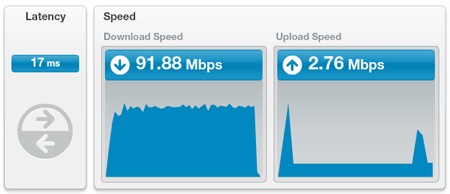
Just ran this test and even more disappointing:

Latency: 17ms
Download: 91.88 Mbps
Upload: 2.76 Mbps

One thing I have noticed when running these speed tests is during the upload test it will spike at about 30ish Mbps then slowly drop down to nothing then spike again and slowly drop back down to nothing.

Weird...


Stream your favourite shows now on Apple TV (affiliate link).
DrDee

273 posts

Ultimate Geek
+1 received by user: 45


  #886676 29-Aug-2013 18:08
Send private message

Couple of more tests from my rig wired into the genius modem, one to sydney then a couple of random NZ servers. Still not flash :(


JamesL
956 posts

Ultimate Geek
+1 received by user: 342
Inactive user


  #886677 29-Aug-2013 18:23
Send private message

Sounds like QOS, don't know if the genius modem has it or not

Sounddude
I fix stuff!
1935 posts

Uber Geek
+1 received by user: 640

Trusted
2degrees
Lifetime subscriber

  #886706 29-Aug-2013 19:22
Send private message

Hi DrDee

This is far from optimal.

Can you please log a support ticket via the Orcon website. We can then start to get to the bottom of it.

Its far from normal. First time I have seen good downloads and crap upload!


DrDee

273 posts

Ultimate Geek
+1 received by user: 45


  #886924 30-Aug-2013 10:15
Send private message

Sounddude: Hi DrDee

This is far from optimal.

Can you please log a support ticket via the Orcon website. We can then start to get to the bottom of it.

Its far from normal. First time I have seen good downloads and crap upload!


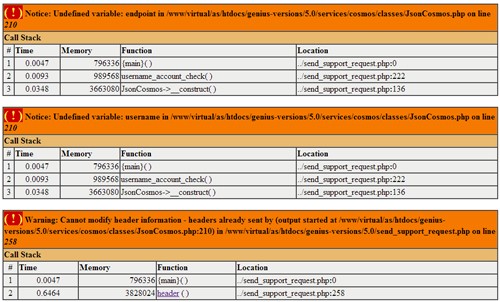
Can't even log a ticket via the website support page, it just errors out when I go to submit the ticket, closed the browser and tried again with same result....


 1 | 2
View this topic in a long page with up to 500 replies per page Create new topic


Geekzone Live »

Try automatic live updates from Geekzone directly in your browser, without refreshing the page, with Geekzone Live now.


Are you subscribed to our RSS feed? You can download the latest headlines and summaries from our stories directly to your computer or smartphone by using a feed reader.