Geekzone: technology news, blogs, forums
Guest
Welcome Guest.
You haven't logged in yet. If you don't have an account you can register now.


Ladygrace

22 posts

Geek
+1 received by user: 1


#208428 11-Feb-2017 16:21
Send private message

I moved into a new flat and the current people here have been having issues with the internet constantly dropping and very very slow speeds.


I have been looking into it and there are odd issues using tracert where everything is timing out some times or hitting a 3000ms on some hops or some getting alot more hops.


Completed some speed tests last night and i got 0.6Mb download on ADSL2+ and we are located in town.


From what i know the flatmates have rung up and complained but all slingshot said was it is there fault and it has to be the wiring causing the problems. (The flatmates don't know much about routers etc so took it as it is their fault. And they have rung many times.)


ADSL filter i replaced this morning with no improvements at all in the quality.


I do not have access to another ADSL router to try as all of the ones i own are gig ones for fiber.


These are the traces that i just done to google.


First Hop is my router for my system in between my Nasbox etc but the traces look the very same when i am directly plugged into the router.


I really don't know what to do as the account isn't under my name (Under other flatmates) and there is a $200 cancellation fee.


For my study i need pretty good internet and this is just ruining it.


Any one have any other ideas?


Filter this topic showing only the reply marked as answer View this topic in a long page with up to 500 replies per page Create new topic
 1 | 2
RunningMan
9184 posts

Uber Geek
+1 received by user: 4833


  #1718687 11-Feb-2017 16:54
Send private message

Post the xDSL line stats - sync rate, attenuation, noise margin. Need those to establish if there is an actual line fault, or if the connection is just being saturated.


Ladygrace

22 posts

Geek
+1 received by user: 1


  #1718691 11-Feb-2017 17:14
Send private message

Took me 15 minutes to get to reply from it cutting out sigh.


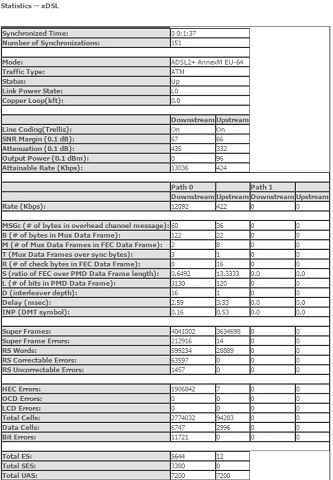
Here is a picture of the stats for you:


Thank you


RunningMan
9184 posts

Uber Geek
+1 received by user: 4833


  #1718692 11-Feb-2017 17:15
Send private message

 Too small to read. Try using the image tag that displays the thumbnail to click on.


coffeebaron
6304 posts

Uber Geek
+1 received by user: 3566

Trusted
Lifetime subscriber

  #1718694 11-Feb-2017 17:18
Send private message

Upstream is not great, most likely wiring issue. What town?


Rural IT and Broadband support.


Broadband troubleshooting and master filter installs.
Starlink installer - one month free: https://www.starlink.com/?referral=RC-32845-88860-71 
Wi-Fi and networking
Cel-Fi supply and installer - boost your mobile phone coverage legally


Need help in Auckland, Waikato or BoP? Click my email button, or email me direct: [my user name] at geekzonemail dot com


RunningMan
9184 posts

Uber Geek
+1 received by user: 4833


  #1718696 11-Feb-2017 17:20
Send private message

Managed to make out some of it.


If that is actually 43dB downstream attenuation you are on a very long line - don't expect much better than you are getting. Having said that, the 6dB SNR implies you are on Slingshot's ULL gear. It's very rare these days, but you may be suffering from midspan injection that occurs when you are connected to ULL at the exchange, when there is a Chorus cabinet closer on your line. Ask Slingshot to check if a Chorus wholesale connection would be better.


Your upstream is pretty poor, but consistent with line length. The most likely cause of dropouts and timeouts is that someone is saturating your upstream connection with some sort of upload - torrent / iCloud / onedrive / crashplan etc.


yitz
2238 posts

Uber Geek
+1 received by user: 594


  #1718701 11-Feb-2017 17:25
Send private message

https://cdn.geekzone.co.nz/imagessubs/ec36375962de91d7fb560875534caa1e.jpg


151 resyncs would point to a wiring issue.


I would try disable annex M for testing.
Advanced Setup > DSL, uncheck 'Annex M' then Apply/Save.


Going by the traceroute, cpcch-ric would indicate callplus core chch(riccarton exchange) so chch CBD.


If this line has POTS voice and you have a phone make sure they are plugged in through filters and that they are working.
If there are multiple jack points try relocating the modem if possible.


Stream your favourite shows now on Apple TV (affiliate link).
richms
29097 posts

Uber Geek
+1 received by user: 10205

Trusted
Lifetime subscriber

  #1718711 11-Feb-2017 18:17
Send private message

Annex M and 6dB is unbundled gear. First thing I would check is if the address is in a location that should be connected to a chorus cabinet. Might just be a case as has happened many times in the past when the ISP has left the customer on their own gear from the exchange rather than pay more to chorus to supply a better service from the cabinet.


Put the address in the chorus map tool and see what it says you should get. Compare it with the neighbours. If it says you are in a VDSL area and you have stats that bad, then that is whats happened.


Richard rich.ms

Ladygrace

22 posts

Geek
+1 received by user: 1


  #1718730 11-Feb-2017 19:03
Send private message

richms:


Annex M and 6dB is unbundled gear. First thing I would check is if the address is in a location that should be connected to a chorus cabinet. Might just be a case as has happened many times in the past when the ISP has left the customer on their own gear from the exchange rather than pay more to chorus to supply a better service from the cabinet.


Put the address in the chorus map tool and see what it says you should get. Compare it with the neighbours. If it says you are in a VDSL area and you have stats that bad, then that is whats happened.


Where i live there is the option to have fiber installed. My old flat was 20 meters from here and even the ADSL that was there was super fast then we had fiber installed for an amazing connection. We are using the supplied Router/Modem that was sent to us. (The one for my Nas box is connected to a lan port from the supplied gear). We have no phones or any other devices connected to the phone lines at all so it is just the supplied gear and mine which i have done all the tests without it hooked up and the same problem.


This flat is able to get fiber but the thing it the Landlord will most likely not allow it at all as it took almost 1 full year to get accepted to get it installed in my old flat from the same landlord.


My town is Invercargill and live pretty close to the center of town. Does anyone know what other options i have since it is most likely the wiring then and how to go about getting it passed the landlord?


Edit: We are about 100 meters from the cabnet MAX. No torrents or anything is uploading as i have checked as well. We can not get VDSL as i think we are to close to the cabnet.


RunningMan
9184 posts

Uber Geek
+1 received by user: 4833


  #1718735 11-Feb-2017 19:28
Send private message

Ladygrace:[snip] We can not get VDSL as i think we are to close to the cabnet.


Nope.


As @richms mentioned, go to the Chorus website, stick your address in and see if you can get VDSL. Stick your neighbours addresses in and see what connection sync rates they have. If they are wildly different to yours, the likely issues is that you should be connected to a cabinet, not to ULL gear.


Ladygrace

22 posts

Geek
+1 received by user: 1


  #1718740 11-Feb-2017 19:57
Send private message

 This is what i get for our address


Click to see full size


And the other flats beside us get 7Mbps+


RunningMan
9184 posts

Uber Geek
+1 received by user: 4833


  #1718741 11-Feb-2017 20:08
Send private message

Try going a few properties up/down the street, and see if you get anyone in the VDSL range on the scale.


Either way, 151 resyncs means the connection has dropped 151 times since you last restarted the modem. Putting aside whether you should see a better sync rate, that's an unstable connection. What's the internal wiring like in the property - number of phone jacks etc?


Shop now on AliExpress (affiliate link).
coffeebaron
6304 posts

Uber Geek
+1 received by user: 3566

Trusted
Lifetime subscriber

  #1718769 11-Feb-2017 20:54
Send private message

PM me your address if you are happy to and I'll look up some details.


Cheers


Fraser


Rural IT and Broadband support.


Broadband troubleshooting and master filter installs.
Starlink installer - one month free: https://www.starlink.com/?referral=RC-32845-88860-71 
Wi-Fi and networking
Cel-Fi supply and installer - boost your mobile phone coverage legally


Need help in Auckland, Waikato or BoP? Click my email button, or email me direct: [my user name] at geekzonemail dot com


Ladygrace

22 posts

Geek
+1 received by user: 1


  #1718770 11-Feb-2017 21:02
Send private message

RunningMan:


Try going a few properties up/down the street, and see if you get anyone in the VDSL range on the scale.


Either way, 151 resyncs means the connection has dropped 151 times since you last restarted the modem. Putting aside whether you should see a better sync rate, that's an unstable connection. What's the internal wiring like in the property - number of phone jacks etc?


There are 7 phone jacks that i know of. No phones plugged in or in use.


One phone jack was cut because they installed a new alarm but cant use it because it randomly goes off for no reason at all.


In the past 1 and a half hours we have had a total of 120 resyncs nvm 122 now.


I am unable to check any other places around the area because the sites never load since it cuts out so often that even making this reply takes along time to submit. There is only a 3-10 second window that i can use it before it messes up.


I really have no other info on what the rest of the wiring is like. I am at the point i have no clue what to do. It is so unusable i can not so any school work.


RunningMan
9184 posts

Uber Geek
+1 received by user: 4833


  #1718772 11-Feb-2017 21:17
Send private message

See what @coffeebaron comes back with in terms of what sort of connection you should expect, but I suspect that you have at least got an internal wiring issue - with 7 jackpoints, and an alarm, the potential is pretty high...


The best way of resolving it is a master splitter instal with a dedicated xDSL jackpoint - about $200 if Chorus do it, but if you have electrical skills, far less than that...


Ladygrace

22 posts

Geek
+1 received by user: 1


  #1718773 11-Feb-2017 21:23
Send private message

Well it took me over an hour to load this site and i have Pmed Coffee and sent an email to the real estate agent to contact the landlord as this is pathetic.


Also stated that installing fiber would most likely fix the internet issues i would hope.


 1 | 2
Filter this topic showing only the reply marked as answer View this topic in a long page with up to 500 replies per page Create new topic


Geekzone Live »

Try automatic live updates from Geekzone directly in your browser, without refreshing the page, with Geekzone Live now.


Are you subscribed to our RSS feed? You can download the latest headlines and summaries from our stories directly to your computer or smartphone by using a feed reader.