Geekzone: technology news, blogs, forums
Guest
Welcome Guest.
You haven't logged in yet. If you don't have an account you can register now.


Blockster

20 posts

Geek
+1 received by user: 1


#208499 14-Feb-2017 21:26
Send private message


Hello all - My family and I are at our wits end with an internet issue


We have been dealing with Slingshot and she's been a hard slog


My wife, computer illiterate and my 13 year old knows more than me


My wife has talked a few times to the customer service people and I have both talked and emailed the tech support team


In a nutshell, there is a download issue, it crawls and only barely, you connect fine on either wireless or ethernet but any download does not function


Slingshot have a process that they like you to follow, involves DNS Server changes, Running a script (bat file) etc, we have done all sorts, Slingshots requests and our own investigations, have tried a lot of things


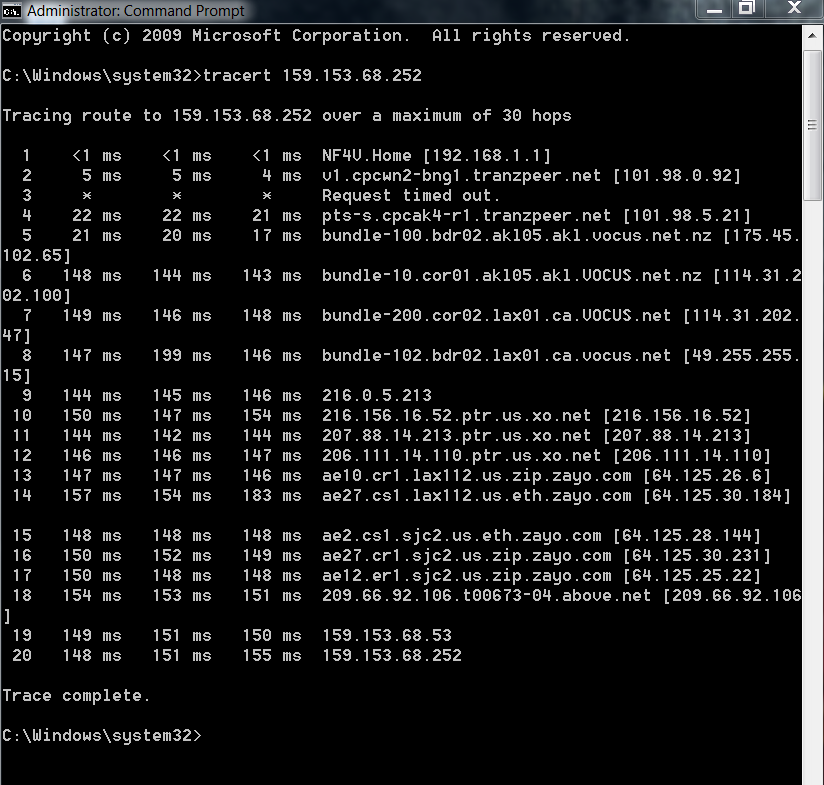
Tracert and pathping using the CMD function shows the culprit, early time out either at or near modem


We have had very little in the way of direction of basic help from SS


SUMMARY


Line Speeds are fine - both wired and wireless, no issues - tested plenty


New Modem has been reset plenty


Affects PC and Laptop to the same level


Tried both PC and Laptop at another location under a different network and all fine .... so dont believe it is any settings or firewalls in any computer


We can read Stuff and Trademe and vaguely watch youtube with plenty of buffering going on, when you download anything it will take 2 to 15 hours


Any ideas on what else we can try ?


Much appreciated - Cheers


Aaron and Jenny


Filter this topic showing only the reply marked as answer View this topic in a long page with up to 500 replies per page Create new topic
 1 | 2
freitasm
BDFL - Memuneh
80646 posts

Uber Geek
+1 received by user: 41024

Administrator
ID Verified
Trusted
Geekzone
Lifetime subscriber

  #1720223 14-Feb-2017 21:29
Send private message

Is this ADSL or VDSL? When was the installation? Do you have a master filter installed? Can you post modem stats?


Referral links: Quic Broadband (free setup code: R587125ERQ6VE) | Samsung | AliExpress | Wise | Sharesies 


Support Geekzone by subscribing (browse ads-free), or making a one-off or recurring donation through PressPatron.


Blockster

20 posts

Geek
+1 received by user: 1


  #1720228 14-Feb-2017 21:40
Send private message


VDSL is the service provided


The Modem is a


VDSL/ADSL WIFI GIGABIT MODEM ROUTER
NF4V


Unsure about the master filter - didn't realise we needed one ?


Also worth noting and Im not sure if this is indeed anything but if you see the below pics (tracert on youtube, smh.au and a star wars game site by son plays on)


Youtube hops fine


SMH.AU doesnt has per normal with most - when the timeout happens, tranzpeer.net is involved in the failure ?


Thanks


Sounddude
I fix stuff!
1935 posts

Uber Geek
+1 received by user: 640

Trusted
2degrees
Lifetime subscriber

  #1720232 14-Feb-2017 21:48
Send private message

The BNG has a ICMP protect rule on it which limits the amount of ICMP it will reply to. This will make it look like its got a high ping but in reality its not the issue.


Linux
12173 posts

Uber Geek
+1 received by user: 8467

Trusted
Lifetime subscriber

  #1720239 14-Feb-2017 22:04
Send private message

First step get a expert in to check out the house wiring and install a VDSL master filter before going off at ISP

Linux

Stu

Stu
Hammered
8737 posts

Uber Geek
+1 received by user: 2390

Moderator
ID Verified
Trusted
Lifetime subscriber

  #1720240 14-Feb-2017 22:04
Send private message

 Moved to the Slingshot sub-forum


People often mistake me for an adult because of my age.


Keep calm, and carry on posting.


Referral Links: Sharesies


Are you happy with what you get from Geekzone? If so, please consider supporting us by subscribing.


No matter where you go, there you are.


yitz
2238 posts

Uber Geek
+1 received by user: 594


  #1720243 14-Feb-2017 22:19
Send private message

It seems there are multiple recent cases of Slingshot/Orcon customers on VDSL having issues with international traffic.


http://www.geekzone.co.nz/forums.asp?forumid=82&topicid=207718


http://www.geekzone.co.nz/forums.asp?forumid=81&topicid=208204


All this seems to coincide with the introduction of IPv6, is IPv6 taking up all the bandwidth or something? :P


Now that UFB is going IPv6 can we expect the same problems??


Shop now on Samsung phones, tablets, TVs and more (affiliate link).
Blockster

20 posts

Geek
+1 received by user: 1


  #1720294 14-Feb-2017 22:38
Send private message


Thank you all :)


Appreciated


euge
22 posts

Geek


  #1720814 15-Feb-2017 19:58
Send private message

yitz: It seems there are multiple recent cases of Slingshot/Orcon customers on VDSL having issues with international traffic. http://www.geekzone.co.nz/forums.asp?forumid=82&topicid=207718 http://www.geekzone.co.nz/forums.asp?forumid=81&topicid=208204 All this seems to coincide with the introduction of IPv6, is IPv6 taking up all the bandwidth or something? :P Now that UFB is going IPv6 can we expect the same problems??


I had the same problem while on ADSL since Dec, hence the 'upgrade' :/


Blockster

20 posts

Geek
+1 received by user: 1


  #1720841 15-Feb-2017 20:43
Send private message


I am talking to Sling shot in the morning again


Should I be bringing up this IPv6 conversation ? I dont have the knowledge as many here do so I learn on the fly


We continually go backwards with SS, today they asked us to do the same tests we did twice previously, seems to be no system for continuance of service


10 days later, seriously considering opting out. The Mrs has the email of Mark Callander, Vocus Chief and Taryn Hamilton GM of SS, and she will eventually contact them, there is something not quite right with 10 days and asking the same questions as day one, will give it 24 hours


Thanks for ideas in any case


Linux
12173 posts

Uber Geek
+1 received by user: 8467

Trusted
Lifetime subscriber

  #1720848 15-Feb-2017 20:57
Send private message

Have you had an expert in to check out the house telephone wiring and master filter installed?


Linux


Blockster

20 posts

Geek
+1 received by user: 1


  #1720891 15-Feb-2017 22:05
Send private message


Thanks Linux, there is a filter there yes


Checking wiring is not the logical next step, that would feel like, jumping the gun when nothing else has been considered


If it was the wiring, surely it would affect every website visited in a generic fashion, both incoming and outgoing data ? rather than a specific issue


Shop now at Mighty Ape (affiliate link).
freitasm
BDFL - Memuneh
80646 posts

Uber Geek
+1 received by user: 41024

Administrator
ID Verified
Trusted
Geekzone
Lifetime subscriber

  #1721010 16-Feb-2017 08:58
Send private message

Could be some intermittent wiring fault - affected by water, or corroded wires, or interference from someone else's equipment, or monitored alarm.


Also is that one of those filters you plug into the wall or an actual filter installed as part of the wiring?


Referral links: Quic Broadband (free setup code: R587125ERQ6VE) | Samsung | AliExpress | Wise | Sharesies 


Support Geekzone by subscribing (browse ads-free), or making a one-off or recurring donation through PressPatron.


Spyware
3817 posts

Uber Geek
+1 received by user: 1366

Lifetime subscriber

  #1721018 16-Feb-2017 09:12
Send private message

Blockster:


Thanks Linux, there is a filter there yes


Checking wiring is not the logical next step, that would feel like, jumping the gun when nothing else has been considered


If it was the wiring, surely it would affect every website visited in a generic fashion, both incoming and outgoing data ? rather than a specific issue


Wiring should be the first thing considered with VDSL. We aren't talking about inline filters but rather a filter that isolates DSL signal from the voice circuit/cable stubs and is installed at external termination point. You haven't provided the stats from the modem or even a speedtest.net test to give any indication of the health of the connection. VDSL installed on previously acceptable ADSL connections may result in worse performance and very low upload speeds simply because of the lack of a master filter.


Spark Max Fibre using Mikrotik CCR1009-8G-1S-1S+, CRS125-24G-1S, Unifi UAP, U6-Pro, UAP-AC-M-Pro, Apple TV 4K (2022), Apple TV 4K (2017), iPad Air 1st gen, iPad Air 4th gen, iPhone 13, SkyNZ3151 (the white box). If it doesn't move then it's data cabled.


Blockster

20 posts

Geek
+1 received by user: 1


  #1721088 16-Feb-2017 11:15
Send private message


Its plugged into the wall - the speeds are fine - stats to the modem ? is that from the manufacturers website or do I need to find those stats from the wireless router admin area ?


In your opinion, Is the timing out within the trace or ping test irrelevant ?


The 2 websites that dont timeout and work ok - youtube and netflix ....... everything else we use, a 30 sec download is over an hour, most other websites where data is coming and going it struggles


Thanks mate


Spyware
3817 posts

Uber Geek
+1 received by user: 1366

Lifetime subscriber

  #1721142 16-Feb-2017 12:09
Send private message

Speedtest shows mediocre speeds.


Sync and attenuation figures are obtainable from the modem itself.


An inline filter doesn't isolate the voice circuits and other cable stubs as it is unfiltered in respect to the dsl signal. If you have an alarm connected to phone wiring you definitely need a master filter at ETP. Installing a master filter may significantly increase the sync rates depending on condition and layout of wiring.


Your tracerts are normal and irrelevant in my opinion.


Spark Max Fibre using Mikrotik CCR1009-8G-1S-1S+, CRS125-24G-1S, Unifi UAP, U6-Pro, UAP-AC-M-Pro, Apple TV 4K (2022), Apple TV 4K (2017), iPad Air 1st gen, iPad Air 4th gen, iPhone 13, SkyNZ3151 (the white box). If it doesn't move then it's data cabled.


 1 | 2
Filter this topic showing only the reply marked as answer View this topic in a long page with up to 500 replies per page Create new topic


Geekzone Live »

Try automatic live updates from Geekzone directly in your browser, without refreshing the page, with Geekzone Live now.


Are you subscribed to our RSS feed? You can download the latest headlines and summaries from our stories directly to your computer or smartphone by using a feed reader.

