Geekzone: technology news, blogs, forums
Guest
Welcome Guest.
You haven't logged in yet. If you don't have an account you can register now.


Invoker

15 posts

Geek
+1 received by user: 1


#289602 16-Sep-2021 05:42
Send private message

Hi Everyone


Just yesterday (15/9/21) I've switched over to 2d, 100/20 Fibre from Contact Energy. The reason behind the switch was that Contact's ISP were having DNS server issues and I couldn't browse the majority of websites. This had been going on for several weeks leading up to the 15th. When previously connected to Contact Fibre tracert would often show packet loss after the 3rd hop (Devoli's DNS server) when trace routing.


Once I'd switched over to 2d, my internet has been intermittent and I can only browse certain websites. Some websites, such as reddit would load instantly and others such as Chorus.co.nz (for speedtest) would only be sporadically accessible. Game clients such as League of Legends would not connect to their servers, also I can't seem to connect to Discord. Oddly enough, once connect to the LoL servers and in game the ping is fine.


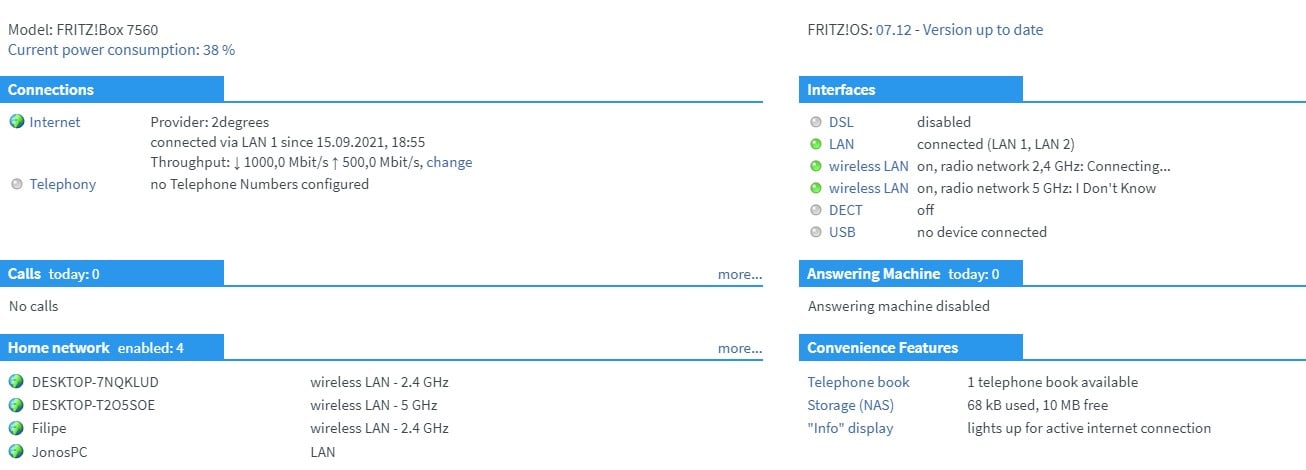
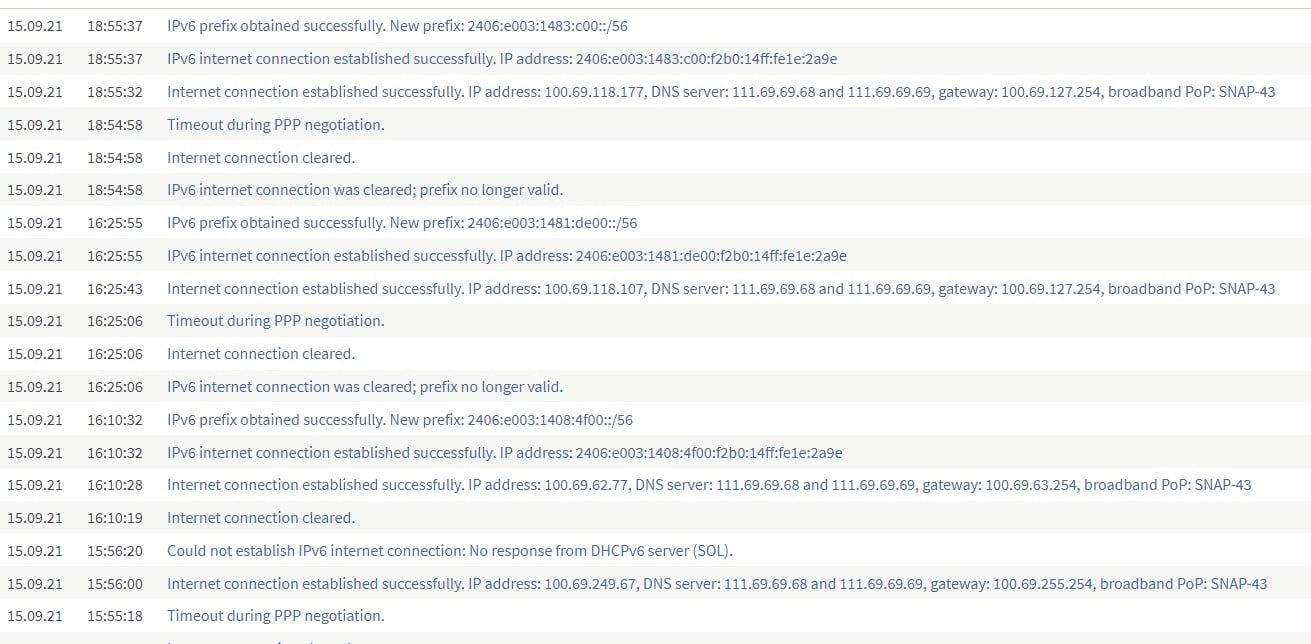
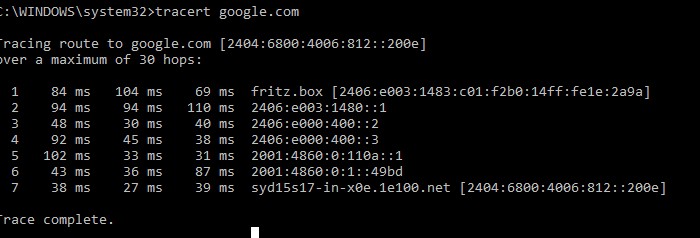
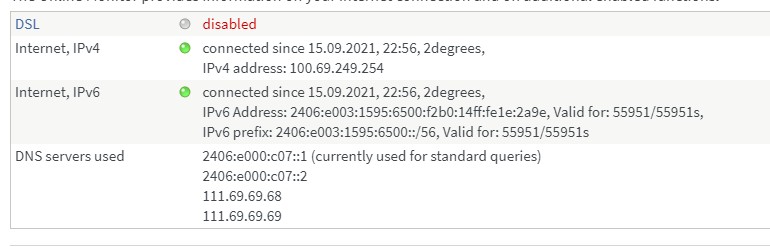
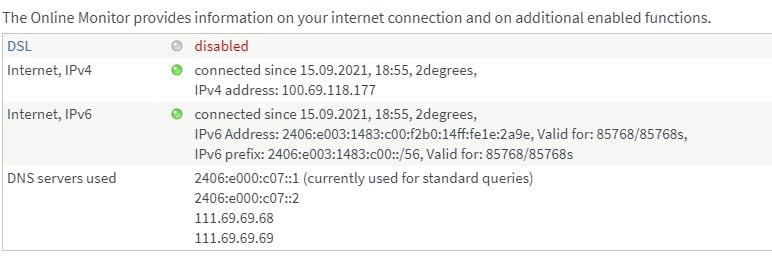
Running trace routes to reddit and google I get OK ping and timing. I am using standard recommended settings in my brand new Fritz box. I've performed all the tracert testing and website browsing over 5GHz and ethernet cable plugged directly into my router and get the same results. I called 2d customer support yesterday and was assigned a static IVP4 and IVP6 addresses which exacerbated the latency and didn't help by much so I cancelled the static IPs. The tier 1 customer support person said they would raise it to their tier 2 team and look into it. 


See below for router setup and tracerts to google as pf 7:04pm 15/9/21 


The internet issues only started week two of lvl 4 lockdown (I live in AKl).


Filter this topic showing only the reply marked as answer Create new topic
Jiriteach
1139 posts

Uber Geek
+1 received by user: 373

ID Verified
Trusted
Lifetime subscriber

  #2779078 16-Sep-2021 06:14
Send private message

Have you tried disabling IPV6 and seeing how things look?

Also are you running these ping/traceroutes over wifi? If so - rerun via Ethernet connection to start eliminating some possible options.


-- opinions expressed by me are solely my own. ie - personal


Invoker

15 posts

Geek
+1 received by user: 1


  #2779082 16-Sep-2021 07:04
Send private message

Jiriteach: Have you tried disabling IPV6 and seeing how things look?

Also are you running these ping/traceroutes over wifi? If so - rerun via Ethernet connection to start eliminating some possible options.


I haven't tried disabling IPV6 and running tracerts.


However, I have ran the tracerts on both Wifi and Ethernet router connections with identical results.


cyril7
9073 posts

Uber Geek
+1 received by user: 2499

ID Verified
Trusted
Subscriber

  #2779083 16-Sep-2021 07:08
Send private message

+1 for disabling IPv6, it has often proven to give issues as you mention.

Cyril


RunningMan
9184 posts

Uber Geek
+1 received by user: 4833


  #2779084 16-Sep-2021 07:08
Send private message

69-104ms to your own router suggests you need to resolve the issues inside your own network first.


pwner
423 posts

Ultimate Geek
+1 received by user: 96

Trusted
2degrees

  #2779088 16-Sep-2021 07:16
Send private message

Hi There


Disabling IPv6 isn't the right way to fix this sort of issue.


From the Traceroute you have shown it looks like the right sort of RTT to get to Google in Sydney 27ms is about as good as you can get with physics. I ping to google would provide a better understanding of if you are seeing big jumps in latency.


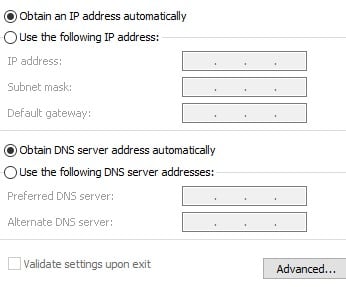
Your Frtizbox has all the correct addressing for itself and our DNS Resolvers so no issues there, i would suggest there is something wrong with your computer setup, have you confirmed your using the automatic DNS servers and not hardcoded to some other DNS servers?


Any posts are personal comments and not that of my employer


timmmay
20857 posts

Uber Geek
+1 received by user: 5349

Trusted
Lifetime subscriber

  #2779089 16-Sep-2021 07:26
Send private message

2degrees has been reliable for me for years, probably are very rare. I think whatever the problem is is within your network or PC. A 100ms ping to your router is pretty crazy, it should be well sub ms on ethernet and not a lol more on WiFi. I'd look at computer network settings.


Shop now for Lego sets and other gifts (affiliate link).
Invoker

15 posts

Geek
+1 received by user: 1


  #2779090 16-Sep-2021 07:27
Send private message

pwner:


Hi There


Disabling IPv6 isn't the right way to fix this sort of issue.


From the Traceroute you have shown it looks like the right sort of RTT to get to Google in Sydney 27ms is about as good as you can get with physics. I ping to google would provide a better understanding of if you are seeing big jumps in latency.


Your Frtizbox has all the correct addressing for itself and our DNS Resolvers so no issues there, i would suggest there is something wrong with your computer setup, have you confirmed your using the automatic DNS servers and not hardcoded to some other DNS servers?


Both my, router's and WiFi DNS settings are set to the default IPV4 and IPV6 DNS servers. The same problems persists when I log on my flatmates laptops and PCs and get similar results. At the time of this post, internet is fully functional. 


pwner
423 posts

Ultimate Geek
+1 received by user: 96

Trusted
2degrees

  #2779093 16-Sep-2021 07:32
Send private message

So your internet to all services is fully working right now? thats good and how it should be.


I guess then the only next step is to understand what is different when it isn't working. next time it isn't working can you post the specific services not working along with a traceroute to the specific services so that we can compare to when it is working. To help with this i would suggest taking some baselines now when it is working well for comparison.


Any posts are personal comments and not that of my employer


clinty
1201 posts

Uber Geek
+1 received by user: 402

Lifetime subscriber

  #2779113 16-Sep-2021 08:21
Send private message

Also - perform some isolation testing in case it is device on your network causing the issue


When the issue occurs, or you can replicate it consistently, turn off all the other network devices and see if the issue goes away. Slowly turn them on again until the issue re-occurs 


As mention the high MS pings to your router are unusual. try turning every other device off and connected with a cable and see if it is still high. If so, then the issue is likely with your PC


Clint


Invoker

15 posts

Geek
+1 received by user: 1


  #2779411 16-Sep-2021 15:41
Send private message

Update on my internet issues:


The slow, laggy net has inextricably gone away. I suspect the poor performance in the previous day was teething problems on connection day.


Filter this topic showing only the reply marked as answer Create new topic


Geekzone Live »

Try automatic live updates from Geekzone directly in your browser, without refreshing the page, with Geekzone Live now.


Are you subscribed to our RSS feed? You can download the latest headlines and summaries from our stories directly to your computer or smartphone by using a feed reader.