Geekzone: technology news, blogs, forums
Guest
Welcome Guest.
You haven't logged in yet. If you don't have an account you can register now.


quickymart

14942 posts

Uber Geek
+1 received by user: 13959

ID Verified

#251690 6-Jul-2019 21:39
Send private message

As the title says...while going through the channels tonight I noticed that The Edge TV was gone, which seemed weird, although I had heard they were making some changes. No worries, I (foolishly) thought, this will be a piece of cake to retune my Freeview box. Unfortunately I accidentally deleted all channels, and try as I might, I now can't get them back or retune them. There doesn't seem to be a "scan" or "auto search" or even a "manual search" option to retrieve the channels again (well, not one that I've found anyway).


I tried a factory reset and it brings back the channel titles (TV1, TV2, etc) but when I try to view them now I get "no signal".


I found an old manual for this online but it's not very user-friendly. Can someone with one of these boxes please help? Ideally, some sort of step-by-step would be helpful, ie, 1: open this menu, 2: select that option, etc - something the manual completely lacks!


Thanks in advance :)


Filter this topic showing only the reply marked as answer Create new topic
Linux
12188 posts

Uber Geek
+1 received by user: 8480

Trusted
Lifetime subscriber

  #2271198 6-Jul-2019 22:08
Send private message


quickymart

14942 posts

Uber Geek
+1 received by user: 13959

ID Verified

  #2271200 6-Jul-2019 22:16
Send private message

Thanks for that John, I wondered what was going on :) Now if I can only get the rest of my channels back...


Brunzy
2019 posts

Uber Geek
+1 received by user: 241

Trusted

  #2271231 7-Jul-2019 01:03
Send private message

I can’t find a manual, but it’s normally under Installation

Have you checked the Aerial input incase you dislodged it, as if you can see the Channel titles, that suggests it hasn’t reset to default


quickymart

14942 posts

Uber Geek
+1 received by user: 13959

ID Verified

  #2271241 7-Jul-2019 08:14
Send private message

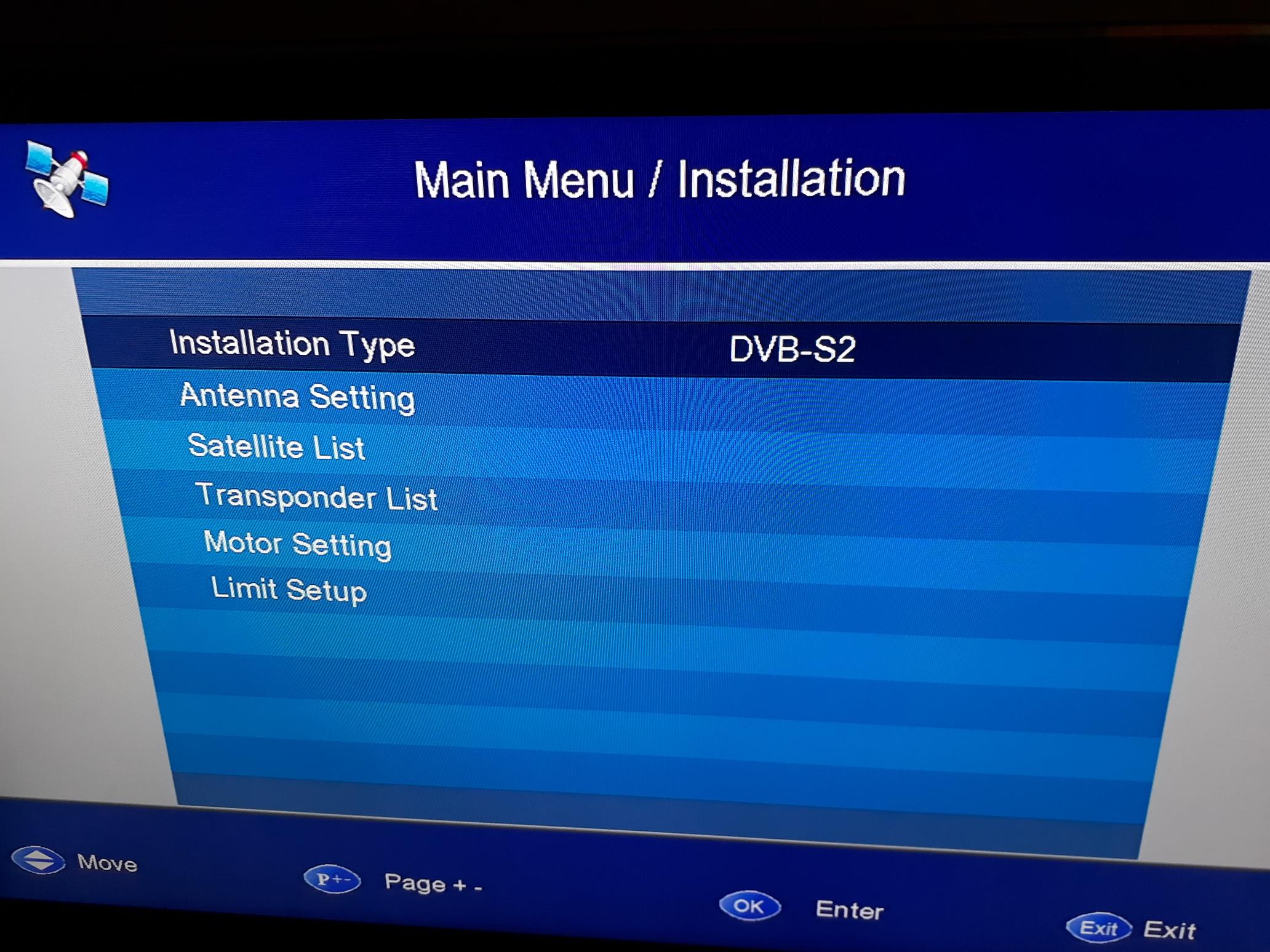
This is what I see on the Installation screen.


djtOtago
1181 posts

Uber Geek
+1 received by user: 605


  #2271259 7-Jul-2019 09:46
Send private message

You mention UHF Installation in your OP. So I would have thought "Installation Type" should read DVB-T.


DVB-S2 is Satellite. 


cb1

cb1
339 posts

Ultimate Geek
+1 received by user: 44


  #2271266 7-Jul-2019 10:24
Send private message

From that screen image it looks like it is a satellite receiver (maybe satellite and terrestrial?) If it is terrestrial, need to change the installation type to DVB-T. If satellite, is there a setting for DVB-S1?


May have to set the LNB correctly - either 11300 or 10750 are the usual values.


https://freeviewforum.co.nz/forum/topics/new-satellite-program-groups shows a list of freeview channels and their mux groupings. As mentioned above, Edget tv has gone but hasn't been deleted from the list yet - supposed to be being replaced by Three Life +1 as UHF has already done.


Maybe you could attach or give a link to the manual you have so others can confirm


cb


Shop now for Dyson appliances (affiliate link).
quickymart

14942 posts

Uber Geek
+1 received by user: 13959

ID Verified

  #2271281 7-Jul-2019 11:13
Send private message

I changed it to DVB-T2 and suddenly a search function appeared - now all my channels are restored!
Thanks so much for all the help :)


Filter this topic showing only the reply marked as answer Create new topic


Geekzone Live »

Try automatic live updates from Geekzone directly in your browser, without refreshing the page, with Geekzone Live now.


Are you subscribed to our RSS feed? You can download the latest headlines and summaries from our stories directly to your computer or smartphone by using a feed reader.