Geekzone: technology news, blogs, forums
Guest
Welcome Guest.
You haven't logged in yet. If you don't have an account you can register now.


Filter this topic showing only the reply marked as answer View this topic in a long page with up to 500 replies per page Create new topic
1 | ... | 9 | 10 | 11 | 12 | 13 | 14 | 15 | 16 | 17 | 18 | 19 | ... | 22
SumnerBoy
2079 posts

Uber Geek
+1 received by user: 306

ID Verified
Lifetime subscriber

  #1854386 28-Aug-2017 21:17
Send private message

I will mention it again, as I think it has real merit. *Restic* is working very well for me. It is written in Go so there are builds for just about anything you can think of. I have it running on my FreeNAS box pushing snapshots to B2 and then a second set to a RPi running on my network with their very simple `rest-server` which acts as another backup source (2x4TB USB HDDs attached). So now I have two full sets of versioned backups, all accessible from any computer on my network via the `restic` CLI tool.


There is no UI so I realise it won't suit everyone, but it is very simple to use and there is excellent documentation.


timmmay
20859 posts

Uber Geek
+1 received by user: 5350

Trusted
Lifetime subscriber

  #1854512 29-Aug-2017 07:26
Send private message

Restic looks interesting. It seems similar to Borg Backup, but it has couple of advantages over Borg a) a native Windows version b) More support for sending backups to other destinations. If I'd found that first I might've used it over Borg.


SumnerBoy
2079 posts

Uber Geek
+1 received by user: 306

ID Verified
Lifetime subscriber

  #1854520 29-Aug-2017 08:06
Send private message

Yeah, I checked out Borg on your recommendation and came to the same conclusions. Very similar. Having versions for just about every platform is pretty handy. And it seems to be very stable so far. Need to figure out the best prune settings, but from what I can tell it is quite clever in that you can easily say "keep last 1 years, last 3 months, last 7 days" and it will keep the latest snapshot from the previous year, the latest snapshots from the last 3 months, and the last 7 days snapshots. I.e. a nice rolling set of snapshots with both very recent and quite old versions, without having to keep everything in the middle.


SumnerBoy
2079 posts

Uber Geek
+1 received by user: 306

ID Verified
Lifetime subscriber

  #1854525 29-Aug-2017 08:14
Send private message

Something else I like about restic - you can add `--json` to most of the commands to get an output in JSON format. I intend to write a little icinga2 script which checks each repo to ensure a snapshot has been created in the last 24 hours. Very easy with JSON payloads and a little bit of python. Effectively giving me the Crashplan style notifications if a backup is missed or fails.


Item
1739 posts

Uber Geek
+1 received by user: 726

Subscriber

  #1854610 29-Aug-2017 10:25
Send private message

Very late to the party on this epic thread, but FWIW I have been using Backblaze on two Macs and a PC for about 6 years now and it does everything I need and does it well.


I did actually have cause to do a full restore/download when my iMac HD crapped itself and I had to replace it - no problems at all.


.

cadman
1014 posts

Uber Geek
+1 received by user: 557
Inactive user


  #1854622 29-Aug-2017 10:44
Send private message

Paul1977:


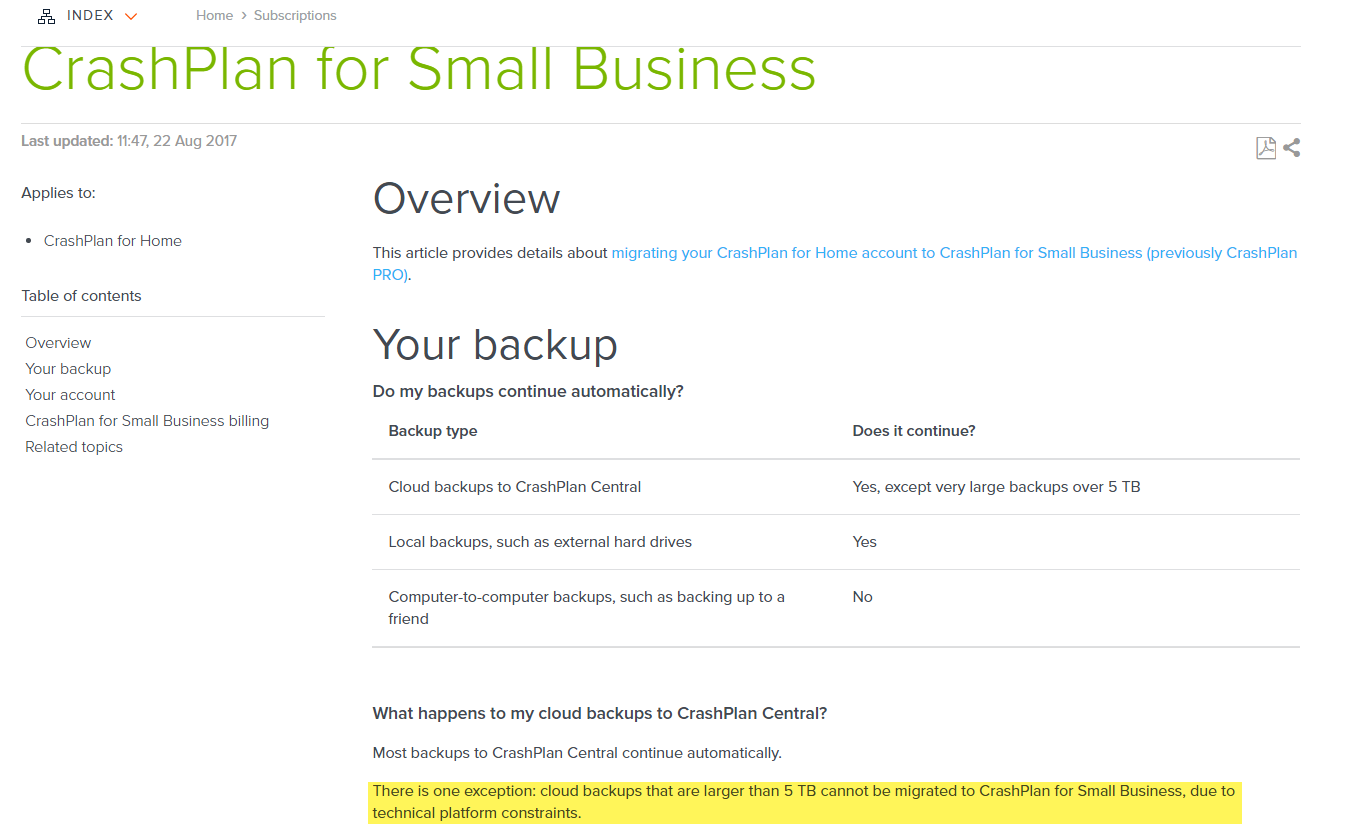
Would have been far easier if they had not limited the migration to 5TB. CrashPlan Home is unlimited, CrashPlan Small Business is unlimited - stupid that your archive needs to be under 5TB to migrate between the two.


They're claiming some technical reason for the 5TB barrier.


Click to see full size


HP


Shop now for HP laptops and other devices (affiliate link).
SirHumphreyAppleby
2942 posts

Uber Geek
+1 received by user: 1863


  #1854635 29-Aug-2017 11:08
Send private message

cadman:


They're claiming some technical reason for the 5TB barrier.


There may be some additional resources used in order to flag blocks encrypted with Blowfish vs AES, but there must already be headers for blocks as encryption and compression can be disabled on archives. Seems improbable they wouldn't have a free bit somewhere in the headers in order to flag Blowfish/AES. The limit therefore appears to be entirely arbitrary.


I believe the technical platform constraint is that they are hoping people with larger backups go elsewhere. Last year they changed the definition of commercially reasonable for the multi-computer Home plan from 20TB to 5TB. I note the CrashPlan for Small Business terms now state e.g. 5TB, while the Home terms said i.e. 5TB (previously 20TB). That's quite a significant change in definition. Sneaky.


jpwise
jpwise
591 posts

Ultimate Geek
+1 received by user: 13

Lifetime subscriber

  #1854673 29-Aug-2017 11:54
Send private message

IcI:


jpwise: Anyone seen any good candidates for linux based backup? Single Server Ubuntu. ...


I'm currently trialling UrBackup. They have cross platform clients and can do backups across the Internet to another of your machines. So far, no costs involved.


As an alternative, do you have a local NAS box? They all seem to be Linux friendly. 


I'll have to see what it's capabilities are. Ideally I want an all in one drop in replacement for Crashplan that won't cost an arm and a leg. NAS box is an option, but doesn't give any cover if the house burns down. :/ So internet backup is preferable.


Working for Service Plus - serviceplus.co.nz

Authorised Service Provider for Apple, Asus, BenQ, Dynabook, Lenovo, and others - refer serviceplus.co.nz/brands


timmmay
20859 posts

Uber Geek
+1 received by user: 5350

Trusted
Lifetime subscriber

  #1854677 29-Aug-2017 12:06
Send private message

jpwise:


I'll have to see what it's capabilities are. Ideally I want an all in one drop in replacement for Crashplan that won't cost an arm and a leg. NAS box is an option, but doesn't give any cover if the house burns down. :/ So internet backup is preferable.


Three backups, two copies in the main location, at least one offsite copy is the general minimum rule. I wouldn't be comfortable with cloud as my only offsite copy, an offsite hard drive with incremental backups is good peace of mind.


jpwise
jpwise
591 posts

Ultimate Geek
+1 received by user: 13

Lifetime subscriber

  #1854704 29-Aug-2017 12:13
Send private message

timmmay:


Three backups, two copies in the main location, at least one offsite copy is the general minimum rule. I wouldn't be comfortable with cloud as my only offsite copy, an offsite hard drive with incremental backups is good peace of mind.


This is for my personal server, so it's not the complete end of the world if data is lost, just a bit (lot) heartbreaking. It's also a little tricky to do an additional offsite with only 1 house. ;p


Working for Service Plus - serviceplus.co.nz

Authorised Service Provider for Apple, Asus, BenQ, Dynabook, Lenovo, and others - refer serviceplus.co.nz/brands


timmmay
20859 posts

Uber Geek
+1 received by user: 5350

Trusted
Lifetime subscriber

  #1854723 29-Aug-2017 12:29
Send private message

jpwise:


This is for my personal server, so it's not the complete end of the world if data is lost, just a bit (lot) heartbreaking. It's also a little tricky to do an additional offsite with only 1 house. ;p


Family photos and stuff are important.


A second copy is typically pretty easy. I have a 5TB hard disk in my work drawer that has two copies of data, incremental and a mirror.


I back up from my parents computers to my computer using Reslio Sync. That costs them nothing other than a bit of bandwidth, it works great. If you can can a cheap hosted server somewhere, or a friend with plenty of hard drive space, that can work. When you're at the multiple TB size it becomes more difficult.


Shop now for Lego sets and other gifts (affiliate link).
Benoire
2878 posts

Uber Geek
+1 received by user: 681


  #1854726 29-Aug-2017 12:37
Send private message

Indeed, I found out as I lost a hwole load of photos about 10 years ago due to HDD Failure!


I store all machine backups to my Essentials server using the folder redirection GPO, this is then version synced to my synology unit which is running Raid 6 and then finally the entire NAS is backed up to Crashplan Pro.. Having lost personal photos before I wouldn't risk it and so happy to pay for Crashplan!


Paul1977
5171 posts

Uber Geek
+1 received by user: 2192


  #1854784 29-Aug-2017 14:05
Send private message

SirHumphreyAppleby:


I believe the technical platform constraint is that they are hoping people with larger backups go elsewhere. Last year they changed the definition of commercially reasonable for the multi-computer Home plan from 20TB to 5TB. I note the CrashPlan for Small Business terms now state e.g. 5TB, while the Home terms said i.e. 5TB (previously 20TB). That's quite a significant change in definition. Sneaky.


That's my thoughts.


But I'd imagine the average user uses far less than 5TB, so I don't feel bad about using more than that.


I will look at other options in 14 months when the Small Business discount runs out for me, or earlier if they decide to change from unlimited and enforce a maximum archive size that is too small for my needs.


RmACK
196 posts

Master Geek
+1 received by user: 27


  #1854941 29-Aug-2017 20:56
Send private message

Paul1977:


Already tried clearing the cache, took about 24 hours to rebuild then the same thing happened when trying to compact again.


Interesting thought about the file verification though, I'll try pushing it way out to only do it every 30 days then manually run it once so it hopefully won't do it again.


On the backup schedule I have now set the schedule to never run (i.e. set to "specified times" but deselected all days), and have also disabled the "watch in real-time" settings.


Hopefully this will mean nothing can possibly interrupt it.


Good luck! I had a deep pruning forced on me right when I wanted to do a restore - and it took over 24 hours! 


I can't emphasise enough just how big a speed increase I got by turning dedupe & compression to minimum settings - I frequently get over 120Mbps, but it does vary down to 20Mbps sometimes. Before changing settings, I never went over 8Mbps. This is on Bigpipe 1000/500 fibre. And for large backup sets, assign 1GB per TB to Java or risk random crashes.


Sam91
620 posts

Ultimate Geek
+1 received by user: 183


  #1854953 29-Aug-2017 21:24
Send private message

@RmACK

Legend! Just did what you suggested and went from 3Mbps to 32Mbps. That's on VDSL with just over 30Mbps upload (speedtest).


1 | ... | 9 | 10 | 11 | 12 | 13 | 14 | 15 | 16 | 17 | 18 | 19 | ... | 22
Filter this topic showing only the reply marked as answer View this topic in a long page with up to 500 replies per page Create new topic


Geekzone Live »

Try automatic live updates from Geekzone directly in your browser, without refreshing the page, with Geekzone Live now.


Are you subscribed to our RSS feed? You can download the latest headlines and summaries from our stories directly to your computer or smartphone by using a feed reader.