|
|
|
BlakJak:
If it is indeed a routing fault with an upstream service provider, what should happen is that a fault should be logged, and pushed upward from peer to peer. This means Xtra/Telecom (Retail) to Global Gateway to ... whoever. So on one hand it is indeed 'not their problem' but on the other hand, it is - they can a) push a fault upward and b) try to route around the problem if it's close enough to 'home'.
The reality however is when dealing with big providers like Telecom, the work required to do so is often bigger (and wider in impact / risk terms) than is often considered reasonable.
Sales Engineer
Snowflake
www.snowflake.com
about.me/nzregs
Twitter: @nzregs
Ryrager: Apparently a SingTel Routing issue, being worked on.
Regs:
I still find the biggest problem in this country is the expectation of business owners that they can run an online business using residential grade adsl connections and services such as mail, pay less than they do for other 'essential' services, and then either complain and cry 'compensation' when there is any sort of service disruption, or complain about speed and quality of internet connections. I find it especially frustrating with companies moving to the cloud who have the option of 'fat' pipe, stick to an ADSL solution with a upload speed of < 1mbps.
Regs:
have you tried disabling any WAN acceleration rules for CRM Online in the riverbeds? I've heard of lots of problems where performance is substandard when going through wan accelerators. Also, if you're finding performance slow from within outlook, check this blog post: http://blogs.msdn.com/b/crminthefield/archive/2011/11/11/crm-2011-outlook-client-performance-delays-caused-by-expect-100-continue-setting.aspx
There is also an update to the CRM Client Performance whitepaper out today, check that and ensure you are optimised as best as possible: http://t.co/52OAwtSK
vonfluffy: Im glad its not just a handful of customers as unfortunately then it gets pushed back to being a client side problem.
Thankyou geekzone for being a good source to gather other IT people with similar issues.
plambrechtsen: I've had a chat with our 3rd level CTS support guys and they are aware of it and looking into the issue. So far it looks like a SingTel / MS issue but the root cause still isn't known.
My wife is giving me jip for being on my computer during my holiday so I suggest everyone who is having the issue log a call with the helpdesk, and then if it's a global gateway / routing issue that can be escalated through to them.
Edit: Done some searching and it seems to be a Global Gateway / SingTel routing issue: http://community.office365.com/en-us/forums/148/p/80482/312339.aspx
I'm trying to escalate into Global Gateway folks.
vonfluffy: I tried to log a ticket with the adsl helpdesk and gave up.. Alas getting through to someone who can understand an issue like this proved a problem this morning.
ZeeBOB:Regs:
have you tried disabling any WAN acceleration rules for CRM Online in the riverbeds? I've heard of lots of problems where performance is substandard when going through wan accelerators. Also, if you're finding performance slow from within outlook, check this blog post: http://blogs.msdn.com/b/crminthefield/archive/2011/11/11/crm-2011-outlook-client-performance-delays-caused-by-expect-100-continue-setting.aspx
There is also an update to the CRM Client Performance whitepaper out today, check that and ensure you are optimised as best as possible: http://t.co/52OAwtSK
Yes I have put the accelerator into bypass mode (as always to eliminate my network as the source of issues).
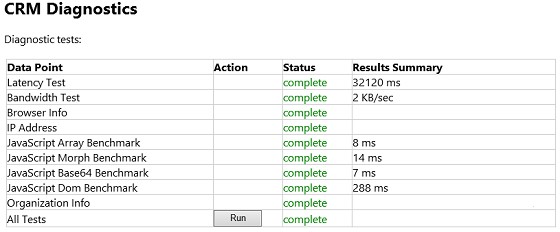
Thanks for the updated whitepaper, i've been through that and ensured we comply as best as possible. We don't use CRM in outlook, just the Web UI but even logging in is almost impossible at the moment.
CallPlus are more than aware of the issue and have their own case escalated with SCCN/GG... Here's hoping they fix it soon :)
Sales Engineer
Snowflake
www.snowflake.com
about.me/nzregs
Twitter: @nzregs
|
|
|