|
|
|
All comments are my own opinion, and not that of my employer unless explicitly stated.
Shrapnel: Thanks for everyones replies, so if I flash the JP2 which seems to have once been the official Telecom 2.2 update, and then the faster modem as lofreq mentioned it would be agood start from 2.1? Obviously a nandroid backup willl be done. Im still uneasy on modding my phone as I cant really afford to "break" it, but thats my problem
lofreq:Shrapnel: Thanks for everyones replies, so if I flash the JP2 which seems to have once been the official Telecom 2.2 update, and then the faster modem as lofreq mentioned it would be agood start from 2.1? Obviously a nandroid backup willl be done. Im still uneasy on modding my phone as I cant really afford to "break" it, but thats my problem
you wont break it if you just stick to download mode and Odin.
download mode is when you hold down vol down, home, and power to turn on, and you see the yellow triangle with the little android guy sweeping some digital rubbish on the ground. i love that pic. anyway in that mode almost anything is recoverable.
i wouldnt flash JP2 over JPY just because it would be like upgrading to vista now instead of win7. i had no issues with JP2 but admittedly JPY seems much more like a proper phone in terms of performance.
i would
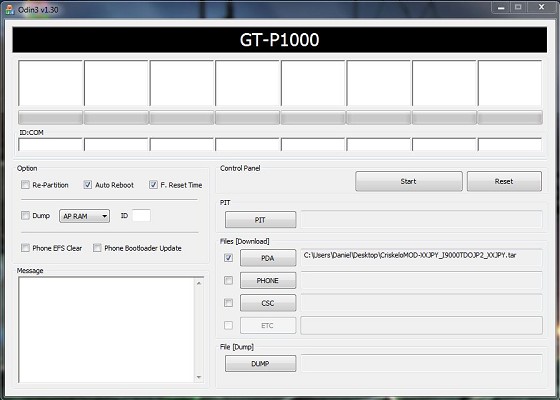
1) get the full JPY tar file from samfirmware.com, odin that across (put the tar file into the PDA slot) and flash it across, let it boot up into full XXJPY
2) back into download mode, and flash over the JPA modem. reason: i have just been testing the JPY modem on telecom, and i found the battery life definitely more sensitive to location. i would get minimal drain in one place, then at work or at lunch with no use on the phone, suddenly lose 10%. like it was inefficient connecting to towers or something. so i have gone back to the JPA modem and it seems (so far) much more stable
and thats it, id just run with this setup for a while and get used to it, then you can consider a custom Doc rom or Darky's etc, later.
so how bout some helpful links? i spent ages collecting these so here i might as well pass it fwd for all XT users
-------------------
HERE is the full JPY rom with default telecom JP2 modem on board. this will work perfectly as is without bothering to flash the JPA modem. and it includes Hardcore's speedmod. AND i even think it includes CWM recovery?? so this might be a one step upgrade for most people to get you instantly 90% there:
XXJPY_I9000TDOJP2_XXJPY.zip
http://www.multiupload.com/TDHAU71AQI
File Contents, .tar
PDA I9000XXJPY
PHONE I9000TDOJP2
CSC I9000XXJPY
KERNEL K12C of HARCORD
Just place the file. tar into the PDA section of Odin - dont change anything else, dont tick Re-patition
you wont lose any saved files on your internal SD card, i think you may have to redownload apps. and maybe set up your email accounts, and check that your telecom APNs are intact.
--------------------
HERE is the improved JPA modem for 850mhz
Link:Modem (Best results + better signal reception)
I9000B_JPA_JP3_JPA_JPA_modem_850.zip ODIN
http://www.mediafire.com/file/3xrkrbyz6y3a5kn/I9000B_JPA_JP3_JPA_JPA_modem_850.zip
place this file into the PHONE section of Odin, dont change anything else, and go. it will only replace the modem data in the phone and reboot your phone, watch the bars when it reboots it should reconnect to telecomNZ
--------------------
HERE is a guide on how to use ODIN with screenshots. follow "stage 2" of the instructions, and ignore the use of the PIT file, since you are not repartitioning. instead of the files they specifiy, use the .tar files i linked you above. the process of going into download mode, connecting usb, watching the odin screen to see if it connects, is all the same. once its done odin will reboot your phone. once odin goes all green PASS! and completed successfully, you are safe to unplug USB and wait for phone to configure and boot up, which will take a while, dont worry. be sure your phone is at 100% battery before starting, or you will stuff up your batt stats
http://www.addictivetips.com/mobile/how-to-use-odin-to-upgrade-samsung-galaxy-s-gt-i9000-to-android-2-2-froyo-download/
to compare notes, heres another guide so you get the idea
http://androidadvices.com/update-samsung-galaxy-s-gt-i9000-to-froyo-xxjpy-2-2-1/
-------------------
HERE are the APN settings for you to check after youre done, to ensure connectivity to TNZ
http://www.geekzone.co.nz/forums.asp?forumid=39&topicid=32983
and more detail on setting up the MMS APN ( if you dont care about MMS then dont worry)
http://www.geekzone.co.nz/forums.asp?forumid=39&topicid=66173
i personally have set up TelecomContent, TelecomDefault, and TelecomMMS - i dont think you need TelecomContent, and i didnt even have TelecomMMS before, now that i added it, my MMS sending works perfectly! bonus :) hopefully bonus for you too
--------------------
there you go, hows that?
Shrapnel: What did you use to backup your device lofreq? I was using One click root to root my phone for a nandroid backup but it failed. My phone works fine but it's definitely not rooted. What did you use? Thanks
Shrapnel: Ok, thanks, I was more aiming at backing up the the whole os at its state for something to revert to but I suppose I can go back to the Telecom 2.2 which is floating around somewhere.
So let me get this straight(for the millionth time),
1) I download this http://www.multiupload.com/TDHAU71AQI zip file(in progress)
2) and then this http://www.multiupload.com/4JLU4QHUV7,(odin v1.3).
3) I put my phone into download mode(100% battery) < do this BEFORE PLUGGING THE PHONE INTO USB PORT - once its in download mode THEN plug it in and make sure it appears detected in odin.
4) I click on pda and direct odin to the extracted tar file from the zip file I downloaded.
5) Make sure pda is ticked and repartition isn't everything else stays the same I'm guessing. <CORRECT
6) And click start. < yep, then wait for it to flash, pay attention to any messages, assuming all goes well the Odin indicator box goes BLUE whilst initiating reboot, then should go GREEN with "PASS" indicated, at this point its safe to unplug the phone, you can even just leave it plugged in and let it boot and configure for first time
7) As I understand once it restarts I will have to put telecoms APN info etc in < you may not even have to do this, but just check your APNs and make sure they are there. if they arent, then recreate them.
8) and it should work straight away, but I can change the modem for best results reception with this: http://www.mediafire.com/file/3xrkrbyz6y3a5kn/I9000B_JPA_JP3_JPA_JPA_modem_850.zip
which I direct odin to by clicking on phone.
Does that sound right lofreq? Thanks
lofreq:Shrapnel: Ok, thanks, I was more aiming at backing up the the whole os at its state for something to revert to but I suppose I can go back to the Telecom 2.2 which is floating around somewhere.
So let me get this straight(for the millionth time),
1) I download this http://www.multiupload.com/TDHAU71AQI zip file(in progress)
2) and then this http://www.multiupload.com/4JLU4QHUV7,(odin v1.3).
3) I put my phone into download mode(100% battery) < do this BEFORE PLUGGING THE PHONE INTO USB PORT - once its in download mode THEN plug it in and make sure it appears detected in odin.
4) I click on pda and direct odin to the extracted tar file from the zip file I downloaded.
5) Make sure pda is ticked and repartition isn't everything else stays the same I'm guessing.
6) And click start. < yep, then wait for it to flash, pay attention to any messages, assuming all goes well the Odin indicator box goes BLUE whilst initiating reboot, then should go GREEN with "PASS" indicated, at this point its safe to unplug the phone, you can even just leave it plugged in and let it boot and configure for first time
7) As I understand once it restarts I will have to put telecoms APN info etc in < you may not even have to do this, but just check your APNs and make sure they are there. if they arent, then recreate them.
8) and it should work straight away, but I can change the modem for best results reception with this: http://www.mediafire.com/file/3xrkrbyz6y3a5kn/I9000B_JPA_JP3_JPA_JPA_modem_850.zip
which I direct odin to by clicking on phone.
Does that sound right lofreq? Thanks
i edited your post with some numbered steps and carriage returns, and some notes. but yes running thru the steps in my head i think thats pretty bang on for a basic upgrade :) its all over in 5 mins and u will be like..... is that it?? and then suddenly for the next 9 days you will be flash crazy and will have flashed your phone 34 times and stayed up till 4:30am every day on this forum and your life disappears and you wont know whats going on and you will talk to the little yellow android sweeper guy in different voices and pretend he talks back to you and be yelled at by your gf and just ignore her but yell in fury of she gets close to bumping your usb cable midflash
the adventure is just beginning :D
Neets:lofreq:Shrapnel: Ok, thanks, I was more aiming at backing up the the whole os at its state for something to revert to but I suppose I can go back to the Telecom 2.2 which is floating around somewhere.
So let me get this straight(for the millionth time),
1) I download this http://www.multiupload.com/TDHAU71AQI zip file(in progress)
2) and then this http://www.multiupload.com/4JLU4QHUV7,(odin v1.3).
3) I put my phone into download mode(100% battery) < do this BEFORE PLUGGING THE PHONE INTO USB PORT - once its in download mode THEN plug it in and make sure it appears detected in odin.
4) I click on pda and direct odin to the extracted tar file from the zip file I downloaded.
5) Make sure pda is ticked and repartition isn't everything else stays the same I'm guessing.
6) And click start. < yep, then wait for it to flash, pay attention to any messages, assuming all goes well the Odin indicator box goes BLUE whilst initiating reboot, then should go GREEN with "PASS" indicated, at this point its safe to unplug the phone, you can even just leave it plugged in and let it boot and configure for first time
7) As I understand once it restarts I will have to put telecoms APN info etc in < you may not even have to do this, but just check your APNs and make sure they are there. if they arent, then recreate them.
8) and it should work straight away, but I can change the modem for best results reception with this: http://www.mediafire.com/file/3xrkrbyz6y3a5kn/I9000B_JPA_JP3_JPA_JPA_modem_850.zip
which I direct odin to by clicking on phone.
Does that sound right lofreq? Thanks
i edited your post with some numbered steps and carriage returns, and some notes. but yes running thru the steps in my head i think thats pretty bang on for a basic upgrade :) its all over in 5 mins and u will be like..... is that it?? and then suddenly for the next 9 days you will be flash crazy and will have flashed your phone 34 times and stayed up till 4:30am every day on this forum and your life disappears and you wont know whats going on and you will talk to the little yellow android sweeper guy in different voices and pretend he talks back to you and be yelled at by your gf and just ignore her but yell in fury of she gets close to bumping your usb cable midflash
the adventure is just beginning :D
Do you mind if I interrupt?
I'd have done steps 4 and 5 ahead of step 3. Get Odin fully ready before you connect your phone (in download mode) to the computer.
AND!! Make sure you've recently rebooted your computer. You don't want it having a case of the random restart or anything (CyperX just recently had this happen too - so timely lesson).
AND .... if you've got a way of accessing your /efs folder (you'll need root) then make a backup and put a copy of it on your phone *and* somewhere else!
I can't remember, but do you have the 3BR mode? You'll want to make sure you have this function before flashing.
Usually I also make sure I've got debugging selected before flashing, and I tend to pull the SIM and external SD card (if you've got one) if you're going to do a factory reset.
Ok, I'll slip back into the shadows now.
|
|
|