Geekzone: technology news, blogs, forums
Guest
Welcome Guest.
You haven't logged in yet. If you don't have an account you can register now.


Filter this topic showing only the reply marked as answer View this topic in a long page with up to 500 replies per page Create new topic
1 | ... | 44 | 45 | 46 | 47 | 48 | 49 | 50 | 51 | 52 | 53 | 54
Wade
2225 posts

Uber Geek
+1 received by user: 373


  #1195412 11-Dec-2014 09:18
Send private message

old3eyes:
Wade: Playstore tells me this update is already installed on my XT1068


That app is not Lollipop just an app so that it can be updated  later to lollipop ..


I'm well aware of this, the update cannot happen soon enough though as after using lollipop on my other phone for the last few days kit kat feels decidedly old and very average by comparison

My comment is in relation to people suggesting it is only for 2013 models, mine is gen 2 and has this OTA update app already installed, safe to assume the app is for all moto g's


old3eyes
9158 posts

Uber Geek
+1 received by user: 1365

Subscriber

  #1195413 11-Dec-2014 09:20
Send private message

Wade:
old3eyes:
Wade: Playstore tells me this update is already installed on my XT1068


That app is not Lollipop just an app so that it can be updated  later to lollipop ..


I'm well aware of this, the update cannot happen soon enough though as after using lollipop on my other phone for the last few days kit kat feels decidedly old and very average by comparison

My comment is in relation to people suggesting it is only for 2013 models, mine is gen 2 and has this OTA update app already installed, safe to assume the app is for all moto g's


Just hope the hold off is to wait until A5.0.1 is available. 


Regards,

Old3eyes


Wade
2225 posts

Uber Geek
+1 received by user: 373


  #1195417 11-Dec-2014 09:34
Send private message

^^ I would imagine that is the case as per my HTC, that was delayed somewhat and went straight to 5.0.1

I'm really hoping lollipop works some magic for the g's multi tasking ability as it can be unbearably slow when put under the pump 


openmedia
3450 posts

Uber Geek
+1 received by user: 878

Trusted

  #1195629 11-Dec-2014 16:32
Send private message

martyyates:
Zipdisk:
openmedia: Odd I can't find an update to Motorola Update Services in the Google Play Store.


Here it is


https://play.google.com/store/apps/details?id=com.motorola.ccc.ota


looks like that app and the update is for the moto g 2013 only - not the 2014 moto g lte XT 1039 model many of us will have. I second its great price, quality and size. :)


I've got the LTE model and Play Store says the update is already installed


Generally known online as OpenMedia, now working for Red Hat APAC as a Technology Evangelist and Portfolio Architect. Still playing with MythTV and digital media on the side.


ovipop
34 posts

Geek


  #1195634 11-Dec-2014 16:38
Send private message

Wade: ^^ I would imagine that is the case as per my HTC, that was delayed somewhat and went straight to 5.0.1

I'm really hoping lollipop works some magic for the g's multi tasking ability as it can be unbearably slow when put under the pump 


Try enabling the Developer menu and switch the runtime to ART.

martyyates
68 posts

Master Geek


  #1195691 11-Dec-2014 17:05
Send private message

openmedia:
martyyates:
Zipdisk:
openmedia: Odd I can't find an update to Motorola Update Services in the Google Play Store.


Here it is


https://play.google.com/store/apps/details?id=com.motorola.ccc.ota


looks like that app and the update is for the moto g 2013 only - not the 2014 moto g lte XT 1039 model many of us will have. I second its great price, quality and size. :)


I've got the LTE model and Play Store says the update is already installed


Same - and then this helpful little number: This app is incompatible with your device. Sad face...


Shop now on Samsung phones, tablets, TVs and more (affiliate link).
Wade
2225 posts

Uber Geek
+1 received by user: 373


  #1195721 11-Dec-2014 18:10
Send private message

ovipop:
Wade: ^^ I would imagine that is the case as per my HTC, that was delayed somewhat and went straight to 5.0.1

I'm really hoping lollipop works some magic for the g's multi tasking ability as it can be unbearably slow when put under the pump 


Try enabling the Developer menu and switch the runtime to ART.


I tried ART but it offered no obvious benefits compared to dalvik plus it played havoc every time you rebooted as it optimized every app every time :(

Rustee75
32 posts

Geek
+1 received by user: 2


  #1196506 12-Dec-2014 18:47
Send private message

So I grabbed a Moto G 2014 model from Noel Leeming yesterday - $250 was so hard to resist!
Coming from a hand-me-down S3 , first impressions are of the G's speed - seems very nippy. And the screen quality - hmmm - a slight step down there I think but still reasonable. And the lack of physical buttons (back button esp) is taking a bit of getting used to.
Already abandoned the Google Now Launcher for good ol Nova.
Interested in what Lollipop can bring to it, one of the main reasons for buying.
Anyone got any tips or tricks for me to get the best out of my new toy?

old3eyes
9158 posts

Uber Geek
+1 received by user: 1365

Subscriber

  #1206140 30-Dec-2014 16:17
Send private message

Looks like a LTE version of the Moto G 2014 is on the way  Moto G 2014 LTE


Regards,

Old3eyes


garbonzai
317 posts

Ultimate Geek
+1 received by user: 51


  #1216939 18-Jan-2015 14:12
Send private message

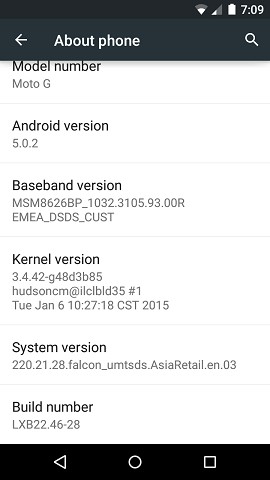
Done a manual update on Moto G XT1033 (8GB dual sim) to Lollipop 5.02 AsiaRetail via Moto G xda forum link.

Been using it a day now, seems fine and very fluid. (phone has to be stock and not rooted)


http://forum.xda-developers.com/moto-g/general/moto-g-xt1033-asia-retail-android-t3001206


I used the top link for file, MediaFire

Just put in root directory, and on phone-> settings, about phone, system updates and fellow prompts.

Don't soft brick your phone!!!!, is down gradable back to KK so I have read.

Good luck


meesham
973 posts

Ultimate Geek
+1 received by user: 267


  #1217149 18-Jan-2015 21:36
Send private message

A manual upgrade to 5.0.2 is also possible with the Moto G v2 (5" model). You can use the captured Indian OTA release on our European models (files here), you just copy the zip to the root of the internal storage and then do a check for updates, no root needed and it still shows up as the European model afterwards. The memory management bug seems to be gone, I've found the phone to be much more usable and I haven't needed to reboot it constantly.


Shop now at Mighty Ape (affiliate link).
PottsyNZ
336 posts

Ultimate Geek
+1 received by user: 23


  #1217731 19-Jan-2015 17:11
Send private message

Wonder how this will play with my US retail (amazon) Moto G...

lchiu7
6521 posts

Uber Geek
+1 received by user: 543

Trusted

  #1217804 19-Jan-2015 19:06
Send private message

PottsyNZ: Wonder how this will play with my US retail (amazon) Moto G...


I hope so too since my son just bought that model from Amazon (he had bunch of Amazon gift vouchers given to him for various occasions) and we are now awaiting its arrival.


Staying in Wellington. Check out my AirBnB in the Wellington CBD.  https://www.airbnb.co.nz/h/wellycbd  PM me and mention GZ to get a 15% discount and no AirBnB charges.


garbonzai
317 posts

Ultimate Geek
+1 received by user: 51


  #1217925 19-Jan-2015 22:21
Send private message

Just a word of warning, their are some bugs, prob better to wait for official OTA update to be pushed to your phone for Android 5**


I manually adjusted the brightness from main drop down and it went blank (instead of very dim) and I could not get the screen back on as I could not see anything, was about to do a hard reset and tried again using screen as if I could see it to get brightness, like patern unlook, pull down menu, then slide brightness backup, all doing this with a blank screen just "thinking and guessing" where I was and after about 45min, finally turned brightness backup...eewww, that was close to loosing all my data and spending a day putting everything back in.


Here's a quote from xda, of bugs for it,----->

"Bad:
1. Brightness bug, don’t lower your brightness by mistake, use adaptive brightness instead.
2. It will not update your legacy launcher and default messaging app. download those from play store.
One thing: don’t use messaging app from play store f you are using both the Sims for messaging. It does not have dual sim features, it will use the settings define in other messaging app.
3. Dialer app is little bit slow and laggy which I dislike the most."


The dialer seems fine to me, don't have another sim in it to try the dual sim bit.

So if you manually turn brightness down, instead of going to very dim at most, it goes blank.... don't remove your finger, just slide it back up immediately, or you won't see what you are doing, and a restart won't work, it will still be blank.


Zipdisk
200 posts

Master Geek
+1 received by user: 2


  #1218134 20-Jan-2015 11:12
Send private message

PottsyNZ: Wonder how this will play with my US retail (amazon) Moto G...


v5.02  is only a test version, I would leave well alone till the V5.1  comes out

1 | ... | 44 | 45 | 46 | 47 | 48 | 49 | 50 | 51 | 52 | 53 | 54
Filter this topic showing only the reply marked as answer View this topic in a long page with up to 500 replies per page Create new topic


Geekzone Live »

Try automatic live updates from Geekzone directly in your browser, without refreshing the page, with Geekzone Live now.


Are you subscribed to our RSS feed? You can download the latest headlines and summaries from our stories directly to your computer or smartphone by using a feed reader.