Geekzone: technology news, blogs, forums
Guest
Welcome Guest.
You haven't logged in yet. If you don't have an account you can register now.


View this topic in a long page with up to 500 replies per page Create new topic
1 | ... | 52 | 53 | 54 | 55 | 56 | 57 | 58 | 59 | 60 | 61 | 62 | ... | 427
seriously
41 posts

Geek


  #375464 1-Sep-2010 20:07
Send private message

Jattennz:
seriously:
Jattennz: Multimedia question if anyone knows,

What would be best connection to use to get the Galaxy connected to a stereo and still have the function to control the songs etc.

I used the 3.5mm jack to A left right cables into the stereo but the sound volume is limited and quality not that great.

The stereo has usb port, and mic, etc. Trying to think best way to connect it, other than the left right audio cables in.

Tried using my usb cable that came with it but of course it doesn't recognize it connected.


Volume limited? Use the 3.5mm -> RCA cables you were using, then you have to have the sound control on the galaxy S turned to max and then control the volume with the stereo sound, if you haven't already tried that, then the sound should be better.


Yea that's what I tried, It didn't seem to matter how high the volume was set it just maxed out pretty low. Compared to a normal mp3 player connected to it.

I even went to the settings menu where the media & music seperate volume control is and set that to max, it's a lot louder on my phone but makes no difference through the 3.5mm > RCA cable.


Just put mine into my stereo, max sound on Galaxy s, turned stereo up, volume loud (as to be expected) likewise with sound clarity.

Is it plugged into the 3.5 jack all the way?

Picture of set up?


lokhor

2858 posts

Uber Geek
+1 received by user: 171

Trusted

  #375493 1-Sep-2010 21:03
Send private message

What sort of battery life are most of you getting?i usually run out just after lunch


All comments are my own opinion, and not that of my employer unless explicitly stated.


Kilack
527 posts

Ultimate Geek
+1 received by user: 9

Trusted

  #375494 1-Sep-2010 21:03
Send private message

Jattennz: Multimedia question if anyone knows,

What would be best connection to use to get the Galaxy connected to a stereo and still have the function to control the songs etc.

I used the 3.5mm jack to A left right cables into the stereo but the sound volume is limited and quality not that great.

The stereo has usb port, and mic, etc. Trying to think best way to connect it, other than the left right audio cables in.

Tried using my usb cable that came with it but of course it doesn't recognize it connected.


I suggest you read this thread
http://forum.xda-developers.com/showthread.php?t=758326
That is an audioboost app that lets you increase the amp in the sgs, its set low because of european regulations possibly.

Then read this thread
http://forum.xda-developers.com/showthread.php?t=735918&highlight=music

That is about sorting out the actual quality of the audio in the sgs.


kiwijunglist
2983 posts

Uber Geek
+1 received by user: 135

ID Verified

  #375517 1-Sep-2010 22:06
Send private message

Actually you should apply the headphone quality firmware update that fixes some of the audio problems, apparently audio quality via the 3.5mm jack improves dramatically. there are instructions in one my old posts entitled video tutorial for flashing firmware for galaxy s.


HTPC / Home automation (home assistant) enthusiast.


NSRfreak
14 posts

Geek


#375622 2-Sep-2010 10:31
Send private message

Just made my order with Clove! Oh the excitement ha ha. Unfortunately they are out of stock :( How long do they usually take to arrive from Clove?

n95

n95
194 posts

Master Geek
+1 received by user: 9


  #375625 2-Sep-2010 10:34
Send private message

NSRfreak: Just made my order with Clove! Oh the excitement ha ha. Unfortunately they are out of stock :( How long do they usually take to arrive from Clove?

Mine took less than a week...


Shop now on AliExpress (affiliate link).
tomgeeknz
923 posts

Ultimate Geek
+1 received by user: 11


  #375633 2-Sep-2010 10:40
Send private message

Looking at my friends Galaxy S at the moment. It is freaking awesome!! If XT release this then it will be a serious consideration. Especially if the 2.2 update is as awesome as it sounds.


Kilack
527 posts

Ultimate Geek
+1 received by user: 9

Trusted

  #375641 2-Sep-2010 10:53
Send private message

Just some updates :)

A lot of new firmwares released lately (leaked).
I have only been following the 2.1 firmwares, froyo is still a bit buggy in the leaks so far though getting better rapidly.

Anyway the last couple of 2.1 firmwares that have been leaked are pretty good.
GPS quality has improved dramatically, it looks like they finally are getting it done, great locking and uses a lot of satellites and holds them better and holds onto weaker one too now.
This is on XFJM6 which I am running, by far the best firmware yet.  Lag has really been dealt with a lot better too, small delays here and there but nothing that will make you think wow this lag sucks..

Also the first real lagfix was created yesterday, this time it natively changes the samsung file system to ext4.  No nasty hacks this time and it works nicely.  I/O is increased nicely. no lags with market etc.

Turning into a nice phone now :).

My only gripe about the phone now would be the camera quality...


mishnz
1 post

Wannabe Geek


  #375680 2-Sep-2010 11:41
Send private message

I'm after some advice here.

I'm going to buy a i9000, I have several options.
I'm currently on XT and would like to stay there, but can change if required.

Option 1) Buy the "Captivate" AT&T version from mobicity.
URL: http://www.mobicity.co.nz/samsung-i9000-galaxy-s-nextg.html
Pros: Works on XT.
Cons: Doesn't have the flash or front camera, different layout, not 100% the same as the original.

Option 2) Wait for the Telecom release of the "Galaxy"
Pros: Phone model I want.
Cons: May never happen as even the Milestone isn't out yet!

Option 3) Buy the standard "Galaxy" version and move to Vodafone.
Pros: Phone model I want.
Cons: Seperate bill from other phones in house, not XT.

Option 4) Buy the standard "Galaxy" version version and stay with Telecom for now.
Pros: Phone model I want.
Cons: Will only get 3G speeds where Telecom has 2100 cell towers, (Main Cities, where I spend most my time), I can switch to Vodafone if this ever becomes an issue. 

I prefer Option 4, but I'm open to suggestions. 

NzBeagle
971 posts

Ultimate Geek
+1 received by user: 128

Trusted

  #375687 2-Sep-2010 11:56
Send private message

With option 4, you will only get coverage where 2100 is available on Telecom. Outside that coverage you won't be able to use Telecom. 2100 has a few building issues also so may not be ideal.

old3eyes
9158 posts

Uber Geek
+1 received by user: 1365

Subscriber

  #375708 2-Sep-2010 12:35
Send private message

NzBeagle: With option 4, you will only get coverage where 2100 is available on Telecom. Outside that coverage you won't be able to use Telecom. 2100 has a few building issues also so may not be ideal.


Option 4 will get you 3G on 2Degrees as well..


Regards,

Old3eyes


Move to New Zealand's best fibre broadband service (affiliate link). Free setup code: R587125ERQ6VE. Note that to use Quic Broadband you must be comfortable with configuring your own router.
kiwijunglist
2983 posts

Uber Geek
+1 received by user: 135

ID Verified

  #375738 2-Sep-2010 13:30
Send private message

@Kilack - yes i wish the cam was better too! i'm only running stock firmwares so not sure if that effects the quality, i have minimun lag unless i run lots of apps/widgets, however since i setup adv task killer i don't have any lag because it never lets the amount of apps in memory build up too high.  Do any of the software mods improve cam quality?


HTPC / Home automation (home assistant) enthusiast.


Neets
1376 posts

Uber Geek

Trusted

  #375750 2-Sep-2010 14:02
Send private message

kiwijunglist: @Kilack - yes i wish the cam was better too! i'm only running stock firmwares so not sure if that effects the quality, i have minimun lag unless i run lots of apps/widgets, however since i setup adv task killer i don't have any lag because it never lets the amount of apps in memory build up too high.  Do any of the software mods improve cam quality?


Here's an observation about the use of the Advance Task Killer.
http://iconlogic.blogs.com/weblog/2010/09/technology-tips-make-your-droid-battery-last-longer.html

I follow this blog for completely different reasons but today the author decided to talk about his problems with his new Android phone.


Samsung Galaxy S5 SM-G900I

kiwijunglist
2983 posts

Uber Geek
+1 received by user: 135

ID Verified

  #375804 2-Sep-2010 15:25
Send private message

I don't use it for batt life, i use it for lag.  Also on safe setting it wont kill those kinda processes and i set it to not kill anything i use frequently .  Eg. Don't kill "Clock,phone,contacts,messenging,widgets,calender,itself"  On safe setting it will only have option to kill apps, processes wont come up.  Good advice none the less.


HTPC / Home automation (home assistant) enthusiast.


vinnieg
2260 posts

Uber Geek

Trusted

  #375902 2-Sep-2010 17:49
Send private message

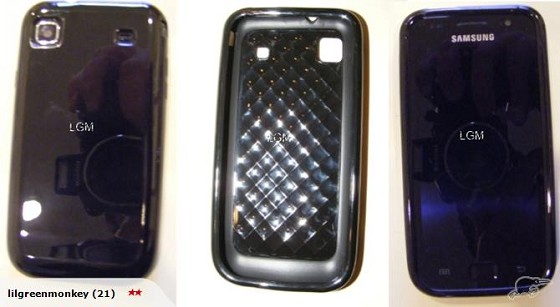
If anyone wants some black cases(went really fast last time), as in not clear like my other photos, totally black, can't see through them and the gel feels nicer in the one I'm using now :)
(I alternate between clear and black) just PM :), they also cover up the outer silver ring


I have moved across the ditch.  Now residing in Melbourne as a VOIP/Video Technical Trainer/Engineer. 

1 | ... | 52 | 53 | 54 | 55 | 56 | 57 | 58 | 59 | 60 | 61 | 62 | ... | 427
View this topic in a long page with up to 500 replies per page Create new topic


Geekzone Live »

Try automatic live updates from Geekzone directly in your browser, without refreshing the page, with Geekzone Live now.


Are you subscribed to our RSS feed? You can download the latest headlines and summaries from our stories directly to your computer or smartphone by using a feed reader.