Geekzone: technology news, blogs, forums
Guest
Welcome Guest.
You haven't logged in yet. If you don't have an account you can register now.


View this topic in a long page with up to 500 replies per page Create new topic
1 | ... | 65 | 66 | 67 | 68 | 69 | 70 | 71 | 72 | 73 | 74 | 75 | ... | 133
fishb8
85 posts

Master Geek
+1 received by user: 25


  #3072672 5-May-2023 13:12
Send private message quote this post

mclean:


clayton: How do I remove items from the Continue Watching? 


There might be a better way, but:


  • Open the stream.
  • Fast forward to the credits or thereabouts.
  • Press play again.

My understanding is that the encoding in the stream which tells the player that it has been watched is usually near the start of the credits.


But that's the whole point. I get told


YOUR DEVICE IS NOT SUPPORTED


PLEASE MAKE SURE YOU ARE USING A COMPATIBLE


AN ANDROID TV DEVICE


Even trying to install a streaming device isn't working.


I'm getting RNZ news via Marantz streaming


clayton
342 posts

Ultimate Geek
+1 received by user: 100

ID Verified

  #3072677 5-May-2023 13:31
Send private message quote this post

mclean:


clayton: How do I remove items from the Continue Watching? 


There might be a better way, but:


  • Open the stream.
  • Fast forward to the credits or thereabouts.
  • Press play again.

My understanding is that the encoding in the stream which tells the player that it has been watched is usually near the start of the credits.


Done that and now S1 E2 shows up, it's tedious FF on one of them let alone the who Series 


pdkm
43 posts

Geek
+1 received by user: 2


  #3072700 5-May-2023 14:19
Send private message quote this post

Go to the last episode in the series and do the above. That should work..


clayton
342 posts

Ultimate Geek
+1 received by user: 100

ID Verified

  #3072717 5-May-2023 14:52
Send private message quote this post

pdkm: Go to the last episode in the series and do the above. That should work..


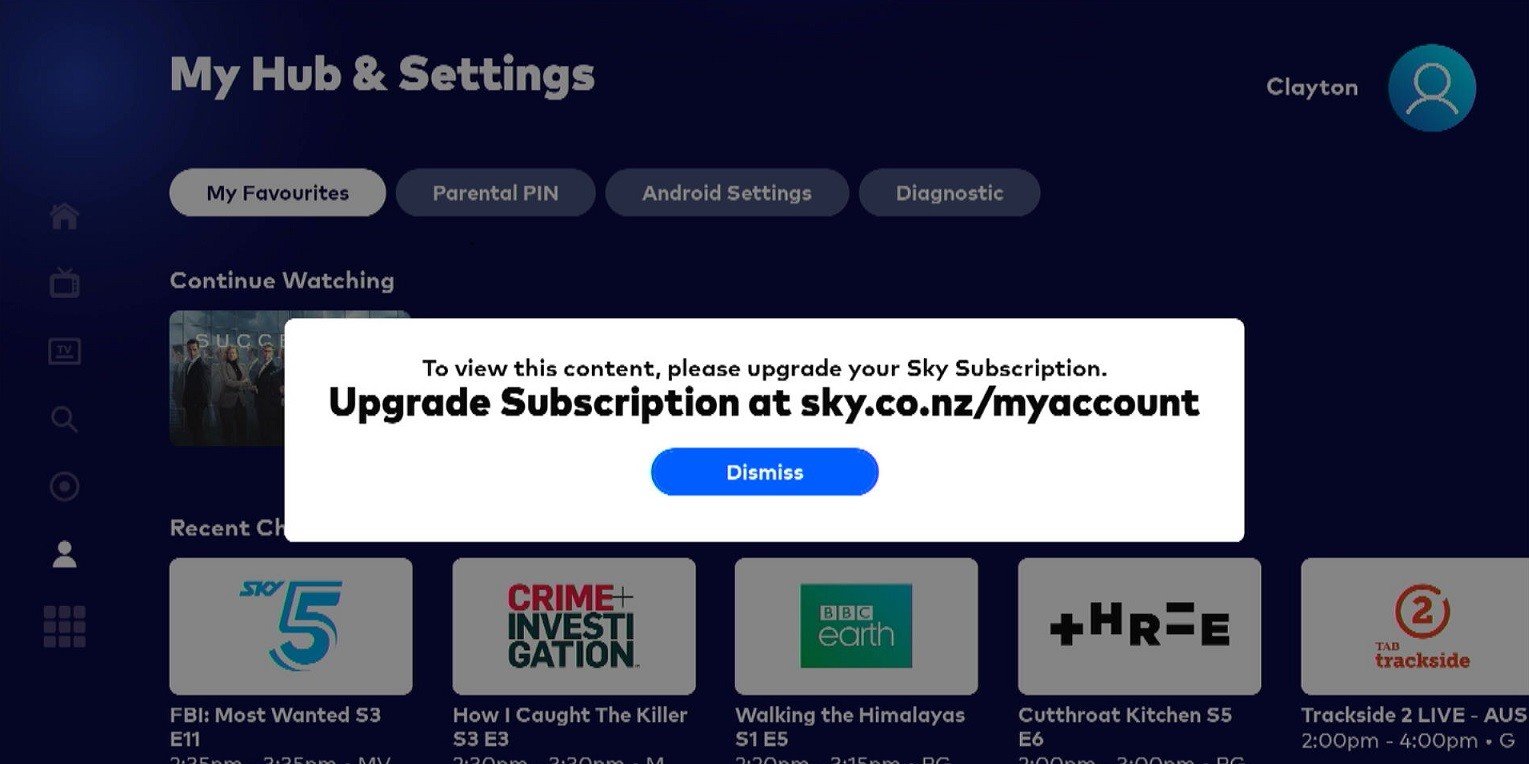
Thanks that worked last episode in series FF to end removed it but have 1 more left Succession so I went to last episode in series and did the mase as before, now it shows up as 59 minutes remaining and now says (attached)  


tdgeek
30048 posts

Uber Geek
+1 received by user: 9455

Trusted
Lifetime subscriber

  #3072756 5-May-2023 18:05
Send private message quote this post

It may, or may not be relevant, but Im on MySkyHDi, no interest in the new box based on this thread, but I see lag when checking my recordings (I rarely watch live) . If I was recording 3 at once, that lag happens, ok with that (CPU issue) , but lately its been quite often. I can only assume that there is drag on all of us?


clayton
342 posts

Ultimate Geek
+1 received by user: 100

ID Verified

  #3072758 5-May-2023 18:10
Send private message quote this post

clayton:


pdkm: Go to the last episode in the series and do the above. That should work..


Thanks that worked last episode in series FF to end removed it but have 1 more left Succession so I went to last episode in series and did the mase as before, now it shows up as 59 minutes remaining and now says (attached)  


I've figured out why, Succession is on Soho and I'm not subscribed to that channel, don't know why it allowed me to play and FF it in the first place, now it's going to be stuck on Continue Watching forever


Want to support Geekzone and browse the site without the ads? Subscribe to Geekzone now (monthly, annual and lifetime options).
Apsattv
2460 posts

Uber Geek
+1 received by user: 727


  #3072854 6-May-2023 04:54
Send private message quote this post

RE Rainfade


Might not be the new box.. Sky swapped satellite to Optus D2  due to the delay with the Optus D1 replacement.


drseuss25
76 posts

Master Geek
+1 received by user: 21


  #3072881 6-May-2023 09:05
Send private message quote this post

"FEATURE FOUND"


Double press the "Back" button quickly and it will take you back to the last channel you were on!!


Finally something decent found to make things easier. (Wife actually found it by accident)


Views are my own and subject to review!


WhiteCat
7 posts

Wannabe Geek


  #3072882 6-May-2023 09:16
Send private message quote this post

clayton:


I've figured out why, Succession is on Soho and I'm not subscribed to that channel, don't know why it allowed me to play and FF it in the first place, now it's going to be stuck on Continue Watching forever


I think it's split, season 1 is free-to-air, season 2 onwards SoHo.


clayton
342 posts

Ultimate Geek
+1 received by user: 100

ID Verified

  #3072884 6-May-2023 09:21
Send private message quote this post

WhiteCat:


clayton:


I've figured out why, Succession is on Soho and I'm not subscribed to that channel, don't know why it allowed me to play and FF it in the first place, now it's going to be stuck on Continue Watching forever


I think it's split, season 1 is free-to-air, season 2 onwards SoHo.


I got rid of Season 1 from Continue watching and now left with S2E1 with 59 min remaining


Corrsea
9 posts

Wannabe Geek
+1 received by user: 1


  #3073003 6-May-2023 11:47
Send private message quote this post


I got returned my Sky pod after one day of use so I am not sure if this will work. Removing an item from continue watching should be as simple as long pressing on it. This should bring up an option to hide it.


Shop now on AliExpress (affiliate link).
Movieman
Movieman
3846 posts

Uber Geek
+1 received by user: 2542

ID Verified
Lifetime subscriber

  #3073010 6-May-2023 12:31
Send private message quote this post

I did look at "upgrading" to the new SKY Box, but I already have an Apple TV 4K, 2021 Sony Google Smart TV and a PS5 which can all stream Netflix etc. so I decided that it wasn't worth it for me. If, in the future, SKY start to broadcast programs in 4K, I will probably upgrade. By then any small problems will hopefully be rectified.


MAN CAVE: 2025 TCL C7K 75" QD Mini LED TV - Apple TV 4K 32gb (2nd Gen) - Samsung HW Q990F Soundbar - Panasonic DP-UB820 4K Blu-ray Player - Apple Airpods Max - LIVING ROOM: 2021 Sony 75” X95J LCD/LED TV - Apple TV 4K 32gb (1st Gen) - 2 x Apple Homepods Gen.2 (paired) - TECH: iPhone 15 Plus, iPad Gen. 10, Apple Watch SE.


CampbellDNZ
8 posts

Wannabe Geek
+1 received by user: 3


  #3073093 6-May-2023 14:28
Send private message quote this post

Does any one know if the new sky box remote is Bluetooth or still an IR type model.

I have AV senders and the IR part drives me crazy and hoped the new remote could work in proximity via line of sight …

Any info would be great

Linux
12209 posts

Uber Geek
+1 received by user: 8493

Trusted
Lifetime subscriber

  #3073141 6-May-2023 14:37
Send private message quote this post

Bluetooth spoken about already in this thread a number of times

clayton
342 posts

Ultimate Geek
+1 received by user: 100

ID Verified

  #3073142 6-May-2023 14:46
Send private message quote this post

Corrsea:

I got returned my Sky pod after one day of use so I am not sure if this will work. Removing an item from continue watching should be as simple as long pressing on it. This should bring up an option to hide it.


Nope, tried just about everything to get rid of it even system reset!! and it's still showing up


1 | ... | 65 | 66 | 67 | 68 | 69 | 70 | 71 | 72 | 73 | 74 | 75 | ... | 133
View this topic in a long page with up to 500 replies per page Create new topic


Geekzone Live »

Try automatic live updates from Geekzone directly in your browser, without refreshing the page, with Geekzone Live now.


Are you subscribed to our RSS feed? You can download the latest headlines and summaries from our stories directly to your computer or smartphone by using a feed reader.