Geekzone: technology news, blogs, forums
Guest
Welcome Guest.
You haven't logged in yet. If you don't have an account you can register now.


Filter this topic showing only the reply marked as answer View this topic in a long page with up to 500 replies per page Create new topic
1 | ... | 31 | 32 | 33 | 34 | 35 | 36 | 37 | 38 | 39 | 40 | 41 | ... | 56
TCSwivel
26 posts

Geek
+1 received by user: 1


  #1908279 27-Nov-2017 09:45
Send private message

Maxcat:


TCSwivel:


Hello.


Having a problem with the networking.


My PC see's the Tivo and can list the programs, also can tag the programs.


But when I go to transfer (from pc to tivo or tivo to Pc) it will error says file not found.


Windows 10 , Tivo chipped and on same network, TivoDesktop 2.8, All paths are correct


Any Ideas why the error ??


I Tag the file, Agree to the Transfer warning, Transfer starts and then errors out


"The System cannot find the file specified.


Thanks


Tomo


Mine is working 'business as usual' with Windows 7. Can you try on another non Windows 10 PC? I have HNP on 3 Tivos and desktop app on Windows 7 PC.


Speaking of which...I could try on my Windows 10 PC (and confirm/deny it is  potential problem for you) but how do I move and 'run' the Tivo files for the Desktop App of the desktop on this PC or is it not possible?


I think i have a Windows 7 system some place, Will try that, I still have the desktop 2.8 setup file. 


rphenix
990 posts

Ultimate Geek
+1 received by user: 127

ID Verified
Lifetime subscriber

  #1908306 27-Nov-2017 10:19
Send private message

Spong:


I know what you mean about the Panasonic. I've modified close to 80x Tivos so far, and many belong to disillusioned owners of  Panasonic and Dish units. 


I've had a number of people get me to fix their Tivo's and stating they've already taken back the Dish TV T2200's after being disappointed with them.


KiwiDen
10 posts

Wannabe Geek
+1 received by user: 5


  #1908504 27-Nov-2017 14:56
Send private message

Just got my Tivo back from Spong and it's working perfectly.  CHEEHOO!!


BIG THANKS to him and the OzTivo community for the awesome job of working together and getting this back up and running.  Our family is very grateful at the effort.  To keep this fantastic piece of kit running (and out of the rubbish tip!!) and the development work that has gone on in the background is ... well... JUST AMAZING.  Thank you so very much!


Maxcat
273 posts

Ultimate Geek
+1 received by user: 74


  #1908740 28-Nov-2017 06:40
Send private message

TCSwivel:


Maxcat:


TCSwivel:


Hello.


Having a problem with the networking.


My PC see's the Tivo and can list the programs, also can tag the programs.


But when I go to transfer (from pc to tivo or tivo to Pc) it will error says file not found.


Windows 10 , Tivo chipped and on same network, TivoDesktop 2.8, All paths are correct


Any Ideas why the error ??


I Tag the file, Agree to the Transfer warning, Transfer starts and then errors out


"The System cannot find the file specified.


Thanks


Tomo


Mine is working 'business as usual' with Windows 7. Can you try on another non Windows 10 PC? I have HNP on 3 Tivos and desktop app on Windows 7 PC.


Speaking of which...I could try on my Windows 10 PC (and confirm/deny it is  potential problem for you) but how do I move and 'run' the Tivo files for the Desktop App of the desktop on this PC or is it not possible?


I think i have a Windows 7 system some place, Will try that, I still have the desktop 2.8 setup file. 


This from the Whirlpool Oz discussion:


"I've just managed to get my Tivo Desktop installed into win 7 I installed on my win 10 PC.(Dual Boot). So the transfer of recordings is now working again for my Tivo with MAK.


I installed win 7, because win 10 doesn't support firewire, which I use for video conversions. I don't think win 10 likes Tivo Desktop either."


Lally
102 posts

Master Geek
+1 received by user: 8


  #1908745 28-Nov-2017 07:12
Send private message

Hi all, great thread with great support, may I ask if there is anyone in the Auckland region who I can request the modding job done. I'm out the Norwest of Auckland, but am keen to get my TiVo box to someone to update.


Much appreciated!


rphenix
990 posts

Ultimate Geek
+1 received by user: 127

ID Verified
Lifetime subscriber

  #1908795 28-Nov-2017 08:08
Send private message

Lally:


Hi all, great thread with great support, may I ask if there is anyone in the Auckland region who I can request the modding job done. I'm out the Norwest of Auckland, but am keen to get my TiVo box to someone to update.


Much appreciated!


PM Sent.


Support Geekzone with one-off or recurring donations Donate via PressPatron.
TCSwivel
26 posts

Geek
+1 received by user: 1


  #1908918 28-Nov-2017 11:38
Send private message

Maxcat:


TCSwivel:


Maxcat:


TCSwivel:


Hello.


Having a problem with the networking.


My PC see's the Tivo and can list the programs, also can tag the programs.


But when I go to transfer (from pc to tivo or tivo to Pc) it will error says file not found.


Windows 10 , Tivo chipped and on same network, TivoDesktop 2.8, All paths are correct


Any Ideas why the error ??


I Tag the file, Agree to the Transfer warning, Transfer starts and then errors out


"The System cannot find the file specified.


Thanks


Tomo


Mine is working 'business as usual' with Windows 7. Can you try on another non Windows 10 PC? I have HNP on 3 Tivos and desktop app on Windows 7 PC.


Speaking of which...I could try on my Windows 10 PC (and confirm/deny it is  potential problem for you) but how do I move and 'run' the Tivo files for the Desktop App of the desktop on this PC or is it not possible?


I think i have a Windows 7 system some place, Will try that, I still have the desktop 2.8 setup file. 


This from the Whirlpool Oz discussion:


"I've just managed to get my Tivo Desktop installed into win 7 I installed on my win 10 PC.(Dual Boot). So the transfer of recordings is now working again for my Tivo with MAK.


I installed win 7, because win 10 doesn't support firewire, which I use for video conversions. I don't think win 10 likes Tivo Desktop either."


Interesting. 


Symondo
42 posts

Geek
+1 received by user: 11


  #1909543 29-Nov-2017 13:07
Send private message

Wow it has gone really quiet here. No tivo's to mod either.


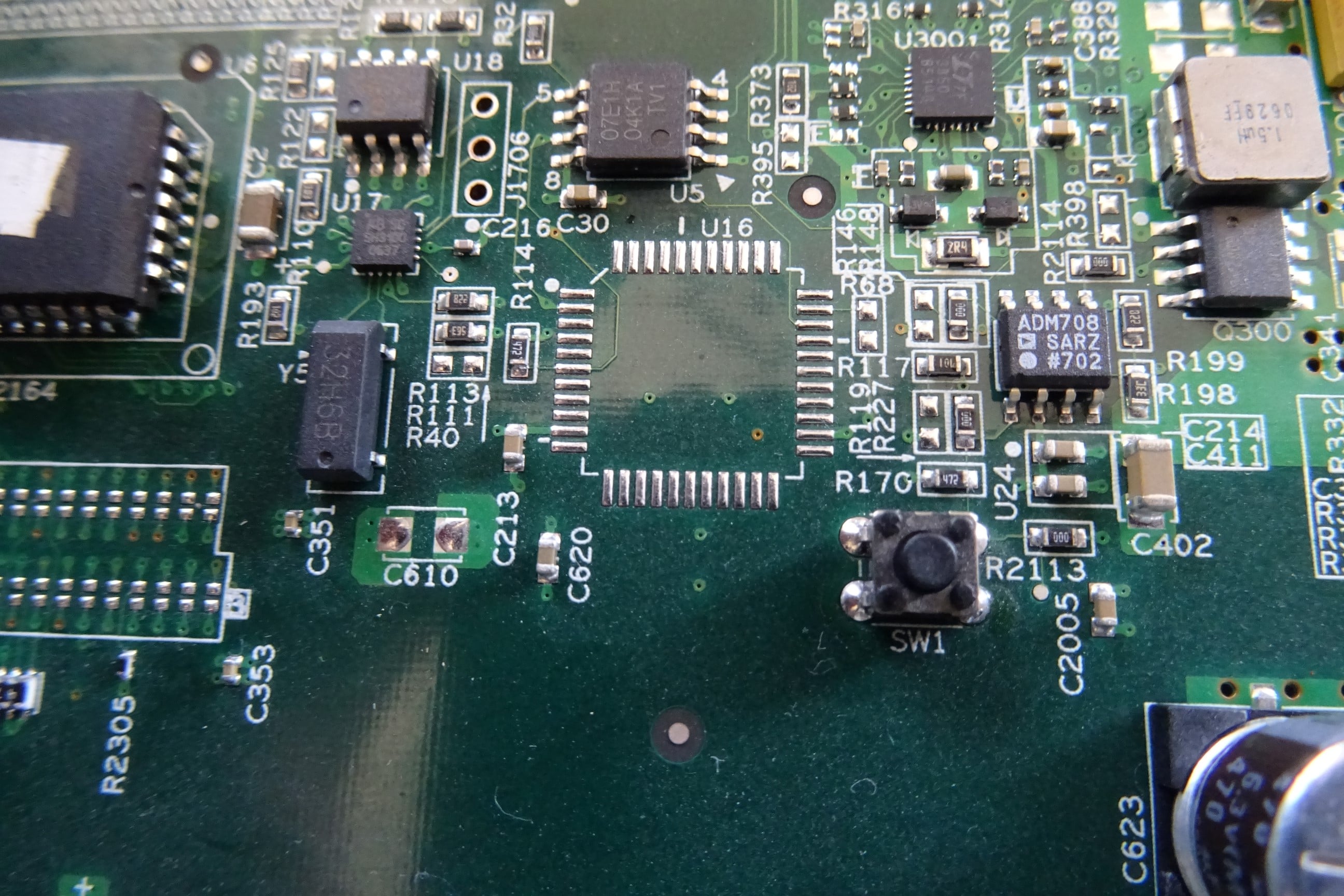
Has anybody any idea what the SW1 switch does on the motherboard? (Right hand bottom). All this time I have never noticed it.


Self destruct button?


Skolink
1081 posts

Uber Geek
+1 received by user: 32


  #1909557 29-Nov-2017 13:41
Send private message

Symondo:


Wow it has gone really quiet here. No tivo's to mod either.


Has anybody any idea what the SW1 switch does on the motherboard? (Right hand bottom). All this time I have never noticed it.


Self destruct button?


From the nearby ADM708 5V supervisory/reset chip data sheet " An active low, debounced manual reset input (MR) is also included." so I would guess a reset button. I've never noticed it before either! I'm going to try it this evening.


TCSwivel
26 posts

Geek
+1 received by user: 1


  #1910690 29-Nov-2017 18:30
Send private message

OK.


Well did some looking into my system, I had re installed Desktop 2.8 a while back, And it was running fine, But when I went to transfer it error'd out with


"file not found".


So went to run it in Admin mode and got error Server different version.


Server 2.8.3, So ran the 2.8.3 install and all working as it should.


Windows 10 and chipped Tivo, Oh what more do I need for Xmas.


Oh, transferring the Fantastic rugby game between NZ and Ireland, The one we Won (Ireland that is).  8-)


Skolink
1081 posts

Uber Geek
+1 received by user: 32


  #1910747 29-Nov-2017 21:03
Send private message

Skolink:


Symondo:


Wow it has gone really quiet here. No tivo's to mod either.


Has anybody any idea what the SW1 switch does on the motherboard? (Right hand bottom). All this time I have never noticed it.


Self destruct button?


From the nearby ADM708 5V supervisory/reset chip data sheet " An active low, debounced manual reset input (MR) is also included." so I would guess a reset button. I've never noticed it before either! I'm going to try it this evening.


Wait...did you solder on that button? I just checked a couple of TiVos and it isn't fitted, and probably never is which is why I haven't noticed it before.


Shop now on AliExpress (affiliate link).
TCSwivel
26 posts

Geek
+1 received by user: 1


  #1910760 29-Nov-2017 21:40
Send private message

Skolink:


Skolink:


Symondo:


Wow it has gone really quiet here. No tivo's to mod either.


Has anybody any idea what the SW1 switch does on the motherboard? (Right hand bottom). All this time I have never noticed it.


Self destruct button?


From the nearby ADM708 5V supervisory/reset chip data sheet " An active low, debounced manual reset input (MR) is also included." so I would guess a reset button. I've never noticed it before either! I'm going to try it this evening.


Wait...did you solder on that button? I just checked a couple of TiVos and it isn't fitted, and probably never is which is why I haven't noticed it before.


Well i have to put my 2 cents worth in.


1st Tivo chipped had a smaller MotherBoard than 2nd Tivo, 3rd Tivo (not chipped) has the button, also doa HD.


Guess it was  to perform some sort of reset function


TCSwivel
26 posts

Geek
+1 received by user: 1


  #1910761 29-Nov-2017 21:40
Send private message

Skolink:


Skolink:


Symondo:


Wow it has gone really quiet here. No tivo's to mod either.


Has anybody any idea what the SW1 switch does on the motherboard? (Right hand bottom). All this time I have never noticed it.


Self destruct button?


From the nearby ADM708 5V supervisory/reset chip data sheet " An active low, debounced manual reset input (MR) is also included." so I would guess a reset button. I've never noticed it before either! I'm going to try it this evening.


Wait...did you solder on that button? I just checked a couple of TiVos and it isn't fitted, and probably never is which is why I haven't noticed it before.


Well i have to put my 2 cents worth in.


1st Tivo chipped had a smaller MotherBoard than 2nd Tivo, 3rd Tivo (not chipped) has the button, also doa HD.


Guess it was  to perform some sort of reset function


sweet308
48 posts

Geek
+1 received by user: 9


  #1910802 29-Nov-2017 23:48
Send private message

Symondo:

Wow it has gone really quiet here. No tivo's to mod either.


Has anybody any idea what the SW1 switch does on the motherboard? (Right hand bottom). All this time I have never noticed it.


Self destruct button?


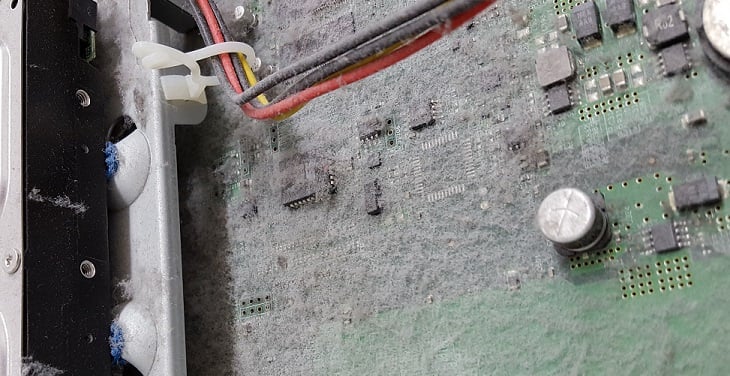
It's usually not there, though it is a bit hard to tell in this case...

I was having trouble deciding if I should persevere with a shovel or hire a Bobcat to clean this one out.

Kaiparagirl
7 posts

Wannabe Geek
+1 received by user: 3


  #1910809 30-Nov-2017 01:03
Send private message

Hi LAlly, answering your question on who can do the modding Norwest Auckland, I highly recommend 


rphenix


1 | ... | 31 | 32 | 33 | 34 | 35 | 36 | 37 | 38 | 39 | 40 | 41 | ... | 56
Filter this topic showing only the reply marked as answer View this topic in a long page with up to 500 replies per page Create new topic


Geekzone Live »

Try automatic live updates from Geekzone directly in your browser, without refreshing the page, with Geekzone Live now.


Are you subscribed to our RSS feed? You can download the latest headlines and summaries from our stories directly to your computer or smartphone by using a feed reader.