Geekzone: technology news, blogs, forums
Guest
Welcome Guest.
You haven't logged in yet. If you don't have an account you can register now.


boland

569 posts

Ultimate Geek
+1 received by user: 90


#324364 31-Mar-2026 19:23
Send private message quote this post

We have a new Gree Whio 270L HWHP, and running Home Assistant in our house, but none of the integrations seem to work with the HWHP. They all seem to be for heat pumps / climate or for air-to-water units.


This one seemed close, but didn't work.


I would like to monitor the temperature, enable/disable boost, etc. 


Ideally network based, i.e. without a custom ESP, but if that's the only option, I can do that.


Create new topic
Beaker
77 posts

Master Geek
+1 received by user: 4


  #3476878 1-Apr-2026 20:22
Send private message quote this post

I just got the 200L one installed today and have the exact same question, I have port scanned the heck out of it and cannot find a listening modbus port.


markaw66
1 post

Wannabe Geek


  #3476997 1-Apr-2026 23:25
Send private message quote this post

This is spooky. I too had the Gree WHIO 270L installed yesterday. Three in NZ on almost the same day.


Anyway, I posted to the dev on Reddit it doesn't work for us. 


It may be the WHIO isn't supported


frstep
12 posts

Geek
+1 received by user: 9


  #3478374 6-Apr-2026 10:00
Send private message quote this post

And I was just looking at heat pump hot water options and the Gree was on the shortlist. If not possible to link to Home Assistant then I'll remove it!


boland

569 posts

Ultimate Geek
+1 received by user: 90


  #3480225 12-Apr-2026 15:47
Send private message quote this post

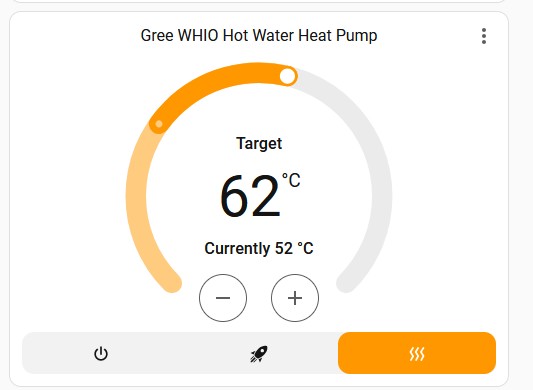
I've got it partly working by forking an integration that used the cloud API. It was built for heat pumps, and didn't work with non-European servers, so I had to modify it. I can read the target and current temperature, and can change the target temperature!


I can't see other things like Boost yes/no, but it's a start :) It also has entities/settings that aren't related to HWHP's so I have to clean it up a bit.


It does mean it is cloud dependent, but I'm fine with that.


All thanks to Claude :)


boland

569 posts

Ultimate Geek
+1 received by user: 90


  #3480226 12-Apr-2026 16:01
Send private message quote this post

Quick update, can now also set Boost mode :)


Jase2985
13773 posts

Uber Geek
+1 received by user: 6254

ID Verified
Lifetime subscriber

  #3480236 12-Apr-2026 16:50
Send private message quote this post

Think you could post how you did it @boland 


Shop now for Dell laptops and other devices (affiliate link).
boland

569 posts

Ultimate Geek
+1 received by user: 90


  #3480241 12-Apr-2026 17:10
Send private message quote this post

@Jase2985 sure, it's very much WIP and the docs need to be updated. You need to add this repo as custom repo to HACS: https://github.com/roldengarm/homeassistant-gree-cloud


Then, add the Gree Climate Cloud integration, enter your details (select Australia for region), and your HWHP should show up :)


Beaker
77 posts

Master Geek
+1 received by user: 4


  #3486183 1-May-2026 11:25
Send private message quote this post

Thanks alot for this information.


I haven't really used Homeassistant before but have managed to get this integration working and wanted to run by an Automation and see if it makes sense.

I have Solar Power at home and wanted to leverage this a bit with a simple automation.  I have it check my Solar Inverter at 3pm and if the Solar Inverter is exporting at least 1500w then set the Temperature of the water to 65 degrees, and at 5pm switch the temperature back to 60 degrees, the thought being that it would give it a boost from the solar before it goes to sleep for the night (it's set to sleep from 8pm to 5am) that between 5pm and 8pm it should hold that extra 5 degrees without a top up (unless someone has a shower) so should use less grid electricity.


boland

569 posts

Ultimate Geek
+1 received by user: 90


  #3486401 2-May-2026 08:37
Send private message quote this post

@Beaker cool that you got it working. Your automation makes sense, but do bear in mind it will only start heating when the difference is ~12c (for the 270L version). So maybe better to set it to 70c instead?


Create new topic


Geekzone Live »

Try automatic live updates from Geekzone directly in your browser, without refreshing the page, with Geekzone Live now.


Are you subscribed to our RSS feed? You can download the latest headlines and summaries from our stories directly to your computer or smartphone by using a feed reader.