Geekzone: technology news, blogs, forums
Guest
Welcome Guest.
You haven't logged in yet. If you don't have an account you can register now.
To post in this sub-forum you must have made 30 posts or have Trust status or have completed our ID Verification


Filter this topic showing only the reply marked as answer View this topic in a long page with up to 500 replies per page Create new topic
1 | 2 | 3 | 4 | 5 | 6 | 7
logo
659 posts

Ultimate Geek
+1 received by user: 255

Trusted

  #2885067 11-Mar-2022 15:34
Send private message

tehgerbil:


logo:


Price is back to $369 now :-(


*kicks self for being responsible and not browsing Geekzone earlier in the day*

I would have bought one for 230 in a heartbeat!!!


Back to $229 now


gnfb
2685 posts

Uber Geek
+1 received by user: 197

ID Verified

  #2885074 11-Mar-2022 15:53
Send private message

Wakrak:


Negatives of this printer:
1) Current bed material (can upgrade to glass bed)
2) Louder fan
3) No auto levelling so every 2 prints you have to use either a paper or special aluminium tool to level to nozzle with the bed(most tedious part because you have to do it often)
4) Small bed size (larger prints off thingiverse, you'll have to split the print in half)
5) Filament is exposed (exposed filament clogs the nozzle because plastic is porous it soaks up the water in humid air which is why my mate cnc'd a box with silica gel to put my filament in)
6) Cheap parts which will most likely break in the first few prints which you'll then have to buy off aliexpress and wait a whole month
7) Mostly sensor and nozzle issues. You'll have to buy spare nozzles and sensors! Nozzles need changing when they start turning black and sensors break easily unless you upgrade to a BL Touch sensor(same amount as the printer - its German)


Pros:
Cheap printer


Well that's not very reassuring. :(


Is an English Man living in New Zealand. Not a writer, an Observer he says. Graham is a seasoned 'traveler" with his sometimes arrogant, but honest opinion on life. He loves the Internet!.


I have two shops online allshop.nz    patchpinflag.nz
Email Me


logo
659 posts

Ultimate Geek
+1 received by user: 255

Trusted

  #2885075 11-Mar-2022 15:56
Send private message

Wakrak:


5) Filament is exposed (exposed filament clogs the nozzle because plastic is porous it soaks up the water in humid air which is why my mate cnc'd a box with silica gel to put my filament in)


One would think you could 3D print a box to put the filament in ;-)


1101

3141 posts

Uber Geek
+1 received by user: 1143


  #2885092 11-Mar-2022 16:19
Send private message

gnfb:


Well that's not very reassuring. :(


Its a $229 printer . Dont expect $1000 quality.
You WILL need to do some tinkering & adjusting, and may need to replace or upgrade parts at some stage.


ALWAYS do some research before buying . :-)


The Ender has a good reputation, with lots of recommendations for it and alot of how to vids on youtube.
But cheap chinese 3D printers arnt perfect and have spotty quality control.
At lest TheMarket offer a return for refund option .


Also , given Creality say they never sell at this sort of price , there is some fishyness here.
Either its fake , or they are dumping stock at below cost.


I thought , for $200ish, what have I got to loose ,  I couldnt buy a fake one that cheap. If not genuine I'll send it back


Please, dont buy unless you know what you are getting into.
Fixing & tweaking is part of the fun .


:-)


Reanalyse
398 posts

Ultimate Geek
+1 received by user: 311


  #2885147 11-Mar-2022 18:26
Send private message

Bought one at $213.00 (incl shipping). To replace my old Troxy P802, mainly for the safety aspects as the Troxy had no thermal run-away protection. Also the restart at same location after power cut appeals.


Done a lot of searching for the HobbyTech part of the offer, not able to find much. The QR code points to Crea1ty.com (not Creality.com) so ...... 


Has anyone got delivery yet and can let us know quality etc.


Reanalyse
398 posts

Ultimate Geek
+1 received by user: 311


  #2885369 12-Mar-2022 16:34
Send private message

elpenguino:


So much for 'try not to hammer the CC for a while dear' .


Now I'm going to have to learn 3D design software (fusion 360 perhaps) so there goes free time for a while too.


I find MatterControl very good, just add primitives (boxes, spheres etc.) align them to each other and add or subtract to get the shape you want to print.


Support Geekzone with one-off or recurring donations Donate via PressPatron.
peejayw
1913 posts

Uber Geek
+1 received by user: 123


  #2885485 13-Mar-2022 07:48
Send private message

Wakrak:


Honestly the most pain in the ass thing is levelling because the extrusion rate from the nozzle is also affected by the humidity (unless you can put your printer in a really dry room) you'll have different levelling settings through winter,summer,spring,autumn. You can spend up to an hour just to try get the bed level this is why I went with the CR10S Pro that comes with auto levelling.


I got the glass plate for my Ender 3 (original) and haven't had to level the bed in over a year now.


 I'm supposed to respect my elders, but it's getting harder and harder for me to find one now.


Krullos
193 posts

Master Geek
+1 received by user: 26

ID Verified

  #2885823 14-Mar-2022 09:06
Send private message

1101:


https://themarket.com/nz/p/hobbytech-ender-3-3d-printer/4969-AACAKLK02


Ender3 3D printer . NZ Stock .


If you use discount codes , its NZ$206 with free shipping


I bought one yesterday .
I'll post an update when it arrives , including if it looks like a genuine Creality Ender .


The price seems too good to be true. Its $340 from other NZ sellers . Even Creality wont sell them that cheap.
:-)


Looks like it's back up to $369.99 again now


1101

3141 posts

Uber Geek
+1 received by user: 1143


  #2885860 14-Mar-2022 10:39
Send private message

Reanalyse:


 mainly for the safety aspects as the Troxy had no thermal run-away protection


I read/veiwed that early ender3's didnt have runaway thermal protection either & a firmware upgrade/tweek was needed to fix that
Im not sure if thats true or not. How do we check for that ?


One problem with the Ender3, theres too much info on the internet .
Just too many YT vids & websites to trawl through to get basic facts & the setup info we need


Krullos
193 posts

Master Geek
+1 received by user: 26

ID Verified

  #2886001 14-Mar-2022 14:18
Send private message

1101:


Reanalyse:


 mainly for the safety aspects as the Troxy had no thermal run-away protection


I read/veiwed that early ender3's didnt have runaway thermal protection either & a firmware upgrade/tweek was needed to fix that
Im not sure if thats true or not. How do we check for that ?


One problem with the Ender3, theres too much info on the internet .
Just too many YT vids & websites to trawl through to get basic facts & the setup info we need


Step 1 will be to see if they come with the 8-bit or the 32-bit motherboard (which has been standard since August 2020, so depends on if these are very old stock or not)


32-bit motherboard firmware upgrade is apparently fairly straightforward - see this video - https://www.youtube.com/watch?v=neS7lB7fCww


Reanalyse
398 posts

Ultimate Geek
+1 received by user: 311


  #2886071 14-Mar-2022 16:42
Send private message

1101:


Reanalyse:


 mainly for the safety aspects as the Troxy had no thermal run-away protection


I read/veiwed that early ender3's didnt have runaway thermal protection either & a firmware upgrade/tweek was needed to fix that
Im not sure if thats true or not. How do we check for that ?


One problem with the Ender3, theres too much info on the internet .
Just too many YT vids & websites to trawl through to get basic facts & the setup info we need


My check will proably be the Octoprint server I use. Big red warnings on the client from the Troxy, and would expect the same for the Ender if not safe- if not protected would be a fire risk and should not be sold.


The details specifically state "Safety Protected Power Supply" and updated extruder so hopefully not "too old" 


Will see when it arrives and is assembled. Busy preparing a LED lighting system the attached to the top bar and runs off the Ender 3 PSU while I wait (using a DC-DC convertor to get the 12v required)


Support Geekzone with one-off or recurring donations Donate via PressPatron.
frankv
5705 posts

Uber Geek
+1 received by user: 3666

Lifetime subscriber

  #2886325 15-Mar-2022 08:48
Send private message

What's the hardware & firmware on the Ender3? I'd guess that a cheap Ender3 runs Marlin on an Arduino Mega 2560 (or something very similar) board? In which case thermal runaway protection could be built-in as supplied by the manufacturer. If it's not, you could build and install your own version of Marlin. It's probably worth learning how to do that, so you can upgrade to newer versions as they become available. In 3D printing, open source firmware is generally much better than any proprietary firmware.


Thermal runaway protection is just a firmware function... it checks if the temperature is increasing even if the heater is turned off. However, if the temperature is increasing despite the firmware's attempts to control it, it probably means that there's a short or failed component or similar, in which case turning off the heater probably won't do squat for fire protection... it'll just save you wasting filament.


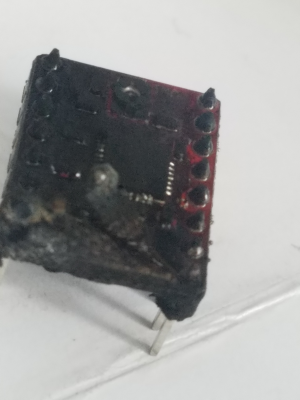
See also below... This was the A4988 Z stepper driver on my laser cutter as I found it after cutting. My control board is, as recommended by the manufacturer, mounted vertically on the gantry, not covered at all. When I replaced this stepper driver, everything worked as usual, so no fuses were blown.

NB that the Z stepper is only used for focussing before cutting, not at all during the cutting operation. So this didn't happen whilst this particular stepper was in use -- I guess that this could happen any time the board is powered up.


If you're serious about fire prevention, you really need a way to automatically turn off the mains power to your printer when not in use or if thermal runway is detected. Or never leave your printer powered up and unattended (which is difficult if you're doing a print that takes 24 hours.


[Edit] https://reprap.org/forum/read.php?392,887594 suggests that Ender3 does have thermal runaway detection enabled.


elpenguino
3577 posts

Uber Geek
+1 received by user: 2939


  #2886328 15-Mar-2022 09:10
Send private message

That all leads me to ask, even when this thing isn't burning my house down, does it give off smell during operation?

Wondering if instead of creating some masterpiece lapenguina will think I'm downstairs sniffing glue.


Most of the posters in this thread are just like chimpanzees on MDMA, full of feelings of bonhomie, joy, and optimism. Fred99 8/4/21


Glassboy
851 posts

Ultimate Geek
+1 received by user: 251

ID Verified
Trusted

  #2886330 15-Mar-2022 09:16
Send private message

All FDM printers are mechanical devices and need maintenance and parts replaced.  But if you get hold of an Ender 3 or an Ender 3 Pro there's only a couple of things you need to do to make it much more reliable.


  1. Replace the stock bed springs with pressure springs.  The stock springs are little more than bent wire and are inconsistent.  They're only a couple of dollars to replace and reduce the amount of tramming needed.
  2. Replace the Bowden tube couplers with PC4 M6 and M10 couplers.  The stock couplers are designed for light pneumatic work and break easily under mechanical load causing retraction problems.  Your probably looking at $10 per pack of each type with enough to last you the life of the printer.
  3. Replace the plastic extruder with an aluminium extruder.  The plastic arm will break sooner or later.  Generally it cracks first where you can't see the crack.  This is about $10.


Apart from that you need spare nozzles and bowden tube.  The cooling fans will also wear out after a couple of years use.  Your v rollers may also need replacing after a lot of use.


Ease of use upgrades are a PEI spring steel bed (so so much better than glass or the stock magnetic bed), X and Y belt tensioners, and a plum blossom coupler on the z-axis motor.


Of the upgrades you can print yourself, the only useful ones are a bearing filament guide, and a bearing filament roller.  Most "mods" make the machine worse or in some case damage it.  A significant number of people seem to "fix" their Ender until it doesn't print properly.


It's also worth installing a bootloader and flashing the board with something like TH3D's Unified Firmware.  It allows you to do things like turn off the power save feature which will kill your SDCARD.  If you're also using Octoprint, stick to Marlin 1 on the 8-bit boards.


frankv
5705 posts

Uber Geek
+1 received by user: 3666

Lifetime subscriber

  #2886402 15-Mar-2022 11:20
Send private message

elpenguino: That all leads me to ask, even when this thing isn't burning my house down, does it give off smell during operation?

Wondering if instead of creating some masterpiece lapenguina will think I'm downstairs sniffing glue.


Smell depends on what you're printing. PLA is fine.


More of an issue is the noise... there's a continual whir from the fans, and zip-zip-zip from the motors and belts.


 You wouldn't want it in same room as you if you were watching TV or almost anything else. Mine is out in the garage, with a webcam to check on it.


1 | 2 | 3 | 4 | 5 | 6 | 7
Filter this topic showing only the reply marked as answer View this topic in a long page with up to 500 replies per page Create new topic


Geekzone Live »

Try automatic live updates from Geekzone directly in your browser, without refreshing the page, with Geekzone Live now.


Are you subscribed to our RSS feed? You can download the latest headlines and summaries from our stories directly to your computer or smartphone by using a feed reader.