Geekzone: technology news, blogs, forums
Guest
Welcome Guest.
You haven't logged in yet. If you don't have an account you can register now.


Metamorphic

58 posts

Master Geek
+1 received by user: 60

ID Verified

#324538 23-Apr-2026 15:08
Send private message quote this post

I currently have a static IPv4 address with Mercury fibre broadband. I want to also connect using IPv6, which doesn't need to be static. I called Mercury customer support who assured me that this is possible, but helping me configure my router was beyond the level of the tech support person. The best they could say was to put everything in "automatic" on the router, and that they can't support routers other than their own.


What should I be filling out in my Omada router configuration options? Do I need enable Prefix Delegation, and then enter a Prefix Delegation Size? I'm just guessing with the value 56. Is the connection type correct?
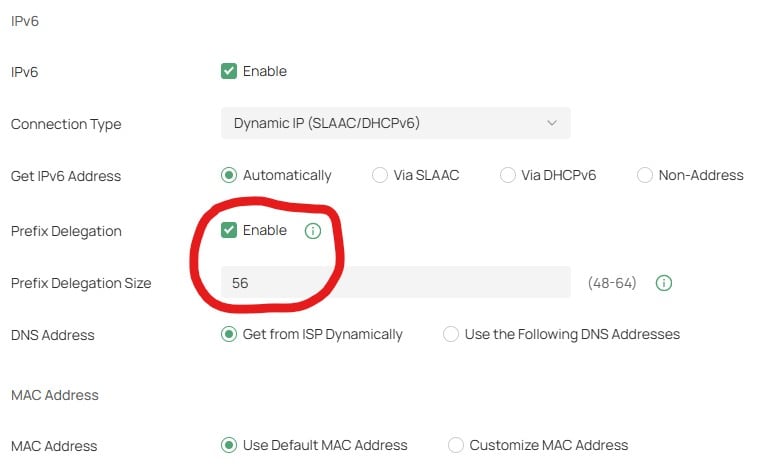


Once these values have been applied in the router, do I need to restart the router and/or the ONT? How do I test that IPv6 is enabled to the router? To test that do I need to enable IPv6 on my VLANs too?


This is my first time to even think about these questions — I have a fair bit to learn. 


Create new topic
SpartanVXL
1508 posts

Uber Geek
+1 received by user: 667


  #3483535 23-Apr-2026 15:31
Send private message quote this post

At a glance those setting should be fine for the router, there should be settings on LAN/VLAN side that enables ipv6. Push a /64 prefix and use SLAAC if you want clients to get their own addresses.


Edit: just did a google on Omada and it recommends heavily to make sure you have ipv6 firewall running as it likely isn’t enabled by default.


Metamorphic

58 posts

Master Geek
+1 received by user: 60

ID Verified

  #3483586 23-Apr-2026 18:27
Send private message quote this post

The Omada config software was updated recently, so it took me a while to figure out where Omada now reports its IP addresses. The gateway indicates it has been assigned an IPv6 address ending in /64. Perhaps I am mistaken, but this is usable for only one subnet, right? That's not helpful when you run VLANs. If this is the case, that's disappointing. Hopefully I am mistaken!


MichaelNZ
1601 posts

Uber Geek
+1 received by user: 487

Trusted
Net Trust Ltd

  #3483598 23-Apr-2026 20:18
Send private message quote this post

The ONT is a layer-2 device so you will not need to restart it and probably shouldn't.


WFH Linux Systems and Networks Engineer in the Internet industry | Specialising in Mikrotik | APNIC member | Open to job offers | ZL2NET


Ruphus
470 posts

Ultimate Geek
+1 received by user: 181


  #3483616 23-Apr-2026 23:22
Send private message quote this post

I just gave it a go (also on Mercury) and was able to get an IPv6 Address with this config. I'm using a Unifi setup for my router.


I also have an IPv4 static IP.


taneb1
547 posts

Ultimate Geek
+1 received by user: 215

ID Verified
Trusted
Mercury

  #3483644 24-Apr-2026 09:03
Send private message quote this post

I'm not sure about Omada specifically - but what you've posted looks correct and should work after a reboot if not already - Could try leaving the Prefix Delegation as automatic if it doesn't work.


May need to check with Omada support if there is anything else thats needed / as mentioned above, always make sure any applicable firewall rules are enabled if not by default. 


Failing that, try turn the router off for 5 minutes then try again - If not, can raise a ticket via techsupport@mercury.co.nz


This goes to our Tier 2 team who can take a look and escalate further if needed. 


Any comments made are my personal views and does not represent those of my employer


Create new topic


Geekzone Live »

Try automatic live updates from Geekzone directly in your browser, without refreshing the page, with Geekzone Live now.


Are you subscribed to our RSS feed? You can download the latest headlines and summaries from our stories directly to your computer or smartphone by using a feed reader.