Geekzone: technology news, blogs, forums
Guest
Welcome Guest.
You haven't logged in yet. If you don't have an account you can register now.


View this topic in a long page with up to 500 replies per page Create new topic
1 | 2 | 3
Ironsfan

26 posts

Geek
+1 received by user: 8


  #3470799 16-Mar-2026 11:21
Send private message quote this post

freitasm:


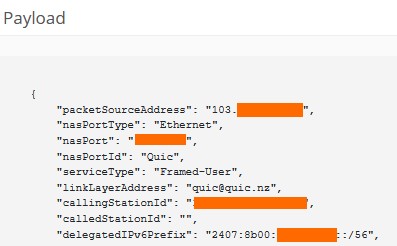
Also, go back to your Quic portal and check on that popup where you can see your active connection for the delegatedIPv6Prefix. This will tell you if it's setup on Quic's side:


mine


freitasm
BDFL - Memuneh
80654 posts

Uber Geek
+1 received by user: 41050

Administrator
ID Verified
Trusted
Geekzone
Lifetime subscriber

  #3470810 16-Mar-2026 11:55
Send private message quote this post

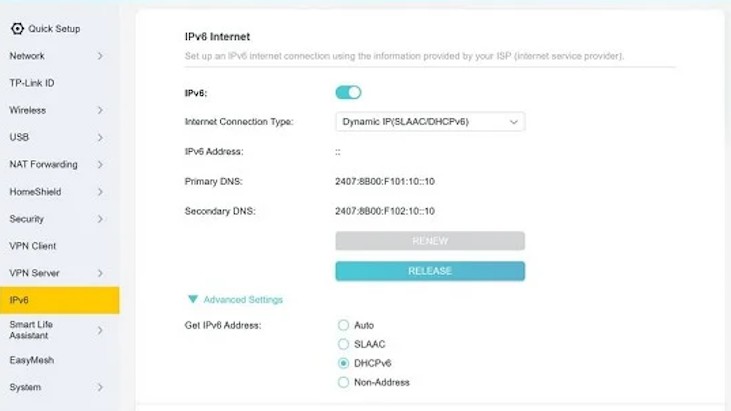
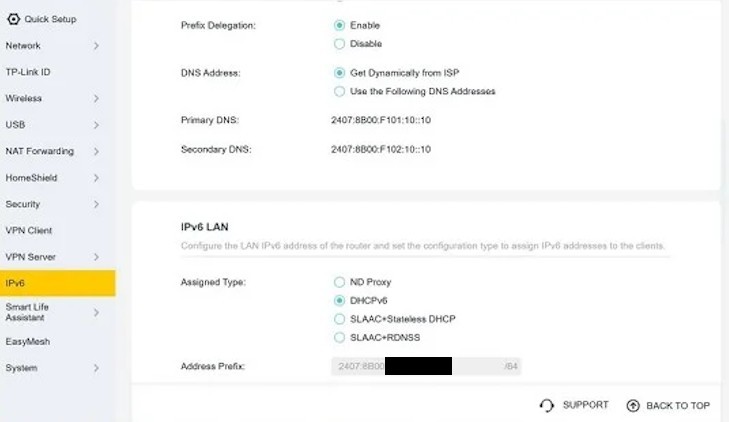
What happens if you change IPv6 LAN Assigned Type to SLAAC+Stateless DHCP?


Referral links: Quic Broadband (free setup code: R587125ERQ6VE) | Samsung | AliExpress | Wise | Sharesies 


Support Geekzone by subscribing (browse ads-free), or making a one-off or recurring donation through PressPatron.



Ironsfan

26 posts

Geek
+1 received by user: 8


  #3470820 16-Mar-2026 12:20
Send private message quote this post

yes but still no ipv6


Ironsfan

26 posts

Geek
+1 received by user: 8


  #3470822 16-Mar-2026 12:22
Send private message quote this post

freitasm:


What happens if you change IPv6 LAN Assigned Type to SLAAC+Stateless DHCP?


nothing seems to have changed-still no ipv6


freitasm
BDFL - Memuneh
80654 posts

Uber Geek
+1 received by user: 41050

Administrator
ID Verified
Trusted
Geekzone
Lifetime subscriber

  #3470825 16-Mar-2026 12:24
Send private message quote this post

Have you restarted the router and the client machine after the change?


Referral links: Quic Broadband (free setup code: R587125ERQ6VE) | Samsung | AliExpress | Wise | Sharesies 


Support Geekzone by subscribing (browse ads-free), or making a one-off or recurring donation through PressPatron.


Ironsfan

26 posts

Geek
+1 received by user: 8


  #3470826 16-Mar-2026 12:28
Send private message quote this post

freitasm:


Have you restarted the router and the client machine after the change?


yes. both of them


Shop now for Lenovo laptops and other devices (affiliate link).
freitasm
BDFL - Memuneh
80654 posts

Uber Geek
+1 received by user: 41050

Administrator
ID Verified
Trusted
Geekzone
Lifetime subscriber

  #3470827 16-Mar-2026 12:35
Send private message quote this post

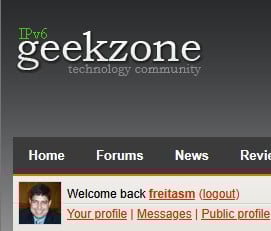
Do you see the IPv6 Geekzone logo at all when you visit our pages, like my one?


Did you buy this TP-Link router to replace the previous TP-Link model you had? Or borrowed it?


You could plug a computer directly into the ONT (swap the router and computer) and see if you get IPv6 on the client.


Just make sure to configure the client correctly as needed (VLAN10 if in use, PPPoE if in use).


You have to be sure the TP-Link router is not the problem.


Referral links: Quic Broadband (free setup code: R587125ERQ6VE) | Samsung | AliExpress | Wise | Sharesies 


Support Geekzone by subscribing (browse ads-free), or making a one-off or recurring donation through PressPatron.


Ironsfan

26 posts

Geek
+1 received by user: 8


  #3470829 16-Mar-2026 12:50
Send private message quote this post

freitasm:


Do you see the IPv6 Geekzone logo at all when you visit our pages, like my one?


Did you buy this TP-Link router to replace the previous TP-Link model you had? Or borrowed it?


You could plug a computer directly into the ONT (swap the router and computer) and see if you get IPv6 on the client.


Just make sure to configure the client correctly as needed (VLAN10 if in use, PPPoE if in use).


You have to be sure the TP-Link router is not the problem.


No ipv6 on logo. Router is new. Plugged into ont -no change


PM sent with info


freitasm
BDFL - Memuneh
80654 posts

Uber Geek
+1 received by user: 41050

Administrator
ID Verified
Trusted
Geekzone
Lifetime subscriber

  #3470830 16-Mar-2026 12:52
Send private message quote this post

Thanks, got the PM. PC not on IPv6 direct to ONT. Do you have another device to test, like a phone via WiFi to router to rule out the client?


Referral links: Quic Broadband (free setup code: R587125ERQ6VE) | Samsung | AliExpress | Wise | Sharesies 


Support Geekzone by subscribing (browse ads-free), or making a one-off or recurring donation through PressPatron.


Ironsfan

26 posts

Geek
+1 received by user: 8


  #3470836 16-Mar-2026 13:09
Send private message quote this post

freitasm:


Thanks, got the PM. PC not on IPv6 direct to ONT. Do you have another device to test, like a phone via WiFi to router to rule out the client?


Plugged a second computer into ont-no ipv6. No ipv6 for that computer either once connected via router. Same with phone via wifi.


freitasm
BDFL - Memuneh
80654 posts

Uber Geek
+1 received by user: 41050

Administrator
ID Verified
Trusted
Geekzone
Lifetime subscriber

  #3470837 16-Mar-2026 13:11
Send private message quote this post

Ok, time to raise a ticket with Quic then.


Referral links: Quic Broadband (free setup code: R587125ERQ6VE) | Samsung | AliExpress | Wise | Sharesies 


Support Geekzone by subscribing (browse ads-free), or making a one-off or recurring donation through PressPatron.


Support Geekzone with one-off or recurring donations Donate via PressPatron.
Ironsfan

26 posts

Geek
+1 received by user: 8


  #3470838 16-Mar-2026 13:13
Send private message quote this post

Thankyou for your effort in trying to help me.


zespri
424 posts

Ultimate Geek
+1 received by user: 94

Lifetime subscriber

  #3470856 16-Mar-2026 14:49
Send private message quote this post

KiwiSurfer:


Ironsfan:


Maybe this will help to see what is happening. Tests to ipv4 and then ipv6 sites.


https://www.nperf.com/en/r/3631094347089482-xG1lMIRN


https://www.nperf.com/en/r/3631094550308457-LYTIPeUQ


The issue is nothing to do with speeds. My routers also loses its IPv6 connection every few days on Quic. Same Edgerouter worked fine for years on Vocus and for several months on Quic. Started playing up in ~Jan and was recommended by Quic Discord to invest into a better router -- Mikrotik -- as the consensus was that the Edgerouter was the cluprit. Got that and still seeing the same IPvb6 drops after a few says so am now more confident it is not a router issue given the config I'm using on the Mikrotik is the same as what other Quic customers are using.


Someone in the Quic Discord kindly let me know of a Mikrotik script that can automatically bonce my IPv6 connection. Not a great solution and no help to the OP of this thread. Quic really need to own up to whatever issues they are having and give us a timeframe for when it'll be fixed.


Yeah, same here with Mikrotik. DHCP lease seems to expire and not able to renew until router restart.


michaelmurfy
meow
13580 posts

Uber Geek
+1 received by user: 10912

Moderator
ID Verified
Trusted
Lifetime subscriber

  #3470927 16-Mar-2026 16:05
Send private message quote this post

zespri: Yeah, same here with Mikrotik. DHCP lease seems to expire and not able to renew until router restart.


This is off-topic but I've got 2x Mikrotik's on Quic connections and they both have zero issues.


However, I'm statically assigning my pools and are not reliant on DHCPv6. I think this more affects people who do not have a static /56.


Michael Murphy | https://murfy.nz
Referral Links: Quic Broadband (use R122101E7CV7Q for free setup)

Are you happy with what you get from Geekzone? Please consider supporting us by subscribing.
Opinions are my own and not the views of my employer.


deadlyllama
1283 posts

Uber Geek
+1 received by user: 476

Trusted

  #3470941 16-Mar-2026 16:44
Send private message quote this post

KiwiSurfer:


The issue is nothing to do with speeds. My routers also loses its IPv6 connection every few days on Quic. Same Edgerouter worked fine for years on Vocus and for several months on Quic. Started playing up in ~Jan and was recommended by Quic Discord to invest into a better router -- Mikrotik -- as the consensus was that the Edgerouter was the cluprit. Got that and still seeing the same IPvb6 drops after a few says so am now more confident it is not a router issue given the config I'm using on the Mikrotik is the same as what other Quic customers are using.


Someone in the Quic Discord kindly let me know of a Mikrotik script that can automatically bonce my IPv6 connection. Not a great solution and no help to the OP of this thread. Quic really need to own up to whatever issues they are having and give us a timeframe for when it'll be fixed.


One awkward thing about Quic is the lack of an official compatibility list of routers & configuration instructions.  There's no "this router model + configuration is guaranteed to work."


Ironically in your case, the only router models mentioned on their support page are ASUS routers, and the EdgeRouter... yet you've had advice from other customers that the Edgerouter doesn't work properly with Quic v6!


1 | 2 | 3
View this topic in a long page with up to 500 replies per page Create new topic


Geekzone Live »

Try automatic live updates from Geekzone directly in your browser, without refreshing the page, with Geekzone Live now.


Are you subscribed to our RSS feed? You can download the latest headlines and summaries from our stories directly to your computer or smartphone by using a feed reader.