Geekzone: technology news, blogs, forums
Guest
Welcome Guest.
You haven't logged in yet. If you don't have an account you can register now.


johno1234

3508 posts

Uber Geek
+1 received by user: 2989


#324911 12-Jun-2026 08:58
Send private message quote this post

This is a 3 yo Lenovo laptop, seems to be running normally but reporting:
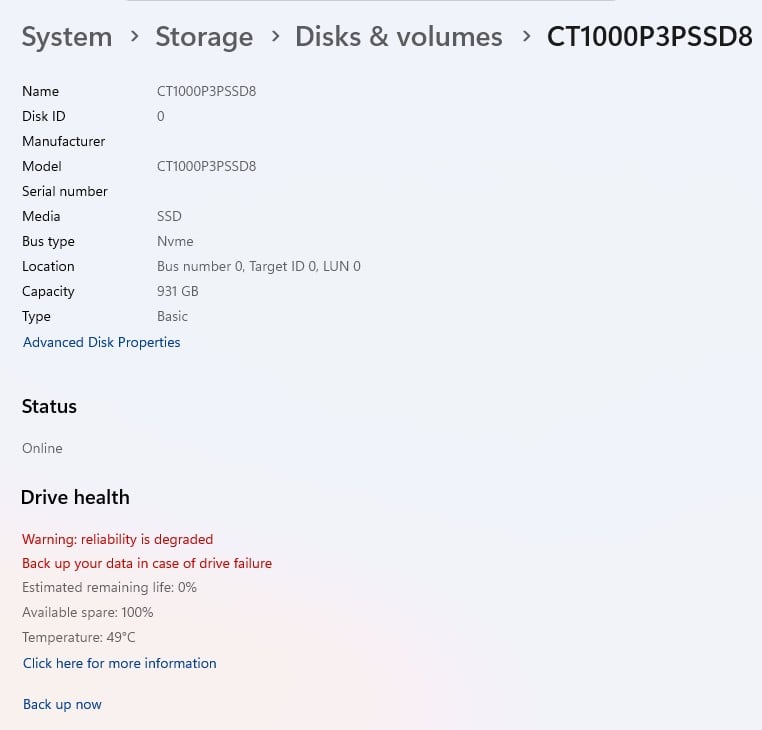


View this topic in a long page with up to 500 replies per page Create new topic
 1 | 2

xpd

xpd
Geek of Coastguard
14210 posts

Uber Geek
+1 received by user: 4687

Retired Mod
ID Verified
Trusted
Lifetime subscriber

  #3502240 12-Jun-2026 09:15
Send private message quote this post

Grab HDSentinel and let that take a look, but I'd say its probably correct.


XPD / Gavin


LinkTree


huckster
897 posts

Ultimate Geek
+1 received by user: 469

ID Verified
Lifetime subscriber

  #3502242 12-Jun-2026 09:23
Send private message quote this post

xpd:


Grab HDSentinel and let that take a look, but I'd say its probably correct.


Maybe back stuff up first just to be safe before running tests. But yes, probably on the way out.


freitasm
BDFL - Memuneh
80971 posts

Uber Geek
+1 received by user: 41758

Administrator
ID Verified
Trusted
Geekzone
Lifetime subscriber

  #3502244 12-Jun-2026 09:33
Send private message quote this post

And you had Disk Defrag running on it (which should do a retrim)?


Referral links: Quic Broadband (free setup code: R587125ERQ6VE) | Samsung | AliExpress | Wise | Sharesies 


Support Geekzone by subscribing (browse ads-free), or making a one-off or recurring donation through PressPatron.



johno1234

3508 posts

Uber Geek
+1 received by user: 2989


  #3502245 12-Jun-2026 09:38
Send private message quote this post

freitasm:


And you had Disk Defrag running on it (which should do a retrim)?


Not that I know of?


freitasm
BDFL - Memuneh
80971 posts

Uber Geek
+1 received by user: 41758

Administrator
ID Verified
Trusted
Geekzone
Lifetime subscriber

  #3502247 12-Jun-2026 09:44
Send private message quote this post

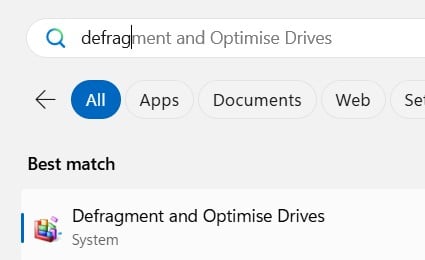
Start, search for defrag and you will see it:


Retrim makes sure data is effectively spread across, avoiding problems with high usage on specific sectors.


As mentioned, make sure you have a backup before testing or applying retrim (as it may be too late for it to be beneficial, if the drive is really on the way out).


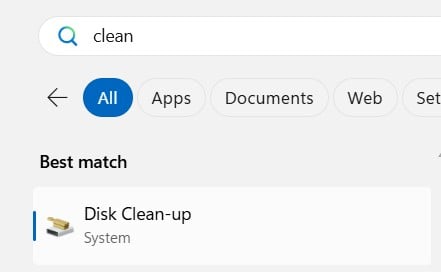
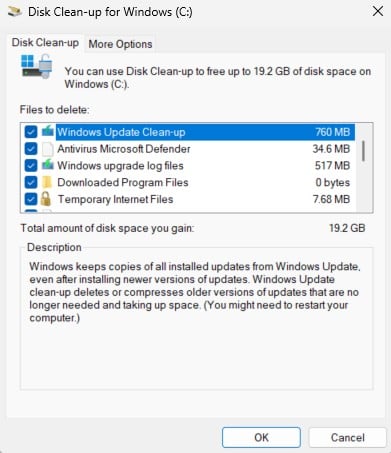
Also, use Disk Cleanup to delete unwanted files before running retrim. Click "Clean up system files" to delete updates, etc:


Referral links: Quic Broadband (free setup code: R587125ERQ6VE) | Samsung | AliExpress | Wise | Sharesies 


Support Geekzone by subscribing (browse ads-free), or making a one-off or recurring donation through PressPatron.


johno1234

3508 posts

Uber Geek
+1 received by user: 2989


  #3502248 12-Jun-2026 09:44
Send private message quote this post

Thanks for the info above.


I have a spare "Samsung T7 Shield 1TB" external SSD that I could backup onto. What would be the recommended approach to create a backup and perhaps restore onto a new internal SSD? 


The actual SSD in this device is a "Crucial P3 Plus CT1000P3PSSD8 1TB" - what should I replace it with?


Cheers


Shop now for Lenovo laptops and other devices (affiliate link).
SpartanVXL
1537 posts

Uber Geek
+1 received by user: 679


  #3502250 12-Jun-2026 09:53
Send private message quote this post

Copy any critical files first. You can use something like macrium reflect to make an image of the drive onto your external, then image it back to a new disk if you replace it.


Do the copy first and then take a look with some disk utilities, crucial have their own storage software that can tell you whats going on.


I’m surprised that a p3 plus has run out of endurance only after 3 years despite it being QLC. Was the laptop ex-lease or used for something with heavy disk writes?


johno1234

3508 posts

Uber Geek
+1 received by user: 2989


  #3502253 12-Jun-2026 10:09
Send private message quote this post

SpartanVXL:


Copy any critical files first. You can use something like macrium reflect to make an image of the drive onto your external, then image it back to a new disk if you replace it.


Do the copy first and then take a look with some disk utilities, crucial have their own storage software that can tell you whats going on.


I’m surprised that a p3 plus has run out of endurance only after 3 years despite it being QLC. Was the laptop ex-lease or used for something with heavy disk writes?


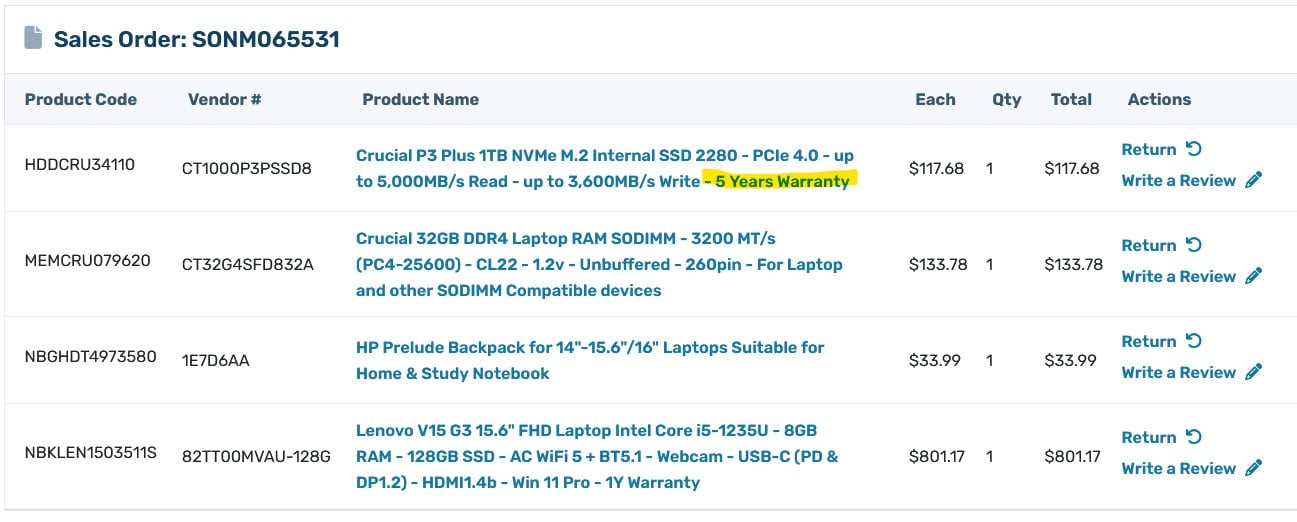
I looked this up on my PBTech account. Purchased this laptop brand new with a smaller SSD, along with the 1TB SSD and installed it myself. This was on 19/12/2023.


Apparently the SSD has a 5 year warranty. I am pessimistic that I can claim on that - presumably it is a manufacturer's warranty and PBT won't want to hear about it. I will email them to inquire...


Wow, the price of memory chips really has gone up. Similar SSD now $300.


freitasm
BDFL - Memuneh
80971 posts

Uber Geek
+1 received by user: 41758

Administrator
ID Verified
Trusted
Geekzone
Lifetime subscriber

  #3502256 12-Jun-2026 10:10
Send private message quote this post

johno1234:


Apparently the SSD has a 5 year warranty. I am pessimistic that I can claim on that - presumably it is a manufacturer's warranty and PBT won't want to hear about it. I will email them to inquire...


They will have to honour if it was part of the deal when you bought it - and it's right there in the invoice.


Referral links: Quic Broadband (free setup code: R587125ERQ6VE) | Samsung | AliExpress | Wise | Sharesies 


Support Geekzone by subscribing (browse ads-free), or making a one-off or recurring donation through PressPatron.


johno1234

3508 posts

Uber Geek
+1 received by user: 2989


  #3502262 12-Jun-2026 10:17
Send private message quote this post

I will take this to PBT.


Hard Disk Sentinel reports this drive has performed 19.62 TB lifetime writes and I believe it is rated to 80 so well under.


This will be awkward to return as this is my daily work device - would need to backup the drive, restore it onto my external SSD and maybe config my laptop to boot from it (is that possible?) then remove the internal SSD to return.


Or is there a smarter way around this? 


robjg63
4175 posts

Uber Geek
+1 received by user: 1442

Subscriber

  #3502266 12-Jun-2026 10:22
Send private message quote this post

Certainly chase the warranty, but if it were me:


1) Backup all important files


2) Buy another SSD ASAP and 'clone' the existing disk onto the new one so you can swap disks and just carry on.


That said - has the cost of SSD drives really has gone through the roof since I last looked? I know there was mention that memory and storage was going to increase dramatically - but I hadnt really looked recently.


If buying a spare is an option - do that for a quick fix and still tackle the warranty.


Nothing is impossible for the man who doesn't have to do it himself - A. H. Weiler


Shop now at Mighty Ape (affiliate link).
robjg63
4175 posts

Uber Geek
+1 received by user: 1442

Subscriber

  #3502269 12-Jun-2026 10:36
Send private message quote this post

Most SSD drives allow you to use an app to 'clone' the existing disk onto a new disk.


As mentioned above, I think "Crucial" drives let you download a version of macrium reflect (other brands usually have a similar app) to clone the existing drive to a new drive.


So you would need something like an external USB/SSD enclosure https://www.pbtech.co.nz/product/ENCORC0016/Orico-USB-C-25-SATA-USB-31-Gen1-SSD--HDD-Enclosure


Install the cloning software on the computer.


Pop the new SSD into the enclosure and connect it to a USB port on the computer.


Follow your nose on the softwrae and clone the existing disk to the new SSD.


Shut down the computer and swap drives.


Turn it back on and carry on with the new disk.


Not sure how that gets in the way of a warranty process.


Nothing is impossible for the man who doesn't have to do it himself - A. H. Weiler


xpd

xpd
Geek of Coastguard
14210 posts

Uber Geek
+1 received by user: 4687

Retired Mod
ID Verified
Trusted
Lifetime subscriber

  #3502275 12-Jun-2026 10:49
Send private message quote this post

Take it to PB once youve copied your data off it and wiped it. I was surprised when they honored a lifetime warranty on some RAM I had purchased.


XPD / Gavin


LinkTree


johno1234

3508 posts

Uber Geek
+1 received by user: 2989


  #3502279 12-Jun-2026 11:12
Send private message quote this post

I am creating a Macrium image to an external USB-C SSD... says it will take 3-4 hours, 360Mb/s...


I have another external USB-C - smaller, only 128GB. Macrium has an option to create bootable recovery media so will look at that after...


KiwiSurfer
1772 posts

Uber Geek
+1 received by user: 1029

ID Verified
Lifetime subscriber

  #3502280 12-Jun-2026 11:20
Send private message quote this post

PB Tech was very good when I brought in a 1TB SSD that had started failing a few weeks after I bought it. Replaced it on the spot with a new one and didn't charge labour to replace it as it was in my laptop. They didn't even test the drive - I just showed them the SMART report and that was all they needed. Hopefully you have the same/similar experience.


But echo all the people here saying backup ASAP. Despite all the hype, SSD drives are not 100% reliable and do fail - I've had one personal SSD drive fail so far (touch wood) but have observed high SSD failure rates at one of my pervious employers.


 1 | 2
View this topic in a long page with up to 500 replies per page Create new topic


Geekzone Live »

Try automatic live updates from Geekzone directly in your browser, without refreshing the page, with Geekzone Live now.


Are you subscribed to our RSS feed? You can download the latest headlines and summaries from our stories directly to your computer or smartphone by using a feed reader.