|
|
|
My Cable modem is on software ver SR70.12.20, will keep an eye out to see if that changes in the next few weeks
Great thanks for those replies. Will see what they say about fibre and then go to Big Pipe or someone else if they won't give it to me. Seems silly not to try fibre with it actually installed and for a rental it's surely easiest to just go with what's already set up.
Regarding my earlier question about fibre or fibreX I have now sorted Fibre with Vodafone at my new place. Called to get the services relocated and figured it was easiest to try and get the same thing transferred, then once setup change to fibre or whatever rather than cancel at one place and sign up to something else for the new place at the same time. They wanted to transfer straight to cable which for some reason meant closing the account and opening a new one, and moving Sky back to Sky directly (it’s been through Vodafone with a discount etc). Asked about fibre as the place already has it installed and after going to check with someone she came back and said I can have fibre on the same account.
So 12 month contract with a $300 credit and their current promotion of free Sky Sport for 12 months. Was looking at Big Pipe’s fibre ($79 and no contract compared to $90.99 with Vodafone) which I tried but ultimately couldn’t get installed at our current place, but free Sky Sport makes things cheaper overall with this deal as that’s the thing I have Sky for and would be paying for regardless. Happy with this deal so hopefully it can get setup on or close to the move in day and we don’t have to wait weeks. With everything already installed hopefully it’s more a case of someone flicking a switch somewhere rather than having to come to the house to install anything with landlord’s consent and all that.
invisibleman18: ... and moving Sky back to Sky directly (it's been through Vodafone with a discount etc). ...
Current ticket: INC000002274836
Ticket assigned to: redacted
https://www.facebook.com/vodafoneNZ/posts/10154667852497503
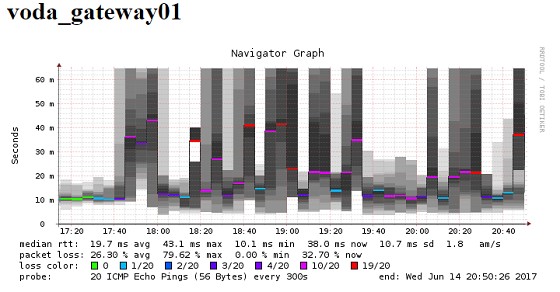
Problem description: frequent internet disconnections; 10+ hours of outages per week. Temporarily resolved by power cycling Technicolor DOCSIS 3.1 modem (HW 3.6.0 SW: SR70.12.20).
Node: W33a
2017 Week 23 uptime: 94.12%
2017 Week 22 uptime: 93.22%
2017 Week 21 uptime: 99.76%
2017 Week 20 uptime: 68.32%
2017 Week 19 uptime: 96.65%
2017 Week 18 uptime: 95.6%
2017 Week 17 uptime: 98.25%
2017 Week 16 uptime: 97.94%
2017 Week 15 uptime: 96.86%
CPE equipment connected via large UPS - no power outages reported by UPS in the above time frames.
Smokeping: https://goo.gl/LbtHi4
StatusCake: https://goo.gl/p4pZzl
Troubleshooting:
Ticked escalated to “Customer Fault Escalations” who said via email “Please let me know when you have a couple of minutes to have some down time so I can rebuild your circuit manually from the ground up.” - unfortunately the tech had finished work when I was home (to reset the modem for him) so the call was passed to another staff member. Who rang 2017-06-09 at 17:57 and said he would look into rebuilding the circuit, and would call me back shortly. He phoned back at 18:34 and reported that the entire node (W33) had a lot of noise which would be investigated physically.
I then followed up with ^Jessie (via facebook) who checked up on the job notes Sat the 10th. They reported that the notes stated “the notes advise that a tech need to be booked and that you will follow up on Monday so was assuming this meant a tech had been booked if you were going to follow up on Monday but this is not the case.” - Jessie then arranged for a Downer tech for Tuesday 2017-06-13
Downer technician visited house 2017-06-13 and upon arrival I asked what his job notes were for my issue. He reported a line fault with intermittent disconnections and I enquired as to if he had any notes on excess noise at the node. He reported no - I just deal with house connections. This was disappointing given the INC notes state high noise at the node. The Downer tech proceeded to disconnect the coax cable from the modem, scanned the line with his tool and reported the signal was “all greens, and very good”.
There was no troubleshooting done at the grey box outside the house (eg; inspect or replace isolator, check for F connectors with deteriorated connections)
He then phoned someone at Vodafone where the Downer tech asked if there had been a resolution to this issue as it has happened at other DOCSIS 3.1 connected homes, Vodafone contact reported that yes, there is an issue and that they are working with Huawei & Technicolor in France to attempt to replicate the issue so that the hardware vendors can diagnose the issue, but it is suspected that the issue lies within the Technicolor modem. Vodafone rep suggested I formally request to downgrade from DOCSIS 3.1 to 3.0 and be returned to my grandfathered 200/20 plan or look into Fibre availability (Chorus site shows UFB fibre up to 1 Gbps by May-2018).
So; what should I do? Do I try to get back on DOCSIS 3.0? I moved to FibreX purely for the faster upload speed!
adimw:
<snip>
... Vodafone rep suggested I formally request to downgrade from DOCSIS 3.1 to 3.0 and be returned to my grandfathered 200/20 plan or look into Fibre availability (Chorus site shows UFB fibre up to 1 Gbps by May-2018).
So; what should I do? Do I try to get back on DOCSIS 3.0? I moved to FibreX purely for the faster upload speed!
Sounds like typical "FibreX" to me. ![]()
I find that "FibreX" is significantly slower (worse real world speeds despite "good" speed tests) and less reliable than my old cable 100/10 connection.
Go back to your grandfathered plan if you can (I presume that it was 100/10 Mbps).
Refuse to pay an Early Termination Fee if asked to do so.
Get "real" fibre at the earliest opportunity.
Sideface
Came home to this tonight

Anyone else having issues tonight or possibly weather related?
almost a "green" result for uptime in the past week
https://www.facebook.com/vodafoneNZ/posts/10154689730737503

still no resolution though. I asked the VF tech with my assigned job last week what he considered to be fair uptime - he hasn't yet replied.
invisibleman18:
Regarding my earlier question about fibre or fibreX I have now sorted Fibre with Vodafone at my new place.
So close to elusive Fibre. Had it available at in the street at the last place for about a year and a half but couldn’t manage to get it to the house due to a shared driveway. Moved into new place which already has it installed inside on Tuesday, was told connection date would be yesterday but it wouldn’t work when I tried to set it up last night. Spent 45 minutes on the phone with Vodafone who told me it was connected from their end so must be a fault with the router which worked fine up until Tuesday morning when it was unplugged at the old house. They logged a fault last night and this afternoon I got a text from them welcoming me to fibre and saying my connection is now active. So I suspect that even though Chorus switched it on yesterday Vodafone hadn’t actually activated it from their side. Fingers crossed when I get home from work I finally have fibre!
Nope, still no internet so have to call them again. Using the HG659 router so is there something I should be doing for it to be able to connect to fibre? It's plugged into GE1 on the ONT which Vodafone advised me to do, but don't know if there may be some other settings at my end that are no good.
invisibleman18:
Nope, still no internet so have to call them again. Using the HG659 router so is there something I should be doing for it to be able to connect to fibre? It's plugged into GE1 on the ONT which Vodafone advised me to do, but don't know if there may be some other settings at my end that are no good.
In theory, the same settings should work between cable and fibre connections, so if it was working at your old connection it should be fine. But you might want to try resetting the modem to default settings.
Do all fibre connections use PPPoE diallers or only some of them?
On FibreX I used DHCP over Tagged Vlan 10 (3rd party router)
On fibre (non vodafone) I needed to use PPPoE on tagged Vlan 10 (3rd party router)
I'm not sure if that makes a difference?
invisibleman18: Year did that when on the phone to them last night. Sent seen to be anything obviously wrong at our end. Could the ONT be faulty perhaps?
Have you tried the other port on the ONT?
Haha my fault. I got the ethernet cables mixed up and had the one from the laptop going into WAN on the router and from LAN1 on the router to the ONT. Now it works, and probably would have last night too if I wasn't an idiot!
|
|
|