
Geekzone: technology news, blogs, forums
Guest
Welcome Guest.
You haven't logged in yet. If you don't have an account you can register now.


View this topic in a long page with up to 500 replies per page Create new topic
1 | 2 | 3 | 4 | 5 | 6 | 7 | 8 | 9 | 10 | ... | 16
tanivula
998 posts

Ultimate Geek
+1 received by user: 158

Lifetime subscriber

  #2773553 7-Sep-2021 13:28
Send private message

PoHq:


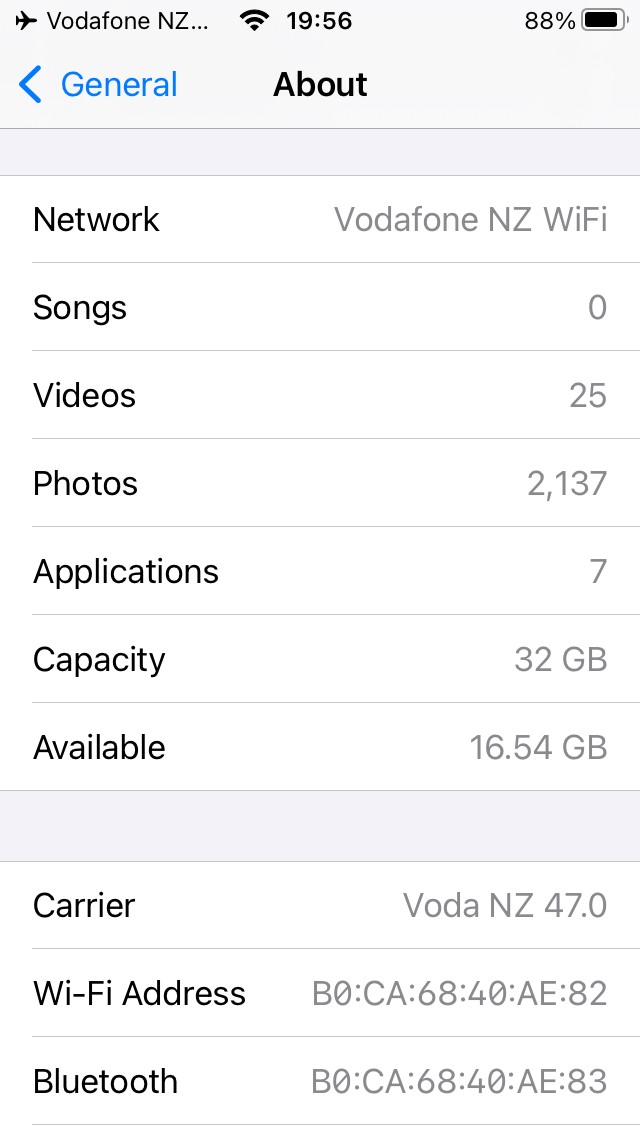
Trying to test mine at the moment. Latest iPhone iOS 15. All enabled in options, I turn on airplane mode and enable wifi, I see Voda NZ Wifi but when I try and make a call it says no network available turn off airplane mode.


Airplane mode + VoWiFi seems to work (tested to voicemail) on Android. Maybe an iOS implementation?  Have you made a VoWiFi call while airplane mode is off (just wondering if there's some 'activation' involved)?


3puttssuck
745 posts

Ultimate Geek
+1 received by user: 54


  #2773558 7-Sep-2021 13:32
Send private message

PoHq:


Trying to test mine at the moment. Latest iPhone iOS 15. All enabled in options, I turn on airplane mode and enable wifi, I see Voda NZ Wifi but when I try and make a call it says no network available turn off airplane mode.


I just tried also. I got this error message too. I hit cancel and tried again and it worked I was able to call Voice Mail and my HO.


PoHq
466 posts

Ultimate Geek
+1 received by user: 146


  #2773562 7-Sep-2021 13:35
Send private message

Got it working. It was a dual sim issue, my spark sim was set to default voice line so when it was in airplane mode it was trying to use that. I set default line to voda and it worked. Interestingly I put my default line back to spark as I want it like that and wifi calling worked. It all works in airplane mode as it it should. As long as you see vodafone wifi whilst in airplane mode you are good.


Calls seem pretty good.


ztytian
31 posts

Geek
+1 received by user: 22


  #2773707 7-Sep-2021 14:41
Send private message

freitasm:


PoHq:


Trying to test mine at the moment. Latest iPhone iOS 15. All enabled in options, I turn on airplane mode and enable wifi, I see Voda NZ Wifi but when I try and make a call it says no network available turn off airplane mode.


Probably needs access to the SIM card for authentication, which is disabled in aeroplane mode.


Nope, wifi calling works for me with aeroplane mode on.


KiwiSurfer
1722 posts

Uber Geek
+1 received by user: 993

ID Verified
Lifetime subscriber

  #2773734 7-Sep-2021 15:20
Send private message

Both WiFi Calling and VoLTE enabled on my dual-SIM S21 for both 2degrees and Vodafone. Well done to those behind the scenes making this happen! :)


scottjpalmer
6032 posts

Uber Geek
+1 received by user: 790

Moderator
ID Verified
Trusted
Lifetime subscriber

  #2773737 7-Sep-2021 15:27
Send private message

KiwiSurfer:

Both WiFi Calling and VoLTE enabled on my dual-SIM S21 for both 2degrees and Vodafone. Well done to those behind the scenes making this happen! :)


The dream! Is it running the firmware variant of one of those telcos?


Want to support Geekzone and browse the site without the ads? Subscribe to Geekzone now (monthly, annual and lifetime options).
jjnz1
1371 posts

Uber Geek
+1 received by user: 195

Lifetime subscriber

  #2773743 7-Sep-2021 15:36
Send private message

Okay so a few quick questions/Summarisations:


  • Geographical limitations with VoWiFi


    • Only accessible in NZ or can this now be used as a roaming alternative?
    • If no, will a VPN work?
  • Vodafone VoWiFi can hand over to VoLTE


    • What about handover to 3G/2G
    • What about network handover to WiFi?
    • Expect handover delay to be up to half a second
  • Only certain phones that Vodafone approves will get access to VoWiFi


    • If you use a Vodafone MVNO such as Kogan, they appear to have less restrictions on limiting phones
  • Currently official support is limited to:


    • Samsung S21 series
    • iPhone devices > iPhone 6S/SE or newer devices
    • More will come over the coming months
  • Sure signal will stop on 10th Dec'21


    • Sure signal users will receive text messages asking them to purchase a compatible device (currently an S21 or iPhone device) to prevent loss of service
  • User Experience


    • Currently some users are reporting teething problems including call drop outs when using VoWiFi.
    • VoWiFi will work when the phone is on flight mode under most circumstances. However users with dual sim functionality may need to play with their SIM selection settings 

Anything else?


KiwiSurfer
1722 posts

Uber Geek
+1 received by user: 993

ID Verified
Lifetime subscriber

  #2773994 7-Sep-2021 21:32
Send private message

scottjpalmer:
KiwiSurfer:


Both WiFi Calling and VoLTE enabled on my dual-SIM S21 for both 2degrees and Vodafone. Well done to those behind the scenes making this happen! :)


The dream! Is it running the firmware variant of one of those telcos?


I believe that Samsung supplies a single NZ firmware for all NZ telcos for the S21. So same firmware should work fine with all the NZ telcos.


Linux
12182 posts

Uber Geek
+1 received by user: 8476

Trusted
Lifetime subscriber

  #2773995 7-Sep-2021 21:37
Send private message

As above posted by @KiwiSurfer is correct and same with the S10 and S20 series


scottjpalmer
6032 posts

Uber Geek
+1 received by user: 790

Moderator
ID Verified
Trusted
Lifetime subscriber

  #2774013 7-Sep-2021 21:56
Send private message

Thanks. I'm currently using a Vodafone primary connection and a 2degrees secondary connection on a non VoLTE and non WiFi Calling capable handset. Samsung seems my best bet for gaining these 2 new calling options on both providers. Or an iPhone. Anything else?

cokemaster
Exited
4937 posts

Uber Geek
+1 received by user: 1089

Retired Mod
Trusted
Lifetime subscriber

  #2774015 7-Sep-2021 22:03
Send private message

I've done some further non-work testing on Wireless Calling, seems to be holding calls up a lot better than yesterday.


I look forward to the day that I can retire the basement/mancave/garage suresignal :) Will give it a second go on work related calls tomorrow.


webhosting

Loose lips may sink ships - Be smart - Don't post internal/commercially sensitive or confidential information!


Shop on-line at New World now for your groceries (affiliate link).
kiwifidget
"Cookie"
3640 posts

Uber Geek
+1 received by user: 1969

Lifetime subscriber

  #2774030 7-Sep-2021 22:20
Send private message

Thanks in advance to all the people testing which phones will work best with VoWifi, so that I know which one I should buy come December. 😀


Delete cookies?! Are you insane?!


Linux
12182 posts

Uber Geek
+1 received by user: 8476

Trusted
Lifetime subscriber

  #2774034 7-Sep-2021 22:27
Send private message

kiwifidget:


Thanks in advance to all the people testing which phones will work best with VoWifi, so that I know which one I should buy come December. 😀


@kiwifidget VodafoneNZ have a list on the website but you will find this will change often


kiwifidget
"Cookie"
3640 posts

Uber Geek
+1 received by user: 1969

Lifetime subscriber

  #2774035 7-Sep-2021 22:33
Send private message

@Linux, exactly, I dont need to race out and buy one now.


I can read everyones reviews here and make a considered purchase closer to the time.


I am not expecting my Xiaomi MiMix3 to be on the list, ever.


Delete cookies?! Are you insane?!


cokemaster
Exited
4937 posts

Uber Geek
+1 received by user: 1089

Retired Mod
Trusted
Lifetime subscriber

  #2774041 7-Sep-2021 23:52
Send private message

If it helps you with your decision making, many of the former Geekzone IRC moderators were secret iPhone fans (Nate and Brad), including the big man himself. ;)


webhosting

Loose lips may sink ships - Be smart - Don't post internal/commercially sensitive or confidential information!


1 | 2 | 3 | 4 | 5 | 6 | 7 | 8 | 9 | 10 | ... | 16
View this topic in a long page with up to 500 replies per page Create new topic


Geekzone Live »

Try automatic live updates from Geekzone directly in your browser, without refreshing the page, with Geekzone Live now.


Are you subscribed to our RSS feed? You can download the latest headlines and summaries from our stories directly to your computer or smartphone by using a feed reader.