Geekzone: technology news, blogs, forums
Guest
Welcome Guest.
You haven't logged in yet. If you don't have an account you can register now.


Filter this topic showing only the reply marked as answer View this topic in a long page with up to 500 replies per page Create new topic
1 | 2 | 3 | 4 | 5 | 6 | 7 | 8 | 9 | 10 | 11 | ... | 14
Bung
6734 posts

Uber Geek
+1 received by user: 2927

Subscriber

  #2640120 22-Jan-2021 13:31
Send private message

Presumably 24m plans come with discounted rentals.


kiwifidget
"Cookie"
3641 posts

Uber Geek
+1 received by user: 1969

Lifetime subscriber

  #2640123 22-Jan-2021 13:35
Send private message

What is a good way to measure the wifi-ness around the house?


Delete cookies?! Are you insane?!


DonH
231 posts

Master Geek
+1 received by user: 158

Lifetime subscriber

  #2640181 22-Jan-2021 16:42
Send private message

kiwifidget:


What is a good way to measure the wifi-ness around the house?


There are Wifi analyser apps for Android and Apple.


I use this Android one:


https://play.google.com/store/apps/details?id=com.vrem.wifianalyzer


People hear what they see. - Doris Day


halper86
555 posts

Ultimate Geek
+1 received by user: 156

ID Verified

  #2640185 22-Jan-2021 16:45
Send private message

AirPort Utility by Apple on the App Store can measure output power of the APs.


Jaxson
8172 posts

Uber Geek
+1 received by user: 1332

Trusted

  #2640186 22-Jan-2021 16:45
Send private message

Originally these wifi analyser apps didn't work on apple, (forget the exact reason why), so interesting to see that's changed?


halper86
555 posts

Ultimate Geek
+1 received by user: 156

ID Verified

  #2640208 22-Jan-2021 17:39
Send private message

Jaxson:


Originally these wifi analyser apps didn't work on apple, (forget the exact reason why), so interesting to see that's changed?


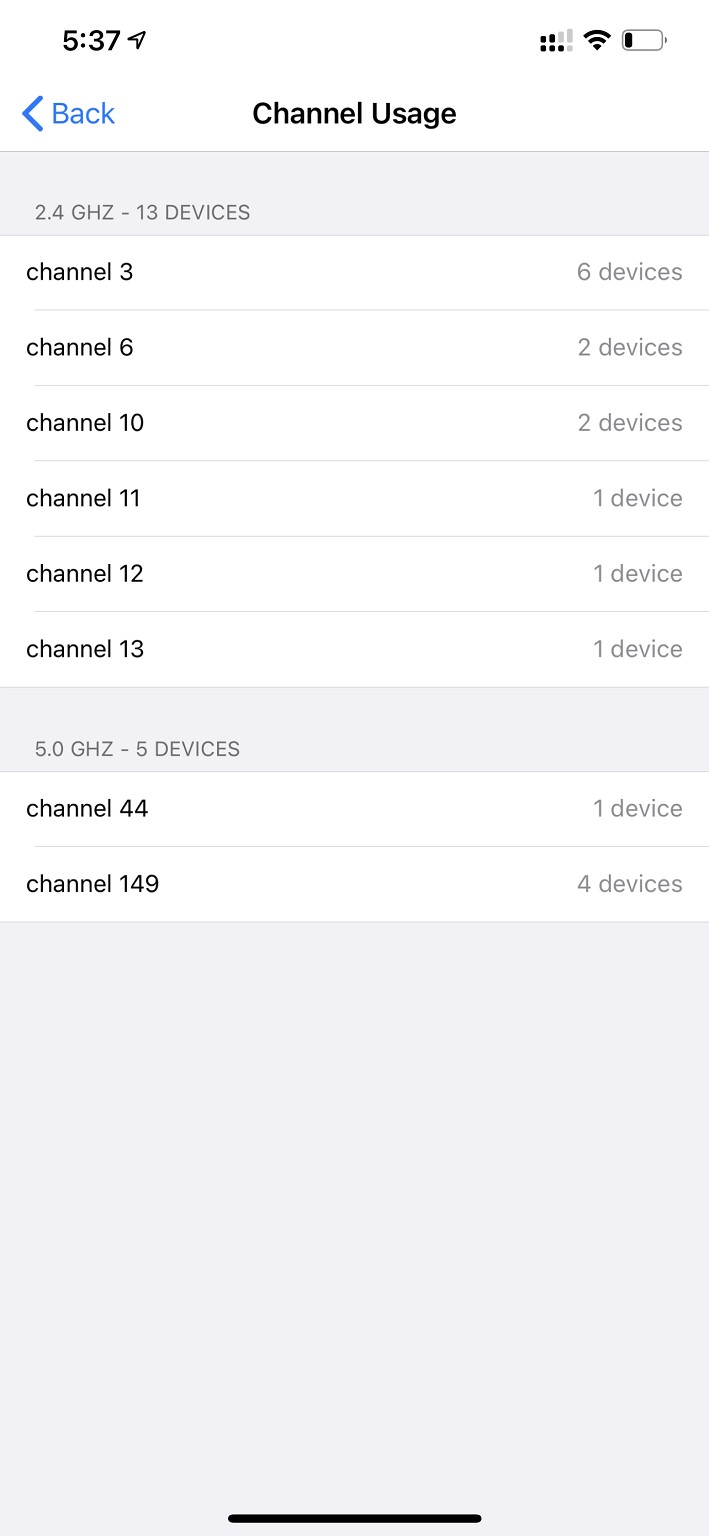
You need to enable it in settings first, then it will work:


Click to see full size


Stream your favourite shows now on Apple TV (affiliate link).
kiwifidget
"Cookie"
3641 posts

Uber Geek
+1 received by user: 1969

Lifetime subscriber

  #2640710 23-Jan-2021 21:11
Send private message

Those of you who re-signed on to a 12 mth plan to get the offer, how long after pulling the trigger did you get an email from VF confirming your new plan?


Delete cookies?! Are you insane?!


bcbear
18 posts

Geek
+1 received by user: 7

ID Verified

  #2642370 26-Jan-2021 13:51
Send private message

Hi


I re-signed last Wed 20-Jan


Got the confirmation email 21-Jan


Redeemed Yesterday 25-Jan 3pm


Just received notification of despatch today 26-Jan 12 noon


R


kiwifidget
"Cookie"
3641 posts

Uber Geek
+1 received by user: 1969

Lifetime subscriber

  #2646799 4-Feb-2021 10:12
Send private message

Just ordered the 2X Deco X20 pack.


Has anyone needed to get extra units?


Was there a charge?


Delete cookies?! Are you insane?!


bcbear
18 posts

Geek
+1 received by user: 7

ID Verified

  #2646867 4-Feb-2021 10:42
Send private message

Hi,


mine arrived and was a breeze to setup.


coverage is great ... I was anticipating needing a 3rd unit but 2 have covered everything over 2 levels, to minor dwelling and even the pool (1st world issue previously)


apparently getting s 3rd is reasonably easy,  when I asked I was advised that as most situations would easily be covered by 2 units it made sense to only ship 2 initially and then a 3rd as required


R


kiwifidget
"Cookie"
3641 posts

Uber Geek
+1 received by user: 1969

Lifetime subscriber

  #2648071 5-Feb-2021 11:24
Send private message

My X20s are supposedly arriving today. I hope so, will be something to do over the long weekend.


Currently I have my UltraHub serving the 5GHz wifi, and a we-dont-want-it-back Truenet device (Mikrotik 951G 2HnD) doing the 2.4GHz.


Different SSIDs and passwords. This resulted from getting the Truenet after the Ultrahub and then setting it up as per Truenet's instructions.


My older Surface Pro 2 (Marvell AVASTAR 350N, which I thought wasn't 5GHz capable) happily connects to the UltraHub every time, and my newer HP Probook 430 G3 (AC-8260) has a stubborn preference for the Truenet.


When I get the X20s, should I setup different SSIDs like I have already, or should I combine into one super-SSID?


Delete cookies?! Are you insane?!


Move to New Zealand's best fibre broadband service (affiliate link). Free setup code: R587125ERQ6VE. Note that to use Quic Broadband you must be comfortable with configuring your own router.
Lewk
572 posts

Ultimate Geek
+1 received by user: 256

Trusted
dns4me
Lifetime subscriber

  #2648082 5-Feb-2021 11:49
Send private message

kiwifidget:


My X20s are supposedly arriving today. I hope so, will be something to do over the long weekend.


Currently I have my UltraHub serving the 5GHz wifi, and a we-dont-want-it-back Truenet device (Mikrotik 951G 2HnD) doing the 2.4GHz.


Different SSIDs and passwords. This resulted from getting the Truenet after the Ultrahub and then setting it up as per Truenet's instructions.


My older Surface Pro 2 (Marvell AVASTAR 350N, which I thought wasn't 5GHz capable) happily connects to the UltraHub every time, and my newer HP Probook 430 G3 (AC-8260) has a stubborn preference for the Truenet.


When I get the X20s, should I setup different SSIDs like I have already, or should I combine into one super-SSID?


I have mine connected to my HG659B (needed to keep it as we have a landline for our alarm system) and operating in Access Point mode. The second unit down in our workroom is connected by Ethernet back to the first X20.  I set them up to use both 2.4GHz and 5GHz (I have a few devices that still need 2.4GHz) and using the same SSID.  This seems to be working well but there have been a couple of issues that I have come across.  These may not be related to the X20 units but perhaps my devices but mention it in case others have experienced this as well.  Firstly I have noticed that my Samsung Galaxy Tab S2 tablet occasionally looses Wi-Fi access - it drops completely and I have to turn the Wi-Fi off on the device and then back on and it reconnects. The second issue I have noticed with my Samsung A50 mobile.  On occasion it has lost internet but still shows as connected to the X20's with good signal strength. Again turning off the Wi-Fi and then back on fixes the issue.


kiwifidget
"Cookie"
3641 posts

Uber Geek
+1 received by user: 1969

Lifetime subscriber

  #2648084 5-Feb-2021 11:58
Send private message

I have mentioned previously that I will be keeping the Ultrahub due to having a landline, but repeat here for the benefit of the new question. 😀


Delete cookies?! Are you insane?!


hio77
'That VDSL Cat'
13036 posts

Uber Geek
+1 received by user: 3896

ID Verified
Trusted
Lizard Networks
Subscriber

  #2648099 5-Feb-2021 12:26
Send private message

Jaxson:

Originally these wifi analyser apps didn't work on apple, (forget the exact reason why), so interesting to see that's changed?


To be fair Android also broke them in 9 and 10.

Rate limited requests to check wifi so low that its unreliable. 11 adds in a extra permission again so you can allow no limit on these apps


#include <std_disclaimer>


Any comments made are personal opinion and do not reflect directly on the position my current or past employers may have. 


kiwifidget
"Cookie"
3641 posts

Uber Geek
+1 received by user: 1969

Lifetime subscriber

  #2648669 6-Feb-2021 13:54
Send private message

Woohoo, I have installed the X20s.


Unplugged the Mikrotik 951G 2HnD, and disabled all wifi on the Ultrahub.


Not sure if I have wall to wall, but I do have workable wifi so I'll consider that a win for now.


Delete cookies?! Are you insane?!


1 | 2 | 3 | 4 | 5 | 6 | 7 | 8 | 9 | 10 | 11 | ... | 14
Filter this topic showing only the reply marked as answer View this topic in a long page with up to 500 replies per page Create new topic


Geekzone Live »

Try automatic live updates from Geekzone directly in your browser, without refreshing the page, with Geekzone Live now.


Are you subscribed to our RSS feed? You can download the latest headlines and summaries from our stories directly to your computer or smartphone by using a feed reader.