Geekzone: technology news, blogs, forums
Guest
Welcome Guest.
You haven't logged in yet. If you don't have an account you can register now.


Filter this topic showing only the reply marked as answer View this topic in a long page with up to 500 replies per page Create new topic
1 | 2 
RunningMan
9217 posts

Uber Geek
+1 received by user: 4858


  #3482316 19-Apr-2026 22:13
Send private message quote this post

Factory reset will wipe it. Anything synced to iCloud should just download again. If the iPad is set to back up to iCloud then it should redownload all the apps and settings. Photos - will depend on if they are also set to sync to iCloud (or some other service). Same with Music - where did it come from...


It's normal for it to disappear from the Finder during an update for a couple of minutes though, but you usually see a progress bar on the screen of the device as this part happens.


RunningMan
9217 posts

Uber Geek
+1 received by user: 4858


  #3482317 19-Apr-2026 22:14
Send private message quote this post

I'd try just doing the update a few times rather than a factory reset if you can. If the update fails, reboot the ipad and have another go.


OnceBitten

554 posts

Ultimate Geek
+1 received by user: 12


  #3482325 19-Apr-2026 22:24
Send private message quote this post

RunningMan:


Factory reset will wipe it. Anything synced to iCloud should just download again. If the iPad is set to back up to iCloud then it should redownload all the apps and settings. Photos - will depend on if they are also set to sync to iCloud (or some other service). Same with Music - where did it come from...


It's normal for it to disappear from the Finder during an update for a couple of minutes though, but you usually see a progress bar on the screen of the device as this part happens.
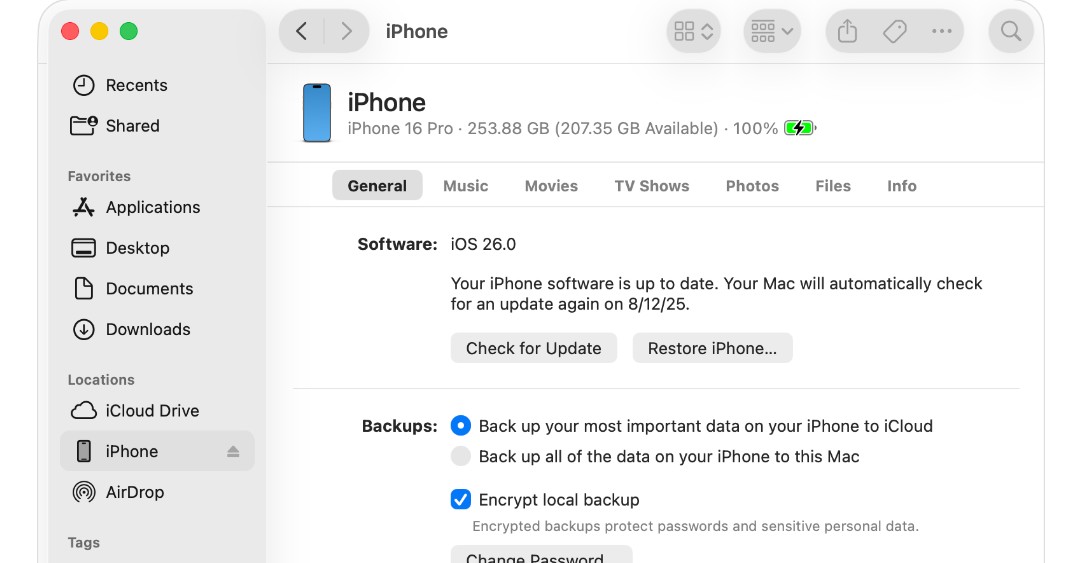


thanks - when I try to update it.... it prepares for the update and has a progress bar at the bottom for about 30 seconds, then the iPad disappears from the finder side bar and on the iPad it shows cable and macbook - presumably meaning I need to plug the iPad into the Macbook - which it already is


Our icloud hasn't updated for a couple of years, as it's full and I don't really want to pay for more storage, so i disabled everythig that was being backed up to it.


I guess I'm going to have to do a factory reset and risk losing everything.... oh well nothing much I can do really... thanks for the help


RunningMan
9217 posts

Uber Geek
+1 received by user: 4858


  #3482350 20-Apr-2026 08:02
Send private message quote this post

OnceBitten:thanks - when I try to update it.... it prepares for the update and has a progress bar at the bottom for about 30 seconds, then the iPad disappears from the finder side bar and on the iPad it shows cable and macbook - presumably meaning I need to plug the iPad into the Macbook - which it already is


Yep, just leave it alone for a few minutes at that point and see if it progresses. That sounds like a normal sequence of events unless it stalls for multiple minute there.


OnceBitten

554 posts

Ultimate Geek
+1 received by user: 12


  #3482356 20-Apr-2026 08:38
Send private message quote this post

RunningMan:


Yep, just leave it alone for a few minutes at that point and see if it progresses. That sounds like a normal sequence of events unless it stalls for multiple minute there.


thanks I tried several times last night and it starts to do the update, then after about 30 seconds the progress bar at the bottom disappears and the iPad disappears from the finder side bar.... then the iPad shows a picture / graphic of a cable needed to be plugged into the MacBook, so I do that again and it repeats the same process over again...


RunningMan
9217 posts

Uber Geek
+1 received by user: 4858


  #3482402 20-Apr-2026 10:36
Send private message quote this post

OnceBitten:[snip] it starts to do the update, then after about 30 seconds the progress bar at the bottom disappears and the iPad disappears from the finder side bar.... then the iPad shows a picture / graphic of a cable needed to be plugged into the MacBook,


Yep that looks like a totally normal update. You may have to wait for several minutes at that point, are you waiting?


Support Geekzone with one-off or recurring donations Donate via PressPatron.
OnceBitten

554 posts

Ultimate Geek
+1 received by user: 12


  #3482408 20-Apr-2026 11:20
Send private message quote this post

RunningMan:


OnceBitten:[snip] it starts to do the update, then after about 30 seconds the progress bar at the bottom disappears and the iPad disappears from the finder side bar.... then the iPad shows a picture / graphic of a cable needed to be plugged into the MacBook,


Yep that looks like a totally normal update. You may have to wait for several minutes at that point, are you waiting?


I tried it last night and waited about 5-10 mins and each time it did the same thing, then I tried again and left it for about 25 minutes and it stil did the same thing - then iPad just showed same picture / graphic of a cable needed to be plugged into the MacBook


I'll try it again tonight and leave it for longer to see if anything happens...


RunningMan
9217 posts

Uber Geek
+1 received by user: 4858


  #3482413 20-Apr-2026 11:51
Send private message quote this post

Just check it's not waiting for the update to download in the background. Open Activity Monitor in the Utilities folder and look at the network tab. It's possible the update is being downloaded at this time - it will be roughly 10GB, so that could be the delay.


1 | 2 
Filter this topic showing only the reply marked as answer View this topic in a long page with up to 500 replies per page Create new topic


Geekzone Live »

Try automatic live updates from Geekzone directly in your browser, without refreshing the page, with Geekzone Live now.


Are you subscribed to our RSS feed? You can download the latest headlines and summaries from our stories directly to your computer or smartphone by using a feed reader.