|
|
|
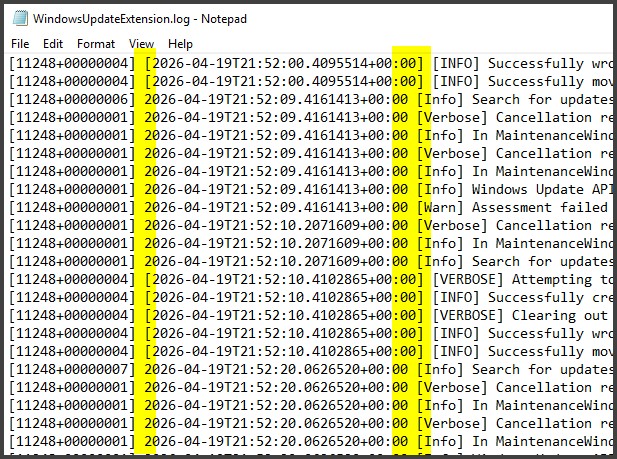
But at least there's a timestamp in the message, for when a future Outlook "improvement" removes the Date field!
As a long term Southern Cross member, I am keen to mitigate the increasingly high costs of Travel Insurance by switching off my medical cover in NZ while I'm overseas.
SC has an amazingly generous policy - allowing you 5 suspensions in 30 years - as long as they are 12 months apart.
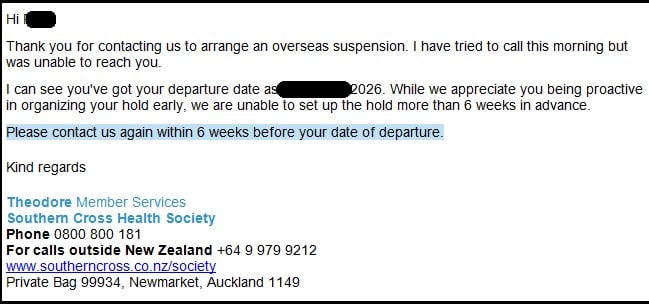
So I sent them a heads-up - and got this:

I'm not sure if this is another we-can't-wait-to-be-helpful aspect of their corporate policy (/sarc) or bad programming.
Let's blame it on the programmer - and imagine you are writing code to set up a policy suspension.
Wouldn't you code it so you can't set a start date more than 42 days ahead ?
It's more likely to be the business analysts or product managers that specify 6 weeks than the coders.
TinyTim:
It's more likely to be the business analysts or product managers that specify 6 weeks than the coders.
As a coder, the default would be "just set the hold in place". Would only add a time limit if requested.
Microsoft has added a new "Drafts" feature to Teams. I can't imagine why I'd need drafts in an instant messaging tool and it just takes up space, so I figured I'd right-click on it and remove it. No such luck. The item has a menu attached, but there are no items in it. I think this is the first time I've ever seen a menu with nothing in it!
Behodar:
Microsoft has added a new "Drafts" feature to Teams. I can't imagine why I'd need drafts in an instant messaging tool and it just takes up space, so I figured I'd right-click on it and remove it. No such luck. The item has a menu attached, but there are no items in it. I think this is the first time I've ever seen a menu with nothing in it!
Left clicking on an image in Teams this morning (to try and copy it) shows a menu with nothing in it.
Behodar:
Microsoft has added a new "Drafts" feature to Teams. I can't imagine why I'd need drafts in an instant messaging tool and it just takes up space, so I figured I'd right-click on it and remove it. No such luck. The item has a menu attached, but there are no items in it. I think this is the first time I've ever seen a menu with nothing in it!
Logged in on work laptop today, after a week away... Teams... groan
cddt:
Left clicking on an image in Teams this morning (to try and copy it) shows a menu with nothing in it.
Famous words: "It works for me."
Referral links: Quic Broadband (free setup code: R587125ERQ6VE) | Samsung | AliExpress | Wise | Sharesies
Support Geekzone by subscribing (browse ads-free), or making a one-off or recurring donation through PressPatron.

Behodar:
Microsoft has added a new "Drafts" feature to Teams. I can't imagine why I'd need drafts in an instant messaging tool and it just takes up space, so I figured I'd right-click on it and remove it. No such luck. The item has a menu attached, but there are no items in it. I think this is the first time I've ever seen a menu with nothing in it!
I was about to post the same thing - on what planet do I need a dedicated area that takes up screen space to view all the draft IMs that I DON'T ACTUALLY HAVE and are NEVER LIKELY to EVER have.
Teams has several times in the last few weeks decided to randomly do strange things in the middle of a Teams call - the extreme case was the entire Teams app just freezing forcing me to kill the process and rejoin the call. I probably logged thousands of Zoom call hours in my previous job with zero faults -- yet I can barely go a week without Teams deciding to do random stuff disrupting my call. Other things it has done include everyone just going blank for a few seconds, saying I'm still in the waiting room even though I can see on someone else's device that I've apparently already joined the call, the same thing happening to someone else, etc. Sometimes I think Teams really need to decide what it is -- is it a video calling app? a chat app? and just focus on being the best at that one function. Currently it does a whole lot of stuff really poorly indeed.
There's a new update to SQL Server Management Studio. Like with the past few updates, there's a prominent link to the release notes that does nothing when clicked. But after updating "blind", I particularly like the new feature where attempting to delete a row pops up a window with no text and a single button labelled "Yes".
This:

OMG WHY?????? Clippy flashbacks....
KiwiSurfer:
Teams has several times in the last few weeks decided to randomly do strange things in the middle of a Teams call - the extreme case was the entire Teams app just freezing forcing me to kill the process and rejoin the call. I probably logged thousands of Zoom call hours in my previous job with zero faults -- yet I can barely go a week without Teams deciding to do random stuff disrupting my call. Other things it has done include everyone just going blank for a few seconds, saying I'm still in the waiting room even though I can see on someone else's device that I've apparently already joined the call, the same thing happening to someone else, etc. Sometimes I think Teams really need to decide what it is -- is it a video calling app? a chat app? and just focus on being the best at that one function. Currently it does a whole lot of stuff really poorly indeed.
It's never going to decide it's any of those things, since it's actually a web browser masquerading as a native application.
Thank you Microsoft for inconsistent log formatting

Please keep this GZ community vibrant by contributing in a constructive & respectful manner.
I have a personal iCloud email address, example@me.com. I must've mistyped it once without thinking, because Outlook keeps suggesting example@mac.com. No matter how many times I click the X next to the @mac.com address, and despite it bouncing if I try to send a message to it, Outlook still insists on suggesting the @mac.com address and never suggesting the @me.com one. Drives me bonkers.
Edit: And how about Geekzone putting links to users inside plain-text email addresses? Does that count for something? 😁
Behodar:
Edit: And how about Geekzone putting links to users inside plain-text email addresses? Does that count for something? 😁
Absolutely. Like this (actual) example from a website update years ago: replace (Telecom//Spark)
Telecom NZ = Spark NZ
Telecommunications = Sparkmunications
Referral links: Quic Broadband (free setup code: R587125ERQ6VE) | Samsung | AliExpress | Wise | Sharesies
Support Geekzone by subscribing (browse ads-free), or making a one-off or recurring donation through PressPatron.
|
|
|