Geekzone: technology news, blogs, forums
Guest
Welcome Guest.
You haven't logged in yet. If you don't have an account you can register now.


Filter this topic showing only the reply marked as answer View this topic in a long page with up to 500 replies per page Create new topic
1 | ... | 20 | 21 | 22 | 23 | 24 | 25 | 26 | 27 | 28 | 29 | 30 | ... | 33
kyonz
31 posts

Geek
+1 received by user: 12


  #2658726 17-Feb-2021 21:11
Send private message

Tel1nz:


just a silly point - how are you measuring speeds? I was seeing around 1G down/2G up measured using OOKla speedtest in the browser, got solid 4Gb/s  up and down using the app running native - browser / java overhead really kicks in at this sort of speed...


Nah that sounds like a great point, was using browser - just tried app and receive same behavior unfortunately.


Tel1nz
6 posts

Wannabe Geek
+1 received by user: 3


  #2658731 17-Feb-2021 21:22
Send private message

kyonz:


Tel1nz:


just a silly point - how are you measuring speeds? I was seeing around 1G down/2G up measured using OOKla speedtest in the browser, got solid 4Gb/s  up and down using the app running native - browser / java overhead really kicks in at this sort of speed...


Nah that sounds like a great point, was using browser - just tried app and receive same behavior unfortunately.


Thats a shame - I'm using the cheapest 10G NIC I could find - TP-Link TX401 (Windows says it a Marvell/Aquantia AQtion 10Gbit Network Adapter - same as yours?) and the Cat 6a cable that came with. Installed out of the box and no tweaked settings - only thing is I left it at auto-negotiate and it latched onto 10G straight off, maybe try that? Assuming you're testing by plugging direct into the 10G port on the ONT with nothing else connected, although it made no difference to my tests if the rest of the world (2 8-port 1G switches, wifi and all sorts of home network junk) was connected and working on the 1G ports... I can grab the individual config settings off the NIC setup if that'd help?


kyonz
31 posts

Geek
+1 received by user: 12


  #2658734 17-Feb-2021 21:24
Send private message

Tel1nz:


Thats a shame - I'm using the cheapest 10G NIC I could find - TP-Link TX401 (Windows says it a Marvell/Aquantia AQtion 10Gbit Network Adapter - same as yours?) and the Cat 6a cable that came with. Installed out of the box and no tweaked settings - only thing is I left it at auto-negotiate and it latched onto 10G straight off, maybe try that? Assuming you're testing by plugging direct into the 10G port on the ONT with nothing else connected, although it made no difference to my tests if the rest of the world (2 8-port 1G switches, wifi and all sorts of home network junk) was connected and working on the 1G ports... I can grab the individual config settings off the NIC setup if that'd help?


Yeah that sounds like the same chip then. Am trying plugged straight in without anything else - half tempted to try removing my windows installs from the mix and going to a linux live cd or something now haha.


Would love your settings, definitely worth a shot - especially seen as yours is working perfectly.


Tel1nz
6 posts

Wannabe Geek
+1 received by user: 3


  #2658742 17-Feb-2021 21:54
Send private message

kyonz:


Tel1nz:


Thats a shame - I'm using the cheapest 10G NIC I could find - TP-Link TX401 (Windows says it a Marvell/Aquantia AQtion 10Gbit Network Adapter - same as yours?) and the Cat 6a cable that came with. Installed out of the box and no tweaked settings - only thing is I left it at auto-negotiate and it latched onto 10G straight off, maybe try that? Assuming you're testing by plugging direct into the 10G port on the ONT with nothing else connected, although it made no difference to my tests if the rest of the world (2 8-port 1G switches, wifi and all sorts of home network junk) was connected and working on the 1G ports... I can grab the individual config settings off the NIC setup if that'd help?


Yeah that sounds like the same chip then. Am trying plugged straight in without anything else - half tempted to try removing my windows installs from the mix and going to a linux live cd or something now haha.


Would love your settings, definitely worth a shot - especially seen as yours is working perfectly.


Not sure if this should be private to avoid spamming the board, but it might be helpful to someone else, so... my win10 driver "advanced" settings are:


ARP Offload                           Enabled
Downshift Retries                   4
Energy-Efficient Internet         Disabled
Flow control            Rx&Tx      Enabled
Interrupt Moderation               Enabled
Interrupt Moderation Rate        Adaptive
Jumbo Packet                        Disabled
Large Send Offload V1 (IPv4)    Enabled
Large Send Offload V2 (IPv4)    Enabled
Large Send Offload V2 (IPv6)    Enabled
Link Speed                            Auto Negotiation
Locally Administered Address    Not Present
Log Link state Event                Enabled
Maximum number of RSS Queues  8 Queues
NS Offload                             Enabled
Priority & VLan                       Enabled
Receive Buffers                      512
Receive Side Scaling               Enabled
Recv Segment Coalescing (IPV4)  Enabled
Recv Segment Coalescing (IPV6)  Enabled
TCP/UDP Checksum offload (IPV4)  Rx & Tx Enabled
TCP/UDP Checksum offload (IPV6)  Rx & Tx Enabled
Transmit Buffers                         2048
VLAN ID                                0
VLAN Monitor Mode                 Disabled
Wait for Link                          Auto Detect
Wake from Power Off State      Enabled
Wake on Link                         Disabled
Wake on Magic Packet            Enabled
Wake on Pattern Match           Enabled
Wake on Ping                         Disabled


Driver is Marvell AQtion 10Gbit Networkj Adapter date 4/30/2020 version 2.2.2.0 (aqnic650.sys)


Also, I've disabled IPv6 (while testing, and never re-enabled), and disabled Windows turning the NIC off to save power..


kyonz
31 posts

Geek
+1 received by user: 12


  #2659158 18-Feb-2021 19:40
Send private message

Tel1nz:


Not sure if this should be private to avoid spamming the board, but it might be helpful to someone else, so... my win10 driver "advanced" settings are:


...


Thanks Tel1nz, unfortunately didn't work - I'll give things a proper go in a day or 2 when I can find some time to run some new cabling to allow me to test things without annoying my partner too much.


Really appreciate yourself and others trying to help out.


vhunt3r
30 posts

Geek
+1 received by user: 8


  #2659182 18-Feb-2021 20:58
Send private message

kyonz:


Tel1nz:


Not sure if this should be private to avoid spamming the board, but it might be helpful to someone else, so... my win10 driver "advanced" settings are:


...


Thanks Tel1nz, unfortunately didn't work - I'll give things a proper go in a day or 2 when I can find some time to run some new cabling to allow me to test things without annoying my partner too much.


Really appreciate yourself and others trying to help out.


Make sure when running your tests from your windows 10 box you dont have any 3rd party antivirus or firewall products running.


Move to New Zealand's best fibre broadband service (affiliate link). Free setup code: R587125ERQ6VE. Note that to use Quic Broadband you must be comfortable with configuring your own router.
kyonz
31 posts

Geek
+1 received by user: 12


  #2659296 18-Feb-2021 23:34
Send private message

Finally fixed my problem, I had to factory reset the ONT/router combo thing  - I wasn't confident it would keep settings so was putting off doing it.


Factory reset the ONT and it immediately started giving me proper speeds. Reboots of the ONT didn't help. Well damn.


eong
100 posts

Master Geek
+1 received by user: 31


  #2662253 24-Feb-2021 16:24
Send private message

davyike:


I've got a lot more clarity now. What I'm taking away from this is that;


  1. Copper will be fine - definitely 6a, probably even 6 or 5e. Fibre is hard to DIY.
  2. I will need a RJ45 to SFP+ Transceiver Module to connect to my Dream Machine Pro with 10G copper from the ONT. e.g. https://www.pbtech.co.nz/product/NETUBI0227/Ubiquiti-UF-RJ45-10G-RJ45-to-SFP-Transceiver-Modul


Thanks all!!


The recent UDM Pro firmware has a bug with DHCP on the 10G port. It keeps connecting and disconnecting. Be careful when you upgrade. I upgraded and found I cannot downgrade properly. I have to wait for further upgrades fixing this issue. Just left it on my rack.


I am using a 2U DELL server with two ports Mellanox 40G adapter as router now, running Linux. 


BTW, the prices of 10G/40G network adapters are too expensive here in NZ. Try FS.com, eBay or AliExpress. My Mellanox 40G adapater is only 200NZD, excluding shipping.


Just a geek/coder.


CuriousTraveler
10 posts

Wannabe Geek
+1 received by user: 2


  #2673517 12-Mar-2021 23:03

Hyperfibre 4gb plan - Wellington: with Orcon - using Cat7 cabling (1000mhz) and connected directly to Chorus's Nokia Hyperfibre Router: Link Speed 10Gbps.


I am using a TP-Link TX401 10gbps network card (approx. $155 NZD).
TX401 | 10 Gigabit PCI Express Network Adapter | TP-Link Australia (tp-link.com)


michaelmurfy
meow
13581 posts

Uber Geek
+1 received by user: 10914

Moderator
ID Verified
Trusted
Lifetime subscriber

  #2673520 12-Mar-2021 23:10
Send private message

@CuriousTraveler Instead of focusing your tests locally - do them to overseas destinations like Australia, the US, the UK etc.


Michael Murphy | https://murfy.nz
Referral Links: Quic Broadband (use R122101E7CV7Q for free setup)

Are you happy with what you get from Geekzone? Please consider supporting us by subscribing.
Opinions are my own and not the views of my employer.


CuriousTraveler
10 posts

Wannabe Geek
+1 received by user: 2


  #2673523 12-Mar-2021 23:20


Shop now for Lego sets and other gifts (affiliate link).
michaelmurfy
meow
13581 posts

Uber Geek
+1 received by user: 10914

Moderator
ID Verified
Trusted
Lifetime subscriber

  #2673525 12-Mar-2021 23:22
Send private message

@CuriousTraveler And to the US? Seems to be the common trend with "Hyprefibre" with it being great domestically but turning to rubbish internationally to the point there isn't really much point being on it yet.


Michael Murphy | https://murfy.nz
Referral Links: Quic Broadband (use R122101E7CV7Q for free setup)

Are you happy with what you get from Geekzone? Please consider supporting us by subscribing.
Opinions are my own and not the views of my employer.


CuriousTraveler
10 posts

Wannabe Geek
+1 received by user: 2


  #2673526 12-Mar-2021 23:24

The Windows App won't let me test against US servers, only NZ and Australia. I found the website speedtest.net via a web browser doesnt provide accurate results.


Jase2985
13735 posts

Uber Geek
+1 received by user: 6217

ID Verified
Lifetime subscriber

  #2673595 13-Mar-2021 07:08
Send private message

michaelmurfy:


CuriousTraveler And to the US? Seems to be the common trend with "Hyprefibre" with it being great domestically but turning to rubbish internationally to the point there isn't really much point being on it yet.


but you and others constantly tell us that 80% of our traffic comes from local CDN's


kyonz
31 posts

Geek
+1 received by user: 12


  #2673818 13-Mar-2021 16:55
Send private message

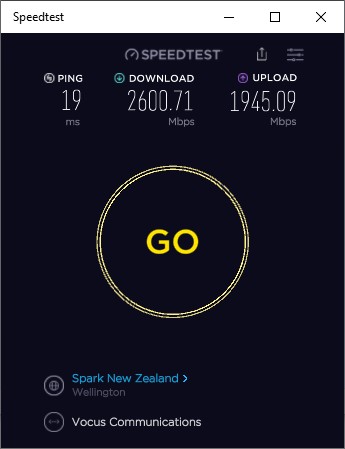
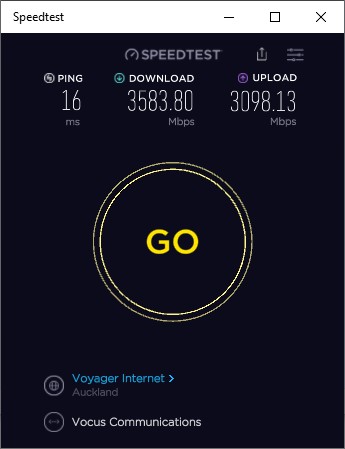
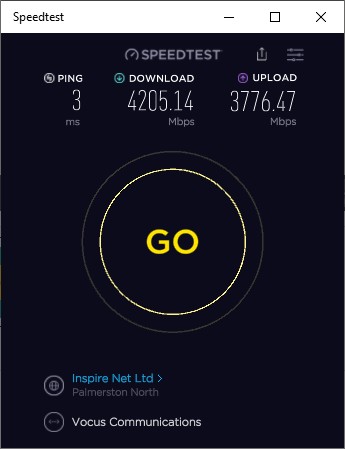
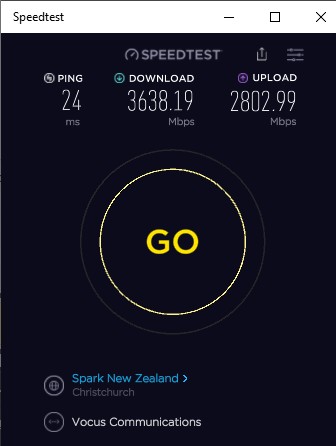
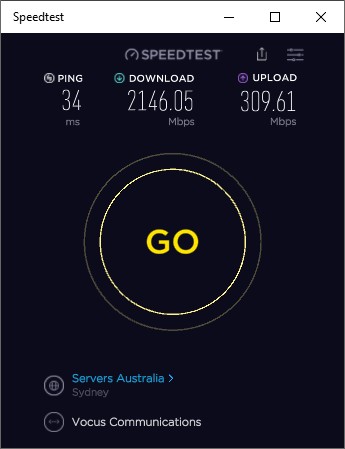
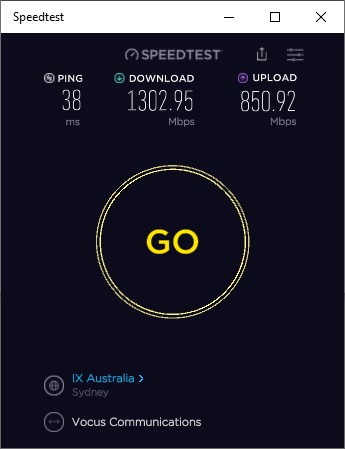
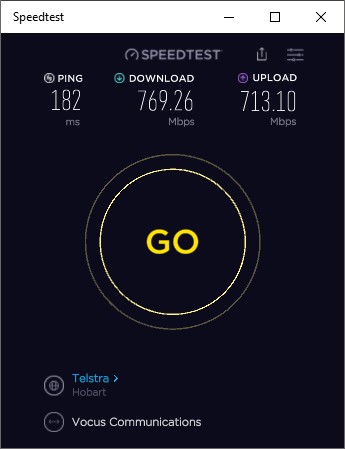
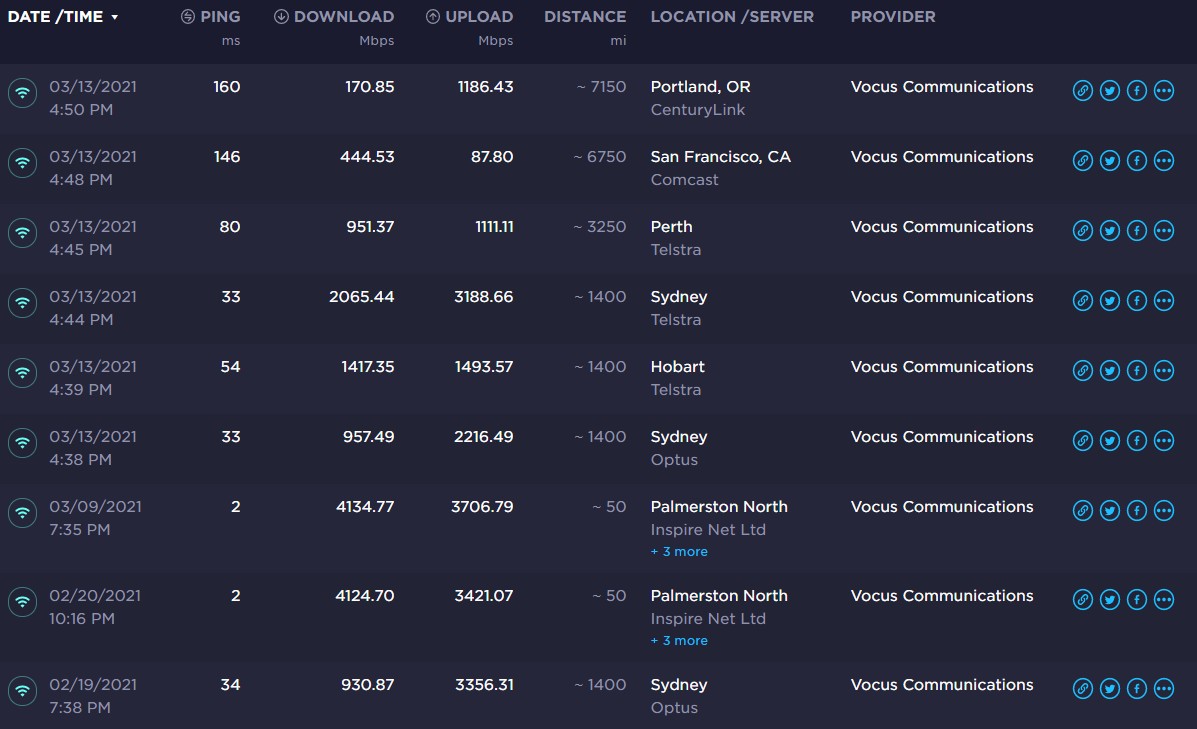
Some of the above doesn't align with my experiences so thought I'd post some speed tests. This is from Wellington if at all useful.


None of this is in a sterile environment so expect background radiation 😂.


Bit of commentary, Aus seems decent but results further get weird - e.g. that portland result being 170 down and 1186 up (and seems totally dependent on what provider you hit)


1 | ... | 20 | 21 | 22 | 23 | 24 | 25 | 26 | 27 | 28 | 29 | 30 | ... | 33
Filter this topic showing only the reply marked as answer View this topic in a long page with up to 500 replies per page Create new topic


Geekzone Live »

Try automatic live updates from Geekzone directly in your browser, without refreshing the page, with Geekzone Live now.


Are you subscribed to our RSS feed? You can download the latest headlines and summaries from our stories directly to your computer or smartphone by using a feed reader.