Geekzone: technology news, blogs, forums
Guest
Welcome Guest.
You haven't logged in yet. If you don't have an account you can register now.


Filter this topic showing only the reply marked as answer View this topic in a long page with up to 500 replies per page Create new topic
1 | ... | 26 | 27 | 28 | 29 | 30 | 31 | 32 | 33
amanzi
Amanzi
1355 posts

Uber Geek
+1 received by user: 335

ID Verified
Trusted
Lifetime subscriber

  #2938641 5-Jul-2022 20:55
Send private message

davyike:


Last year I was holding off because of the general consensus that all ISPs offering HF were rubbish. I haven't seen any new HF offerings since then, but would be keen to hear if I'm wrong.


I'm still waiting for Voyager to launch their HyperFibre offering before I consider switching.


cyril7
9075 posts

Uber Geek
+1 received by user: 2499

ID Verified
Trusted
Subscriber

  #2938648 5-Jul-2022 21:20
Send private message


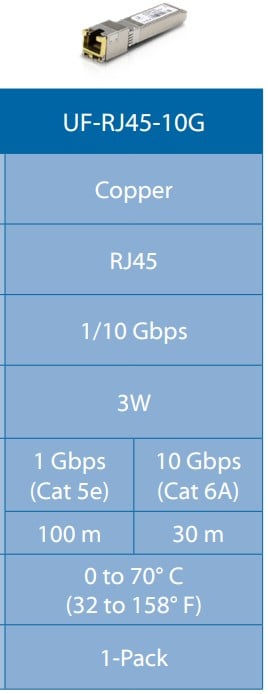
Ah - of course. I see PB Tech have the Ubiquity SFP+ to RJ45 module for about $130, and then I'd obviously need a CAT6a or higher patch cable. No other issues connecting the UDM-Pro to HyperFibre with these two items? Do all these modules run hot or is that a 'feature' of the Mikrotik one?


Hi, please keep to facts not fiction re cat6a or higher.

Cyril

amanzi
Amanzi
1355 posts

Uber Geek
+1 received by user: 335

ID Verified
Trusted
Lifetime subscriber

  #2938654 5-Jul-2022 21:43
Send private message

cyril7: Hi, please keep to facts not fiction re cat6a or higher.

Cyril


If you've got something constructive to add to the discussion, I'm keen to hear it. I based my comment about needing CAT 6A on the Ubiquity spec sheet for that module. If I've read that wrong and don't need a CAT 6A cable to use with that module, then I could save myself $3 by not having to buy one.


cheers.


noroad
1025 posts

Uber Geek
+1 received by user: 675

Trusted

  #2938677 5-Jul-2022 23:33
Send private message

So, I've been using HF 4G/4G for the last year or so and to summarise my leanings -


1. No, you won't notice any meaningful difference between a gig or 300meg plan in day to day use. It is fun sending your Aussie mates 3-4Gb/s speedtests to make fun of them but this wears off after a while.


2. Having fast up-link is very nice when moving files around using cloud drives, but in general hosts out on the internet don't feed at over 1G rates for anything significant. It is kinda cool to torrent a 4k movie I mean ISO in a couple of minutes but again this depends on where its coming from.


3. You have to do a lot of work in the house to get any advantage, I have a combination of 10G fiber, 10GBASET Copper and 2.5GBASET (and a single 5GBASET). If you are going to use wifi to connect anything serious HF is a total waste of money. Wifi5 gives me about 600/500 speed tests, wifi6 can go up to about 900/800 in my testing.


4. The vast bulk of devices can not make use of these speeds, I have a 10G attached desktop that gets pretty close and a 10G attached Linux server that does full rate 4G/4G. Most other machines are good for 1.5-2.5G max at best.


5. 2.5GBASET is a really nice sweet spot, I've found it can use pretty much any cat5 or better cabling and cheap USB3 adapters ($30 on Ali) work fantastically. 10GBASET and 5GBASET both need good quality cat6 or better. The SFP+ all get hot in 5G or 10G mode, like 70+ degrees indicated and they draw a lot of power. The 5GBASET usb-c adapter I have for example won't reliably power off my Surface Laptop directly, only off the base station. There are now fairly cheap switches that have a couple of 10G ports and a bunch of 1/2.5's, as I say the 2.5G Ethernet is a really nice usable sweet spot between price and technical ability to actually make use of the connection. 2.5G makes a significant difference just moving files around your internal network outside of the internet discussion. To do 10G on a desktop you need at least a pcie 4x slot. a 1x slot can however easily take a cheap ($30) 2.5G ethernet card.


6. Using the ONT as the gateway sucks if you want to do anything but the absolute basics. Its fast (on Ethernet, not the wifi) but due to a permissions issue (sharing access with Chorus) most of the control is locked out. So to do anything serious you need an external router (RGW) (the ISP sets the ONT to bridge instead of RGW mode). Don't assume your average Ubiquity or whatever will actually route at over 2gig, just because its got an SFP+ port does not indicate it will do the job. Personally I use a Mikrotik CCR2004-1G-12S+2XS with a bunch of 10GBASET SFP+ or 1G SFP, this is an expensive device but this whole exercise is not for you if you don't want to spend some cash. The next release of Chorus HF ONT's (this year) will not actually have the RGW mode available at all, so buying a router/gateway will be mandatory.


7. I actually think the most useful HF plan is the 2G/2G one. This allows you to have full rate, full duplex gig or better to every device in your house. I would recommend this - https://mikrotik.com/product/rb5009ug_s_in which is about $400 locally as the router. You can point the 2.5G or the 10G port to the ONT (the ONT will do 10G/5G/2.5G/1G) and you can connect one high speed device or a switch as well as the 1G's onboard.


Hopefully this has been helpful.


fe31nz
1294 posts

Uber Geek
+1 received by user: 423


  #2938678 5-Jul-2022 23:42
Send private message

Cat 6 cable is fine for 10 Gbit/s but only over a shorter distance than for 1 Gbit/s.  If you want to go 100 metres at 10 Gbit/s then you need cat 6A.  For a patch cable between two devices a metre or two apart, cat 6 is just fine.


noroad
1025 posts

Uber Geek
+1 received by user: 675

Trusted

  #2938679 5-Jul-2022 23:46
Send private message

Links to recommended devices


Gateway router (for 2G HF) -


https://www.pbtech.co.nz/product/NETMKT1391/MikroTik-RB5009UGSIN-RB5009UGSIN-Ultimate-heavy-du


affordable 2.5G switches -


https://www.pbtech.co.nz/product/SWHTPL2105/TP-Link-TL-SG105-M2-5-Port-25Gbps-Unmanaged-Deskto


https://www.pbtech.co.nz/product/SWHDLK25106/D-Link-DMS-106XT-6-Port-Multi-Gigabit-Unmanaged-Sw


Adapters-


https://www.aliexpress.com/item/1005002694782956.html?spm=a2g0o.productlist.0.0.53166464XoMNyg&algo_pvid=4951502e-89ab-494c-ba00-ac96c6e9e98b&algo_exp_id=4951502e-89ab-494c-ba00-ac96c6e9e98b-0&pdp_ext_f=%7B%22sku_id%22%3A%2212000027441634843%22%7D&pdp_npi=2%40dis%21NZD%21%2126.52%21%21%21%21%21%402103255a16570207948258138e4563%2112000027441634843%21sea


https://www.aliexpress.com/item/1005002637149626.html?spm=a2g0o.productlist.0.0.68833c8czedLGD&algo_pvid=a56dd61b-aef5-47e7-b717-83b1499887fe&algo_exp_id=a56dd61b-aef5-47e7-b717-83b1499887fe-1&pdp_ext_f=%7B%22sku_id%22%3A%2212000028179017757%22%7D&pdp_npi=2%40dis%21NZD%21%2123.18%21%21%21%21%21%402103399116570214799418217eca7d%2112000028179017757%21sea


https://www.aliexpress.com/item/1005003392518774.html?spm=a2g0o.productlist.0.0.68833c8czedLGD&algo_pvid=a56dd61b-aef5-47e7-b717-83b1499887fe&algo_exp_id=a56dd61b-aef5-47e7-b717-83b1499887fe-0&pdp_ext_f=%7B%22sku_id%22%3A%2212000025571959699%22%7D&pdp_npi=2%40dis%21NZD%21%2117.24%21%21%21%21%21%402103399116570214799418217eca7d%2112000025571959699%21sea


Shop now on Samsung phones, tablets, TVs and more (affiliate link).
noroad
1025 posts

Uber Geek
+1 received by user: 675

Trusted

  #2938680 5-Jul-2022 23:48
Send private message

fe31nz:


Cat 6 cable is fine for 10 Gbit/s but only over a shorter distance than for 1 Gbit/s.  If you want to go 100 metres at 10 Gbit/s then you need cat 6A.  For a patch cable between two devices a metre or two apart, cat 6 is just fine.


I run 10M & 20M cat6 direct patch leads on 10GBASET without any issues in practice as an FYI.


cyril7
9075 posts

Uber Geek
+1 received by user: 2499

ID Verified
Trusted
Subscriber

  #2938686 6-Jul-2022 07:14
Send private message

amanzi:


cyril7: Hi, please keep to facts not fiction re cat6a or higher.

Cyril


If you've got something constructive to add to the discussion, I'm keen to hear it. I based my comment about needing CAT 6A on the Ubiquity spec sheet for that module. If I've read that wrong and don't need a CAT 6A cable to use with that module, then I could save myself $3 by not having to buy one.


cheers.


snip


Thanks, I think you will find my comments totally constructive, i dont care what UBNT have to say, you are better off checking the scripters of the 10G standard, and you will find, cat6 is fine for 10G UTP for length upto 50-60m, and as others have found using it with 20m cat5e also offers no issues so to mandate cat6a is ............fiction. And yes I have used many manufactures UTP SFP's including UI and Mikrotik amoungst others.


Cyril


noroad
1025 posts

Uber Geek
+1 received by user: 675

Trusted

  #2938690 6-Jul-2022 07:59
Send private message


Thanks, I think you will find my comments totally constructive, i dont care what UBNT have to say, you are better off checking the scripters of the 10G standard, and you will find, cat6 is fine for 10G UTP for length upto 50-60m, and as others have found using it with 20m cat5e also offers no issues so to mandate cat6a is ............fiction. And yes I have used many manufactures UTP SFP's including UI and Mikrotik amoungst others.


Cyril


To be clear even a 1M cat5e will not work for 10G at all, the link just won't stand up. 2.5G works fine on decent cat5e. Cat6 works fine at the 10/20M length. Cat6a has shielding so is recommended (by me) for anything longer than 20M. If you are putting in new cables then fiber is worth looking at as well if you want something to do 10+ gig at longer distances.


davyike
6 posts

Wannabe Geek


  #2938693 6-Jul-2022 08:23
Send private message

noroad:


So, I've been using HF 4G/4G for the last year or so and to summarise my leanings -


Which ISP are you with? Any thoughts on bandwidth internationally? I recall this was the main concern - the current HF ISPs had high domestic speeds but internationally was subpar.


I like your 2G/2G suggestion. Would be nice to have symmetrical up/down.


cyril7
9075 posts

Uber Geek
+1 received by user: 2499

ID Verified
Trusted
Subscriber

  #2938695 6-Jul-2022 08:48
Send private message

Hi, interesting, I have never had a 10G link with short Cat5e runs not work, currently sitting on my workbench is an SRX with a Juniper provided 10G UTP SFP not sure of the exact brand, other end is a Catalyst 9300 with a multi speed onboard interface, and a 3m cat5e lead, not sure of brand, yellow in colour if that helps, regardless the link is up and 10G.


With regards to Cat6, a 100m run on its own in most cases will work without issue. The main failing of Cat6 is insufficient alien cross talk as you start stepping towards the top of the required band (500MHz), but in the cabling standards it is required that performance is maintained even when cables are installed in 24 cable bundles. With GigE alien cross talk never is an issue, so you can bundle cables without failing ClassE (250MHz profile). However if you have 24cable bundles to meet alien crosstalk on cat6 its typically required that run length is reduced to around 55m. In a typical domestic installation, cables are often on their own for their entire run, or never more than a couple in a run, so the problem is less of an issue, so meeting >50m should not be a problem.


If you look at the construction and performance figures of cat6a UTP you will find the key differnce to Cat6 is that the spine is cross shaped (as in crusifix) as opposed to x as in cat6, and more importantly the spine twists along its entire length. This causes the four pairs to continually rotate their presentation to other cables, mitigating alien cross talk. The down side of cat6a is its bulk and its a lot harder to install in tight wall spaces.


In our organisation all new cabling is F/FTP 6a, the advantage is that it has superiour crosstalk performance both alien and intra pair, comapred to 6a UTP, but only has a size/bulk similar to cat6 as it does not have or require a spine, the only downside is you do have to manage earth considerations. I should also note that the use of F/FTP in our situation is as much for security (Tempest testing) rather than for 10G performance.


As a disclaimer, I should note that in recent years I have overseen the design and technical installation oversight of several 10s of $m of cable installations, (MoE SNUP in particular) and am co writer of cabling standards for several Govment agencies, before that I spent over 30yrs practicing as an RF design engineer, RF transmission lines is something I have a good knowledge of.


Cyril


Shop now for Lenovo laptops and other devices (affiliate link).
amanzi
Amanzi
1355 posts

Uber Geek
+1 received by user: 335

ID Verified
Trusted
Lifetime subscriber

  #2938696 6-Jul-2022 08:57
Send private message

noroad: I run 10M & 20M cat6 direct patch leads on 10GBASET without any issues in practice as an FYI.


Thanks for this, and all the previous info - very useful indeed. I had been drawn to the Ubiquiti direction due to the integrated nature of the platform, including access points. I currently have TP-Link Omada router, switches, APs, and really like the integration but have been getting frustrated with their slow release schedule and lack of certain key features (e.g. no IPv6 firewall). Is there anything similar in the MikroTik ecosystem? Or do you manage routers, switches, and APs separately? And I agree with your comments about HyperFibre not being necessary, I just want to make sure whatever I buy today has the option of going up in speed, even if it's just to send SpeedTest screenshots to friends. :-)


cyril7
9075 posts

Uber Geek
+1 received by user: 2499

ID Verified
Trusted
Subscriber

  #2938697 6-Jul-2022 09:03
Send private message

amanzi:


Is there anything similar in the MikroTik ecosystem? Or do you manage routers, switches, and APs separately? And I agree with your comments about HyperFibre not being necessary, I just want to make sure whatever I buy today has the option of going up in speed, even if it's just to send SpeedTest screenshots to friends. :-)


Hi, I will make comment on that too :), Mikrotik does have a kind of single pane of managment for wireless, this is in the form of Capsman, its very effective, but not the prettiest of things. Switches currently still stand alone regardless of it they are on SwOS or RouterOS


Cyril


Edit, they are currently putting out feelers for what users are wanting for a single pane of glass managment, but still way off I suspect.


noroad
1025 posts

Uber Geek
+1 received by user: 675

Trusted

  #2938705 6-Jul-2022 09:21
Send private message

cyril7:


Hi, interesting, I have never had a 10G link with short Cat5e runs not work, currently sitting on my workbench is an SRX with a Juniper provided 10G UTP SFP not sure of the exact brand, other end is a Catalyst 9300 with a multi speed onboard interface, and a 3m cat5e lead, not sure of brand, yellow in colour if that helps, regardless the link is up and 10G.


Cyril


Your cat5e patch lead's must be better than mine.


amanzi
Amanzi
1355 posts

Uber Geek
+1 received by user: 335

ID Verified
Trusted
Lifetime subscriber

  #2938708 6-Jul-2022 09:30
Send private message

cyril7:Hi, I will make comment on that too :), Mikrotik does have a kind of single pane of managment for wireless, this is in the form of Capsman, its very effective, but not the prettiest of things. Switches currently still stand alone regardless of it they are on SwOS or RouterOS


Cyril


Edit, they are currently putting out feelers for what users are wanting for a single pane of glass managment, but still way off I suspect.


Thanks :-)


I do like what I'm reading about MikroTik being very customer-focused. They seem very keen to support home-lab scenarios which is perfect for me.


And with regards to the CAT 6/6A cables, I found several articles on ServeTheHome (e.g. Ubiquiti UF-RJ45-10G SFP+ to 10Gbase-T Module Review) where they do all their 10GbE testing with a 20m CAT 6 cable. So even though the vendors recommend CAT 6A, it seems this is not necessary (although the cost difference is minimal anyway...)


1 | ... | 26 | 27 | 28 | 29 | 30 | 31 | 32 | 33
Filter this topic showing only the reply marked as answer View this topic in a long page with up to 500 replies per page Create new topic


Geekzone Live »

Try automatic live updates from Geekzone directly in your browser, without refreshing the page, with Geekzone Live now.


Are you subscribed to our RSS feed? You can download the latest headlines and summaries from our stories directly to your computer or smartphone by using a feed reader.