Geekzone: technology news, blogs, forums
Guest
Welcome Guest.
You haven't logged in yet. If you don't have an account you can register now.


gemtwinkle123

10 posts

Wannabe Geek
+1 received by user: 3


#324995 23-Jun-2026 16:17
Send private message quote this post

Hi there. Thanks in advance for any help - I have done a lot of googling and also searching on this forum and can't seem to work out what to do.


We live rurally on SH1 (fibre runs right past the gate but we're not allowed to connect to it) and currently use Starlink, which has been a huge improvement on previous speeds etc with Spark.


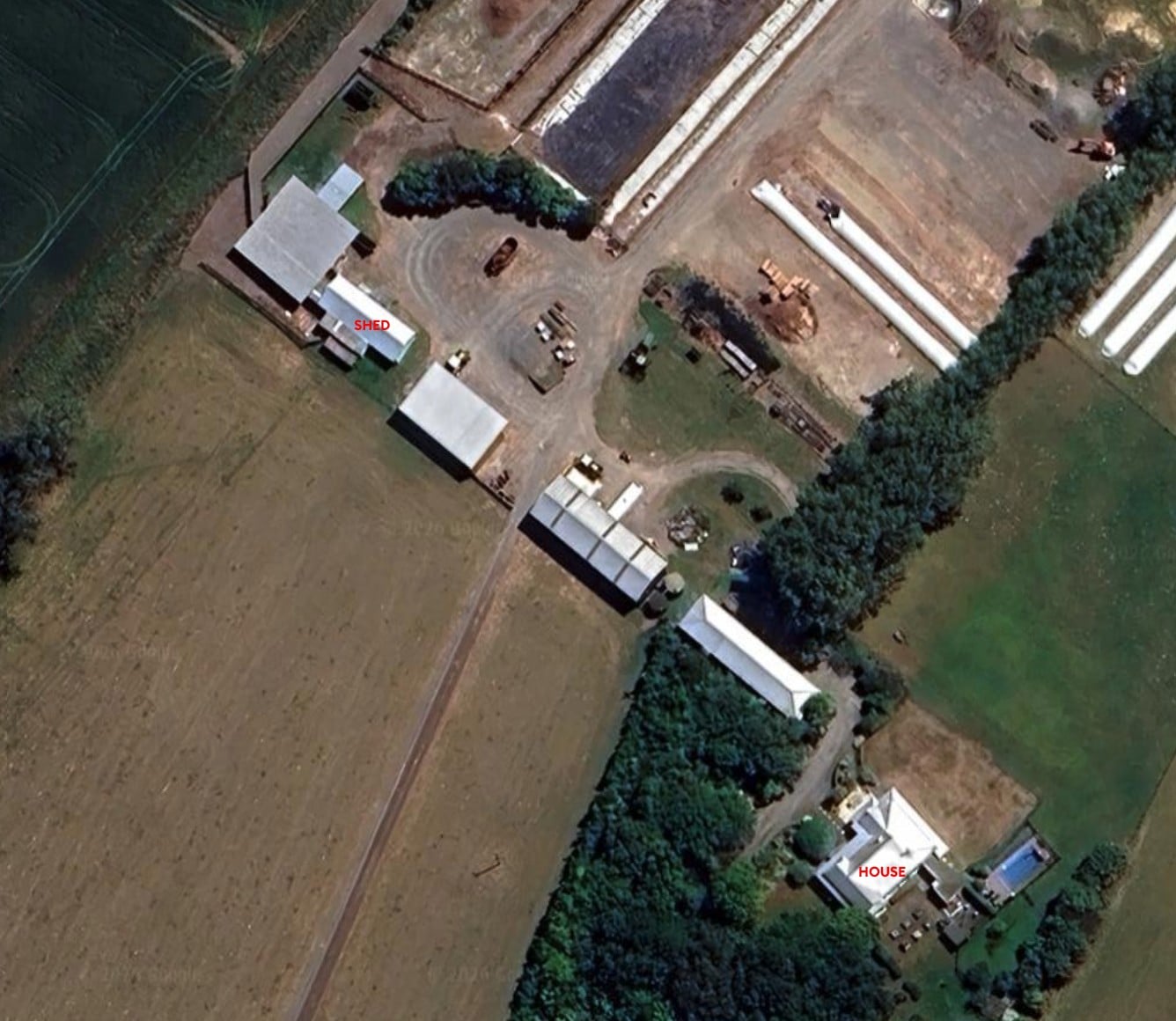
We have recently converted an old shed and need to get internet to it. It is roughly 120m from the house where the starlink router is. And due to more sheds and a lot of trees, there is no line of sight - so wifi extenders are not an option. We don't want to pay for another monthly connection for the shed when it's not used regularly.


We can run a conduit all the way between the two locations. Because it's over 100m, the internet is telling me something like fibre with media converters would work? And that ethernet cable won't be able to handle distance over 100m.


Has anyone done this or have any specific recommendations? I'm not a complete tech novice but have no idea about the difference between cables like 0S2 or OM3 etc, so would love some specific advice.


Thanks again for any help.


View this topic in a long page with up to 500 replies per page Create new topic
 1 | 2
wellygary
8983 posts

Uber Geek
+1 received by user: 5546


  #3505587 23-Jun-2026 16:28
Send private message quote this post

Agree that Wifi extenders are not going to cut it, 


But before you totally commit to trenching a conduit/fibre, Have you fully exhausted making a point-2-point bridge work??  Receivers can be mounted on a post or a pole to potentially get around or over other buildings or vegetation.. Ubiquiti gear is really good at bridging a gap...


Not saying you're wrong, but just wanting to confirm you've checked the options fully...


coffeebaron
6325 posts

Uber Geek
+1 received by user: 3587

Trusted
Lifetime subscriber

  #3505603 23-Jun-2026 17:34
Send private message quote this post

I have done a range of these. Sometimes it is possible once you're on a roof to find a LOS gap. If not, you can usually exceed 100m slightly with CAT6 cable. I've done one that was 120M and it's been rock solid 1Gbps connection. You can also put a repeater in halfway along and effectively extend to 200m (and maybe add midpoint Wi-Fi). Getting a premade fibre is also a good option. Pretty much if you can get a trench run, then someone like me, or depending on where you live, there will be someone who can do the rest. Or of course, try DIY from advice here.


Rural IT and Broadband support.


Broadband troubleshooting and master filter installs.
Starlink installer - one month free: https://www.starlink.com/?referral=RC-32845-88860-71 
Wi-Fi and networking
Cel-Fi supply and installer - boost your mobile phone coverage legally


Need help in Auckland, Waikato or BoP? Click my email button, or email me direct: [my user name] at geekzonemail dot com


Dairusire
344 posts

Ultimate Geek
+1 received by user: 126


  #3505607 23-Jun-2026 17:44
Send private message quote this post

I guess the question really is down to what's easier for you. If you've got easy access to a tractor with a backhoe or something to dig the trench (preferably to 600mm) and ability to get conduit then Fibre is easy and cake. 


My recommendation would be to get stuff from fs.com it's cheaper and there is absolutely nothing wrong with it. 

As for what you'd need, you have two options. Either you get a switch at either end, that has SFP or SFP+, or yes you get two media converters.. 

Either way, you'll need


120m Single Mode Armored OS2 LC/LC fibre patch cable. Better to have too much than not enough. Distance doesn't really matter. This stuff will work at Kilometers. (https://www.fs.com/au/products/20720.html?now_cid=220
2x SFP+ LC Singlemode adapters (10gb short range of 300m) https://www.fs.com/au/products/11556.html?now_cid=63


Personally I'd get a couple switches instead of a media converter at either end. Reason being that they can be expensive for what you get. A 10Gb media converter can be a couple hundred where-as getting a Unifi Switch with 10gb SFPs (which allows you to connect whatever at the other end) is under $500? 


https://www.pbtech.co.nz/product/SWHUBI10569/Ubiquiti-UniFi-USW-Flex-25G-8-PoE-10-Port-10G-L2-M


Either way, you're looking at probably $1500 in 'stuff' to get the job done, before the labour and conduit to trench. But you'll get two 10Gb capable switches at either end, direct fibre tie. 


richms
29311 posts

Uber Geek
+1 received by user: 10396

Trusted
Lifetime subscriber

  #3505619 23-Jun-2026 19:02
Send private message quote this post

If you are not concerned about management or PoE then the cheap horaco and similar dual 10gb SFP+ and 4 2.5gig swiches work really well, so long as you use a better power adapter. They are in the $40-45ish range on aliexpress and the 10 gig SFP+ modules about the same for a pair of bidirectional ones, or you can get separate ones that need a duplex cable but it seems no cheaper.


Just allow for replacing the power adapter on the switch as that is the weak part, and dont expect them to run power hungry 10 gig copper SFP+ modules, the short range copper ones seem fine with one and an optical one if you do want to connect to something 10 gig copper at either end.


Very little to save stepping down to gigabit gear, but there are options if that is all you want to spend, but at that point you may find people offloading old gear for free rather than ewasteing it. A lot of what you will find being turfed out is multimode tho because historically that was cheaper and got used within buildings and single mode was only for long runs. Now people will single mode everywhere as it will have higher speed upgrades available in the future. 


Richard rich.ms

gemtwinkle123

10 posts

Wannabe Geek
+1 received by user: 3


#3505622 23-Jun-2026 19:20
Send private message quote this post

Thank you very much to everyone for your replies! Ok maybe I'm a lot less tech savvy than I thought ! 


Most of this is going over my head. Yes we have access to tractor etc to dig a trench, but because it has to go past a whole lot of sheds and tall tree hedges, we were thinking of running the conduit along the roof of the house along the power line part of the way and then under the ground. I realise the power line part sounds risky but I'm not explaining it properly, it's not live power. 


Here is a google earth picture of where we're trying to get it to and from. There are definitely sheds that are higher than the trees if you think we could use extenders that way. Would the extenders have to be under cover? And just to clarify, we definitely haven't explored all options, so I am grateful for any suggestions. Thanks again for everyone's help!


tweake
2732 posts

Uber Geek
+1 received by user: 1190


  #3505623 23-Jun-2026 19:28
Send private message quote this post

how much speed do you need?


cat6 would probably work, especially locked down to slower speeds. i just used a tp-link switch which has extend mode (basically just forces lower speed).


Shop now for Dell laptops and other devices (affiliate link).
richms
29311 posts

Uber Geek
+1 received by user: 10396

Trusted
Lifetime subscriber

  #3505624 23-Jun-2026 19:29
Send private message quote this post

Are the inbeteen buildings yours and have power in them? Stop off in each of them incase you want cameras or something in them. Dont run copper cables between any buildings with separate power systems - fibre is what you want between them.


Richard rich.ms

coffeebaron
6325 posts

Uber Geek
+1 received by user: 3587

Trusted
Lifetime subscriber

  #3505644 23-Jun-2026 20:04
Send private message quote this post

If the sheds have power, you could add Wi-Fi to one or all of them.


Rural IT and Broadband support.


Broadband troubleshooting and master filter installs.
Starlink installer - one month free: https://www.starlink.com/?referral=RC-32845-88860-71 
Wi-Fi and networking
Cel-Fi supply and installer - boost your mobile phone coverage legally


Need help in Auckland, Waikato or BoP? Click my email button, or email me direct: [my user name] at geekzonemail dot com


aj6828
187 posts

Master Geek
+1 received by user: 54

ID Verified
Trusted

  #3505662 23-Jun-2026 23:24
Send private message quote this post

as you said get some media converters from Aliexpress and also fibre cable to go with it.. i have done it when you get the 1gig media converters, get the right one there is a low power one and a long range high power one if you use the long range with short distances, they burn out.. and the 5v power supplies they sell are not the best .. so far i have been using one for 3 years, except replacing the power adaptor ones.. totoal cost will be around 150$ to 200 well worth it plus its very stable.. 


Geekzone Members!
Dynamic IP & Bring Your Own Device Hyperfibre & Fibre plans & NO Contracts with Hyperline.co.nz powered by ASN 9790 Network


Chrous areas only HYPERLINE.co.nz  


noroad
1045 posts

Uber Geek
+1 received by user: 692

Trusted

  #3505681 24-Jun-2026 07:17
Send private message quote this post

One easy option would be to just put up a simple mesh system with outdoor access points (and indoor ones) on each building. Just put them on a pole on each building or second building and make sure they have line of sight to each other. This has the advantage of making your wifi available across the whole property, not just inside the buildings. 


https://www.pbtech.co.nz/product/NETTPL6507/TP-Link-Deco-X50-Outdoor-AX3000-Dual-Band-WiFi-6-W


https://www.pbtech.co.nz/product/NETTPL12411/TP-Link-Deco-BE25-Outdoor-BE5000-Dual-Band-WiFi-7https://www.pbtech.co.nz/product/NETTPL12411/TP-Link-Deco-BE25-Outdoor-BE5000-Dual-Band-WiFi-7


gemtwinkle123

10 posts

Wannabe Geek
+1 received by user: 3


  #3505760 24-Jun-2026 11:00
Send private message quote this post

Thanks everyone this is super helpful. Yes all the sheds in between are on our property and they all have power in them (including the one we're trying to get internet to). We have been looking to install cameras but didn't have wifi access. So, the idea of having wifi in the whole area is definitely appealing. Re speed, we want to be able to stream tv in the shed - we've converted it into a games type space. 


Shop now for Lego sets and other gifts (affiliate link).
noroad
1045 posts

Uber Geek
+1 received by user: 692

Trusted

  #3505783 24-Jun-2026 12:08
Send private message quote this post

gemtwinkle123:


Thanks everyone this is super helpful. Yes all the sheds in between are on our property and they all have power in them (including the one we're trying to get internet to). We have been looking to install cameras but didn't have wifi access. So, the idea of having wifi in the whole area is definitely appealing. Re speed, we want to be able to stream tv in the shed - we've converted it into a games type space. 


I use the tp-link outdoor AP's to provide cover out to solar powered security camera's (Arlo) on the far side of the property. Works nicely. The outdoor AP (POE power it) can act as the bridge for the network and wireless distribution at the same time. If you use indoor AP connected to the POE that powers the outdoor ones you will get seamless coverage without black spots. If you use something like BE25 outdoor units (maybe three, one on the house, one on the middle shed roof, and one at that far shed. Then match them with indoor units on at least the house and far shed that would do the trick. With the gaming I would recommend the BE25 over the X50 as has a bunch more capacity in the 5Ghz band that will be used for the back-haul between AP's. I'm sure there are other brands that would work, but I know these ones would work well.


coffeebaron
6325 posts

Uber Geek
+1 received by user: 3587

Trusted
Lifetime subscriber

  #3505786 24-Jun-2026 12:14
Send private message quote this post

What area are you from (approx.)?


Rural IT and Broadband support.


Broadband troubleshooting and master filter installs.
Starlink installer - one month free: https://www.starlink.com/?referral=RC-32845-88860-71 
Wi-Fi and networking
Cel-Fi supply and installer - boost your mobile phone coverage legally


Need help in Auckland, Waikato or BoP? Click my email button, or email me direct: [my user name] at geekzonemail dot com


godber
76 posts

Master Geek
+1 received by user: 47

ID Verified
Trusted
Lifetime subscriber

  #3505815 24-Jun-2026 13:51
Send private message quote this post

gemtwinkle123:


We live rurally on SH1 (fibre runs right past the gate but we're not allowed to connect to it) and currently use Starlink, which has been a huge improvement on previous speeds etc with Spark.


Do you really mean not allowed or that the cost is too much

It is likely that you can connect to the fibre I live on SH25 and have paid $25k to connect to fibre (on the opposite side of the road) so it is likely you can connect, but at a cost.


See the discussion on the following thread Rural USB install there are a number of people on GeekZone who in similar circumstances to you have paid to connect to fibre.


Godfrey
Auckland/Coroglen, New Zealand
Quic Broadband - 4G Hyperfibre


Referral Link:
Quic (use R71004E9PVBJ on checkout for free setup)


nztim
4095 posts

Uber Geek
+1 received by user: 2797

ID Verified
Trusted
TEAMnetwork
Subscriber

  #3505821 24-Jun-2026 14:09
Send private message quote this post

@gemtwinkle123 where are you approximately, there are people here who do this stuff day in and day out that could come look


Any views expressed on these forums are my own and don't necessarily reflect those of my employer. 


 1 | 2
View this topic in a long page with up to 500 replies per page Create new topic


Geekzone Live »

Try automatic live updates from Geekzone directly in your browser, without refreshing the page, with Geekzone Live now.


Are you subscribed to our RSS feed? You can download the latest headlines and summaries from our stories directly to your computer or smartphone by using a feed reader.