Geekzone: technology news, blogs, forums
Guest
Welcome Guest.
You haven't logged in yet. If you don't have an account you can register now.


timmmay

20858 posts

Uber Geek
+1 received by user: 5350

Trusted
Lifetime subscriber

#296370 11-Jun-2022 20:18
Send private message

My brother laser printer MFC is eight years old. It's done a great job, but buying the various parts it requires (toner reclaimer or something) is going to cost about 1/4 the cost of a new printer, and it doesn't print double sided any more because some other part wore out. We've decided to just get a new one with features we want. My default choice is the MFCL3770CDW Colour Wireless LED 4-in-1 Printer as it looks like the newer version of the MFC-9140CDN I already have, but looking for opinions / experience.


What we're after is:


  • Color laser printer for low volume printing. I don't want an inkjet, I've had plenty and they fail as we print fairly rarely
  • Double sided scan through a paper feeder, with decent software supplied or easily available. I scan all my receipts so I use this quite a bit
  • Network printing ethernet and / or WiFi. I have ethernet to the printer but if it had WiFi I can reclaim that port which would be handy.
  • Photocopier
  • Nice to have: envelope printing

Can anyone recommend something better than the Brother @ $462 inc GST?


Filter this topic showing only the reply marked as answer View this topic in a long page with up to 500 replies per page Create new topic
 1 | 2
ANglEAUT
altered-ego
2436 posts

Uber Geek
+1 received by user: 842

Trusted
Lifetime subscriber

  #2925447 11-Jun-2022 22:28
Send private message

I am happy with my HP LaserJet Pro MFP M479fdw.


At the low amounts of printing you & I do, a $0.01 cheaper print per page is not going to make a difference. The original black cartridge lasted me >18months.


I certainly like the simpler HP SmartScan then the old Control Centre 4 that comes with Brother Printers.


Please keep this GZ community vibrant by contributing in a constructive & respectful manner.


Scott3
4177 posts

Uber Geek
+1 received by user: 2990

Trusted
Lifetime subscriber

  #2925454 11-Jun-2022 23:02
Send private message

Did exactly the same upgrade path that you are talking about.


Had a Brother MFC-9140CDN (I think, looked like that anyway).

Was still working fine, but all toners were getting low (had been running aftermarket ones and had issues with print quality &very low yields) and we were approaching the 15,000 page life of the drum.

Decided between the value of a new drum (cira $250), and the new starter toners in a new printer, that the cost to upgrade would be fairly trivial vs what we would spend on the current one. Also ment we had a new printer, reset warrenty, and features we badly wanted like duplex scanning.


So we got a MFC-3770.


Up to 9074 pages on it now, and it hasn't missed a beat.


Have been running genuine toners this time after our aftermarket experience on the old printer.


Couple of points:

- It is noticeably big and heavy compared to the MFC-9140CDN (28.9kg's in carton)
- Genuine toners are painfully expensive. Full set of high yeild toners is Cira $700. cira $150 for a 3000 yeild black, and cira $190 times 3 for the 2300 yeild colors. (and only a touch cheaper to go low yield). Black toner isn't actually too bad if you mostly print black and white.


Ours is mostly business use, so we can justify the cost. We planned to conserve the starter color toners, but that didn't work out. Now onto our second set of high yield color toners (have about 80% left). Have just be replacing the blacks toners are required. Obviously have spent much more on toner's than the printer value at this point.


Handle9
11925 posts

Uber Geek
+1 received by user: 9676

Trusted
Lifetime subscriber

  #2925469 12-Jun-2022 06:48
Send private message

I know you said you don’t want an inkjet but the Epson Ecotank printers are well worth considering. I bought one that has all the features you’ve asked for 2 years ago, replacing a Brother colour laser printer which had gotten expensive to buy consumables for.

It came with two full sets of ink and I’m halfway through the first set. The kids print a fair bit and so does my wife. Genuine ink refills are very inexpensive, certainly far cheaper than toner.

It’s a different beast to the old style inkjets. They are well worth considering as a colour laser replacement.


timmmay

20858 posts

Uber Geek
+1 received by user: 5350

Trusted
Lifetime subscriber

  #2925488 12-Jun-2022 08:43
Send private message

Thanks all that's very useful.


@Scott3 that sounds very positive :) The Brother laser printers seem to Just Work. Does Brother still use the old Control Centre 4 for scanning? The downloads suggest they do. It works but it's pretty ugly. I could go third party but I never found an app that was worth paying for.


@Handle9 I've had four inkjet printers (Canon and Epson) back when I needed to print on DVDs probably 10-15 years ago now, and I was printing documents quite regularly about six months a year. I found that when we didn't print for a while they end up blocked and eventually getting thrown out. The laser printer the past 8 years has been a much, much better experience, other than us not replacing the parts that wore out. How long have you had your Ecotank? Any thoughts on their reputation for blocking? I'm unlikely to get an inkjet, but I'm interested.


@ANglEAUT I think the current model is maybe the HP Color LaserJet Pro MFP M283fdn (7KW74A). I don't think it has double sided scanning which is on my must-have list. The higher up models might have it but they look like they might cost a bit more than the Brother.


Has anyone found any good third party scanning software that works with Brother? Control Centre 4 is fairly poor, but works. I mostly scan receipts from stores, in batches every few weeks.


richms
29099 posts

Uber Geek
+1 received by user: 10214

Trusted
Lifetime subscriber

  #2925517 12-Jun-2022 11:12
Send private message

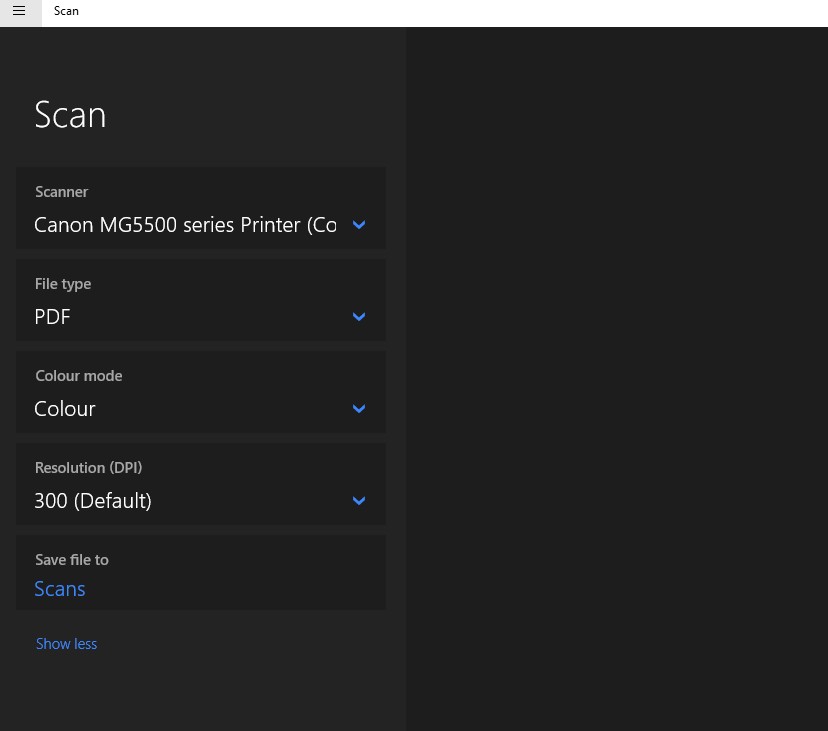
I always just scan in the windows scan software to PDF's in my google drive, then at a later stage open them all up and save them in acrobat to make the searching work better.


Richard rich.ms

timmmay

20858 posts

Uber Geek
+1 received by user: 5350

Trusted
Lifetime subscriber

  #2925522 12-Jun-2022 11:41
Send private message

richms:


I always just scan in the windows scan software to PDF's in my google drive, then at a later stage open them all up and save them in acrobat to make the searching work better.


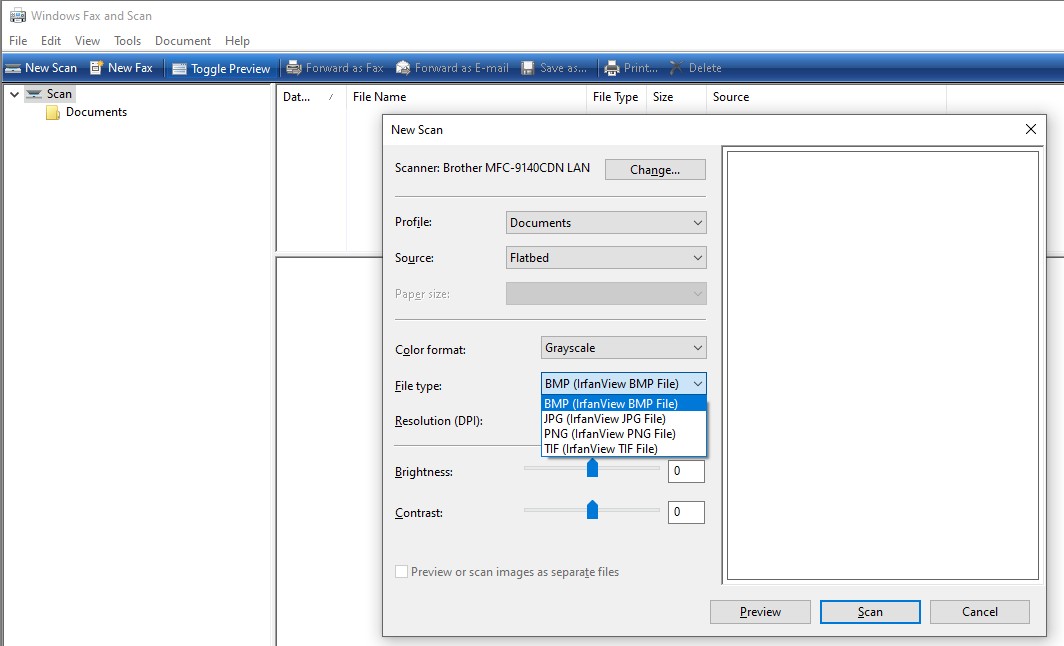
I just tried it, it seems to want to produce png / jpg rather than a PDF file. The scans are also quite large compared with Brother Control Centre 4, 500kb for one receipt compared with a 100kb PDF looking about the same. Any tricks to get it to produce a PDF?


I guess Adobe Acrobat does OCR for you? This is the full paid version not the free reader? I just rename my receipts with the name of the store and what we purchased, it's a bit manual but makes searching trivial.


Shop now on Samsung phones, tablets, TVs and more (affiliate link).
richms
29099 posts

Uber Geek
+1 received by user: 10214

Trusted
Lifetime subscriber

  #2925529 12-Jun-2022 11:56
Send private message

Has it in there for me?


Yes, its the full adobe from creative cloud. I don't have it on this computer with the scanner on it but on another one so I just scan it there and then open them later. It does its magic to make the files smaller, straighten them (Doesn't work when I have ripped a long receipt into halves or thirds to scan) and makes better OCR at that point for google search to find them than googles own one. Possibly that is just the straightening of them.


I then rename them with the date and put them into a folder for the retailer. Makes it interesting to see how bread prices have changed etc.


Richard rich.ms

blackjack17
1713 posts

Uber Geek
+1 received by user: 865


  #2925533 12-Jun-2022 12:09
Send private message

We have the canon g6065 megatank which we picked up during one of the Auckland lockdowns last year.  Was on sale for around $300. Printed a fair bit and only down a 1/4 of the black and a little less on the colours.


We can go weeks with out printing and then print a bit and haven't noticed any blockages.  Scanning is quick and simple.  Refills are like $17-$20 and from memory that will get you 6500 pages.


It is networked, does duplex and has a relatively normal footprint. 


I wouldn't discount the megatank/ecotank inkjets.  They are a different beast from the old injects which were cheaper to get a new printer than refills.      


richms
29099 posts

Uber Geek
+1 received by user: 10214

Trusted
Lifetime subscriber

  #2925542 12-Jun-2022 12:37
Send private message

If I leave my inkjet off at the power, it will have blocked nozzles when I power it back up. If I leave it in its "standby" it seems to do something to keep the ink from blocking that mysteriously uses up the ink. So now I have it with printing probably 30 pages in total over its life, and its out of magenta and the others are all really low.


My laser, can be off for 2 years, power up, put some new dry paper into it and its printing properly on the first go.


Richard rich.ms

blackjack17
1713 posts

Uber Geek
+1 received by user: 865


  #2925544 12-Jun-2022 12:47
Send private message

richms:


If I leave my inkjet off at the power, it will have blocked nozzles when I power it back up. If I leave it in its "standby" it seems to do something to keep the ink from blocking that mysteriously uses up the ink. So now I have it with printing probably 30 pages in total over its life, and its out of magenta and the others are all really low.


My laser, can be off for 2 years, power up, put some new dry paper into it and its printing properly on the first go.


The tank inkjets are different from the old cartridges ones.  You can get 1000s of pages per tank and we haven't had any issues with blocked heads. 


old3eyes
9158 posts

Uber Geek
+1 received by user: 1364

Subscriber

  #2925546 12-Jun-2022 12:52
Send private message

Handle9: I know you said you don’t want an inkjet but the Epson Ecotank printers are well worth considering. I bought one that has all the features you’ve asked for 2 years ago, replacing a Brother colour laser printer which had gotten expensive to buy consumables for.

It came with two full sets of ink and I’m halfway through the first set. The kids print a fair bit and so does my wife. Genuine ink refills are very inexpensive, certainly far cheaper than toner.

It’s a different beast to the old style inkjets. They are well worth considering as a colour laser replacement.


I'll second an Inktank from Epson or Brother. 


Regards,

Old3eyes


Move to New Zealand's best fibre broadband service (affiliate link). Free setup code: R587125ERQ6VE. Note that to use Quic Broadband you must be comfortable with configuring your own router.
old3eyes
9158 posts

Uber Geek
+1 received by user: 1364

Subscriber

  #2925548 12-Jun-2022 12:57
Send private message

richms:


If I leave my inkjet off at the power, it will have blocked nozzles when I power it back up. If I leave it in its "standby" it seems to do something to keep the ink from blocking that mysteriously uses up the ink. So now I have it with printing probably 30 pages in total over its life, and its out of magenta and the others are all really low.


My laser, can be off for 2 years, power up, put some new dry paper into it and its printing properly on the first go.


I have a Canon TS8160  and I never have the ink being used up when on standby.  Sometimes when I go to print a page after  a day or two it seems sometimes  to do a head recharge.  This will be my last  normal inkjet  but I only  buy the  C681 XXX full carts from Cartridge World and they last quite a long time.  Next printer will be an Inktank  Brother or Epson. 


Regards,

Old3eyes


MartinGZ
376 posts

Ultimate Geek
+1 received by user: 128

Subscriber

  #2925552 12-Jun-2022 13:09
Send private message

The OP says he prints very rarely. I have both Laser and Inkjet, but would always go for laser in this situation. I recently had to clear my inkjet (Epson Photo) and it took the best part of full cartridges (x4) to clean the head. My business laser (huge) was declared obselete years ago and still works just fine. Lasers may have a cleaning cycle were they will use a bit of toner, but not if they are turned off 😀. As @richms said, just turn the laser on an it goes.


afe66
3181 posts

Uber Geek
+1 received by user: 1678

Lifetime subscriber

  #2925658 12-Jun-2022 13:41
Send private message

My brother dn5010 from 2008 is still jogging along..


timmmay

20858 posts

Uber Geek
+1 received by user: 5350

Trusted
Lifetime subscriber

  #2925714 12-Jun-2022 14:44
Send private message

richms:


Has it in there for me?


I can only see Windows Fax and Scan. Your app looks a lot newer. A quick search of the Microsoft store suggests you have "Windows Scan" which is an add-on. I'll give it a go, thanks, and I'll look at third party apps again.


 1 | 2
Filter this topic showing only the reply marked as answer View this topic in a long page with up to 500 replies per page Create new topic


Geekzone Live »

Try automatic live updates from Geekzone directly in your browser, without refreshing the page, with Geekzone Live now.


Are you subscribed to our RSS feed? You can download the latest headlines and summaries from our stories directly to your computer or smartphone by using a feed reader.