Geekzone: technology news, blogs, forums
Guest
Welcome Guest.
You haven't logged in yet. If you don't have an account you can register now.


Niber

43 posts

Geek
+1 received by user: 3


#320136 10-Jul-2025 07:25
Send private message


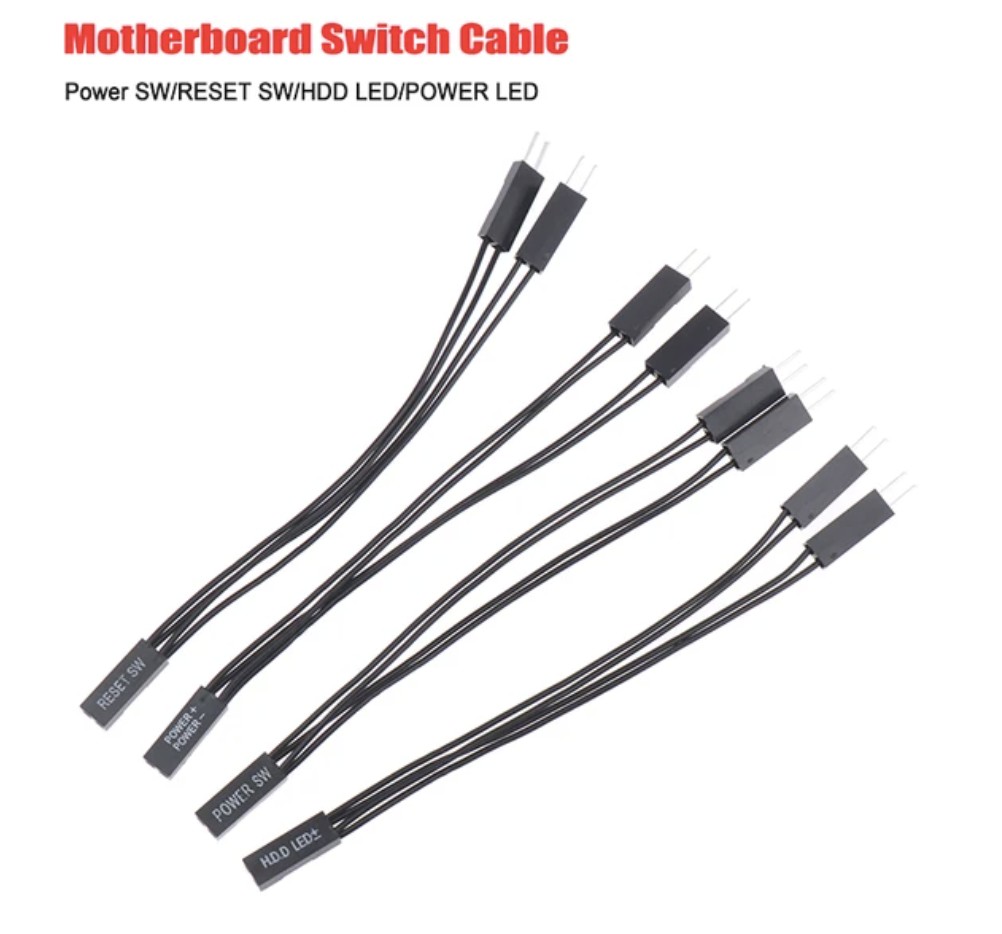
I bought on Aliexpress a powerswitch splitter, so that any computer can be turned off from 2 buttons (one on the desktop, and one in the room where I'm using the desktop),


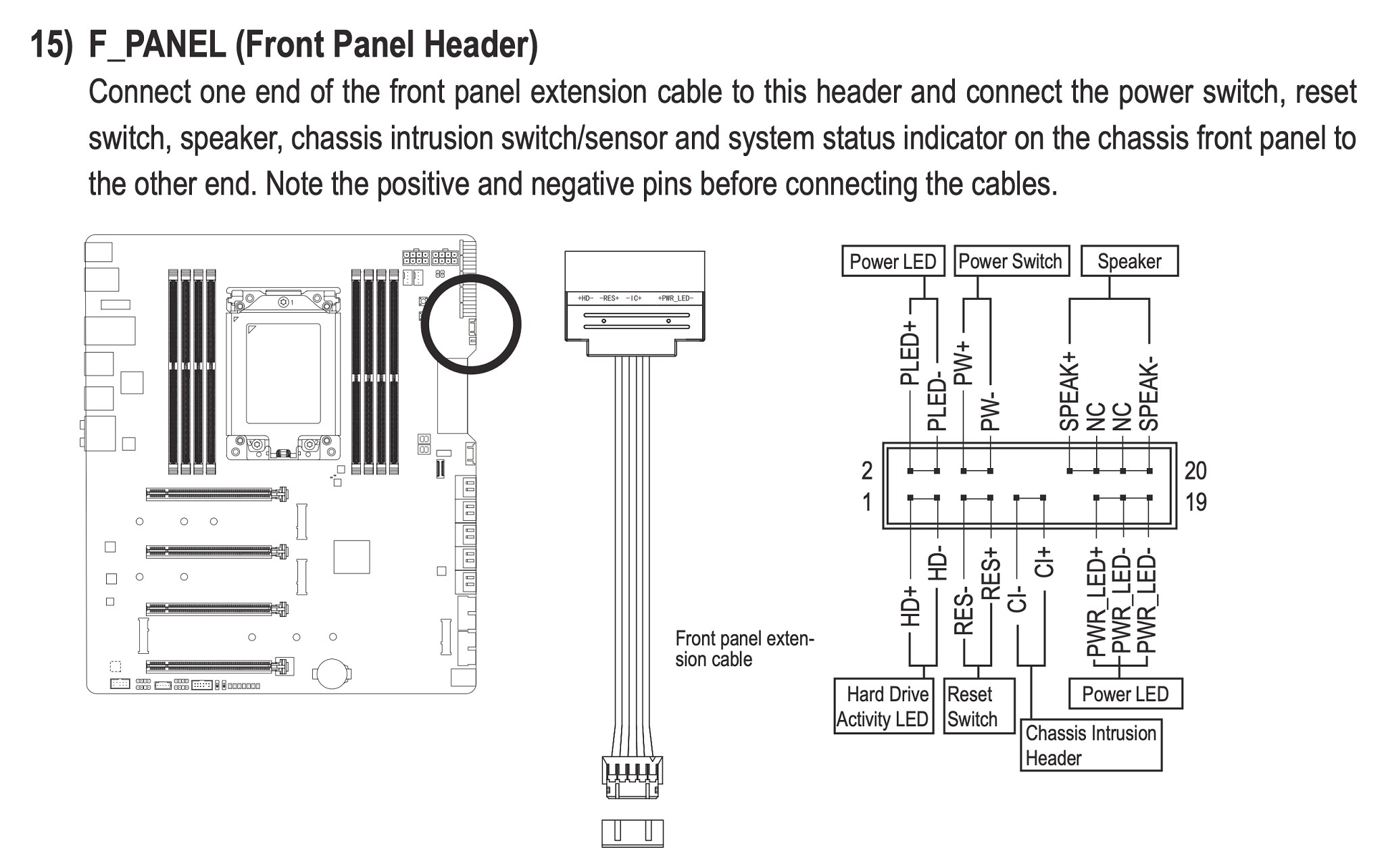
but now that I was about to install it I'm realizing it might not work. Seems my motherboard is using this single cable to bridge its chassi with the motherboard. So I guess unless I'm willing to mess with this cable by cutting it up and soldiering a splitter onto one wire, my idea isn't going to work?


Filter this topic showing only the reply marked as answer Create new topic
nztim
4023 posts

Uber Geek
+1 received by user: 2724

ID Verified
Trusted
TEAMnetwork
Subscriber

  #3392613 10-Jul-2025 08:53
Send private message

It's the chassis cable not the motherboard cable, that pinout is a standard ATX pinout so the Chassis manufacturer can produce a single connector


unless you are willing to cut the chassis cable you are SOOL 


Any views expressed on these forums are my own and don't necessarily reflect those of my employer. 


DaMuzzMan67
45 posts

Geek
+1 received by user: 25

ID Verified

  #3392619 10-Jul-2025 09:00
Send private message

If you are wanting to turn on from a different room, as an alternative, have you thought about waking the computer using Wake on Lan? You need to configure using both the BIOS and Windows settings. I have just set it up using a Gaming Computer (separate room) to our TV using a 30 metre long Fibre Optic HDMI Cable. To turn on I just use my android phone with the "Wake on Lan" app to send the wake-up packet to the computer.


Turning off, not so sure...


nztim
4023 posts

Uber Geek
+1 received by user: 2724

ID Verified
Trusted
TEAMnetwork
Subscriber

  #3392623 10-Jul-2025 09:12
Send private message

DaMuzzMan67:


If you are wanting to turn on from a different room, as an alternative, have you thought about waking the computer using Wake on Lan?


^^^^^ This


However, this requires the device to be connected via ethernet and not Wi-Fi not sure of the OPs setup


Any views expressed on these forums are my own and don't necessarily reflect those of my employer. 


Niber

43 posts

Geek
+1 received by user: 3


  #3392655 10-Jul-2025 10:59
Send private message

DaMuzzMan67:


If you are wanting to turn on from a different room, as an alternative, have you thought about waking the computer using Wake on Lan? You need to configure using both the BIOS and Windows settings. I have just set it up using a Gaming Computer (separate room) to our TV using a 30 metre long Fibre Optic HDMI Cable. To turn on I just use my android phone with the "Wake on Lan" app to send the wake-up packet to the computer.


Turning off, not so sure...


I use WakeOnLan now, but the problem is:


1) can't force turnoff/restart when computer freezes


2) i would like to disable the ethernet adapter when I'm doing overnight renders, as I just don't like the idea of leaving the computer on with internet access

WOW I can't believe u use 30m cable!! previously I did try having my office far away, but eventually I gave up as I found that long cables was just always a hassle, especially usb no matter how many powered hubs or usb-ethernet etc I tried (they would sometimes work and sometimes become unrelyable)


Niber

43 posts

Geek
+1 received by user: 3


  #3392658 10-Jul-2025 11:04
Send private message

nztim:


It's the chassis cable not the motherboard cable, that pinout is a standard ATX pinout so the Chassis manufacturer can produce a single connector


unless you are willing to cut the chassis cable you are SOOL 


Ahh ok bummer, it's quite an expensive chassi that I want to sell some day so not sure if I dare (and would suck if I messed up)

altho I think I just figured out the solution.. I guess I could just ONLY plug in the remote power button, as none of those chassi options seems important. 


nztim
4023 posts

Uber Geek
+1 received by user: 2724

ID Verified
Trusted
TEAMnetwork
Subscriber

  #3392726 10-Jul-2025 12:07
Send private message

Niber:


DaMuzzMan67:


If you are wanting to turn on from a different room, as an alternative, have you thought about waking the computer using Wake on Lan? You need to configure using both the BIOS and Windows settings. I have just set it up using a Gaming Computer (separate room) to our TV using a 30 metre long Fibre Optic HDMI Cable. To turn on I just use my android phone with the "Wake on Lan" app to send the wake-up packet to the computer.


Turning off, not so sure...


I use WakeOnLan now, but the problem is:


1) can't force turnoff/restart when computer freezes


2) i would like to disable the ethernet adapter when I'm doing overnight renders, as I just don't like the idea of leaving the computer on with internet access


Does your motherboard/CPU support AMT?


You can install another NIC in the PC and the use that for OS access data then turn the PC on/off via AMT


Any views expressed on these forums are my own and don't necessarily reflect those of my employer. 


Shop now at Mighty Ape (affiliate link).
SirHumphreyAppleby
2943 posts

Uber Geek
+1 received by user: 1866


  #3392740 10-Jul-2025 12:45
Send private message

nztim:


It's the chassis cable not the motherboard cable, that pinout is a standard ATX pinout so the Chassis manufacturer can produce a single connector


unless you are willing to cut the chassis cable you are SOOL 


No need to cut the cable, just use a 10x2 F to 2x 10x2 M ribbon cable. I had a quick look for an off-the-shelf solution and didn't find one, but they almost certainly exist and wouldn't be difficult to make yourself.


nztim
4023 posts

Uber Geek
+1 received by user: 2724

ID Verified
Trusted
TEAMnetwork
Subscriber

  #3392825 10-Jul-2025 15:54
Send private message

Actually, you could buy this and put your splitter in place of the power switch cable


Chassis Connector > extension cables > motherboard


Any views expressed on these forums are my own and don't necessarily reflect those of my employer. 


jonherries
1434 posts

Uber Geek
+1 received by user: 317

Trusted
Subscriber

  #3393410 12-Jul-2025 09:03
Send private message

Ah… why don’t you use ssh or vnc to turn it off/restart it? Or have I missed something?


Second question why are you turning it off?


Jon


nzkc
1634 posts

Uber Geek
+1 received by user: 1041


  #3393516 12-Jul-2025 13:03
Send private message

jonherries:


Ah… why don’t you use ssh or vnc to turn it off/restart it? Or have I missed something?


Second question why are you turning it off?


Jon


They mentioned "when it locks up" which might mean its unresponsive completely. Assuming it is; I'd be swaying towards some kind of remote KVM a la Jet KVM or Pi KVM


Maybe not the cheapest solution. But possibly the cleanest.


Filter this topic showing only the reply marked as answer Create new topic


Geekzone Live »

Try automatic live updates from Geekzone directly in your browser, without refreshing the page, with Geekzone Live now.


Are you subscribed to our RSS feed? You can download the latest headlines and summaries from our stories directly to your computer or smartphone by using a feed reader.
