Geekzone: technology news, blogs, forums
Guest
Welcome Guest.
You haven't logged in yet. If you don't have an account you can register now.


taylorroach

69 posts

Master Geek


#320205 17-Jul-2025 19:37
Send private message

Hello, I am a project manager building houses.


We use construction software that you access via a web browser (not standalone software).


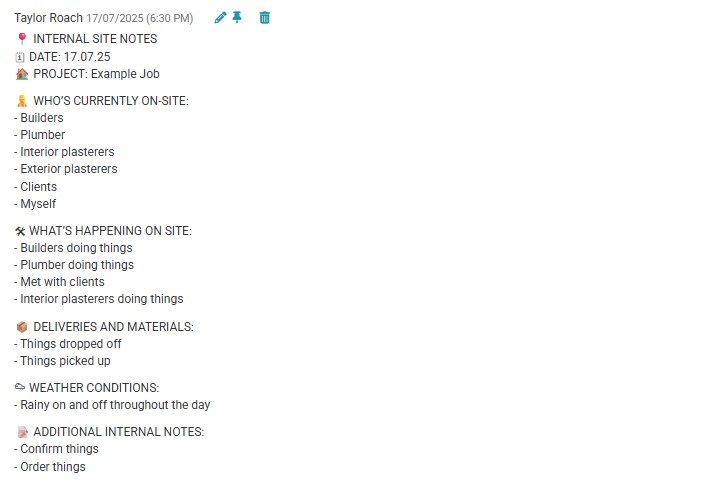
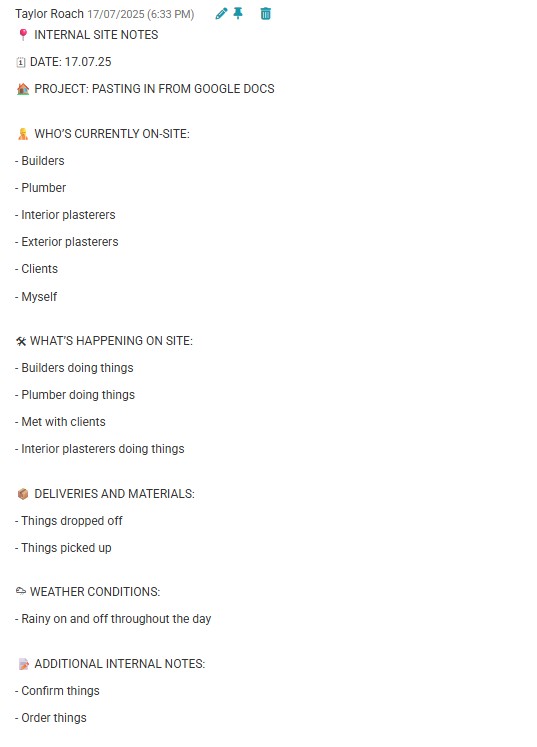
I speak to ChatGPT while driving to make my site notes for both internal notes with whats going on and also communication notes that go to the client. I had ChatGPT setup a template for internal and another for the client. It does a good job of this but when I copy and paste it into the text field to upload on the website it always stuffs up bullets, and line spacing.


It really annoys me and I have tried multiple different things to solve it. time is critical so I need to be as straight forward as possible and look good. I have asked chatgpt to do it different ways and also supplied chatgpt the element info from the text box.


I have also tried copying it into notepad, google docs etc prior to pasting it but still get issues.


I use iPad, Iphone and windows but get the same issue from all of them.


Have attached screenshot of how I would like it to look and also how it looks.


Anyone got any ideas?


TIA


Taylor :)

Create new topic
freitasm
BDFL - Memuneh
80806 posts

Uber Geek
+1 received by user: 41411

Administrator
ID Verified
Trusted
Geekzone
Lifetime subscriber

  #3395088 17-Jul-2025 21:19
Send private message

Do you mean the well-formatted one is the bottom (6:30 PM) and the badly-spaced one is the top (6:33 PM)?


Referral links: Quic Broadband (free setup code: R587125ERQ6VE) | Samsung | AliExpress | Wise | Sharesies 


Support Geekzone by subscribing (browse ads-free), or making a one-off or recurring donation through PressPatron.


taylorroach

69 posts

Master Geek


  #3395094 17-Jul-2025 22:17
Send private message

Yes, that is correct.


Create new topic


Geekzone Live »

Try automatic live updates from Geekzone directly in your browser, without refreshing the page, with Geekzone Live now.


Are you subscribed to our RSS feed? You can download the latest headlines and summaries from our stories directly to your computer or smartphone by using a feed reader.