Geekzone: technology news, blogs, forums
Guest
Welcome Guest.
You haven't logged in yet. If you don't have an account you can register now.


quickymart

15170 posts

Uber Geek
+1 received by user: 14504

ID Verified

#311752 11-Feb-2024 23:41
Send private message quote this post

My son has a new laptop running Windows 11, which I want to setup for him to be able to print documents for school over the network.


The setup goes something like this:


USB printer > plugged into Windows 10 desktop machine > Spark Smart modem > printer shared over network


With my old Vista laptop I recall setting up a USB printer port (or something) and this allowed me to print a document from said laptop, route it through the desktop and the printer would spit it out.


Windows 11 doesn't seem to have this option, and if I try to type in the path manually to the printer I get "Access Denied" - but at the same time I can see the folders that are being shared from the desktop over the network.


Googling hasn't produced much in the way of helpful information so far, and I can't seem to determine what the IP address of the printer might be to try and share it that way, if required.


It's a fairly old one now, an HP LaserJet 1020 but it's perfectly fine for his school assignments, which are mostly text. HP doesn't seem to have drivers for Windows 11 on their site either (I tried installing it directly on his laptop but to no avail).


Anyone had any success setting up one of these with Windows 11? Note that printing from the Vista laptop works fine.


Thanks in advance 🙂


View this topic in a long page with up to 500 replies per page Create new topic
 1 | 2
quickymart

15170 posts

Uber Geek
+1 received by user: 14504

ID Verified

  #3195732 15-Feb-2024 12:46
Send private message quote this post

Anyone know? I can't be the only person with this setup, surely? 😀


Spyware
3832 posts

Uber Geek
+1 received by user: 1378

Lifetime subscriber

  #3195821 15-Feb-2024 13:39
Send private message quote this post

Printing is via the SMB path and any IP address would be that of the machine the printer is connected to.


https://www.tenforums.com/tutorials/101156-add-shared-printer-windows-10-a.html


Spark Max Fibre using Mikrotik CCR1009-8G-1S-1S+, CRS125-24G-1S, Unifi UAP, U6-Pro, UAP-AC-M-Pro, Apple TV 4K (2022), Apple TV 4K (2017), iPad Air 1st gen, iPad Air 4th gen, iPhone 13, SkyNZ3151 (the white box). If it doesn't move then it's data cabled.


quickymart

15170 posts

Uber Geek
+1 received by user: 14504

ID Verified

  #3195869 15-Feb-2024 14:53
Send private message quote this post

Thanks for this, will have a look.


Failing that, is there such a thing as a Windows 11 downgrade kit? ie, you have 11 but want to downgrade to 10 instead? Does such a thing exist?


shrub
794 posts

Ultimate Geek
+1 received by user: 276

ID Verified

  #3195873 15-Feb-2024 14:59
Send private message quote this post

Can the printer be plugged into the USB port on the Router and shared that way?


richms
29326 posts

Uber Geek
+1 received by user: 10408

Trusted
Lifetime subscriber

  #3195876 15-Feb-2024 15:01
Send private message quote this post

shrub:


Can the printer be plugged into the USB port on the Router and shared that way?


That makes its own set of problems as many printers do not use the standard USB printing descriptors because they offload more of the work to the PC, and it also breaks apps like the HP ones that tell you that you need to order more ink etc


Richard rich.ms

Spyware
3832 posts

Uber Geek
+1 received by user: 1378

Lifetime subscriber

  #3195896 15-Feb-2024 15:24
Send private message quote this post

quickymart:


Thanks for this, will have a look.


Failing that, is there such a thing as a Windows 11 downgrade kit? ie, you have 11 but want to downgrade to 10 instead? Does such a thing exist?


Very unlikely to be any functional difference between 10 and 11 re: adding shared printers. Printer wizard interface at least looks the same to me.


Spark Max Fibre using Mikrotik CCR1009-8G-1S-1S+, CRS125-24G-1S, Unifi UAP, U6-Pro, UAP-AC-M-Pro, Apple TV 4K (2022), Apple TV 4K (2017), iPad Air 1st gen, iPad Air 4th gen, iPhone 13, SkyNZ3151 (the white box). If it doesn't move then it's data cabled.


Want to support Geekzone and browse the site without the ads? Subscribe to Geekzone now (monthly, annual and lifetime options).
bagheera
545 posts

Ultimate Geek
+1 received by user: 190


  #3195900 15-Feb-2024 15:32
Send private message quote this post

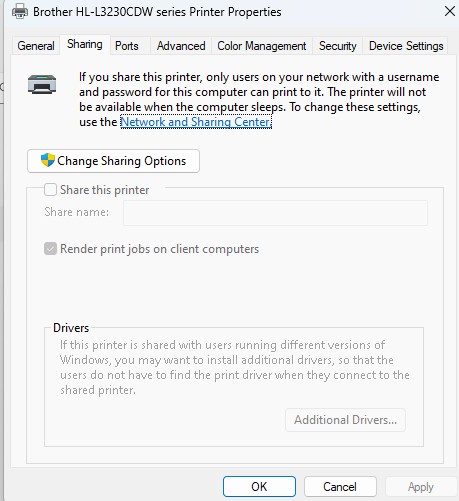
Sound like the printer not shared - on the PC with the printer, got to the printer and get properties, and click on the share tab, then share it, then on the PC with out the printer, add printer and go \\<pc with printer name>\<share name you put in> or most like you will see it with the shared folder after you share it


quickymart

15170 posts

Uber Geek
+1 received by user: 14504

ID Verified

  #3196016 15-Feb-2024 20:38
Send private message quote this post

shrub:


Can the printer be plugged into the USB port on the Router and shared that way?


I don't think that works, this printer is quite old now (2006). Otherwise that's probably what I would do.


quickymart

15170 posts

Uber Geek
+1 received by user: 14504

ID Verified

  #3196017 15-Feb-2024 20:38
Send private message quote this post

bagheera:


Sound like the printer not shared - on the PC with the printer, got to the printer and get properties, and click on the share tab, then share it, then on the PC with out the printer, add printer and go \\<pc with printer name>\<share name you put in> or most like you will see it with the shared folder after you share it


Thanks, but it's definitely setup for sharing - it's been shared using this method previously over the network and worked just fine. It's just this 11 machine that's giving me grief when trying to add it.


lxsw20
3741 posts

Uber Geek
+1 received by user: 2238

Subscriber

  #3196032 15-Feb-2024 21:58
Send private message quote this post

Downgrade rights to Windows 10 is only a thing with Windows 11 Pro (not Home) also why would you move back to an Operating System that is dead next year.


It's very unlikely Windows 11 is the issue. 


snj

snj
346 posts

Ultimate Geek
+1 received by user: 253


  #3196043 15-Feb-2024 23:37
Send private message quote this post

Regarding the "Access Denied" does anything show up in the Audit Log in Event Viewer?


One thing that can trip up sharing on Windows these days is Microsoft Accounts, if the printer is shared with your son's Microsoft Account user, you might need to fix the link/cache for it, a bit of detail at https://cmdrkeene.com/remote-desktop-with-microsoft-account-sign-in/ but the crux is to open a command prompt on the Windows 10 machine and do something like:


runas /u:MicrosoftAccount\[email address] winver


Shop now for Dell laptops and other devices (affiliate link).
quickymart

15170 posts

Uber Geek
+1 received by user: 14504

ID Verified

  #3196077 16-Feb-2024 08:33
Send private message quote this post

Thanks, that's a good idea, will try that when he's home as he has the laptop with him at school at the moment.


Spyware
3832 posts

Uber Geek
+1 received by user: 1378

Lifetime subscriber

  #3196102 16-Feb-2024 09:20
Send private message quote this post

quickymart:


bagheera:


Sound like the printer not shared - on the PC with the printer, got to the printer and get properties, and click on the share tab, then share it, then on the PC with out the printer, add printer and go \\<pc with printer name>\<share name you put in> or most like you will see it with the shared folder after you share it


Thanks, but it's definitely setup for sharing - it's been shared using this method previously over the network and worked just fine. It's just this 11 machine that's giving me grief when trying to add it.


And if you look at the Security tab does Everyone have print permission???


Spark Max Fibre using Mikrotik CCR1009-8G-1S-1S+, CRS125-24G-1S, Unifi UAP, U6-Pro, UAP-AC-M-Pro, Apple TV 4K (2022), Apple TV 4K (2017), iPad Air 1st gen, iPad Air 4th gen, iPhone 13, SkyNZ3151 (the white box). If it doesn't move then it's data cabled.


quickymart

15170 posts

Uber Geek
+1 received by user: 14504

ID Verified

  #3196132 16-Feb-2024 10:58
Send private message quote this post

Spyware:


And if you look at the Security tab does Everyone have print permission???


Just checked that, and yes.


quickymart

15170 posts

Uber Geek
+1 received by user: 14504

ID Verified

  #3484884 27-Apr-2026 21:52
Send private message quote this post

Ahoy, just bumping this thread as now I have a similar issue, although this time around it's kind of in reverse 😁


I finally upgraded the desktop mentioned above to Windows 11 last week, however now my network shared printer isn't working again. Instead of the 1020, I now have an HP Smart Tank 7300 series printer. This was shared under the old desktop OS (Windows 10) and users on my home network could print files with no issues.


However after upgrading to 11, printing from another device (not the desktop) doesn't work. I deleted the printer but now the laptop I'm using can't find the printer. I remember the IP address of the printer needed to be added and setup manually previously so I thought I'd give this a go but to no avail. The help files for the printer are useless.


Can someone please point me in the direction of a step-by-step of adding a network printer on Windows 11 when it's not being detected automatically?


Edit/update: I figured it out in the end, had to install HP's "Smart" application on the laptop, which is a nuisance as I was trying to avoid doing that, but I couldn't find anywhere to just download the drivers and be done with it. All seems to be working now.


 1 | 2
View this topic in a long page with up to 500 replies per page Create new topic


News and reviews »

Philips Hue Ultra-Bright LED Strip Flux Review
Posted 29-Jun-2026 10:46


ECOVACS Deebot T80s Review
Posted 22-Jun-2026 11:58


D-Link A/NZ Launches GaN Charger Range
Posted 12-Jun-2026 09:25


New Amazon Kindle Scribe Range Now Available in New Zealand
Posted 12-Jun-2026 09:19


OPPO Watch X3 Launches in New Zealand
Posted 5-Jun-2026 17:01


Blink Debuts Its First 2K Video Doorbell
Posted 4-Jun-2026 15:45


Geekzone Live »

Try automatic live updates from Geekzone directly in your browser, without refreshing the page, with Geekzone Live now.


Are you subscribed to our RSS feed? You can download the latest headlines and summaries from our stories directly to your computer or smartphone by using a feed reader.