Geekzone: technology news, blogs, forums
Guest
Welcome Guest.
You haven't logged in yet. If you don't have an account you can register now.


hazza87

352 posts

Ultimate Geek
+1 received by user: 7


#116007 15-Apr-2013 12:15
Send private message

Old Setup:

RTA 1320 half bridged to TP Link 1043ND (Gargoyle 1.4.7)

Recently had a few days of constant internet dropouts, would be fixed by power cycling modem and router. But issue would return fairly shortly. Decided it would be time to replace the old RTA 1320 and just get a Vigor 120 and bridge it to the 1043ND as had been getting inconsistent and sub par speeds for a while.

New Setup:

Draytek Vigor 120 bridged (PPoA to PPoE) to TP Link 1043ND (Gargoyle 1.4.7)

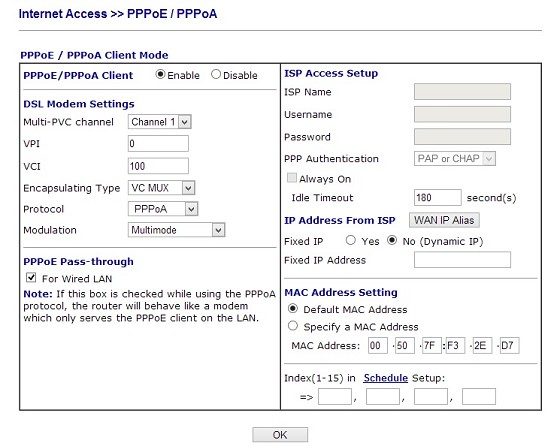
Speeds much improved and more consistent, simple setup (PPPoE Pass Through 
 box on vigor 120 ticked and then doing PPoE authentication on Gargoyle see screenshot of settings)


Still however every 2 days, usually when i wake up in the morning there is no internet connectivity from any devices, i can still connect to the router and modem fine, when i check both seem to still be connected fine, Gargoyle shows same WAN IP address but i cannot browse any websites etc.

Re saving the gargoyle routers settings (no changes) picks up a new IP from Vodafone (WAN ip address in the status view on gargoyle) then all works fine again for a couple of days.

This has been happening for the past week, no idea what is going on.

Create new topic
mentalinc
3384 posts

Uber Geek
+1 received by user: 1023

Trusted

  #799783 15-Apr-2013 18:28
Send private message

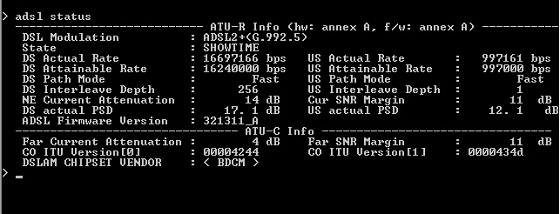
What are your line sync rates?
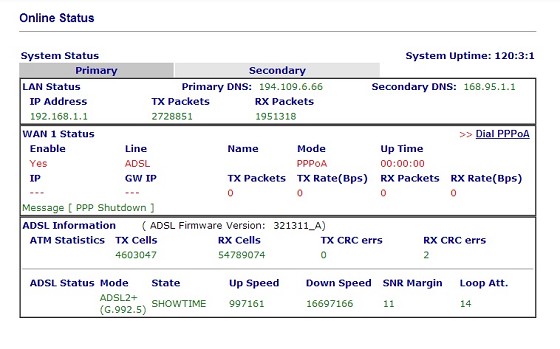
And how many errors do you have on the modem?


CPU: AMD 5900x | RAM: GSKILL Trident Z Neo RGB F4-3600C16D-32GTZNC-32-GB | MB:  Asus X570-E | GFX: EVGA FTW3 Ultra RTX 3080Ti| Monitor: LG 27GL850-B 2560x1440


Quic: https://account.quic.nz/refer/473833 R473833EQKIBX 


hazza87

352 posts

Ultimate Geek
+1 received by user: 7


  #799812 15-Apr-2013 19:27
Send private message

Gargoyle Status Page:


ADSL Stats:


ADSL Errors:


coffeebaron
6304 posts

Uber Geek
+1 received by user: 3566

Trusted
Lifetime subscriber

  #799831 15-Apr-2013 20:21
Send private message

Have you got a master filter? What's your wiring like?


Rural IT and Broadband support.


Broadband troubleshooting and master filter installs.
Starlink installer - one month free: https://www.starlink.com/?referral=RC-32845-88860-71 
Wi-Fi and networking
Cel-Fi supply and installer - boost your mobile phone coverage legally


Need help in Auckland, Waikato or BoP? Click my email button, or email me direct: [my user name] at geekzonemail dot com


hazza87

352 posts

Ultimate Geek
+1 received by user: 7


  #799835 15-Apr-2013 20:26
Send private message

Yes master filter installed, structured cabling done by me last year. Modem in network cupboard with patch panel and switch.

coffeebaron
6304 posts

Uber Geek
+1 received by user: 3566

Trusted
Lifetime subscriber

  #799836 15-Apr-2013 20:32
Send private message

Have you tried the alternate firmware for the Draytek?


Rural IT and Broadband support.


Broadband troubleshooting and master filter installs.
Starlink installer - one month free: https://www.starlink.com/?referral=RC-32845-88860-71 
Wi-Fi and networking
Cel-Fi supply and installer - boost your mobile phone coverage legally


Need help in Auckland, Waikato or BoP? Click my email button, or email me direct: [my user name] at geekzonemail dot com


hazza87

352 posts

Ultimate Geek
+1 received by user: 7


  #799837 15-Apr-2013 20:38
Send private message

No, haven't tried amy other firmwares. Had considered upgrading to a newer version of gargoyle 1.5.4 or 1.5.6
Was hoping it could be something simple like using custom mac address setting in gargoyle. Had read about Tp links having different mac addresses for their wan ports.

HP


Shop now for HP laptops and other devices (affiliate link).
hazza87

352 posts

Ultimate Geek
+1 received by user: 7


  #800536 16-Apr-2013 21:37
Send private message

Do these settings look correct, as i understand it none of these settings matter except the PPPoE passthrough check box.
However i notice the PPP authentication setting is 180 seconds and is not greyed out. i read it should be at -1 for always on connections. Not sure if this setting is now controlled by the gargoyle router since it is doing the authentication now.


coffeebaron
6304 posts

Uber Geek
+1 received by user: 3566

Trusted
Lifetime subscriber

  #800817 17-Apr-2013 11:08
Send private message

Try the two firmware versions for Vigor 120 here:
http://www.draytek.net.nz/draytek/downloads/


Rural IT and Broadband support.


Broadband troubleshooting and master filter installs.
Starlink installer - one month free: https://www.starlink.com/?referral=RC-32845-88860-71 
Wi-Fi and networking
Cel-Fi supply and installer - boost your mobile phone coverage legally


Need help in Auckland, Waikato or BoP? Click my email button, or email me direct: [my user name] at geekzonemail dot com


Create new topic


Geekzone Live »

Try automatic live updates from Geekzone directly in your browser, without refreshing the page, with Geekzone Live now.


Are you subscribed to our RSS feed? You can download the latest headlines and summaries from our stories directly to your computer or smartphone by using a feed reader.