Geekzone: technology news, blogs, forums
Guest
Welcome Guest.
You haven't logged in yet. If you don't have an account you can register now.


Earbanean

1116 posts

Uber Geek
+1 received by user: 378


#324482 15-Apr-2026 19:07
Send private message quote this post

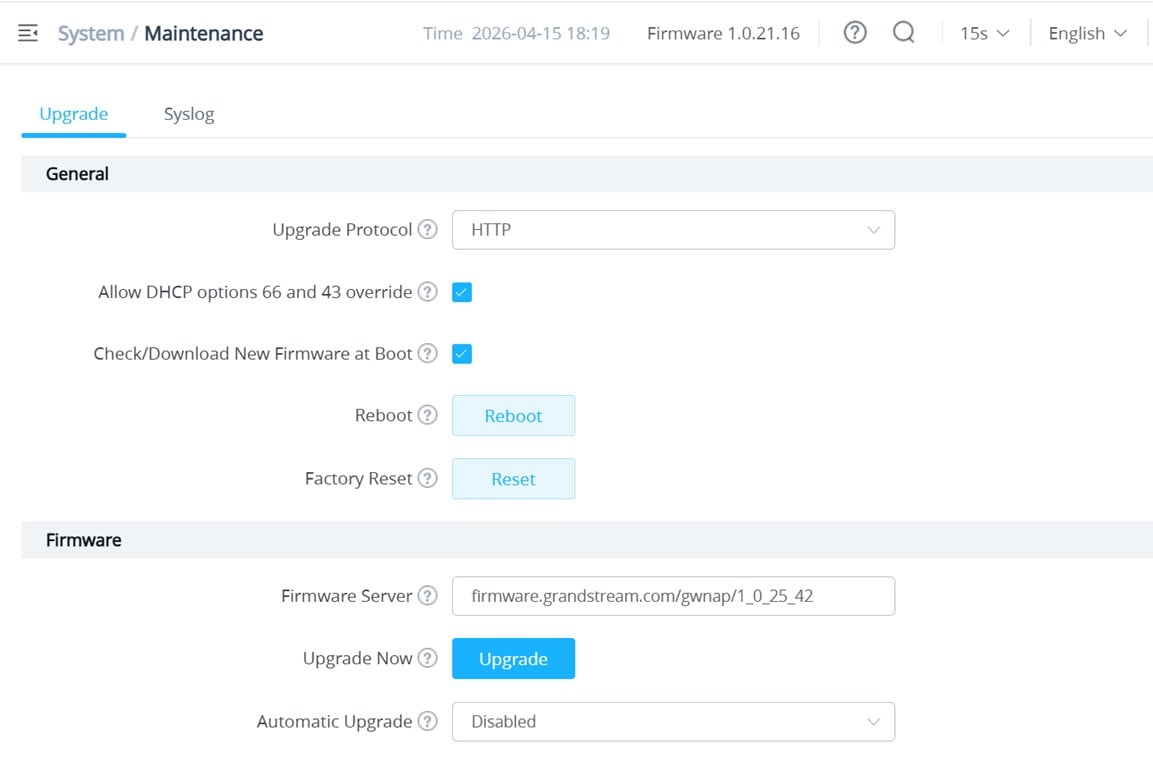
I'm trying to update the firmware on a pair of GWN7660 APs.  I log into the management of the master AP and go to the System/Maintenance page and configure it as below.  However, when I click the 'Ugrade' button, I get the error message "Obatin server firmware failed!".  I assumed that's meant to say "Obtain...". 


Anyone seen this before and/or know what I'm doing wrong here?


Create new topic
Jase2985
13742 posts

Uber Geek
+1 received by user: 6226

ID Verified
Lifetime subscriber

  #3481153 15-Apr-2026 19:17
Send private message quote this post

Do you have the right firmware server address?


I'm sure they changed how they did this a while back to a more generic address


RunningMan
9195 posts

Uber Geek
+1 received by user: 4846


  #3481155 15-Apr-2026 19:20
Send private message quote this post

It was the other way around. Every firmware has its own address to stop auto updating to new firmware. Huge nuisance but implemented because of all the people that had auto update turned on when a dud firmware was dropped.


Either way, change the protocol to https and you should be OK.


Earbanean

1116 posts

Uber Geek
+1 received by user: 378


  #3481158 15-Apr-2026 20:00
Send private message quote this post

Jase2985:


Do you have the right firmware server address?


I'm sure they changed how they did this a while back to a more generic address


Pretty sure, as I've taken that straight from their Firmware web page.


Earbanean

1116 posts

Uber Geek
+1 received by user: 378


  #3481159 15-Apr-2026 20:00
Send private message quote this post

RunningMan:


It was the other way around. Every firmware has its own address to stop auto updating to new firmware. Huge nuisance but implemented because of all the people that had auto update turned on when a dud firmware was dropped.


Either way, change the protocol to https and you should be OK.


Their firmware update page says explicitly "Please note our public firmware upgrade server is using HTTP."


shrub
792 posts

Ultimate Geek
+1 received by user: 272

ID Verified

  #3481160 15-Apr-2026 20:09
Send private message quote this post

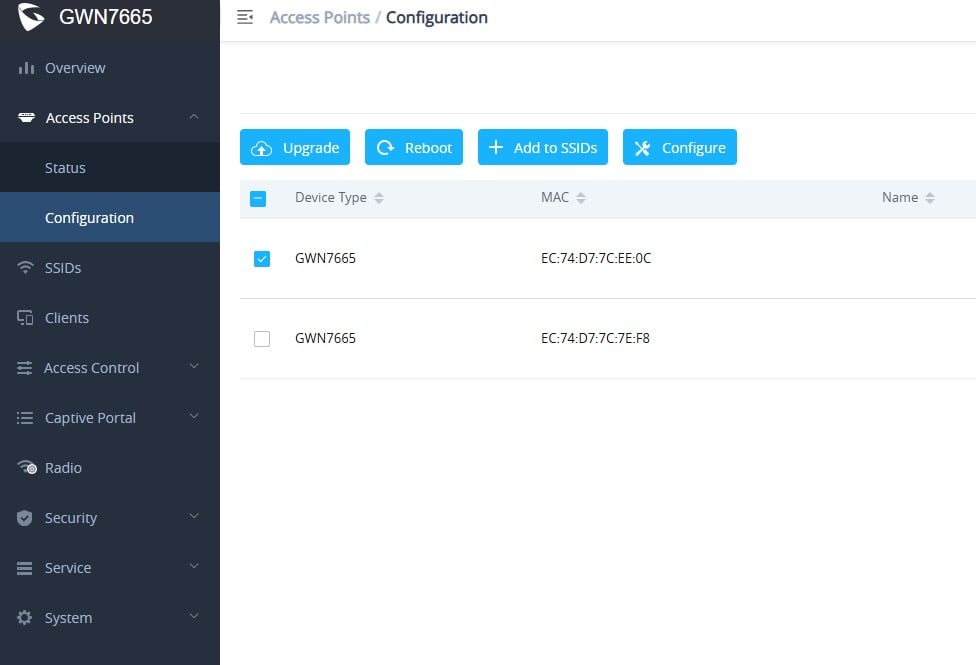
Went through this last night with mine. Apparently you need to put the address in the Maintenance tab then Save.


firmware.grandstream.com/gwnap/1_0_25_42


After that then go back to your access point configuration then select the access point and upgrade. Such a ass backwards system.


RunningMan
9195 posts

Uber Geek
+1 received by user: 4846


  #3481161 15-Apr-2026 20:23
Send private message quote this post

Set the protocol to HTTPS.


Upgrade the master AP from the system/maintenance tab


Upgrade any other APs from the Access Points/Configuration tab


Stream your favourite shows now on Apple TV (affiliate link).
Earbanean

1116 posts

Uber Geek
+1 received by user: 378


  #3481175 15-Apr-2026 21:41
Send private message quote this post

shrub:


Went through this last night with mine. Apparently you need to put the address in the Maintenance tab then Save.


firmware.grandstream.com/gwnap/1_0_25_42


After that then go back to your access point configuration then select the access point and upgrade. Such a ass backwards system.


OK, thanks.  I'll give that a try tomorrow.  They're down at the local rugby club, so only have a small window after work to try to get it done.  This sounds like it should do the trick though.


Shindig
1625 posts

Uber Geek
+1 received by user: 363

Trusted

  #3481212 16-Apr-2026 05:10
Send private message quote this post

Can confirm, add the HTTP address of the firmware then click SAVE, then click UPGRADE.


The little things make the biggest difference.


Create new topic


Geekzone Live »

Try automatic live updates from Geekzone directly in your browser, without refreshing the page, with Geekzone Live now.


Are you subscribed to our RSS feed? You can download the latest headlines and summaries from our stories directly to your computer or smartphone by using a feed reader.