
Geekzone: technology news, blogs, forums
Guest
Welcome Guest.
You haven't logged in yet. If you don't have an account you can register now.


View this topic in a long page with up to 500 replies per page Create new topic
1 | 2 | 3 | 4 | 5 | 6 | 7 | 8 | 9 | 10 | 11 | 12 | ... | 14
matisyahu
1639 posts

Uber Geek
+1 received by user: 355

Trusted

  #2013665 10-May-2018 22:25
Send private message

RichardWong:


matisyahu:


Anyone using Android File Transfer on macOS - is Huawei P20 Pro compatible or is the MTP implementation broken like it is with Samsung's build of Android?


yes it works. I can import to Lightroom on Mac using "Transfer Photos" mode


That is using PTP mode but have you attached the phone up, loaded up Android File Transfer and copied files across? the PTP worked with Samsung Galaxy S8 but the MTP implementation on the phone itself as a complete train wreck along with the bluetooth fundamentally broken thus it didn't work with Handsfree 2.



"When the people are being beaten with a stick, they are not much happier if it is called 'the People's Stick'"


RichardWong
31 posts

Geek
+1 received by user: 14


  #2013667 10-May-2018 22:35
Send private message

matisyahu:


RichardWong:


matisyahu:


Anyone using Android File Transfer on macOS - is Huawei P20 Pro compatible or is the MTP implementation broken like it is with Samsung's build of Android?


yes it works. I can import to Lightroom on Mac using "Transfer Photos" mode


That is using PTP mode but have you attached the phone up, loaded up Android File Transfer and copied files across? the PTP worked with Samsung Galaxy S8 but the MTP implementation on the phone itself as a complete train wreck along with the bluetooth fundamentally broken thus it didn't work with Handsfree 2.


yes also tried that. That's how i copy all the video files off my P20 Pro.


www.photobyrichard.com

RichardWong
31 posts

Geek
+1 received by user: 14


  #2018326 18-May-2018 13:41
Send private message

Just notice PBTech has their P20/Pro deals back (free Sennheiser noise cancelling headphone)


www.photobyrichard.com


maoriboy
1034 posts

Uber Geek
+1 received by user: 562

Trusted

  #2023151 26-May-2018 23:04
Send private message

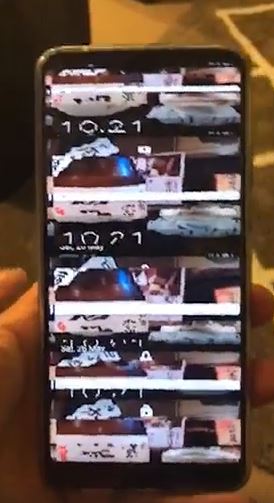
So this just happened to the P20 Pro I just bought on Thursday :-(


Tried a factory reset when I could vaguely see the screen and no difference. I think it's f*#$ed. What should I say to the Spark guys when I go in tomorrow?


heavenlywild
5091 posts

Uber Geek
+1 received by user: 901

Trusted

  #2023152 26-May-2018 23:06
Send private message

maoriboy:

So this just happened to the P20 Pro I just bought on Thursday :-(


Tried a factory reset when I could vaguely see the screen and no difference. I think it's f*#$ed. What should I say to the Spark guys when I go in tomorrow?


Damn, sorry to hear man.

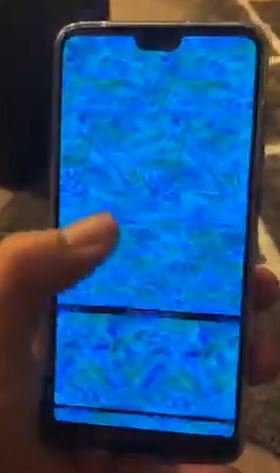
The screen says it all doesn't it?

Ask for another I'd say!

maoriboy
1034 posts

Uber Geek
+1 received by user: 562

Trusted

  #2023154 26-May-2018 23:09
Send private message

And another "interesting" pic showing the issue...


Shop now for Dell laptops and other devices (affiliate link).
heavenlywild
5091 posts

Uber Geek
+1 received by user: 901

Trusted

  #2023155 26-May-2018 23:20
Send private message

Keen to hear what Spark decides to do. Hope it works out well. Keep us posted!

freitasm
BDFL - Memuneh
80655 posts

Uber Geek
+1 received by user: 41052

Administrator
ID Verified
Trusted
Geekzone
Lifetime subscriber

  #2023237 27-May-2018 09:36
Send private message

Let me know the outcome please. 


Referral links: Quic Broadband (free setup code: R587125ERQ6VE) | Samsung | AliExpress | Wise | Sharesies 


Support Geekzone by subscribing (browse ads-free), or making a one-off or recurring donation through PressPatron.


maoriboy
1034 posts

Uber Geek
+1 received by user: 562

Trusted

  #2023311 27-May-2018 11:35
Send private message

OK, got up this morning and bizarrely the phone is fine. I have no idea how that happened as I've done nothing different other than plug it into my computer.


Should I still take it back into the store to get a replacement or just leave it and pass that off as a once off issue? I'm leaning towards taking it back, but I know there will be a fight to get it swapped. What do you think?


*Edit* No scratch that, it's failed again. Righto, into the Spark store we go...grrrrrrr


pgsheng
160 posts

Master Geek
+1 received by user: 3


  #2023320 27-May-2018 11:57
Send private message

For DOA problem you can take it back in 14 days for replacement. Mine had problem with back camera cover, I forgot to take it back within 14 days and ended up with replacing whole back cover. The Fonefix tech damaged the original screen protector during the job and I'm still waiting for their negotiation with Huawei for replacement protector...

maoriboy
1034 posts

Uber Geek
+1 received by user: 562

Trusted

  #2023386 27-May-2018 14:08
Send private message

Alright. Went into the Spark store armed with video evidence and photos and preparing for a fight. They looked at the videos, verified it themselves when they tried to turn it on...and replaced the phone. No fuss or anything. They even replaced the glass screen protector I had purchased. Happy to get that sorted so fast and big ups to the Spark staff who served me.


Move to New Zealand's best fibre broadband service (affiliate link). Free setup code: R587125ERQ6VE. Note that to use Quic Broadband you must be comfortable with configuring your own router.
heavenlywild
5091 posts

Uber Geek
+1 received by user: 901

Trusted

  #2023389 27-May-2018 14:25
Send private message

Nice one, great result! So pleasing to hear they didn't muck you about.

RichardWong
31 posts

Geek
+1 received by user: 14


  #2023422 27-May-2018 16:15
Send private message

pgsheng: For DOA problem you can take it back in 14 days for replacement. Mine had problem with back camera cover, I forgot to take it back within 14 days and ended up with replacing whole back cover. The Fonefix tech damaged the original screen protector during the job and I'm still waiting for their negotiation with Huawei for replacement protector...


hm... when I had problems with my iPhone, (similar problem with the screen) a few days after purchase, I took it back to Vodafone and they refused to replace it for me and only agreed to send it back to repair.


www.photobyrichard.com

maoriboy
1034 posts

Uber Geek
+1 received by user: 562

Trusted

  #2026126 31-May-2018 11:00
Send private message

Anyone else get a 700MB update last night? I'll get the change log when I can, but one thing I did notice straight away is that the Night mode in the camera menu has been moved out of the More menu and onto the selector swipe bar thingee. A much more sensible place imo.


*Edit* Seems like it was just a system security update but that doesn't explain why the camera menu changed. I'm confused...yell


**Edit 2** Camera app was updated in a previous update that I've now only caught up with...figures lol


RichardWong
31 posts

Geek
+1 received by user: 14


  #2026794 1-Jun-2018 11:00
Send private message

Yes I received that on Wednesday.
Pretty sure it's not just a security update. The change log doesn't list everything.
Phone seems to feels a bit more responsive.
I have a feeling they have fixed the Google map issue that affects a lot of apps. (Can't confirm but a few apps i tried seems working fine )
And a lot of changes to the camera app as mentioned. ISO 102400 should be useable now.


www.photobyrichard.com

1 | 2 | 3 | 4 | 5 | 6 | 7 | 8 | 9 | 10 | 11 | 12 | ... | 14
View this topic in a long page with up to 500 replies per page Create new topic


Geekzone Live »

Try automatic live updates from Geekzone directly in your browser, without refreshing the page, with Geekzone Live now.


Are you subscribed to our RSS feed? You can download the latest headlines and summaries from our stories directly to your computer or smartphone by using a feed reader.
