Geekzone: technology news, blogs, forums
Guest
Welcome Guest.
You haven't logged in yet. If you don't have an account you can register now.


Mithster18

17 posts

Geek


#20537 29-Mar-2008 15:54
Send private message

It's been a couple of days since this happened.
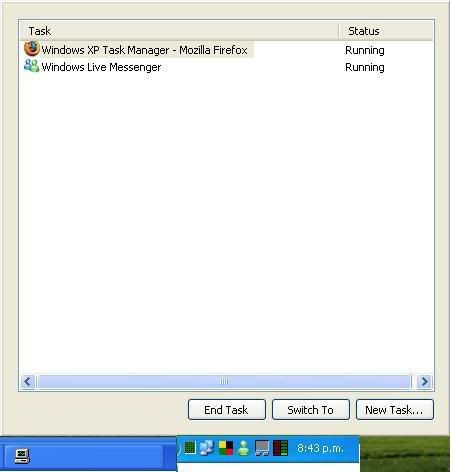
I opened Windows task manager to close an application that had froze and now it has no Options up the top nor any blue bar up the top with the minimize & close options, how do I get this back?

I have Windows XP SP2

Create new topic
manhinli
2483 posts

Uber Geek
+1 received by user: 4

Trusted

  #119557 29-Mar-2008 16:05
Send private message

Is Explorer.exe running?

Press ALT + SPACEBAR to get the window control menu.


Find me on Twitter!

I posted 1, 2 x 10^3 times!


Mithster18

17 posts

Geek


  #119602 29-Mar-2008 21:07
Send private message

Hm, now that I've had a look at the task bar the while the Task Manager is open, there is no name, only the "Opening" look to it.
I have included a montage of what I see.

Task Manager

manhinli
2483 posts

Uber Geek
+1 received by user: 4

Trusted

  #119603 29-Mar-2008 21:20
Send private message

I've only have this happen to me once, but minimising and restoring the window using the taskbar seemed to do the trick. Not sure if its permanent.


Find me on Twitter!

I posted 1, 2 x 10^3 times!


Mithster18

17 posts

Geek


  #119695 30-Mar-2008 15:12
Send private message

Hm, I can't click anywhere apart from selecting the thing to close & The buttons at the bottom of the window.
I can change windows by pressing Crl + Tab. And the only way I can close it is by presing Alt + F4 or Esc.

manhinli
2483 posts

Uber Geek
+1 received by user: 4

Trusted

  #119696 30-Mar-2008 15:16
Send private message

I would have already guessed that...

But it seems to be an actual mode (and it's fun to replicate it too Laughing):
http://www.winxptutor.com/taskmgr.htm

Just double-click the empty areas in the frame.


Find me on Twitter!

I posted 1, 2 x 10^3 times!

Mithster18

17 posts

Geek


#119734 30-Mar-2008 20:25
Send private message

Fixed with the simpliest of actions....

Thanks for the help & the link.


P.S Congrats on 1k posts.

Create new topic


Geekzone Live »

Try automatic live updates from Geekzone directly in your browser, without refreshing the page, with Geekzone Live now.


Are you subscribed to our RSS feed? You can download the latest headlines and summaries from our stories directly to your computer or smartphone by using a feed reader.