Geekzone: technology news, blogs, forums
Guest
Welcome Guest.
You haven't logged in yet. If you don't have an account you can register now.


View this topic in a long page with up to 500 replies per page Create new topic
1 | ... | 21 | 22 | 23 | 24 | 25 | 26 | 27 | 28 | 29 | 30 | 31 | ... | 91
garvani
1873 posts

Uber Geek
+1 received by user: 83

Trusted

  #1084086 8-Jul-2014 13:30
Send private message

freitasm: Interesting, I plugged my wireless Logitech K400 and while the touchpad works fine to move the cursor around the screen, the keyboard and button clicks don't...


Has this just started happening or have you only just plugged in the keyboard for the first time?

If its just started playing up, is this just on the home screen (but fine in xbmc etc?). I saw someone else in a xda thread with the same problem (probably a different keyboard though). There was a remote firmware update in the last week that caused the issue for them, it was working fine before this.


freitasm
BDFL - Memuneh
80657 posts

Uber Geek
+1 received by user: 41064

Administrator
ID Verified
Trusted
Geekzone
Lifetime subscriber

  #1084090 8-Jul-2014 13:35
Send private message

Hmmm, since the first time I plugged the keyboard, about three weeks ago.

Also, what firmware? Amazon pages don't show any updates and the last udpate for my Amazon Fire TV box was installed in April.


Referral links: Quic Broadband (free setup code: R587125ERQ6VE) | Samsung | AliExpress | Wise | Sharesies 


Support Geekzone by subscribing (browse ads-free), or making a one-off or recurring donation through PressPatron.


garvani
1873 posts

Uber Geek
+1 received by user: 83

Trusted

  #1084095 8-Jul-2014 13:50
Send private message

freitasm: Hmmm, since the first time I plugged the keyboard, about three weeks ago.

Also, what firmware? Amazon pages don't show any updates and the last udpate for my Amazon Fire TV box was installed in April.


ahh ok, it will be unrelated to the remote firmware then. It wasn't a full blown firmware update, just a minor remote update. I found out about it here


eliema
20 posts

Geek
+1 received by user: 3


  #1084111 8-Jul-2014 14:20
Send private message

jakenz: No NBA app is listed on the XDA thread that lists the status of apps for sideloading to the Fire TV as Working, Not working or Working with Limitations. The limitation for most of the apps in the last category is they require a mouse and/or keyboard. Roughly a third of apps in each category.


Cheers. I don't think I'd expect it to have been tested as it's a bit of a niche thing at the moment, since the Fire TV is 'not available' here yet and the Fire TV already has the NBA US app. It's a weird set up the NBA have done with their streaming apps across Android and iOS.

I don't suppose anyone would be willing to sideload the apk to test for me?


jakenz
52 posts

Master Geek
+1 received by user: 3


  #1084140 8-Jul-2014 15:06
Send private message

I'd give it a go for you if my Fire TV wasn't still somewhere between YouPost's US depot and Wellington...

jakenz
52 posts

Master Geek
+1 received by user: 3


  #1084141 8-Jul-2014 15:12
Send private message

..er that should of course be YouShop by NZ Post... not sure how effective YouPost (NZ Post's digital mailbox service) would be at digitising a parcel.


Stream your favourite shows now on Apple TV (affiliate link).
cdrnet
92 posts

Master Geek
+1 received by user: 2


  #1084274 8-Jul-2014 17:59
Send private message

jakenz: ..er that should of course be YouShop by NZ Post... not sure how effective YouPost (NZ Post's digital mailbox service) would be at digitising a parcel.


I used www.buyusa.co.nz and received a great service.


Why, oh why, oh why, won't this work )c8

BigMal
998 posts

Ultimate Geek
+1 received by user: 160

ID Verified
Trusted

  #1086716 10-Jul-2014 20:35
Send private message

So I bit the bullet and bought a Fire TV because I liked the idea of having XBMC and Netflix running side by side on a cheap, low power device (I currently run a Roku 3 and a NUC).

It arrived today and so far I've been really unimpressed with Netflix performance on the Fire.  On the Roku I can stream wirelessly in HD and it's beautiful, on the Fire it never gets close to HD and buffers every 15 minutes....and the interface is ugly.

Does anyone else use there Fire for Netflix via wifi and if so how is it for you?  At this stage it'll be on TradeMe by the weekend.

freitasm
BDFL - Memuneh
80657 posts

Uber Geek
+1 received by user: 41064

Administrator
ID Verified
Trusted
Geekzone
Lifetime subscriber

  #1086718 10-Jul-2014 20:46
Send private message

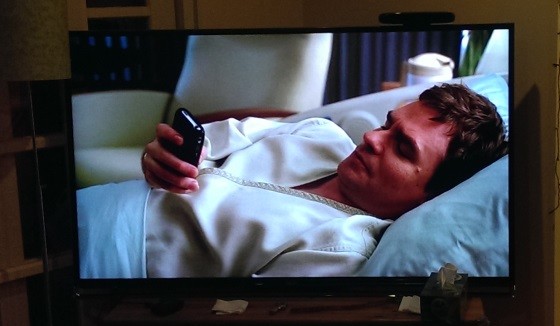
Interesting. I am streaming SuperHD on my Amazon fire TV, no buffering at all - House M.D. looks brilliant on a 65" TV...


Referral links: Quic Broadband (free setup code: R587125ERQ6VE) | Samsung | AliExpress | Wise | Sharesies 


Support Geekzone by subscribing (browse ads-free), or making a one-off or recurring donation through PressPatron.


networkn
Networkn
32871 posts

Uber Geek
+1 received by user: 15464

ID Verified
Trusted
Lifetime subscriber

  #1086723 10-Jul-2014 20:56
Send private message

freitasm: Interesting. I am streaming SuperHD on my Amazon fire TV, no buffering at all - House M.D. looks brilliant on a 65" TV...


Misread... How do you enable super HD?

BigMal
998 posts

Ultimate Geek
+1 received by user: 160

ID Verified
Trusted

  #1086724 10-Jul-2014 20:56
Send private message

freitasm: Interesting. I am streaming SuperHD on my Amazon fire TV, no buffering at all - House M.D. looks brilliant on a 65" TV...


As it does on my Roku. Not sure why it's so bad on the Fire.  Are you connected via wifi?


Shop on-line at New World now for your groceries (affiliate link).
freitasm
BDFL - Memuneh
80657 posts

Uber Geek
+1 received by user: 41064

Administrator
ID Verified
Trusted
Geekzone
Lifetime subscriber

  #1086728 10-Jul-2014 21:01
Send private message

BigMal:
freitasm: Interesting. I am streaming SuperHD on my Amazon fire TV, no buffering at all - House M.D. looks brilliant on a 65" TV...


As it does on my Roku. Not sure why it's so bad on the Fire.  Are you connected via wifi?


I never use WiFi if I want HD.

networkn:
freitasm: Interesting. I am streaming SuperHD on my Amazon fire TV, no buffering at all - House M.D. looks brilliant on a 65" TV...


Misread... How do you enable super HD?


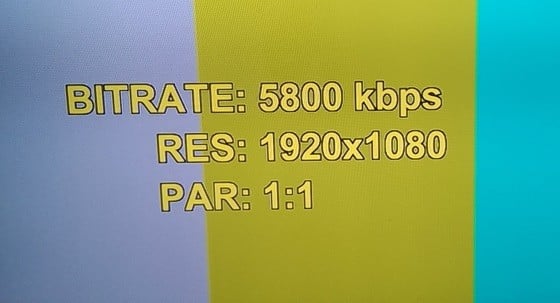
It should be superHD depending on your ISP speed:


Read this discussion to see more about it.


Referral links: Quic Broadband (free setup code: R587125ERQ6VE) | Samsung | AliExpress | Wise | Sharesies 


Support Geekzone by subscribing (browse ads-free), or making a one-off or recurring donation through PressPatron.


BigMal
998 posts

Ultimate Geek
+1 received by user: 160

ID Verified
Trusted

  #1086731 10-Jul-2014 21:07
Send private message


I never use WiFi if I want HD.


Yeah I get super HD quality via wifi on the Roku 3 (tested using the Example short).  Ill try hard wring the Fire and see if it improves.


JimmyH
2898 posts

Uber Geek
+1 received by user: 1554


  #1086760 10-Jul-2014 21:31
Send private message

I currently own WDTVs, but am looking for something a bit more capable to replace one of them - specifically something that can support freeview codecs, stream from my Hauppauge Broadway, and run XBMC. I have been reading this thread with interest, and came *very* close to ordering the Fire TV.

In the end I went with the Minix Neo X8-H, which cost a bit more ($NZ 175), which seems fairly similar but a tad more capable - with an 8-core GPU, essentially stock android with access to the Play Store, and an optimised version of XBMC installed. Also 4K capable, not that I care about that at the moment.

Winging its way to me now, so should have it in my hot little hands for testing early next week. Happy to post impressions if there's any interest?

cdrnet
92 posts

Master Geek
+1 received by user: 2


  #1086770 10-Jul-2014 21:56
Send private message

BigMal: So I bit the bullet and bought a Fire TV because I liked the idea of having XBMC and Netflix running side by side on a cheap, low power device (I currently run a Roku 3 and a NUC).

It arrived today and so far I've been really unimpressed with Netflix performance on the Fire.  On the Roku I can stream wirelessly in HD and it's beautiful, on the Fire it never gets close to HD and buffers every 15 minutes....and the interface is ugly.

Does anyone else use there Fire for Netflix via wifi and if so how is it for you?  At this stage it'll be on TradeMe by the weekend.


I did consider running my Fire TV wirelessly, for about 0.75 of a second, then suddenly the common sense gene kicked in.

Netflix is just perfect on the Amazon Fire TV. I use an RJ45 PowerPlug. People's expectations of wireless technology never ceases to amaze me. I guess if you mess around with the buffering, it might be OK, but there are just so many variables that can screw up your wireless signal. 


Why, oh why, oh why, won't this work )c8

1 | ... | 21 | 22 | 23 | 24 | 25 | 26 | 27 | 28 | 29 | 30 | 31 | ... | 91
View this topic in a long page with up to 500 replies per page Create new topic


Geekzone Live »

Try automatic live updates from Geekzone directly in your browser, without refreshing the page, with Geekzone Live now.


Are you subscribed to our RSS feed? You can download the latest headlines and summaries from our stories directly to your computer or smartphone by using a feed reader.