|
|
|
I quickly learned to ignore the indicated range on the guess-o-meter. I keep an eye on the % charge and as long as it doesn't drop too quickly, I can relax.
langi27:
I'm having issue where our 2013 24X Leaf will beep quickly 3 times along with the 3 Blue LED flashing continuously, does this when i plug in the EVSE charger and stops when i unplug it.
When functioning normally I think it normally gives a quick 2 beeps and then nothing.
Is this my EVSE or a sensor latch that isn't working properly or something else.
It works fine most days and other days will take several attempts to get the normal 2 beeps.
Any help appreciated.
Hi, it seems to be your J1772 Release button worn off and stay in pressed state when you get 3 beeps.
here is a discussion with couple solutions how to deal with it: https://mynissanleaf.com/viewtopic.php?t=15573
cool thanks, i'll give it a try.
Being cheeky posting this here, but captive audience and all :)
Buy my leaf!
https://www.trademe.co.nz/2416803474
Aaaaand it's gone... wondering if I priced it too cheap!
To all Nissan Leaf geeks & techies,
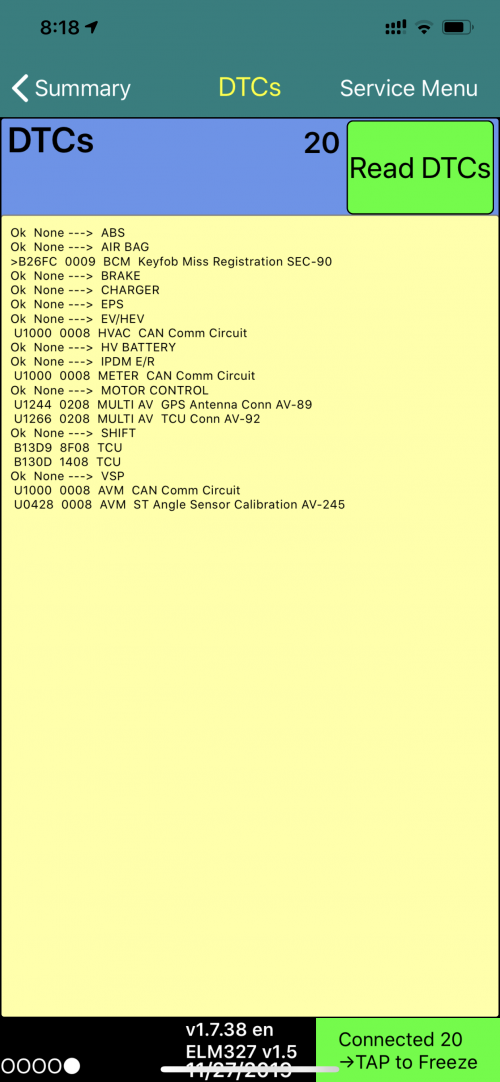
I just went to my LeafSpy and read DTC codes.
Got the following result:

I would really appreciate it if someone could interpret this geeky language for me.
Another question, on the ECU versions:
4NN0A 0553 BCM <- does it mean my BCM version is already updated? (No more 30kWh rapid drop issues.)
I have a 2017 ZE0 Nissan Leaf.
bigLITTLE: Another ECU version that I think may be related:
4NN6A 5253 EV/HEV
4NN6A 0608 HV BATTERY
Yes, 4NN6A is the factory version of the updated BMS firmware. My November 2016 battery has this firmware.
Car seat covers- is there a particular style i should be getting for the Leaf, as most of the ones i can find have the wrong headrest shape
'We love to buy books because we believe we’re buying the time to read them.' WARREN ZEVON
My wife has huge problems with connecting her phone to her 2013 Leaf - the only way to connect is to manually force it to do so, which takes ages and is a hassle. It seems to hate her phone (a Nokia 7 Plus), whereas it'll connect readily and automatically to mine.
So I've tried to look at alternative ways to connect her phone, ie via 3.5mm audio or USB. I've had no luck with either; my concern is that this is a result of the head unit switch they did when we purchased (original Japanese unit replaced by a US one).
Can any gen 1 Leaf owners please confirm:
1. whether the stereo accepts audio from a phone via the USB, or whether that's only for charging and/or playing files directly from a USB stick?
2. how the 3.5mm socket input is selected - is there a direct button for it and/or does it come up when cycling through inputs via the rocker on the steering wheel?
I'm thinking that either the installer didn't connect things up fully or the US head unit doesn't include the 3.5mm socket...
Any other ideas of how I can sort this out would be much appreciated.
jonathan18:
My wife has huge problems with connecting her phone to her 2013 Leaf - the only way to connect is to manually force it to do so, which takes ages and is a hassle. It seems to hate her phone (a Nokia 7 Plus), whereas it'll connect readily and automatically to mine.
So I've tried to look at alternative ways to connect her phone, ie via 3.5mm audio or USB. I've had no luck with either; my concern is that this is a result of the head unit switch they did when we purchased (original Japanese unit replaced by a US one).
Can any gen 1 Leaf owners please confirm:
1. whether the stereo accepts audio from a phone via the USB, or whether that's only for charging and/or playing files directly from a USB stick?
2. how the 3.5mm socket input is selected - is there a direct button for it and/or does it come up when cycling through inputs via the rocker on the steering wheel?
I'm thinking that either the installer didn't connect things up fully or the US head unit doesn't include the 3.5mm socket...
Any other ideas of how I can sort this out would be much appreciated.
I don't have a Leaf but are you trying to connect via Bluetooth? if so I've seen issues on two different head units where the head unit remembers the list of devices that have connected by Bluetooth, and when there are multiple devices in memory, it prevented one of my devices from connecting automatically. I found the list of devices in memory and used the function to clear the list, reconnected with my phone as the only device and it worked great and connected automatically every time afterwards.
1. whether the stereo accepts audio from a phone via the USB, or whether that's only for charging and/or playing files directly from a USB stick?
2. how the 3.5mm socket input is selected - is there a direct button for it and/or does it come up when cycling through inputs via the rocker on the steering wheel?
1. The USB act as a docking station to my iPhone, and it does charge my iPhone (even though it's a very slow charge)
2. The 3.5mm socket input can be selected using the AUX menu, when the AUX menu is selected, then the 3.5mm socket will be the input.
Hope this helps :)
jonathan18:
My wife has huge problems with connecting her phone to her 2013 Leaf ase confirm:
1. whether the stereo accepts audio from a phone via the USB, or whether that's only for charging and/or playing files directly from a USB stick?
2. how the 3.5mm socket input is selected - is there a direct button for it and/or does it come up when cycling through inputs via the rocker on the steering wheel?
I'm thinking that either the installer didn't connect things up fully or the US head unit doesn't include the 3.5mm socket...
I know you ask about a Gen1 but just in case it is the same as the Gen2, I can tell you that in a Gen2 (2013) Leaf with 2015 USA Head Deck the 3.5mm audio does not work because the JDM car and USA head-deck wiring is pinned slightly different. (It took me ages to figure out what was going on).
The USB works fine, but it only plays MP3's from USB storage. You can't "push" audio from the phone to the head deck, but the Head Deck can "suck" it across if your phone can emulate a USB stick (as many but not all androids do). Head Deck will see the MP3's on the storage device/phone and play them just fine.
In the Gen2 the original Japanese source buttons (to the right of the Head Deck) are only partially compatible with the USA head decks, hiding access to some of the sources, but with the steering wheel source button you can cycle through USB/FM/CD/XM just fine. When the dealer transplants the USA Head Deck they also need to transplant the USA source buttons, but few dealers do this.
Bluetooth is flawless but haven't tried an android Nokia (iPhone's, multiple Samsung's & old-school dumb Nokia tested).
Thanks for the replies - some really useful information.
Ah, the naming conventions of Leafs is causing some confusion here! I’m referring to gen 1 being the original shape and gen 2 the current shape, whereas I know some still break down the first shape into the two distinct periods. On that second basis, ours is indeed a 2013 gen 2, so it sounds like our setup is identical to yours, tripper1000 - same car, same age US head unit. (Where did you buy your Leaf from, by the way?)
Your findings confirm my suspicions on both the 3.5 and USB sockets, damn it. Our buttons weren’t mapped properly, either. The most annoying thing of having to rely on the steering wheel controls is trolling through all the satellite radio options... I wish the dealers were upfront about all these limitations at the time of taking money for the headunit swap.
Yep, I’ve never had issues with the BT using my old OnePlus or current Samsung. Looks like it’s her phone, so will investigate any solutions via that device as clearly a phone is the only option. Maybe a new phone is the answer?!
I bought my Leaf at Autolink in Ak, but they were completely upfront that the USA head decks had limitations so I got what I was expecting and wasn't disappointed.
They even showed me how to get into the service menu to manually set the clock. Later. When I was fiddling around figuring all this out I reconnected the GPS antenna and found that as long as I was happy for the calendar to be out by 1 day, I could set it up so that the GPS sync'd to NZ time, rather than Japan/USA time.
The new English firmware upgrades seem to be the way to go now days rather than head-deck swapping.
|
|
|