Geekzone: technology news, blogs, forums
Guest
Welcome Guest.
You haven't logged in yet. If you don't have an account you can register now.


Behodar

11094 posts

Uber Geek
+1 received by user: 6071

Trusted
Lifetime subscriber

#79652 20-Mar-2011 21:30
Send private message

Hi,

I've been having a longstanding problem with my TCL ADSL connection. Most of the time there are no issues, but occasionally (usually a few months apart) I'll start having latency spikes. When I say "spikes", here's an example ping to clear.net.nz:


PING clear.net.nz (203.97.37.85): 56 data bytes
64 bytes from 203.97.37.85: icmp_seq=0 ttl=59 time=23.364 ms
64 bytes from 203.97.37.85: icmp_seq=1 ttl=59 time=23.494 ms
64 bytes from 203.97.37.85: icmp_seq=2 ttl=59 time=125.387 ms
64 bytes from 203.97.37.85: icmp_seq=3 ttl=59 time=125.262 ms
Request timeout for icmp_seq 4
64 bytes from 203.97.37.85: icmp_seq=4 ttl=59 time=1000.847 ms
64 bytes from 203.97.37.85: icmp_seq=5 ttl=59 time=21.961 ms
64 bytes from 203.97.37.85: icmp_seq=6 ttl=59 time=124.071 ms
64 bytes from 203.97.37.85: icmp_seq=7 ttl=59 time=28.735 ms
64 bytes from 203.97.37.85: icmp_seq=8 ttl=59 time=51.855 ms
64 bytes from 203.97.37.85: icmp_seq=9 ttl=59 time=116.216 ms
64 bytes from 203.97.37.85: icmp_seq=10 ttl=59 time=207.827 ms
64 bytes from 203.97.37.85: icmp_seq=11 ttl=59 time=113.800 ms
As you can see, I have a couple of normal readings there in the 20s as well as some in the hundreds and one in the thousands. Pings to other servers such as geekzone.co.nz aren't any better. But as you can also see, it's not giving consistently high pings but is fluctuating all over the place.

I have performed an isolation test and replaced the modem. I have also logged the issue with TelstraClear on multiple occasions. The complication is that the issue will last for a couple of weeks, then appear to fix itself. TelstraClear then closes the ticket as resolved (although I have confirmed that TCL hasn't actually done anything). A few months later, the problem returns and I'm back at square one.

Last year I even tried changing ISP but that ended up making it worse; I changed to Xnet and although my latency to the US (World of Warcraft) was stable over the few weeks that I was with them, it was also significantly higher than what I get on a good day with TCL. Unfortunately switching back to TCL (and getting it set up as a new connection) did not resolve the issue.

What else can I do?

View this topic in a long page with up to 500 replies per page Create new topic
 1 | 2
sbiddle
30853 posts

Uber Geek
+1 received by user: 9996

Retired Mod
Trusted
Biddle Corp
Lifetime subscriber

  #450156 20-Mar-2011 21:32
Send private message

Are you cabinetised or on an old ADSL exchange still? The issue is possibly just congestion so it won't change no matter what ISP you're on.


johnr
19282 posts

Uber Geek
+1 received by user: 2526
Inactive user


  #450159 20-Mar-2011 21:33
Send private message

Move to the US

Behodar

11094 posts

Uber Geek
+1 received by user: 6071

Trusted
Lifetime subscriber

  #450165 20-Mar-2011 21:38
Send private message

I'm on an exchange and due to be cabinetised "soon". Do you think that could help?


Ragnor
8279 posts

Uber Geek
+1 received by user: 585

Trusted

  #450214 20-Mar-2011 23:28
Send private message

What do tracert's show?

Start > Run > cmd > tracert [address]

Behodar

11094 posts

Uber Geek
+1 received by user: 6071

Trusted
Lifetime subscriber

  #450509 21-Mar-2011 21:31
Send private message

It seems to be behaving itself at the moment but I'll post some traceroutes if it happens again.

I should also point out that last time it happened, I called my dad (same ISP and exchange) and his connection was behaving normally.

Ragnor
8279 posts

Uber Geek
+1 received by user: 585

Trusted

  #450755 22-Mar-2011 15:01
Send private message

How many computers/devices on your network at home? Could easily be one of your machines/devices saturating upload or download.

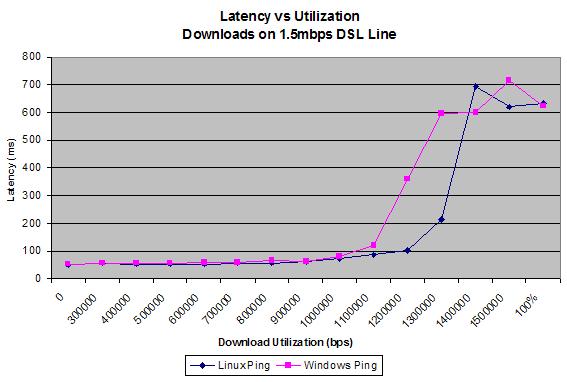
After about 80% utilization on a link, you will see increased in latency.. very common to see gamers in flats set up some kind of QoS or rate limiting system.

Eg:


Move to New Zealand's best fibre broadband service (affiliate link). Free setup code: R587125ERQ6VE. Note that to use Quic Broadband you must be comfortable with configuring your own router.
Behodar

11094 posts

Uber Geek
+1 received by user: 6071

Trusted
Lifetime subscriber

  #450756 22-Mar-2011 15:02
Send private message

Normally a few, but I've tried connecting a single computer directly to the modem and it still happens.

Lias
5655 posts

Uber Geek
+1 received by user: 3978

ID Verified
Trusted
Lifetime subscriber

  #451350 24-Mar-2011 10:15
Send private message

I have similar issues on TCL, I'm cabnetised, have previously tried connecting the router directly to the PC and bypassing my home network, using monitoring tools to ensure there is no traffic other than the ICMP on my line, etc etc. Normally only happens during peak hour, and sadly is pretty much guranteed to be cabinet congestion.

Not even TCL's fault, its simply Chorus/Telecom only suppling a pathetic amount of of bandwidth per wholesale connection, instead of something reasonable.


I'm a geek, a gamer, a dad, a Quic user, and an IT Professional. I have a full rack home lab, size 15 feet, an epic beard and Asperger's. I'm a bit of a Cypherpunk, who believes information wants to be free and the Net interprets censorship as damage and routes around it. If you use my Quic signup you can also use the code R570394EKGIZ8 for free setup. Opinions are my own and not the views of my employer.


Behodar

11094 posts

Uber Geek
+1 received by user: 6071

Trusted
Lifetime subscriber

  #451352 24-Mar-2011 10:17
Send private message

Well, I'll see what happens once the cabinet goes in. If it is congestion then moving from however many thousand exchange users down to a couple of hundred cabinet users should help :)

Lias
5655 posts

Uber Geek
+1 received by user: 3978

ID Verified
Trusted
Lifetime subscriber

  #451363 24-Mar-2011 10:45
Send private message

Ironically I never had congestion issues until I was cabnetised.

It's because the cabinet serves a much smaller number of users so its peak bandwidth pool is much lower.

Aggregate handover is 45kbps per user. So if a cabinet serves 300 end users, it's total handover bandwidth pool is only 13.5 Mbps. That's less than my exchange connect speed. So one single user flatlining his connection on a cabinet can cause congestion for every other user.

Chorus provide backhaul aggregate at a rediculous contention level compared to overseas and other access technologies.. The proposed aggregate for FTTH is 1.5Mbps for comparison, which is much more reasonable but still below international standards. We need the aggregate for DSL set around 1Mbps and FTTH around 5Mbps.

*edit* This is my understanding of how this works, i could be wrong, I'm sure someone will correct me if I am.


I'm a geek, a gamer, a dad, a Quic user, and an IT Professional. I have a full rack home lab, size 15 feet, an epic beard and Asperger's. I'm a bit of a Cypherpunk, who believes information wants to be free and the Net interprets censorship as damage and routes around it. If you use my Quic signup you can also use the code R570394EKGIZ8 for free setup. Opinions are my own and not the views of my employer.


Ragnor
8279 posts

Uber Geek
+1 received by user: 585

Trusted

  #451487 24-Mar-2011 15:09
Send private message

Backhaul gets your data from the cabinet through Telecom wholesale's network to where your ISP has some gear to handover to.

Handover links are the bit that get the data from Telecom wholesale's network to your ISP's network.

Cabinets have GbE backhaul or better to a data switch in Telecom wholesale's access network.

Handover link dimensioning isn't applied on cabinet backhaul like you decribe only on the handover fibre where the ISP is doing their handover.


Shop now on AliExpress (affiliate link).
Lias
5655 posts

Uber Geek
+1 received by user: 3978

ID Verified
Trusted
Lifetime subscriber

  #451880 25-Mar-2011 20:44
Send private message

Thanks for that Ragnor.

I wonder why I only get peak time lag after being cabneitsed then. *sigh*


I'm a geek, a gamer, a dad, a Quic user, and an IT Professional. I have a full rack home lab, size 15 feet, an epic beard and Asperger's. I'm a bit of a Cypherpunk, who believes information wants to be free and the Net interprets censorship as damage and routes around it. If you use my Quic signup you can also use the code R570394EKGIZ8 for free setup. Opinions are my own and not the views of my employer.


Talkiet
4819 posts

Uber Geek
+1 received by user: 3934

Trusted

  #451888 25-Mar-2011 20:58
Send private message

Lias: I have similar issues on TCL, I'm cabnetised, have previously tried connecting the router directly to the PC and bypassing my home network, using monitoring tools to ensure there is no traffic other than the ICMP on my line, etc etc. Normally only happens during peak hour, and sadly is pretty much guranteed to be cabinet congestion.

Not even TCL's fault, its simply Chorus/Telecom only suppling a pathetic amount of of bandwidth per wholesale connection, instead of something reasonable.


[edited] Correct info already supplied.

Cheers - N


Please note all comments are from my own brain and don't necessarily represent the position or opinions of my employer, previous employers, colleagues, friends or pets.


Behodar

11094 posts

Uber Geek
+1 received by user: 6071

Trusted
Lifetime subscriber

  #454502 2-Apr-2011 12:27
Send private message

Well, I'm somewhat embarrassed now... the problem that I've been having recently is NOT a recurrence of the problem that I was having on-and-off last year. The symptoms were the same so I assumed that it was the same issue, but this time it ended up being a faulty Wi-Fi card at my end.

I should point out that this is not the same card that I was having issues with last year (and I tried using Ethernet when I was testing that). So there was an "actual" problem last year (which seems to have been fixed) and the problem that I've been having for the past couple of weeks was actually unrelated.

Behodar

11094 posts

Uber Geek
+1 received by user: 6071

Trusted
Lifetime subscriber

  #454523 2-Apr-2011 14:13
Send private message

... Or not. I think it was a combination of two issues because after switching to Ethernet it was fine for a few hours, but now it's back up into the hundreds of ms again. The saga continues...

 1 | 2
View this topic in a long page with up to 500 replies per page Create new topic


Geekzone Live »

Try automatic live updates from Geekzone directly in your browser, without refreshing the page, with Geekzone Live now.


Are you subscribed to our RSS feed? You can download the latest headlines and summaries from our stories directly to your computer or smartphone by using a feed reader.