Geekzone: technology news, blogs, forums
Guest
Welcome Guest.
You haven't logged in yet. If you don't have an account you can register now.


View this topic in a long page with up to 500 replies per page Create new topic
1 | ... | 12 | 13 | 14 | 15 | 16 | 17 | 18 | 19 | 20 | 21 | 22
Malingo
204 posts

Master Geek
+1 received by user: 7


  #1009331 19-Mar-2014 20:30
Send private message

I am wanting to get to the bottom of 2 things:

1) Do I accept my current VDSL speeds, which are a fraction faster than my previous ADSL speeds as the best I get, and

2) Do I get VF to send the Chorus tech back to investigate and see if the connection can be improved.

I called VF and they said that because I had a 3mb increase in speed, this is considered sufficient and i need to live with it.
When the tech came out, he didn't run any new CAT 5 and used the existing internal wiring and simply replaced the jackpot internally for my naked bb connection. VF said its not a requirement of the installation to lay any new CAT 5, so not a reason to call back the tech.

My current specs per VF call centre:

- 45 nodes away from exchange (Ngo taha)
- Bitrate speeds 11 136
- Attainable speed 11 508
- Attenuation: 45.3
- parameter attenuation: 44.6

Essentially, they can't give me distance to the exchange as they are not allowed to divulge, but they did say i was already getting my max attainable and nothing could be done to improve.

My stats per modem are per screen shot:


The chorus guy did say he would be happy to come back to have a look if speeds did not improve after 10 days, and they haven't, however VF have said if he comes out and there is no "Fault" that I would need to pick up the cost of this call out.

Any advice or assistance would be appreciated guys.


johnr
19282 posts

Uber Geek
+1 received by user: 2526
Inactive user


  #1009333 19-Mar-2014 20:33
Send private message

Malingo: I am wanting to get to the bottom of 2 things:

1) Do I accept my current VDSL speeds, which are a fraction faster than my previous ADSL speeds as the best I get, and

2) Do I get VF to send the Chorus tech back to investigate and see if the connection can be improved.

I called VF and they said that because I had a 3mb increase in speed, this is considered sufficient and i need to live with it.
When the tech came out, he didn't run any new CAT 5 and used the existing internal wiring and simply replaced the jackpot internally for my naked bb connection. VF said its not a requirement of the installation to lay any new CAT 5, so not a reason to call back the tech.

My current specs per VF call centre:

- 45 nodes away from exchange (Ngo taha)
- Bitrate speeds 11 136
- Attainable speed 11 508
- Attenuation: 45.3
- parameter attenuation: 44.6

Essentially, they can't give me distance to the exchange as they are not allowed to divulge, but they did say i was already getting my max attainable and nothing could be done to improve.

My stats per modem are per screen shot:


The chorus guy did say he would be happy to come back to have a look if speeds did not improve after 10 days, and they haven't, however VF have said if he comes out and there is no "Fault" that I would need to pick up the cost of this call out.

Any advice or assistance would be appreciated guys.


Do a speedtest over LAN cable plugged into modem to Vodafone NZ server what are the results up and down?

hio77
'That VDSL Cat'
13036 posts

Uber Geek
+1 received by user: 3896

ID Verified
Trusted
Lizard Networks
Subscriber

  #1009343 19-Mar-2014 20:46
Send private message

Malingo: 

My current specs per VF call centre:

- 45 nodes away from exchange (Ngo taha)
- Bitrate speeds 11 136
- Attainable speed 11 508
- Attenuation: 45.3
- parameter attenuation: 44.6


45db wouldnt be possible with vdsl. somethings gone wrong, iver in the repeating of the values, or the CSR was reading the wrong line..


#include <std_disclaimer>


Any comments made are personal opinion and do not reflect directly on the position my current or past employers may have. 


Malingo
204 posts

Master Geek
+1 received by user: 7


  #1009345 19-Mar-2014 20:47
Send private message

johnr:
Malingo: I am wanting to get to the bottom of 2 things:

1) Do I accept my current VDSL speeds, which are a fraction faster than my previous ADSL speeds as the best I get, and

2) Do I get VF to send the Chorus tech back to investigate and see if the connection can be improved.

I called VF and they said that because I had a 3mb increase in speed, this is considered sufficient and i need to live with it.
When the tech came out, he didn't run any new CAT 5 and used the existing internal wiring and simply replaced the jackpot internally for my naked bb connection. VF said its not a requirement of the installation to lay any new CAT 5, so not a reason to call back the tech.

My current specs per VF call centre:

- 45 nodes away from exchange (Ngo taha)
- Bitrate speeds 11 136
- Attainable speed 11 508
- Attenuation: 45.3
- parameter attenuation: 44.6

Essentially, they can't give me distance to the exchange as they are not allowed to divulge, but they did say i was already getting my max attainable and nothing could be done to improve.

My stats per modem are per screen shot:


The chorus guy did say he would be happy to come back to have a look if speeds did not improve after 10 days, and they haven't, however VF have said if he comes out and there is no "Fault" that I would need to pick up the cost of this call out.

Any advice or assistance would be appreciated guys.


Do a speedtest over LAN cable plugged into modem to Vodafone NZ server what are the results up and down?

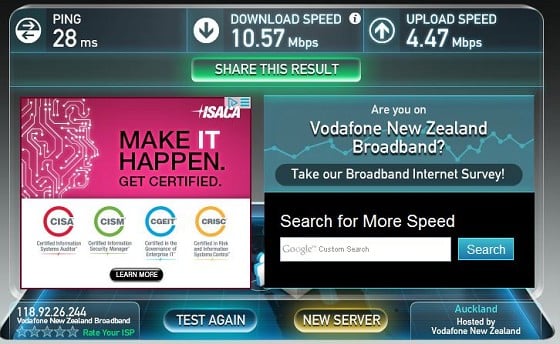
Sure.  see below.  Noted my upload speed has actually dropped from around 5mbps at installation to 4.47Mbps now :-(


johnr
19282 posts

Uber Geek
+1 received by user: 2526
Inactive user


  #1009346 19-Mar-2014 20:49
Send private message

The change in download / upload speed is normal, This is DLM working on the line

Can you DM @TimA here on Geekzone your Vodafone fixed line account number and ask him to do some checks,

John

hio77
'That VDSL Cat'
13036 posts

Uber Geek
+1 received by user: 3896

ID Verified
Trusted
Lizard Networks
Subscriber

  #1009348 19-Mar-2014 20:51
Send private message

Malingo:
johnr:
Malingo: I am wanting to get to the bottom of 2 things:

1) Do I accept my current VDSL speeds, which are a fraction faster than my previous ADSL speeds as the best I get, and

2) Do I get VF to send the Chorus tech back to investigate and see if the connection can be improved.

I called VF and they said that because I had a 3mb increase in speed, this is considered sufficient and i need to live with it.
When the tech came out, he didn't run any new CAT 5 and used the existing internal wiring and simply replaced the jackpot internally for my naked bb connection. VF said its not a requirement of the installation to lay any new CAT 5, so not a reason to call back the tech.

My current specs per VF call centre:

- 45 nodes away from exchange (Ngo taha)
- Bitrate speeds 11 136
- Attainable speed 11 508
- Attenuation: 45.3
- parameter attenuation: 44.6

Essentially, they can't give me distance to the exchange as they are not allowed to divulge, but they did say i was already getting my max attainable and nothing could be done to improve.

My stats per modem are per screen shot:
 

The chorus guy did say he would be happy to come back to have a look if speeds did not improve after 10 days, and they haven't, however VF have said if he comes out and there is no "Fault" that I would need to pick up the cost of this call out.

Any advice or assistance would be appreciated guys.


Do a speedtest over LAN cable plugged into modem to Vodafone NZ server what are the results up and down?

Sure.  see below.  Noted my upload speed has actually dropped from around 5mbps at installation to 4.47Mbps now :-(


thoses speeds line up perfectly with your dsl stats.


#include <std_disclaimer>


Any comments made are personal opinion and do not reflect directly on the position my current or past employers may have. 


Shop now for Dyson appliances (affiliate link).
Coil
6614 posts

Uber Geek
+1 received by user: 2153
Inactive user


  #1009353 19-Mar-2014 20:55
Send private message

johnr: The change in download / upload speed is normal, This is DLM working on the line

Can you DM @TimA here on Geekzone your Vodafone fixed line account number and ask him to do some checks,

John


I am here till 9:45..
Please PM me now if you need me.

johnr
19282 posts

Uber Geek
+1 received by user: 2526
Inactive user


#1009358 19-Mar-2014 21:05
Send private message

TimA:
johnr: The change in download / upload speed is normal, This is DLM working on the line

Can you DM @TimA here on Geekzone your Vodafone fixed line account number and ask him to do some checks,

John


I am here till 9:45..
Please PM me now if you need me.


This man is best to check it out end to end

Moona
18 posts

Geek


  #1010108 20-Mar-2014 19:49
Send private message

Hi guys,

I just signed up on Naked VDSL 80gb today. Initial speed seems to be pretty good

https://www.speedtest.net/result/3382973569.png


I have a few a few questions and concerns that I hope you can help with. Since install this morning I have had constant micro outages for a few minutes at a time(3-10min) throughout the day. Is this DLM in action or is something possibly wrong? The biggest problem I have with this however, apart from the outage of course is whenever this happens I will lose wireless connection on all devices and it wont come back up once connection is restored. The only way to get it working again is to turn of the WLAN with the button on the Huawei HG659 and turn it back on again. Is this normal?

I also accidently turned of the modem a couple of times whilst moving things around on my desk (dodgy powerboard, now rectified) a couple of hours after install. Will this effect DLM?

I seem to also be getting heavily throttled whilst torrenting, a torrent I would download around this time with Telecom ADSL at 1mB/s is now capping at around 200kB/s. Do Vodafone shape p2p traffic?

Another minor question? If I am constantly going to get these outages over the next 9 days should I be paying for 9 days of service I am not really getting? or does billing only start after these 9 days?

Any help is much appreciated.

hio77
'That VDSL Cat'
13036 posts

Uber Geek
+1 received by user: 3896

ID Verified
Trusted
Lizard Networks
Subscriber

  #1010115 20-Mar-2014 19:58
Send private message

Moona: Hi guys,

I just signed up on Naked VDSL 80gb today. Initial speed seems to be pretty good

https://www.speedtest.net/result/3382973569.png


I have a few a few questions and concerns that I hope you can help with. Since install this morning I have had constant micro outages for a few minutes at a time(3-10min) throughout the day. Is this DLM in action or is something possibly wrong? The biggest problem I have with this however, apart from the outage of course is whenever this happens I will lose wireless connection on all devices and it wont come back up once connection is restored. The only way to get it working again is to turn of the WLAN with the button on the Huawei HG659 and turn it back on again. Is this normal?

I also accidently turned of the modem a couple of times whilst moving things around on my desk (dodgy powerboard, now rectified) a couple of hours after install. Will this effect DLM?

I seem to also be getting heavily throttled whilst torrenting, a torrent I would download around this time with Telecom ADSL at 1mB/s is now capping at around 200kB/s. Do Vodafone shape p2p traffic?

Another minor question? If I am constantly going to get these outages over the next 9 days should I be paying for 9 days of service I am not really getting? or does billing only start after these 9 days?

Any help is much appreciated.


your wireless really shouldnt drop out when DLM does its job, your DSL will simply drop for maybe a minute? depends on how long the modem takes to retry the connection.


try to limit your reboots. it will affect DLM (remember DLM acts on the line after the 10 day period, just at a lower polling rate.) since your in the 10 day period it wont matter too much though.


sounds more like your issue is interference on the Wireless channel your currently on.


as for your shaping, are you sure you have the ports open?


#include <std_disclaimer>


Any comments made are personal opinion and do not reflect directly on the position my current or past employers may have. 


Coil
6614 posts

Uber Geek
+1 received by user: 2153
Inactive user


  #1010177 20-Mar-2014 21:18
Send private message

If you are having trouble with torrenting open the ports and make sure the torrent has a good seeder/leecher ratio. 9/10 times you have not got ports open and or its a bad torrent.
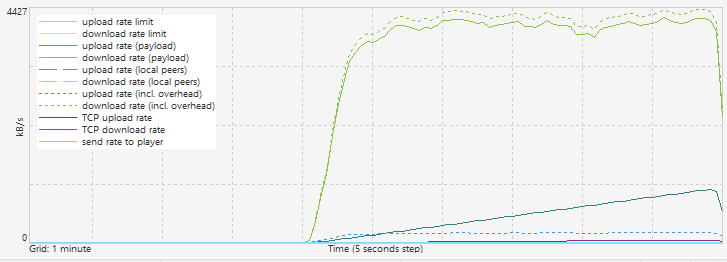
So does this look like shaping?


Want to support Geekzone and browse the site without the ads? Subscribe to Geekzone now (monthly, annual and lifetime options).
Moona
18 posts

Geek


  #1012834 26-Mar-2014 01:28
Send private message

Just got back after a few days away for work to this, after initial install last Thursday

https://www.speedtest.net/result/3394319199.png

Had a few downloads run at 4+ MB/s over the course of the evening which is awesome, however my gaming is unplayable

Constantly getting 300-400ms+ on Blizzard servers and unbearable spiking, on Telecom i'd get 130-170ms consistently and never any spiking.

Gah. I want to restart the HG659 modem just to see if that resolves the problem but dont want to mess with DLM.

Strange thing is when I do a Trace route or an MTR to one of the blizz servers it appears to be pretty good yet in game it has tripled. Could this be something to do with DLM?

Tracing route to 12.129.236.14 over a maximum of 30 hops

1 2 ms 1 ms 2 ms 192.168.1.1
2 6 ms 6 ms 6 ms 118-93-199-254.dsl.dyn.ihug.co.nz [118.93.199.254]
3 7 ms 6 ms 6 ms be7-188.ppnzftc02.akl.vf.net.nz.180.109.203.in-addr.arpa [203.109.180.226]
4 7 ms 6 ms 7 ms be8-188.ppnzftc02.akl.vf.net.nz.180.109.203.in-addr.arpa [203.109.180.225]
5 131 ms 131 ms 135 ms vodafone-gw.customer.alter.net [152.179.103.58]

6 133 ms 139 ms 130 ms 0.xe-2-2-0.GW2.LAX1.ALTER.NET [152.179.103.57]
7 130 ms 130 ms 130 ms 0.xe-4-0-1.XL3.LAX1.ALTER.NET [152.63.113.221]
8 131 ms 131 ms 131 ms 0.ae5.BR3.LAX15.ALTER.NET [140.222.225.139]
9 131 ms 131 ms 131 ms 192.205.35.161
10 132 ms 135 ms 131 ms cr2.la2ca.ip.att.net [12.122.84.70]
11 131 ms 131 ms 131 ms gar29.la2ca.ip.att.net [12.122.129.241]
12 132 ms 132 ms 132 ms 12-122-254-234.attens.net [12.122.254.234]
13 132 ms 132 ms 132 ms mdf001c7613r0004-gig-10-1.lax1.attens.net [12.129.193.250]

MTR

https://imgur.com/K19W1Wz

Suggestions on best course of action to take? Thanks


Coil
6614 posts

Uber Geek
+1 received by user: 2153
Inactive user


  #1012835 26-Mar-2014 01:35
Send private message

@Moona
Going off the average. It seems OK for pings. Some can be delayed due to firewall etc. I get solid pings to that server off my home VDSL.
12.129.236.14 doesnt exist..

Moona
18 posts

Geek


  #1012931 26-Mar-2014 09:43
Send private message

TimA: @Moona
Going off the average. It seems OK for pings. Some can be delayed due to firewall etc. I get solid pings to that server off my home VDSL.
12.129.236.14 doesnt exist..


It does exist it just isnt pingable.

https://us.battle.net/support/en/article/performing-a-traceroute#addresses

I am trying to do tests to uswest.battle.net, an nslookup gives me

Name: uswest.battle.net
Addresses:
12.129.236.22
12.129.236.21
12.129.236.11
12.129.236.12
12.129.236.13
12.129.236.14
12.129.236.15
12.129.236.16
12.129.236.17
12.129.236.18
12.129.236.19
12.129.236.20

Did some testing just now, 9-9.30am before work. Perfect! Stable at around 150ms no lag, no spiking. The test will be tonight to see if the same issue occurs as the previous evening.

hairy1
3352 posts

Uber Geek
+1 received by user: 644

ID Verified
Trusted
Lifetime subscriber

  #1012940 26-Mar-2014 09:48
Send private message

Tim doesn't DLM play havoc with latency for the first week or so with packet inspections?


My views (except when I am looking out their windows) are not those of my employer.


1 | ... | 12 | 13 | 14 | 15 | 16 | 17 | 18 | 19 | 20 | 21 | 22
View this topic in a long page with up to 500 replies per page Create new topic


Geekzone Live »

Try automatic live updates from Geekzone directly in your browser, without refreshing the page, with Geekzone Live now.


Are you subscribed to our RSS feed? You can download the latest headlines and summaries from our stories directly to your computer or smartphone by using a feed reader.