Geekzone: technology news, blogs, forums
Guest
Welcome Guest.
You haven't logged in yet. If you don't have an account you can register now.


kiwibob1

109 posts

Master Geek
+1 received by user: 34

ID Verified
Lifetime subscriber

#208338 7-Feb-2017 15:35
Send private message

I've attempted to follow the instructions to get this working in these posts


http://www.geekzone.co.nz/forums.asp?forumid=85&topicid=182526 and


http://www.geekzone.co.nz/forums.asp?forumid=43&topicid=160104


but I only get one way sound (sound from the internal does not get to the external regardless of who calls whom)


I'm at something of a loss. Any ideas would be welcome.


Click to see full size


View this topic in a long page with up to 500 replies per page Create new topic
 1 | 2
sbiddle
30853 posts

Uber Geek
+1 received by user: 9996

Retired Mod
Trusted
Biddle Corp
Lifetime subscriber

  #1716623 7-Feb-2017 15:52
Send private message

Who is your ISP? I assume you're with somebody that doesn't have you on a CG-NAT connection?


SIPattack
2 posts

Wannabe Geek


  #1716624 7-Feb-2017 15:55
Send private message

Try adding a STUN server - stun.2talk.co.nz

kiwibob1

109 posts

Master Geek
+1 received by user: 34

ID Verified
Lifetime subscriber

  #1716625 7-Feb-2017 15:57
Send private message

sbiddle:


Who is your ISP? I assume you're with somebody that doesn't have you on a CG-NAT connection?


Good point.


2degrees (was Snap)


dan

dan
1134 posts

Uber Geek
+1 received by user: 105

Lifetime subscriber

  #1716635 7-Feb-2017 16:30
Send private message

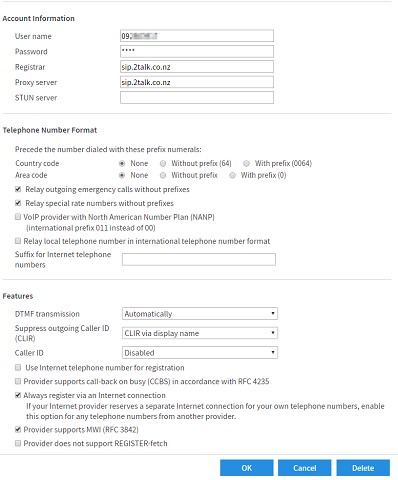
i have a fritz on bigpipe with 2talk  (not cgnat) - works perfectly


here are my settings.


kiwibob1

109 posts

Master Geek
+1 received by user: 34

ID Verified
Lifetime subscriber

  #1716650 7-Feb-2017 16:38
Send private message

I have tried those very settings.


Same problem with or without the proxy, the calling party can't hear me.


SIPattack
2 posts

Wannabe Geek


  #1716653 7-Feb-2017 16:46
Send private message

Have you looked at your SDP in a SIP trace?
Are you sending your RTP to the correct address?
What codec is being negotiated for the call?


Shop now for Dell laptops and other devices (affiliate link).

dan

dan
1134 posts

Uber Geek
+1 received by user: 105

Lifetime subscriber

  #1716655 7-Feb-2017 16:49
Send private message

what handset are you using? one via DECT feature or just plugged in normally via FON1 ?


have you tried another phone just to rule it out..


kiwibob1

109 posts

Master Geek
+1 received by user: 34

ID Verified
Lifetime subscriber

  #1716658 7-Feb-2017 17:13
Send private message

SIPattack: Have you looked at your SDP in a SIP trace?
Are you sending your RTP to the correct address?
What codec is being negotiated for the call?


Live and learn. I did't know that he fritzbox would do that. I have captured a trace of a call. but apart from there being a lot of RTP I'm not un to seeing what it means :(


Yes the address of sip.2talk.co.nz appears in the dialog 27.111.14.65


G.711.


kiwibob1

109 posts

Master Geek
+1 received by user: 34

ID Verified
Lifetime subscriber

  #1716660 7-Feb-2017 17:15
Send private message

dan:


what handset are you using? one via DECT feature or just plugged in normally via FON1 ?


have you tried another phone just to rule it out..


Thanks Dan. I have now done so with both a DECT and wire attached.


Same result.


kiwibob1

109 posts

Master Geek
+1 received by user: 34

ID Verified
Lifetime subscriber

  #1716663 7-Feb-2017 17:26
Send private message

kiwibob1:


What codec is being negotiated for the call?


G.711.


Actually it looks like G.711 inbound and G.722 outbound......


sidefx
3775 posts

Uber Geek
+1 received by user: 1295

Trusted

  #1716705 7-Feb-2017 18:15
Send private message

@kiwibob1:  I have very similar settings to @dan with 2talk on 2degrees with the following differences:


* No proxy server specified


* Area code: "With prefix (09)" is selected


* There's a dropdown at the bottom of the page labelled "Contact Internet telephony provider via" where I've selected "only via IPv4"


Then on the line settings tab under telephone numbers I have the following:


"I was born not knowing and have had only a little time to change that here and there."         | Octopus Energy | Sharesies
              - Richard Feynman


Shop now on Samsung phones, tablets, TVs and more (affiliate link).
sidefx
3775 posts

Uber Geek
+1 received by user: 1295

Trusted

  #1716707 7-Feb-2017 18:20
Send private message

Ah, also on my 2talk user options under "Voice Quality & Networking" it looks like I've turned off G.722 support - Can't recall why... but maybe related to your issue if outbound is negotiating G.722 and not working?


"I was born not knowing and have had only a little time to change that here and there."         | Octopus Energy | Sharesies
              - Richard Feynman


kiwibob1

109 posts

Master Geek
+1 received by user: 34

ID Verified
Lifetime subscriber

  #1717226 8-Feb-2017 14:57
Send private message

Many thanks to all those who responded. 


Curiously the problem solved itself shortly after I contacted 2talk. Basically I can confirm that the settings posted are correct!


sidefx
3775 posts

Uber Geek
+1 received by user: 1295

Trusted

  #1717231 8-Feb-2017 15:16
Send private message

Is it still using G.722 for outbound? Maybe they've turned it off? I'm interested because I might try turn it back on on my connection if they've done something else to fix it :)


"I was born not knowing and have had only a little time to change that here and there."         | Octopus Energy | Sharesies
              - Richard Feynman


sbiddle
30853 posts

Uber Geek
+1 received by user: 9996

Retired Mod
Trusted
Biddle Corp
Lifetime subscriber

  #1717275 8-Feb-2017 16:42
Send private message

There is no point in even having G.722 enabled if you're only using the ATA since it can't work with an analogue phone.


 1 | 2
View this topic in a long page with up to 500 replies per page Create new topic


Geekzone Live »

Try automatic live updates from Geekzone directly in your browser, without refreshing the page, with Geekzone Live now.


Are you subscribed to our RSS feed? You can download the latest headlines and summaries from our stories directly to your computer or smartphone by using a feed reader.