Geekzone: technology news, blogs, forums
Guest
Welcome Guest.
You haven't logged in yet. If you don't have an account you can register now.


View this topic in a long page with up to 500 replies per page Create new topic
1 | ... | 7 | 8 | 9 | 10 | 11 | 12 | 13 | 14 | 15 | 16 | 17 | ... | 24
old3eyes
9158 posts

Uber Geek
+1 received by user: 1364

Subscriber

  #2746497 19-Jul-2021 11:28
Send private message

gehenna:


Anyone notice Defender needs the Virus and Threat Protection feature to be turned on every time you reboot?


I did notice that but after the last update it seems after a while to come online by it's self well mine does. 


Regards,

Old3eyes


Graymond
145 posts

Master Geek
+1 received by user: 12


  #2746596 19-Jul-2021 13:12
Send private message

Well, have got Win11 up and running, looks nice, Classic Start Menu 4.3.1 updated and appears to be running okay.


Noted that "Cumulative Update for Windows 11 (10.0.22000.71) (KB5004252)"  is showing 69% and no further activity, so far.


Did away with my dual boot so will have to look at that and get it going again, miss my Mint


Edit-- Update went through, took a while, rebooted, all okay, my dates showing correctly on task bar, passed on info re having to restart security setting due to it shutting down when computer shuts down..


The new start sequence is good, just hit enter then pin number and up comes the desktop.


Graymond


Windows Version 11.0

"To err is human, but to really foul things up requires a computer." Anon


tanivula
998 posts

Ultimate Geek
+1 received by user: 158

Lifetime subscriber

  #2746598 19-Jul-2021 13:13
Send private message

SATTV:


gehenna:


Anyone notice Defender needs the Virus and Threat Protection feature to be turned on every time you reboot?


Yes I have to do that too.


Has anyone noticed the date on the toolbar is in American format, everything else is in NZ format.


John


Yep, in the same boat here with the defender.  My calendar is all good, after the last update it's in the 'normal' dd/mm/yy format for me.


MikeB4
MikeB4
18776 posts

Uber Geek
+1 received by user: 12767

ID Verified
Trusted
Subscriber

  #2751175 28-Jul-2021 13:47
Send private message

I am currently using the latest developer build (build 22000.100)on my redundant Surface Laptop 3 and I am very impressed. Looks good, very stable and no real gotchas yet, even battery life seems normal. Very promising indeed.


Here is a crazy notion, lets give peace a chance.


DeepBlueSky
549 posts

Ultimate Geek
+1 received by user: 67


  #2758582 11-Aug-2021 13:20
Send private message

Enjoying Windows 11, updated my PC for the first time in a few years.

Ryzen 5 5600x
16 GB DDR 4
Nvidia 1070 from old PC
Samsung 980 NVME

After some hair pulling boot speed issues 180 seconds to get to logon screen that made me think a Win 10 problem turns out not. Resolved now 12 seconds, I had already pulled the upgrade pin to go to Windows 11.

Bottom line super happy nothing is wrong from what I have seen so far it's a good Beta, they must be getting close to a Gold build, I guess just turning on features now.

Highly recommended.

jamesrt
1666 posts

Uber Geek
+1 received by user: 946

ID Verified
Trusted
Lifetime subscriber

  #2758850 12-Aug-2021 08:59
Send private message

Parallels Desktop v17 for Mac was released the other day, which now supports running Windows 11 in a VM on MAC.


Presumably, they're emulating the TPM2.0 in software.


Shop now on AliExpress (affiliate link).

gzt

gzt
18685 posts

Uber Geek
+1 received by user: 7826

Lifetime subscriber

  #2759439 12-Aug-2021 22:46
Send private message

I had a self excuse to replace my perfectly good home machine if it cannot run 11. Now I need to try virtualisation first..

gazzerwgtn
52 posts

Master Geek
+1 received by user: 9


  #2759463 13-Aug-2021 07:43
Send private message

My 10 year old machine installed Win11 fine and activated and completed all updates, just dropped the win11 install.wim/esd into a Win10 iso and no hardware checks required.


Brumfondl
1198 posts

Uber Geek
+1 received by user: 524

Trusted
Subscriber

  #2759519 13-Aug-2021 10:05
Send private message

gazzerwgtn:


My 10 year old machine installed Win11 fine and activated and completed all updates, just dropped the win11 install.wim/esd into a Win10 iso and no hardware checks required.


I am pretty sure that Microsoft has already come out and said that this will not be possible on the final build.


1101
3141 posts

Uber Geek
+1 received by user: 1143


  #2759579 13-Aug-2021 10:31
Send private message

Brumfondl:


I am pretty sure that Microsoft has already come out and said that this will not be possible on the final build.


I suspect there will be alot of angry punters when this happens.
Win11 installs are insider  pre-release test builds . Not really intended to go on our main PC's yet ?  :-)


I dont know why so many are so keen to install Win11 before final release . Unless you want to just have a play around with it .
Some are allready installing Stardock as they dont like Win11 as is ..... so why do they not just stick with 10 ?


old3eyes
9158 posts

Uber Geek
+1 received by user: 1364

Subscriber

  #2759747 13-Aug-2021 16:35
Send private message

1101:


Brumfondl:


I am pretty sure that Microsoft has already come out and said that this will not be possible on the final build.


I suspect there will be alot of angry punters when this happens.
Win11 installs are insider  pre-release test builds . Not really intended to go on our main PC's yet ?  :-)


I dont know why so many are so keen to install Win11 before final release . Unless you want to just have a play around with it .
Some are allready installing Stardock as they dont like Win11 as is ..... so why do they not just stick with 10 ?


Something different to try??  My 9 year old desktop that has more red  errors with the WhyNotWin11 app but after a few hoops to get it installed as a dual boot system works as good as  Win 10.  Like the new update system but I suspect that once it gets general release the  updates will stop and I'll have to go back  to win 10 eventually. 


Regards,

Old3eyes


Stream your favourite shows now on Apple TV (affiliate link).
freitasm

BDFL - Memuneh
80657 posts

Uber Geek
+1 received by user: 41065

Administrator
ID Verified
Trusted
Geekzone
Lifetime subscriber

  #2759807 13-Aug-2021 20:20
Send private message

The latest update installed the Teams app, Microsoft's weak attempt to replace Skype. What a load of crap that app is.


Referral links: Quic Broadband (free setup code: R587125ERQ6VE) | Samsung | AliExpress | Wise | Sharesies 


Support Geekzone by subscribing (browse ads-free), or making a one-off or recurring donation through PressPatron.



MadEngineer
4591 posts

Uber Geek
+1 received by user: 2570

Trusted

  #2759959 14-Aug-2021 12:19
Send private message

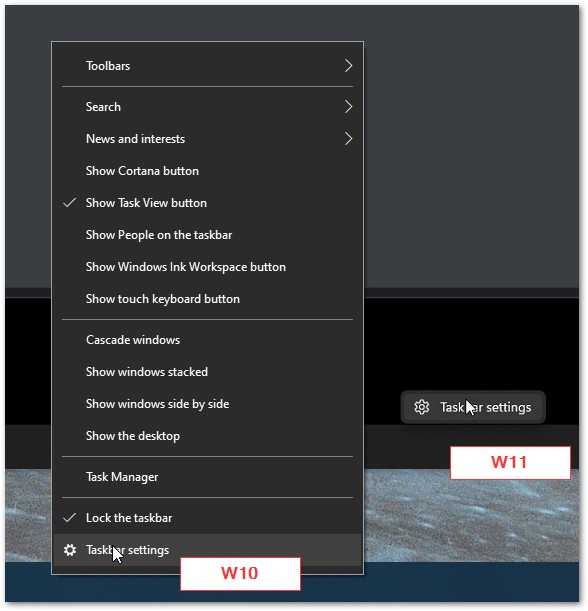
Hmm, no right-click task bar for task manager.  


You're not on Atlantis anymore, Duncan Idaho.

Andib
1396 posts

Uber Geek
+1 received by user: 974

ID Verified
Trusted

  #2759987 14-Aug-2021 13:46
Send private message

MadEngineer:


Hmm, no right-click task bar for task manager.  


You now have to right click the start button


<# 
       .DISCLAIMER
       Anything I post is my own and not the views of my past/present/future employer.
#>


Technofreak
6657 posts

Uber Geek
+1 received by user: 3477

Trusted

  #2759989 14-Aug-2021 13:51
Send private message

freitasm:


The latest update installed the Teams app, Microsoft's weak attempt to replace Skype. What a load of crap that app is.


I've only used Teams on  Win 10 and the Android Teams app but it seems to work OK.


Sony Xperia XA2 running Sailfish OS. https://sailfishos.org The true independent open source mobile OS 
Samsung Galaxy Tab S6
Dell Inspiron 14z i5


1 | ... | 7 | 8 | 9 | 10 | 11 | 12 | 13 | 14 | 15 | 16 | 17 | ... | 24
View this topic in a long page with up to 500 replies per page Create new topic


Geekzone Live »

Try automatic live updates from Geekzone directly in your browser, without refreshing the page, with Geekzone Live now.


Are you subscribed to our RSS feed? You can download the latest headlines and summaries from our stories directly to your computer or smartphone by using a feed reader.