Geekzone: technology news, blogs, forums
Guest
Welcome Guest.
You haven't logged in yet. If you don't have an account you can register now.


sxz

sxz

761 posts

Ultimate Geek
+1 received by user: 194


#115546 29-Mar-2013 10:06
Send private message

This is driving me nuts.

Just bought an awesome new Laptop.

Just bought an SSD for my new Laptop.

My Laptop does not come with a Windows 8 DVD.  Or a Windows 8 Activation code (although appears genuine in all other respects).  I understand the code is held in the firmware so I shouldn't need to enter it anyway.  I have (as a back up) used software to detect the code.  Laptop does not come with Recovery Disk, I have thus far been unable to make one.

1.  Intel SSD came with cloning software.  Wont work because of my Dynamic Disk.
2.  Tried other software.  Appears to work, but new SSD has problems with boot file so wont boot.
3.  Have tried downloading a Windows 8 ISO and making USB Boot version, wont boot from USB.
4. I don't have any blank DVDs to try the ISO with, and it is Easter, everything is closed.

F windows - give me a damn DVD why don't you! 

Any smart ideas to get my new SSD up and running?

View this topic in a long page with up to 500 replies per page Create new topic

This is a filtered page: currently showing replies marked as answers. Click here to see full discussion.

freitasm
BDFL - Memuneh
80655 posts

Uber Geek
+1 received by user: 41052

Administrator
ID Verified
Trusted
Geekzone
Lifetime subscriber

  #789178 29-Mar-2013 11:29
Send private message

nathan: "Create a recovery drive" is built into the control panel of every Windows 8 and Windows RT machine


Sure is. You can use it to restore the HDD image on a new HDD/SSD. But it is not the tool used to create a bootable USB from a ISO download. It creates a bootable device for diagnostics/repair only from the existing system.

So you have two options: 

(a) create a HP Recovery media (USB drive with Windows 8 install files 
(b) create a Windows 8 recovery

Using the HP Recovery Manager means you need one large USB key (8GB should be enough) to create a boot device that will install a fresh Windows 8 environment on your new HDD/SSD that will look exactly like it was when you bought it. Here is a video with all the instructions on how to create the HP Recovery Media on Windows 8.

Everyone should have this media anyway, in case your HDD dies and you replace it with an empty one.

Now, if you want to simply transfer the image from one drive to another (not simply reinstall on another) then let's tell the OP how to use the Windows 8 recovery option if he can't find the HP Recovery Media or he wants to create a full image backup.

1. Create the media 

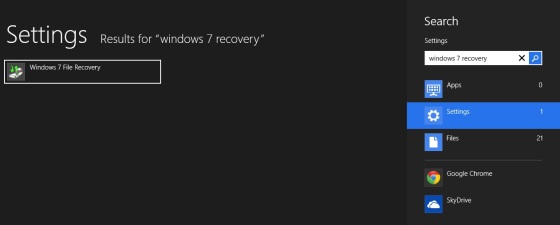
The Windows 8 recovery requires TWO media: one to have the image and one to boot. On Windows 8 Home Screen type "Windows 7 Recovery" (yes, really) and in settings you will find this:


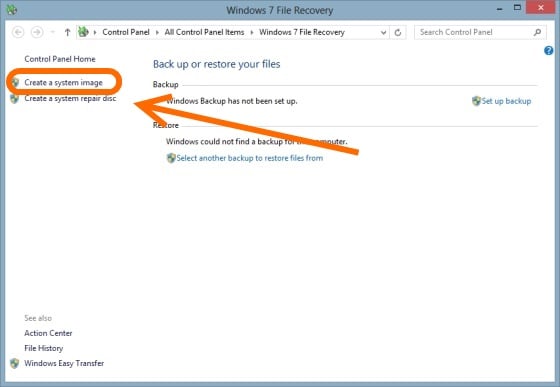
Click that and create a full disk image on an external drive:


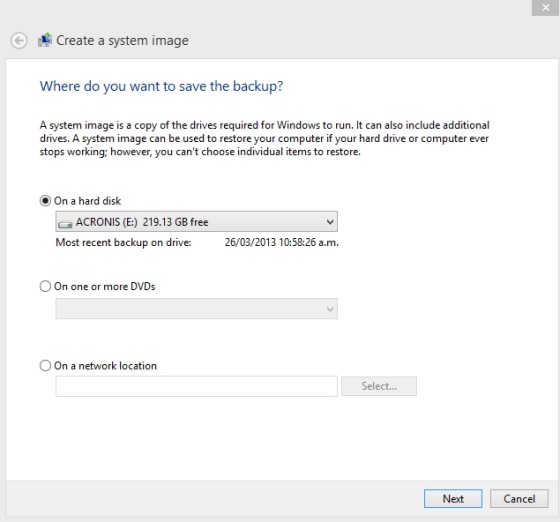
Click "Create a system image" and continue with this:


This is a full image of your HDD. You will need an external drive that is at least the same size of the storage used (if you are using 40GB then you need at least 40GB).

2. Create a Recovery USB

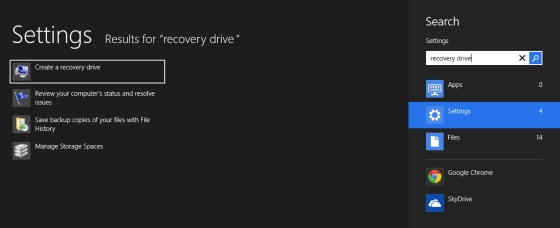
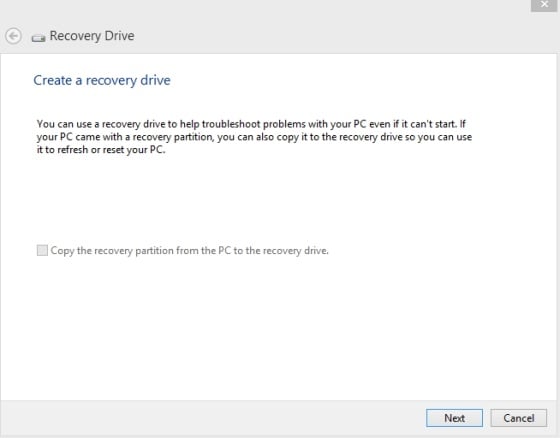
Again on Windows 8 Home Screen type "Recovery drive":


Click "Create a recovery drive". Insert a USB key (a small one will do, only uses a few megabytes really) and continue:


You can now use this USB key to boot your computer and restore the image on other HDD.

You need an external HDD with enough storage to copy your entire drive. This is ok though if you want to move data and installed programs.


Referral links: Quic Broadband (free setup code: R587125ERQ6VE) | Samsung | AliExpress | Wise | Sharesies 


Support Geekzone by subscribing (browse ads-free), or making a one-off or recurring donation through PressPatron.


freitasm
BDFL - Memuneh
80655 posts

Uber Geek
+1 received by user: 41052

Administrator
ID Verified
Trusted
Geekzone
Lifetime subscriber

  #793574 4-Apr-2013 22:31
Send private message

Open a command line and enter chkdsk /f. It will ask if you want to schedule a chkdsk to run on next boot.


Referral links: Quic Broadband (free setup code: R587125ERQ6VE) | Samsung | AliExpress | Wise | Sharesies 


Support Geekzone by subscribing (browse ads-free), or making a one-off or recurring donation through PressPatron.


View this topic in a long page with up to 500 replies per page Create new topic


Geekzone Live »

Try automatic live updates from Geekzone directly in your browser, without refreshing the page, with Geekzone Live now.


Are you subscribed to our RSS feed? You can download the latest headlines and summaries from our stories directly to your computer or smartphone by using a feed reader.