Geekzone: technology news, blogs, forums
Guest
Welcome Guest.
You haven't logged in yet. If you don't have an account you can register now.


quickymart

14940 posts

Uber Geek
+1 received by user: 13953

ID Verified

#202089 16-Sep-2016 10:58
Send private message

Morning,


I'm trying to reinstall my laptop with a new SSD. Previously it had Windows Vista on it (yes, I know, old school) but it worked just fine and all my applications worked well too.


Upon installing the SSD, I've found my DVD's created using the HP facility are not being read anymore and have probably died. I need to get Vista back on there, but how? The laptop was pre-installed with Vista. HP have said they don't have DVD's for it anymore.


I have an .iso file of 32 bit Vista (no other files) however and the full version of Nero 9. Is there any way I can use this to create a bootable DVD to allow reinstalling? Most of the documentation I've looked at says a .com file is required as the boot image file - but I don't have this.


Any help greatly appreciated, thanks.


View this topic in a long page with up to 500 replies per page Create new topic

This is a filtered page: currently showing replies marked as answers. Click here to see full discussion.

blakamin
4431 posts

Uber Geek
+1 received by user: 1306
Inactive user


  #1631848 16-Sep-2016 16:58
Send private message

quickymart:


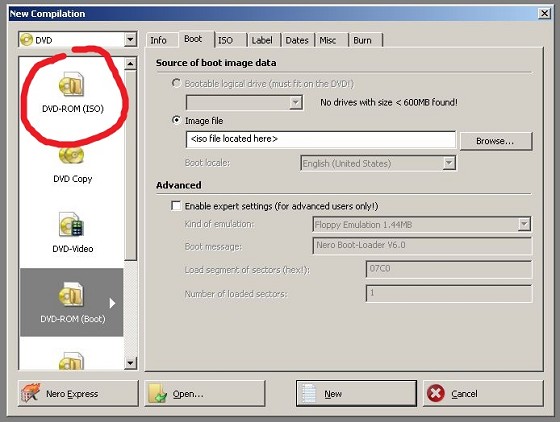
This is the setting I was using:


Click to see full size


People are making it difficult... click on the one in the  red circle... IF it's a proper Vista ISO, it'll boot.


View this topic in a long page with up to 500 replies per page Create new topic


Geekzone Live »

Try automatic live updates from Geekzone directly in your browser, without refreshing the page, with Geekzone Live now.


Are you subscribed to our RSS feed? You can download the latest headlines and summaries from our stories directly to your computer or smartphone by using a feed reader.