Geekzone: technology news, blogs, forums
Guest
Welcome Guest.
You haven't logged in yet. If you don't have an account you can register now.


Wakrak

1748 posts

Uber Geek
+1 received by user: 1126

ID Verified
Lifetime subscriber

#272000 5-Jun-2020 00:35
Send private message

Has anyone performed the above firmware upgrade? 

I'm a bit late to the party, considering it was released 21st February this year. 


Quite a few new features, including better 2.4ghz performance (apparently).


Click to see full size


Last time I upgraded the firmware, I didn't know I was supposed to let Slingshot do it. Somehow in doing it myself, I removed the entire Slingshot interface. Thankfully I managed to find the default username and password for my Netcomm NF18ACV, pre-slingshot overhaul of it. Bloke on the other end had no idea what I was looking at when I was describing the Netcomm menu options. 


They were about to charge me $70 or so for a new modem, since the technical team reckon I 'destroyed' this one, but I somehow solved the problem.


Anyway, anyone tried the update? Was reading some of the issues Whirlpool members were facing. 


Also while I've got you reading, thoughts on NF18ACV vs Fritzbox 7490? Just picked one up for $20. Just need a power cable for it. 



Create new topic
Handsomedan
7769 posts

Uber Geek
+1 received by user: 7402

ID Verified
Trusted
Subscriber

  #2498680 5-Jun-2020 09:02
Send private message

I've now had three NF18ACV's via Slingshot. 


Last one died after a reset, at the instruction of the Slingshot tech I was talking to about slower than expected performance. 


Personally, I am not a fan of these routers and find them to be weak and ordinary. But I am provided this by the ISP as a part of my internet package and it costs me nothing to maintain (unless you call a week without internet a cost). 


It's sufficient and nothing more. 


I wouldn't update the firmware without know exactly what I am doing...and I don't. I've had too many dead routers to want to go through that pain again. 


Handsome Dan Has Spoken.
Handsome Dan needs to stop adding three dots to every sentence...


Handsome Dan does not currently have a side hustle as the mascot for Yale 


*Gladly accepting donations...


Wakrak

1748 posts

Uber Geek
+1 received by user: 1126

ID Verified
Lifetime subscriber

  #2498789 5-Jun-2020 10:09
Send private message

Handsomedan:


talking to about slower than expected performance. 


Personally, I am not a fan of these routers and find them to be weak and ordinary. But I am provided this by the ISP as a part of my internet package and it costs me nothing to maintain (unless you call a week without internet a cost). 


It's sufficient and nothing more. 


Thankfully I'm in a small unit, so wifi doesn't have to travel far. Have connected items through Ethernet where applicable to leave WiFi channels relatively free (for lights, phones etc). The range on this modem is poor. On a 100/20 plan, I average  80-90 D / 20-25 U. 
Considering its free pricetag and the good deal I have with Slingshot, the modem covers everything we need. Streams 4K with relative ease.  


But if I can improve the performance, then why not. 


eonsim
403 posts

Ultimate Geek
+1 received by user: 192

Trusted

  #2499260 5-Jun-2020 19:32
Send private message

I'd be careful updating the firmware if it currently works.


My first one became non-functional within a month after a factory reset following an ISP techs suggestion due to it regularly losing internet. The second one worked okay for wired ethernet, but the wifi sucked if you weren't in the same room it was.


The third one I've dealt with for a family member couldn't provide wifi cover for a 100sqm house, both the 2.4G and 5G signal couldn't pass through a single wooden wall.


If it's currently working for you I highly suggest taking great care before changing anything about it.


bmd1103
8 posts

Wannabe Geek


  #2621191 14-Dec-2020 09:38
Send private message

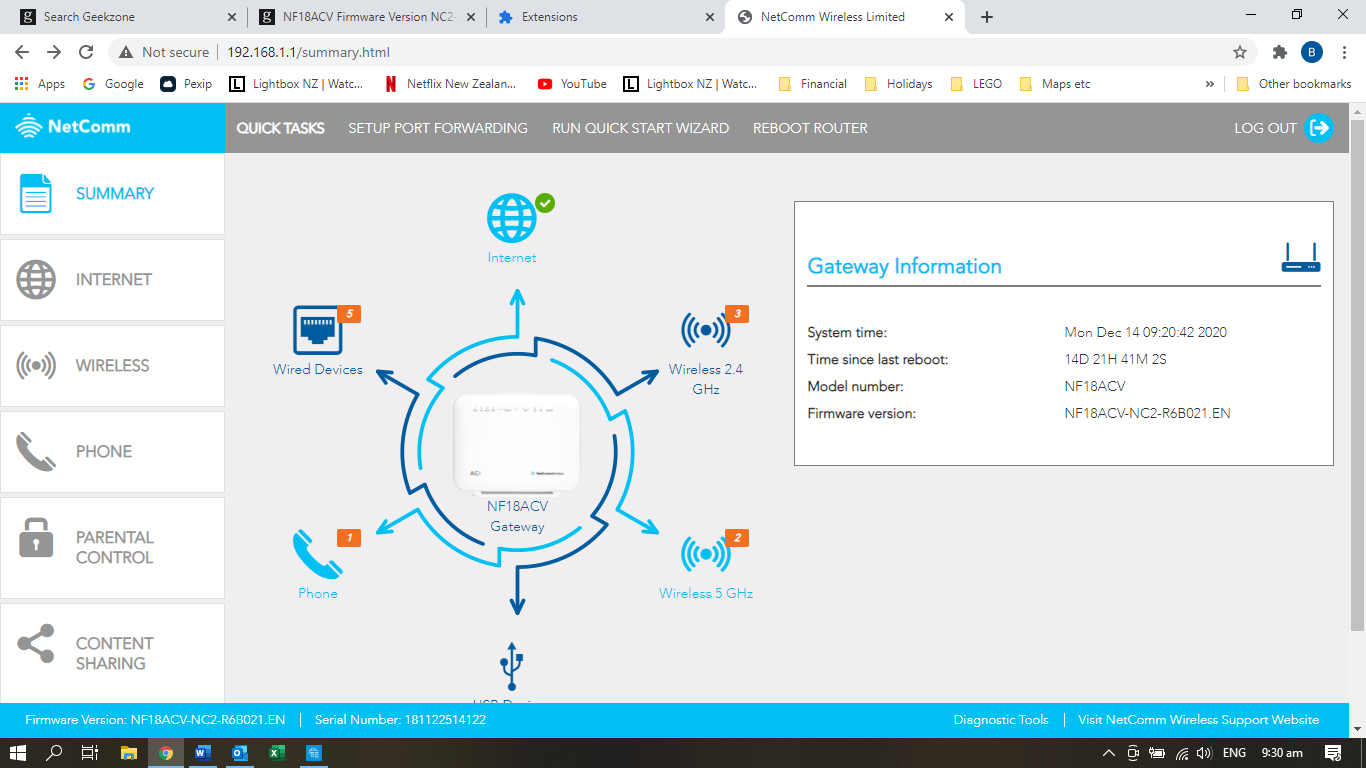
I eventually got totally fed up with the lighthouse that is the NF18ACV with Slingshot software.  A Google check turned up the fact that the latest updates allow the LEDs to be turned off, so I downloaded firmware version NF18ACV-NC2-R6B021.EN.


There was an "OH S**T" moment (actually about an hour) when I restarted only to find I no longer had an Internet connection, or a working phone.  I got on to someone at Slingshot helpdesk who very nicely informed me that the Slingshot firmware is a "special" and includes lots of stuff that is required to work with their systems.  She recommended the sticky-tape fix.  While we were having this discussion. I went to their website and found the recommended config data, and did a comparison.  Their data gave an MTU size (Internet / ETH WAN / More Options) of 1492 whereas the default came up with 0.  I changed to the recommended value and all systems have been go since (about 10 days).


I prefer the interface with the update, as I've been playing with a few Raspberry Pi and other systems, and it's much easier to see what is connected where.  But be warned - if you do mange to brick the modem it has to go back to base and you could be liable for a fee if it can't be repaired.


(I advised the nice person at Slingshot of all this, and said that, since they had had a lot of queries about the lights, I might charge them a consultant's fee.)


BTW - the light fix also worked. 


Click to see full size


Handsomedan
7769 posts

Uber Geek
+1 received by user: 7402

ID Verified
Trusted
Subscriber

  #2621227 14-Dec-2020 10:52
Send private message

bmd1103:


I eventually got totally fed up with the lighthouse that is the NF18ACV with Slingshot software.  A Google check turned up the fact that the latest updates allow the LEDs to be turned off, so I downloaded firmware version NF18ACV-NC2-R6B021.EN.


There was an "OH S**T" moment (actually about an hour) when I restarted only to find I no longer had an Internet connection, or a working phone.  I got on to someone at Slingshot helpdesk who very nicely informed me that the Slingshot firmware is a "special" and includes lots of stuff that is required to work with their systems.  She recommended the sticky-tape fix.  While we were having this discussion. I went to their website and found the recommended config data, and did a comparison.  Their data gave an MTU size (Internet / ETH WAN / More Options) of 1492 whereas the default came up with 0.  I changed to the recommended value and all systems have been go since (about 10 days).


I prefer the interface with the update, as I've been playing with a few Raspberry Pi and other systems, and it's much easier to see what is connected where.  But be warned - if you do mange to brick the modem it has to go back to base and you could be liable for a fee if it can't be repaired.


(I advised the nice person at Slingshot of all this, and said that, since they had had a lot of queries about the lights, I might charge them a consultant's fee.)


BTW - the light fix also worked. 


Click to see full size


Yeah as I stated back in June - I am not going to bugger about with mine, due to the fact that it's now working OK...but I'd love to have that light display turned off. 


Handsome Dan Has Spoken.
Handsome Dan needs to stop adding three dots to every sentence...


Handsome Dan does not currently have a side hustle as the mascot for Yale 


*Gladly accepting donations...


Create new topic


Geekzone Live »

Try automatic live updates from Geekzone directly in your browser, without refreshing the page, with Geekzone Live now.


Are you subscribed to our RSS feed? You can download the latest headlines and summaries from our stories directly to your computer or smartphone by using a feed reader.