Geekzone: technology news, blogs, forums
Guest
Welcome Guest.
You haven't logged in yet. If you don't have an account you can register now.


GregorySanchez

9 posts

Wannabe Geek
+1 received by user: 1


#245252 25-Jan-2019 21:16
Send private message

I have just purchased a new router and I am having trouble getting it set up. I have purchased an ASUS RT-AC5300 router, but I am having issues getting it connected to my Fibre connection. My internet service provider is Orcon, I have done my own research and after few hours still have had no luck. I don't understand too much about networking but I definitely know how to folllow instructions, all of which I've found so far have not worked. Could somebody please help me?

Filter this topic showing only the reply marked as answer View this topic in a long page with up to 500 replies per page Create new topic
 1 | 2 | 3
Spyware
3817 posts

Uber Geek
+1 received by user: 1366

Lifetime subscriber


GregorySanchez

9 posts

Wannabe Geek
+1 received by user: 1


  #2167661 25-Jan-2019 21:47
Send private message

I appreciate this, unfortunately I have already followed these steps with no such luck.

Spyware
3817 posts

Uber Geek
+1 received by user: 1366

Lifetime subscriber

  #2167664 25-Jan-2019 22:00
Send private message

There is no more to it. DHCP with VID=10. Post captures of all settings, entire page.


Batman
Mad Scientist
30012 posts

Uber Geek
+1 received by user: 6217

Trusted
Lifetime subscriber

  #2167665 25-Jan-2019 22:23
Send private message

*assuming your settings are actually all correct*


i have an asus rt ac3200


sometimes i have to reboot a few times before it will get the internet!


took many firmware updates before it became better, router was quite buggy for a while


GregorySanchez

9 posts

Wannabe Geek
+1 received by user: 1


  #2167671 26-Jan-2019 00:46
Send private message

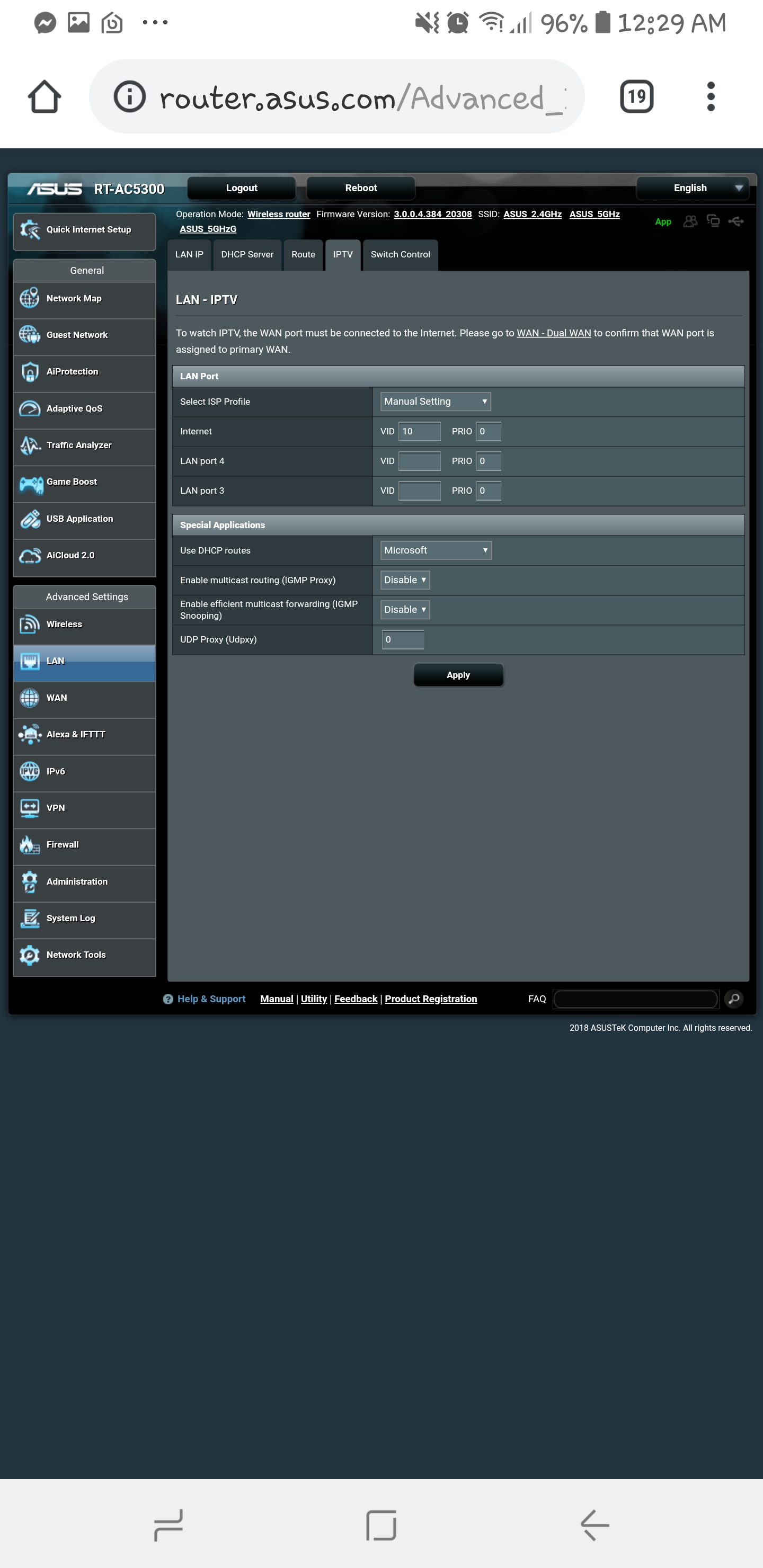
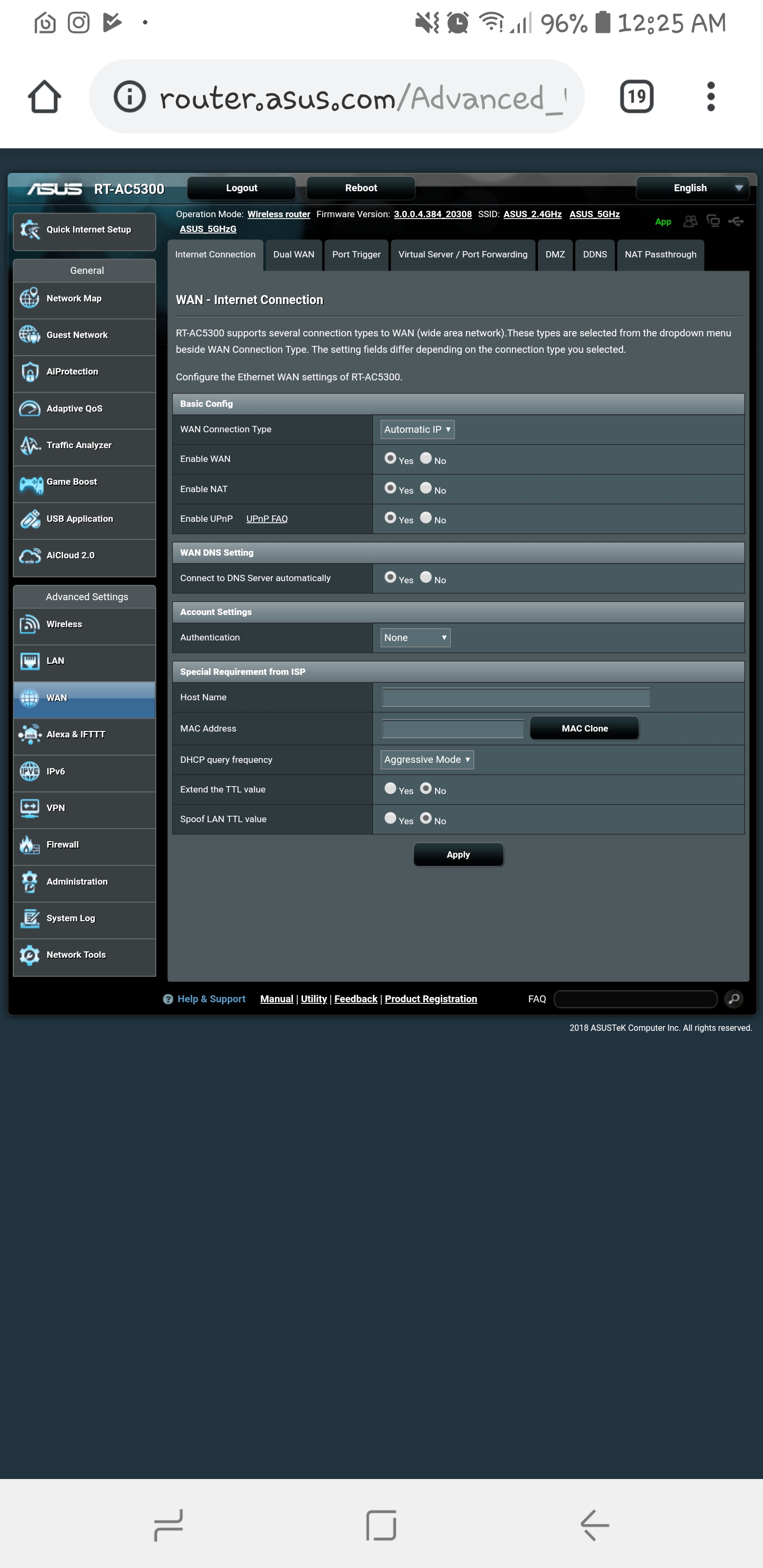
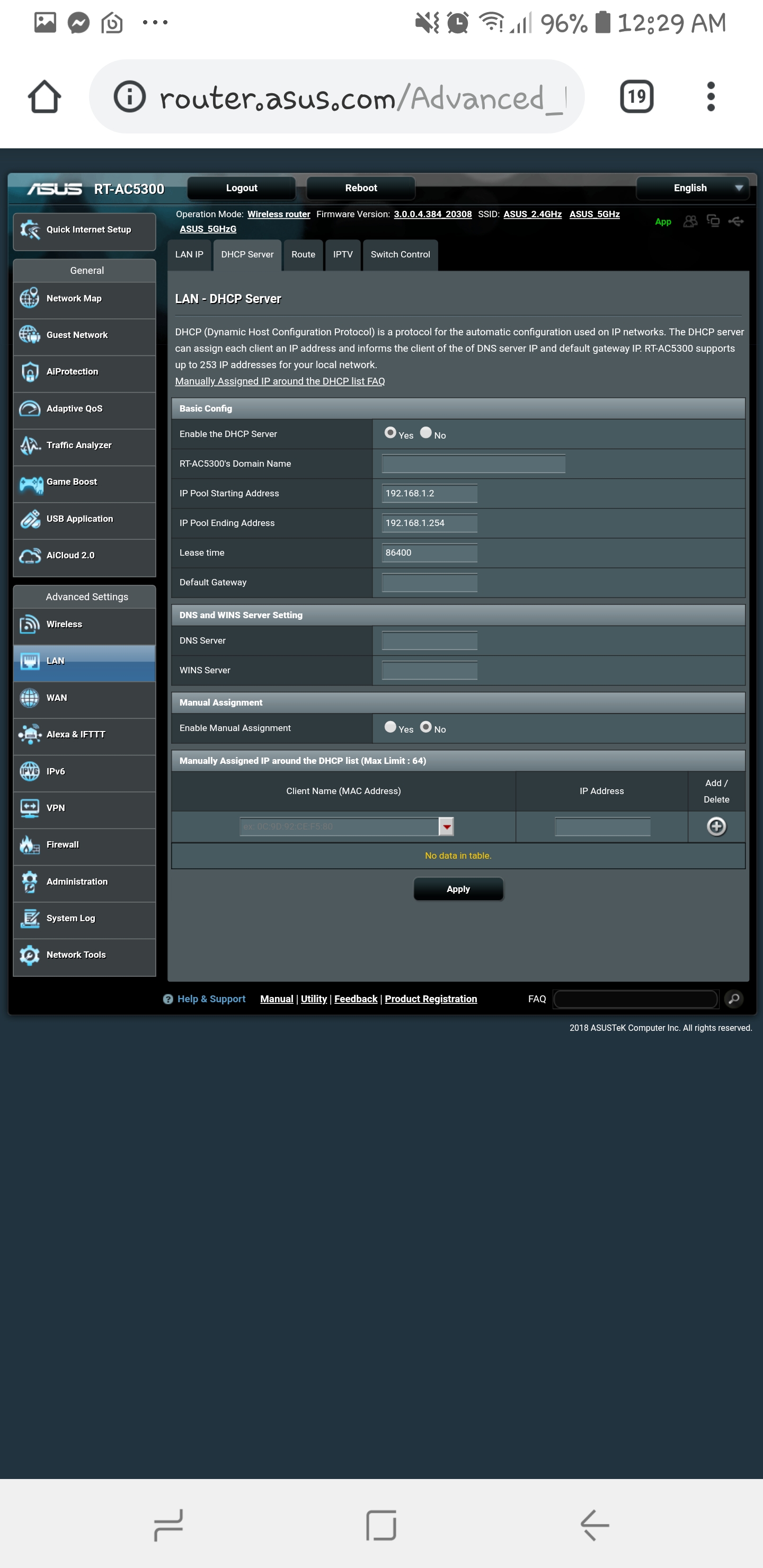
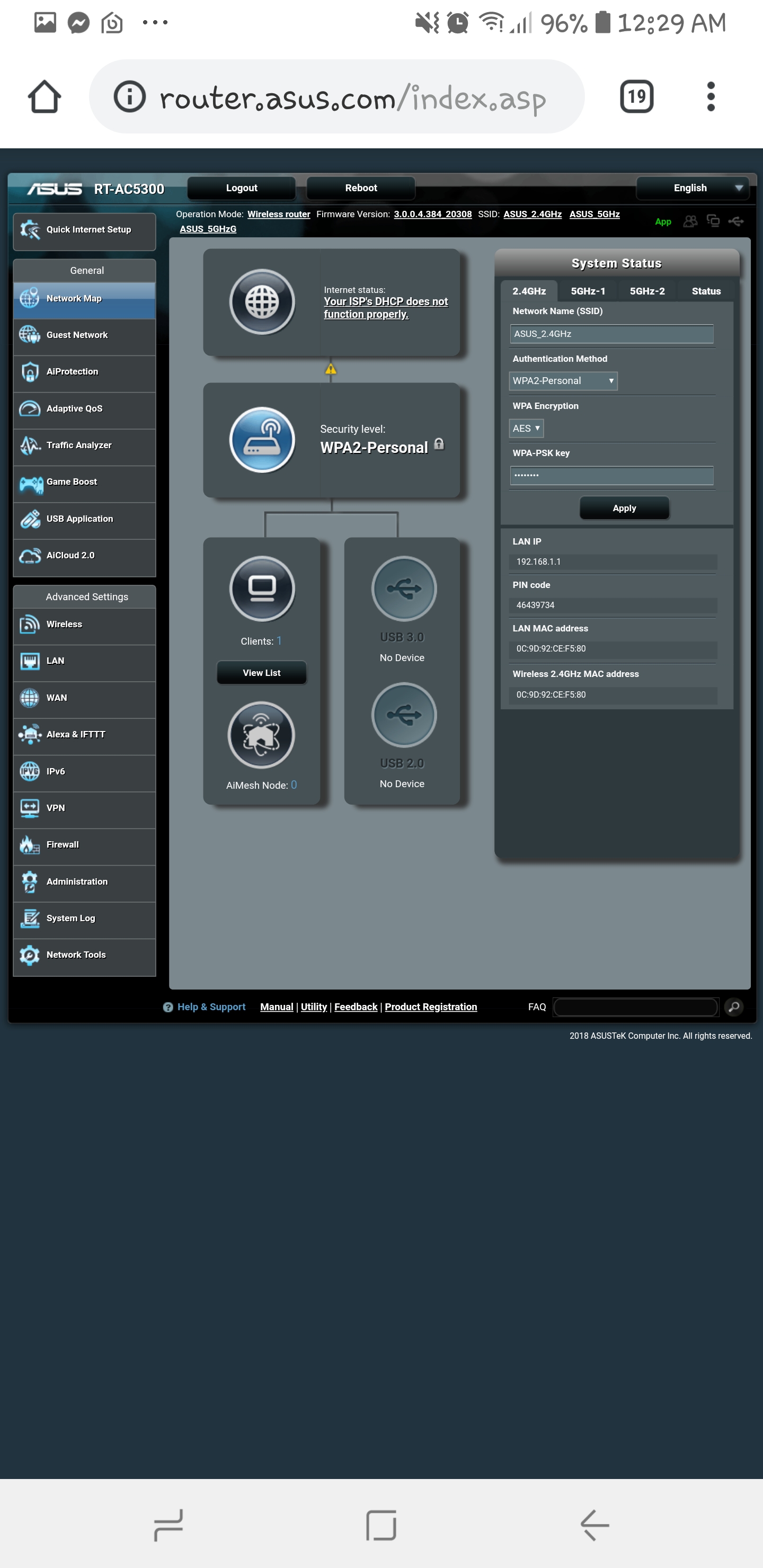
All of the settings are default except for the ones which the PBTech site informed me to change. I've also added the DHCP tab and a screen shot of the network map which states an error.

Iptv tab:

WAN/Internet tab:

DHCP tab:

Network mapping tab:

ANglEAUT
altered-ego
2436 posts

Uber Geek
+1 received by user: 841

Trusted
Lifetime subscriber

  #2167674 26-Jan-2019 01:05
Send private message

Spyware:


https://www.pbtech.co.nz/ASUSISPSettings#VDFRTAC


Very nice. Didn't know they had this.


Please keep this GZ community vibrant by contributing in a constructive & respectful manner.


Want to support Geekzone and browse the site without the ads? Subscribe to Geekzone now (monthly, annual and lifetime options).
freitasm
BDFL - Memuneh
80646 posts

Uber Geek
+1 received by user: 41024

Administrator
ID Verified
Trusted
Geekzone
Lifetime subscriber

  #2167678 26-Jan-2019 01:31
Send private message

No authentication needed for Orcon?


Referral links: Quic Broadband (free setup code: R587125ERQ6VE) | Samsung | AliExpress | Wise | Sharesies 


Support Geekzone by subscribing (browse ads-free), or making a one-off or recurring donation through PressPatron.



Batman
Mad Scientist
30012 posts

Uber Geek
+1 received by user: 6217

Trusted
Lifetime subscriber

  #2167685 26-Jan-2019 07:02
Send private message

Try in this order

Factory reset
Reboot
Reboot
Reboot
Firmware update

Jase2985
13730 posts

Uber Geek
+1 received by user: 6202

ID Verified
Lifetime subscriber

  #2167698 26-Jan-2019 08:08
Send private message

not related to your question but i believe its relevant advice. take it back and get a orbi or amplifi kit for the same price. likely get better coverage and be way more versitile


these "gaming routers" are a bit of a scam. bigger more powerful isnt necessarily better


Batman
Mad Scientist
30012 posts

Uber Geek
+1 received by user: 6217

Trusted
Lifetime subscriber

  #2167714 26-Jan-2019 08:26
Send private message

my asus rt ac3200 gives me wifi that can watch 4k youtube from across the road


it has 3 different wifis so all my devices use a separate wifi :)


it never fails me unless i reboot it, but i don't reboot it. when i say bugs it's the interface that's buggy, performance has been top notch from day 1.


it's not a gimmick


i believe the 5300 has 3 wifis but using MIMO. MIMO only works if every device connected has MIMO. one device without MIMO breaks MIMO so I chose the 3200. since 99% of devices do not have MIMO anyway, I guess you could call MIMO a gimmick.


Jase2985
13730 posts

Uber Geek
+1 received by user: 6202

ID Verified
Lifetime subscriber

  #2167718 26-Jan-2019 08:32
Send private message

it is a gimmick because most devices radios are not that powerful to send the data back from a long distance. easy to receive it hard to send it back.


having a super powerful single access point doesn't work these days with the noise floor of those 2 spectrum getting higher and higher.


all its likely doing it drowning out your neighbours signals as well.


having more less powerful access points is what you should be using.


Shop now for Dell laptops and other devices (affiliate link).
michaelmurfy
meow
13579 posts

Uber Geek
+1 received by user: 10910

Moderator
ID Verified
Trusted
Lifetime subscriber

  #2167771 26-Jan-2019 10:43
Send private message

Jase2985:


it is a gimmick because most devices radios are not that powerful to send the data back from a long distance. easy to receive it hard to send it back.


having a super powerful single access point doesn't work these days with the noise floor of those 2 spectrum getting higher and higher.


all its likely doing it drowning out your neighbours signals as well.


having more less powerful access points is what you should be using.


Furthermore - for the price of a ASUS RT-AC5300 you can get an AmpliFi which not only performs better (WiFi wise) but looks nice too.


Gaming routers are a scam, I've already covered this off multiple times.


Michael Murphy | https://murfy.nz
Referral Links: Quic Broadband (use R122101E7CV7Q for free setup)

Are you happy with what you get from Geekzone? Please consider supporting us by subscribing.
Opinions are my own and not the views of my employer.


GregorySanchez

9 posts

Wannabe Geek
+1 received by user: 1


  #2167782 26-Jan-2019 11:23
Send private message

So going on what I've read I brought the wrong router? Is there no way to get this to work at all? One thing that I wasn't sure of was the DHCP error I got which shows in one of the photos I posted. Could this be an issue with the ONT needing to be configured correctly and not the settings on the router?

rscole86
4999 posts

Uber Geek
+1 received by user: 462

Moderator
Trusted
Lifetime subscriber

  #2167801 26-Jan-2019 11:48
Send private message

Have you tried to factory reset and checking for new firmware? The firmware you're running is almost a year old, the most recent is from December 2018.

GregorySanchez

9 posts

Wannabe Geek
+1 received by user: 1


  #2167802 26-Jan-2019 11:51
Send private message

Yep, I installed the most recent straight from the ASUS website. I'm honestly running out of options here aye.

 1 | 2 | 3
Filter this topic showing only the reply marked as answer View this topic in a long page with up to 500 replies per page Create new topic


Geekzone Live »

Try automatic live updates from Geekzone directly in your browser, without refreshing the page, with Geekzone Live now.


Are you subscribed to our RSS feed? You can download the latest headlines and summaries from our stories directly to your computer or smartphone by using a feed reader.