|
|
|
i believe windows is capable
http://www.tp-link.us/faq-339.html
like that
Jase2985:
Linuxluver:
Here's my status on my WiFi connection. WiFi definitely can go extremely fast if you get the right wifi adpater for your PC and have a newer AC3200-capable AP.
you do realise that your AC3200 AP just has 2x 1300mbps 5ghz wifi networks so you will never get 3200mbps out of it
and looking at your wifi stats your device only suports 867mbps
the only advantage your router provides is if you have say 10+ 5ghz ac capable devices as it will be able to share them over the 2 radios or by having each radio on a seperate SSID
Complete overkill for 99% of residential installs
I understand AC3200. I also understand that I can move files around to / from the NAS via WiFi at about 35MB / second.....which is nice.
I guess I'm the other 1%.
I'm a geek.
Plus the whole family streams HD video off the NAS via wifi......so yeah....I guess we're different.
That 1% does exist. Here I am!!! Over here! ;-)
_____________________________________________________________________
I've been on Geekzone over 16 years..... Time flies....
i can do that too and i dont have a AC3200 AP. also 35MB/s is only 280mbps
im guessing your nas is connected via a single ethernet cable to your AP? which is limited at 1000mbps.
Aargh!
Finally got a reply from Orcon support, I have given them all the information but now I have to wait until I get home because I have to do a factory reset on the brand new modem before it goes to a level 2 tech who will pass it on to enable to sort out...
what modem is it? NF4V?
Jase2985:
what modem is it? NF4V?
Yes, latest revision apparently, I had a NF4V that I just sent back as it was my original and Orcon said it was not capable of the 200/200 speeds.
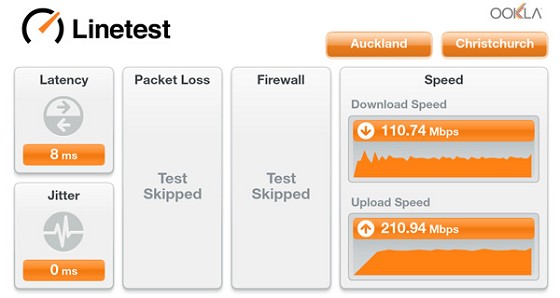
Linetest is a touch more generous

Possibly a bit out of left field but have you tried a different Ethernet cable from the ONT to the router?

Brumfondl:
Possibly a bit out of left field but have you tried a different Ethernet cable from the ONT to the router?
Good thinking, just swapped out that cable with another new one, but still 100/200 :(
DrDee:
Brumfondl:
Possibly a bit out of left field but have you tried a different Ethernet cable from the ONT to the router?
Good thinking, just swapped out that cable with another new one, but still 100/200 :(
weren't you getting 133/200?
tdgeek:
DrDee:
Brumfondl:
Possibly a bit out of left field but have you tried a different Ethernet cable from the ONT to the router?
Good thinking, just swapped out that cable with another new one, but still 100/200 :(
weren't you getting 133/200?
Yes I was, now can only get 100/200, but strangely it is almost exactly 100/200 every time which makes me think it is being hampered by a set limit.
DrDee:
tdgeek:
DrDee:
Brumfondl:
Possibly a bit out of left field but have you tried a different Ethernet cable from the ONT to the router?
Good thinking, just swapped out that cable with another new one, but still 100/200 :(
weren't you getting 133/200?
Yes I was, now can only get 100/200, but strangely it is almost exactly 100/200 every time which makes me think it is being hampered by a set limit.
I had a similar issue with another ISP and it turned out to be a fault with the router...I was consistently getting 70Mbps down, despite being on a 200 connection (and having seen 200Mbps in the past, with no config changes made). After lots of attempts to fix (calls to ISP to check plan, Chorus 'Non-van roll' checks, direct connection to router etc.), the router was finally replaced and put into the same setup (i.e. just swapped all the cables into the new router) and it was all back to 200Mbps down.
hence why i stronly suggest you try using your PC/Laptop as your PPPoE connection straight into the ONT to rule it out.
Unless you have a different router you could try. but at leas you know your PC's LAN port can handle 200/200 from your testing
Jase2985:
hence why i stronly suggest you try using your PC/Laptop as your PPPoE connection straight into the ONT to rule it out.
Orcon uses DHCP not PPPoE (Too much overhead with PPPoE).
However you need your PC to 802.1q vlan 10 also.
|
|
|