Geekzone: technology news, blogs, forums
Guest
Welcome Guest.
You haven't logged in yet. If you don't have an account you can register now.


ztytian

31 posts

Geek
+1 received by user: 22


#289453 7-Sep-2021 11:43
Send private message

I'm in the States at the moment for some urgent business, before I hopped on the jet I figured I'd snatch a 2degrees SIM to avoid some hefty charges.


My debit card got blocked today presumably for international usage, decided to try out 2d's wifi calling. Connected my iPhone to WiFi, toggled on WiFi calling and flight mode, made a call to 200, the call went out without a hitch. Then I tried to dial my bank's 0800 number, the call failed, weird I thought. I figured that might be down to my balance of zero, so I made a quick top up and the call went through without a hitch.


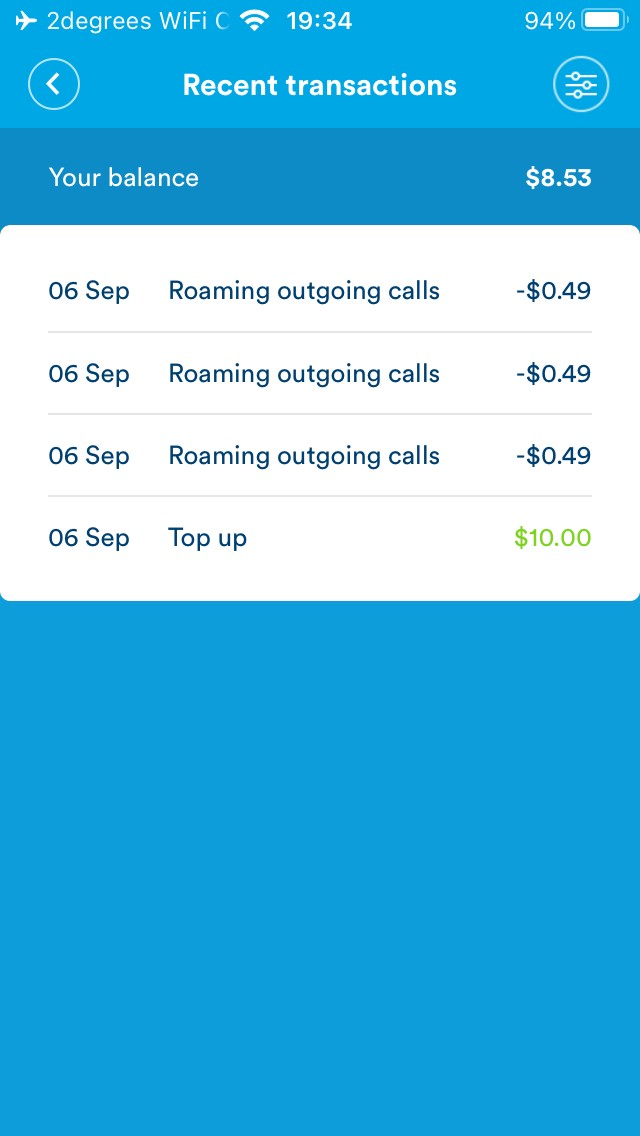
When I finished the call I jumped back to check the degrees app, I was surprised to find that I was charged $0.49 * 3 for my call.


My understanding is that making calls to 0800 numbers within New Zealand should be free, and if I make a call via WiFi calling I should be treated as though I was calling from inside New Zealand, so the call is supposed to be free for me? Or am I missing some caveats here?


I wasn't charged for an inbound call for a friend of mine tho, so I'm pretty sure WiFi calling is on and working. (I turned on flight mode to be extra sure). I've called up customer service they've agreed to refund the charges but aren't willing to investigate any further. Could anyone please shed some light on this particular issue?


View this topic in a long page with up to 500 replies per page Create new topic

This is a filtered page: currently showing replies marked as answers. Click here to see full discussion.

Linux
12209 posts

Uber Geek
+1 received by user: 8493

Trusted
Lifetime subscriber

  #2773516 7-Sep-2021 12:22
Send private message

These calls should be free when roaming and using WiFi calling 


SaltyNZ
8892 posts

Uber Geek
+1 received by user: 9619

Trusted
2degrees
Lifetime subscriber

  #2773517 7-Sep-2021 12:22
Send private message

At the moment due to all the IPO stuff that's going on I won't generally comment on anything 2degrees related. But I agree that you should not be paying international rates to call an NZ number - toll-free or otherwise - from the US, using VoWifi. You'll need to log a call with Care, but you can reference this GZ thread and tell them I said to assign it to me to look at.


iPad Pro 11" + iPhone 15 Pro Max + 2degrees 4tw!


These comments are my own and do not represent the opinions of 2degrees.


Stu

Stu
Hammered
8754 posts

Uber Geek
+1 received by user: 2415

Moderator
ID Verified
Trusted
Lifetime subscriber

  #2773632 7-Sep-2021 14:03
Send private message

Nope, you don't need to muck around with numbers. That's not required for how VoWiFi works. The OP shouldn't have had the issue, and that's been acknowledged above by people in the know. 


People often mistake me for an adult because of my age.


Keep calm, and carry on posting.


Referral Links: Sharesies


Are you happy with what you get from Geekzone? If so, please consider supporting us by subscribing.


No matter where you go, there you are.


SaltyNZ
8892 posts

Uber Geek
+1 received by user: 9619

Trusted
2degrees
Lifetime subscriber

  #2774470 8-Sep-2021 13:29
Send private message

Good news everyone! We have discovered the problem and a fix has been put into the test environment ready for testing. Specifically, it was checking to see if you had dialled a shortcode from overseas to make it free, but forgot to also include toll-free numbers in the check.


It'll take a little while to percolate through to production but we will make sure anyone who was/gets caught by it is refunded.


iPad Pro 11" + iPhone 15 Pro Max + 2degrees 4tw!


These comments are my own and do not represent the opinions of 2degrees.


View this topic in a long page with up to 500 replies per page Create new topic


Geekzone Live »

Try automatic live updates from Geekzone directly in your browser, without refreshing the page, with Geekzone Live now.


Are you subscribed to our RSS feed? You can download the latest headlines and summaries from our stories directly to your computer or smartphone by using a feed reader.
