|
|
|
OMG I'm still on July!! Not had any, very bizarre, or is Samsung just very slow?
I contacted Skinny - the person at the other end of the chat said "they had no information regarding that. Contact Samsung."
So, I chatted online to Samsung. They advised bringing in the phone to a Samsung store to put it on a SMART tool - which would supposedly identify any issues.
I downloaded the SMART Switch app and plugged my phone into my PC - it advised that it was up to date (on October patch). So I decided by myself that the SMART tool at Samsung would probably say the same.
Ended up downloading the 6.5GB of UK files (N986BXXS1ATK1) from SamMobile and flashing myself using Odin. Phone is now on December patch and is working fine.
BryanG:I contacted Skinny - the person at the other end of the chat said "they had no information regarding that. Contact Samsung."
So, I chatted online to Samsung. They advised bringing in the phone to a Samsung store to put it on a SMART tool - which would supposedly identify any issues.
I downloaded the SMART Switch app and plugged my phone into my PC - it advised that it was up to date (on October patch). So I decided by myself that the SMART tool at Samsung would probably say the same.
Ended up downloading the 6.5GB of UK files (N986BXXS1ATK1) from SamMobile and flashing myself using Odin. Phone is now on December patch and is working fine.
I generally always update via Odin. Be aware in some circumstances it breaks Ota updates so you will need to update via Odin each time. Lastly sammobile is very slow I recommend downloading a program called Frija, it connects directly to the Samsung server and generally takes less than 5 minutes.
Thanks! Indeed it did take me 7-8 hours to download from sammobile via my "gig" fibre. Not worried about no OTA's as that was the problem I was attempting to resolve in the first place.
Thanks again for the tip re Frija!
If you update the firmware via the Odin/Friya way, does that mean you lose all your apps/data/settings etc and have to reinstall all the apps and home pages shortcuts etc?
Note2luvr:
If you update the firmware via the Odin/Friya way, does that mean you lose all your apps/data/settings etc and have to reinstall all the apps and home pages shortcuts etc?
I can't speak for 'every upgrade' - but when I went from October to December releases, as long as I chose the CSC file with 'home' in it, all was saved.
If there is an upgrade to 3.0 for example, I don't know sorry.
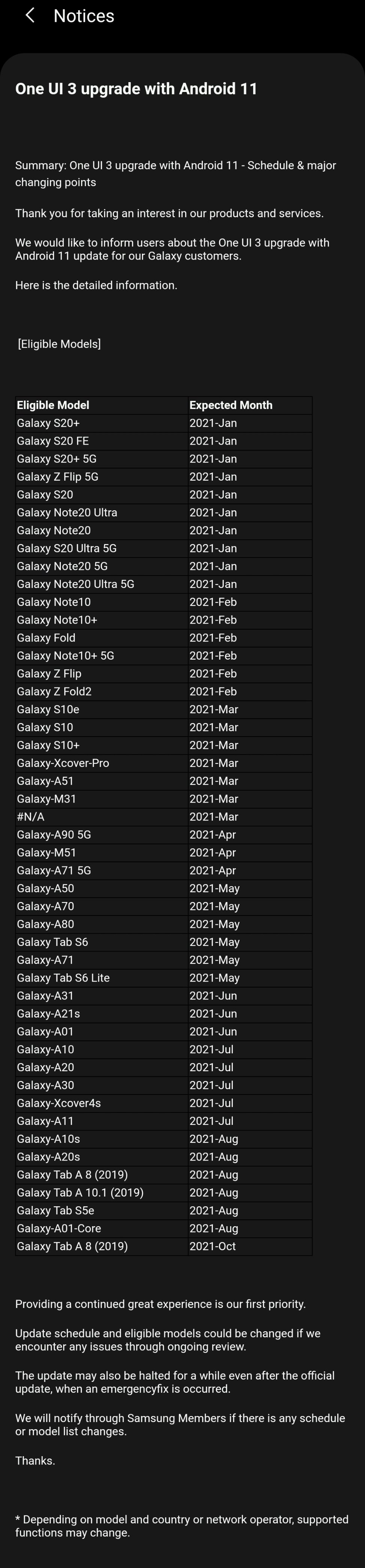
Is there a NZ release window for Android 11?
I saw that, but wasn't sure if it meant for the rest of the world, or mine unit specifically.
Does anyone have a recommendation on a "clearview type" cover that DOESN'T fall open?
For my S10 and now the Note, I have the clearview cover. I like it, as it protects the screen in my pocket etc, yet can be an alarm clock on my wireless charger. However if you drop it, it flaps right open and usually helps the phone land screen down. I don't know why they just don't add a magnet. This is how I got a tiny chip on my S10.
I can only see covers that are extremely bulky, or just protect the back.
networkn: There was an option in android that allowed an icon showing the number of notifications for an app to be long pressed to show the notifications on brief as a pop-up type thing. Anyone know how to enable that function? I have the number showing but long press doesn't show the actual notification.
Product Manager @ PB Tech
Smartphones @ PB Tech | Headphones @ PB Tech
|
|
|