Geekzone: technology news, blogs, forums
Guest
Welcome Guest.
You haven't logged in yet. If you don't have an account you can register now.


linw

2893 posts

Uber Geek
+1 received by user: 1205


#322641 7-Sep-2025 17:27
Send private message

I am a white box newby and my son has told me it should wake the TV via HDMI. (mine is on HDMI 1).


Anyone got this happening on a Sony KD-49x7000D?


AI says it is possible but I can't find the TV settings it points me to.


Create new topic
rprosser
36 posts

Geek
+1 received by user: 9


  #3412221 7-Sep-2025 18:40
Send private message

It;s something like:-


Goto MYHub, then Android settings,then turn CEC on.


There may be an intermediate step in there I've missed but you should be able to find it.


suthland
64 posts

Master Geek
+1 received by user: 15


  #3412242 7-Sep-2025 21:17
Send private message

https://help.sky.co.nz/s/article/Using-your-new-Sky-Box-remote


This page show how to code your white box remote to control (on/off , volume) your TV brand. Make sure the volume on your box is at full volume before you do this  


ANglEAUT
altered-ego
2436 posts

Uber Geek
+1 received by user: 841

Trusted
Lifetime subscriber

  #3412247 7-Sep-2025 21:37
Send private message

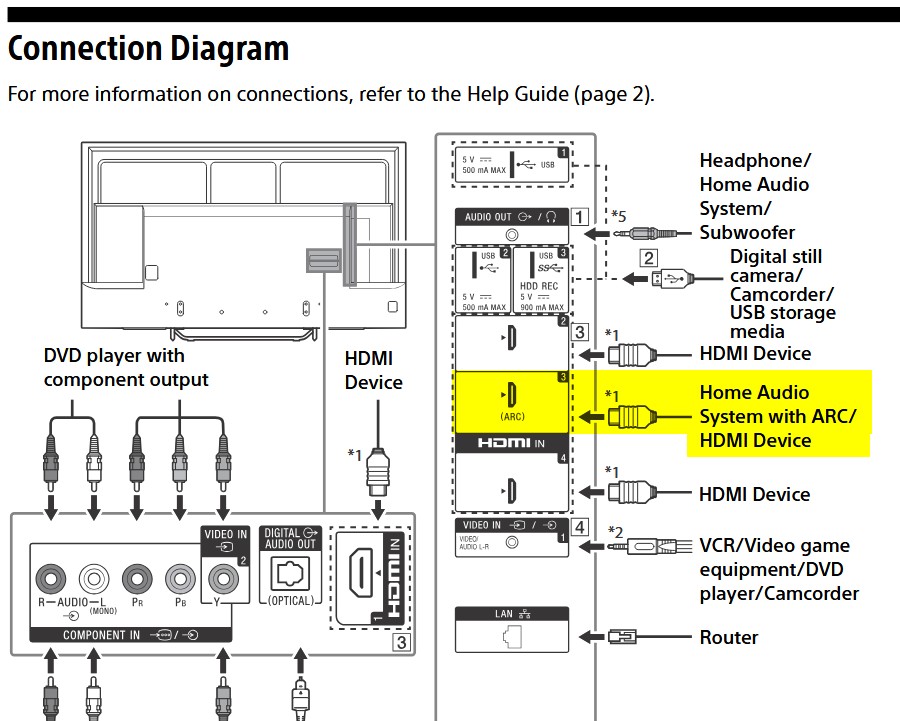
AFAIK, what you are interested in is the CEC portion of the HDMI input. Both devices need to have this option enabled.


Often enough, CEC is on the same HDMI port as ARC. According to the 45850261M reference guide dated 2016-Oct, that would be HDMI 3.


Plug your white box into HDMI 3 and see if the TV turns on (from sleep mode, not power off).


Please keep this GZ community vibrant by contributing in a constructive & respectful manner.


linw

2893 posts

Uber Geek
+1 received by user: 1205


  #3412263 8-Sep-2025 05:53
Send private message

Oh, wow, thank you all for your replies. I will get at it soon.


linw

2893 posts

Uber Geek
+1 received by user: 1205


  #3412269 8-Sep-2025 07:53
Send private message

In the end I saw this from AI.


🔧 Option 2: Program the SKY Remote with SimpleSet


If HDMI-CEC isn’t working or you want direct control of the TV power button:


Steps to pair your SKY remote with your Sony TV:


  1.  

    Turn on your TV manually


  2.  

    On the SKY remote, press and hold FFWD + DIGIT 1 for 3 seconds → The power button LED will blink twice


  3.  

    Press and hold Digit 4 (for Sony TVs) → The red LED turns on


  4.  

    Release Digit 4 when your TV goes into standby → That code is now saved


Once paired, the SKY remote should be able to:


  •  

    Power the TV on/off


  •  

    Control volume


  •  

    Switch HDMI inputs using the TV AV Input button


---------------------------


I did this but didn't see the red LED turn on. 


However, now the SKY controller on/off selection turns the TV on and off as well.


However I got there, I reckon this will work fine for me.


But thanks for your suggestions.


linw

2893 posts

Uber Geek
+1 received by user: 1205


  #3412288 8-Sep-2025 09:11
Send private message

Darn, for an unknown reason it has flipped the on offs. Off is on and vice versa.


So, that isn't the answer.


HP


Shop now for HP laptops and other devices (affiliate link).
linw

2893 posts

Uber Geek
+1 received by user: 1205


  #3412387 8-Sep-2025 12:09
Send private message

It is working properly again. No idea what is going on but I will keep going, as is, to see how permanent it is.


Create new topic


Geekzone Live »

Try automatic live updates from Geekzone directly in your browser, without refreshing the page, with Geekzone Live now.


Are you subscribed to our RSS feed? You can download the latest headlines and summaries from our stories directly to your computer or smartphone by using a feed reader.