Geekzone: technology news, blogs, forums
Guest
Welcome Guest.
You haven't logged in yet. If you don't have an account you can register now.


EviLClouD

305 posts

Ultimate Geek
+1 received by user: 65


#255888 4-Sep-2019 22:51
Send private message

Hello, just wondering if anyone is using a philips hue kit - what are your thoughts?


What is the difference between these two kits, other than the coloured bulb? I need a B22/bayonet kit but they're quite hard to find. Is it possible to buy the bulbs and bridge separately to create your own kit or do you need a starter kit?


https://www.noelleeming.co.nz/shop/computers-tablets/smart-home/smart-lighting/philips-hue200209-hue-white-ambience-starter-kit-bayonet-b22/prod182883.html


https://www.noelleeming.co.nz/shop/computers-tablets/smart-home/smart-lighting/philips-hue257409-hue-starter-kit-bridge-3-bulbs-bayonet/prod182888.html


thanks!


View this topic in a long page with up to 500 replies per page Create new topic
 1 | 2 | 3
michaelmurfy
meow
13579 posts

Uber Geek
+1 received by user: 10910

Moderator
ID Verified
Trusted
Lifetime subscriber

  #2310828 4-Sep-2019 23:01
Send private message

I've done Philips Hue through my whole home.


One thing - Expensive. But also i love it. Ended up doing white bulbs in rooms that are not occupied much, or where I don't care about the colours. Using Colour bulbs in the master bedroom and the living room (combined with Philips Hue lightstrips around things such as the bed head and behind the wall mounted TV). In the Kitchen I use the ambiance bulbs so I can have both warm white and cold white when I want it.


On the walls I use the Philips Hue dimmer switch. This works great and is easy for anyone to use. I've just simply taped the light switches to the ON position for all the lights.


I also use a Logitech Harmony remote which has the ability to control the living room lights. Having control over the lights from the TV remote is a huge advantage. There are many other automatons you can put in place also as it is a pretty open platform.


It is addictive, you get the starter kit and always want more lights. I am currently looking at doing the outside with the spotlights and bollard lights.


Michael Murphy | https://murfy.nz
Referral Links: Quic Broadband (use R122101E7CV7Q for free setup)

Are you happy with what you get from Geekzone? Please consider supporting us by subscribing.
Opinions are my own and not the views of my employer.


Dingbatt
6804 posts

Uber Geek
+1 received by user: 3694

Lifetime subscriber

  #2310829 4-Sep-2019 23:01
Send private message

Mitre10 has separate bulbs and bridges, if Bunnings do as well, do a 15% price match to get them cheaper.


“We’ve arranged a society based on science and technology, in which nobody understands anything about science technology. Carl Sagan 1996


RickW
302 posts

Ultimate Geek
+1 received by user: 57


  #2310835 4-Sep-2019 23:49
Send private message

Philips hue is awesome. I’ve got quite a few bulbs now (54, all coloured) ive got a mix of e27’s, strips, outdoor bollards, spots, a bunch of hue motion sensors and the latest addition as of last weekend is the play bar lights. We couldn’t be happier with them and they have a high waf. We arnt using any of the hue apps for control tho we have openHAB running on a rpi talking to the hue bridge and controlling the lights and most of that is automated using the hue motion sensors, Alexa and presence detection.

Here’s the bollards and spots when I installed them about a year ago.
Click to see full size


karni
50 posts

Geek
+1 received by user: 10


  #2310866 5-Sep-2019 08:15
Send private message

I've got a mix of Hue bulbs in small rooms and Aeotec switches in the lounge/kitchen where there are a lot of lights ganged together.


To me it's similar to Apple v Android with the Hue kit being Apple. It is expensive but easy to set up and get working, (in my case with Google Home) and my 6yr old loves changing the colour of the light in her bedroom. 


stocksp
721 posts

Ultimate Geek
+1 received by user: 355

ID Verified
Lifetime subscriber

  #2310869 5-Sep-2019 08:28
Send private message

karni:

I've got a mix of Hue bulbs in small rooms and Aeotec switches in the lounge/kitchen where there are a lot of lights ganged together.


To me it's similar to Apple v Android with the Hue kit being Apple. It is expensive but easy to set up and get working, (in my case with Google Home) and my 6yr old loves changing the colour of the light in her bedroom. 


How do you control the Aoetec? Does it need a seperate hub or does it work just wth Alexa / google home?

alasta
6889 posts

Uber Geek
+1 received by user: 3363

Trusted
Subscriber

  #2310871 5-Sep-2019 08:32
Send private message

I'm really struggling to see the difference between the two kits that you linked above. The contents look identical to me.


You can certainly buy the components separately if the kit doesn't contain what you want. You may want to consider whether you prefer the dimmer switch included in this kit, or whether you prefer the multi-button alternative which doesn't allow precise dimming but is a bit more flexible in controlling multiple lights and/or scenes.


My own experience with the product is as follows:


  • Easy to set up and use. I'm no IT expert but even I could do it.
  • Reliability is reasonably good. The only major issue I have had was one occasion when the system appeared to lose awareness of time and the bridge had to be power cycled.
  • Hue is a product that is well suited to use cases where your primary goal is to control the brightness and colour temperature of your lighting. If your primary goal is to control your lights remotely then you may get frustrated when lights get effectively disabled by people flicking off the main wall switches - in this case you may need to replace your wall switches with smart switches or cover them with ugly tape.
  • The whole system is great for circadian rhythm and for getting to the toilet at night without having the lights on full power. I recommend setting up your system to dim and warm the lights before going to bed, and enable night lights in all rooms except bedrooms during the night. 
  • To achieve the above you will need the ambiance bulbs - the white ones obviously don't allow you to change the colour temperature. However you don't need the full colour bulbs unless you really want them.


Shop now on Samsung phones, tablets, TVs and more (affiliate link).
Blurtie
487 posts

Ultimate Geek
+1 received by user: 131


  #2310939 5-Sep-2019 09:29
Send private message

I've also got the Hue system at home, although not as comprehensive as some of the other posters above. I started off with a starter kit and just added bulbs/accessories as I went along (as funds permitted - they are expensive!). 


To echo the above, you don't really need colour bulbs in every room. I only have them in my living room, with ambience bulbs in the bedrooms. 


I've got a brand new/unused bridge (left over from a second starter kit I bought) which I have been meaning to sell. Let me know if you want it. 


gehenna
8667 posts

Uber Geek
+1 received by user: 3883

Moderator
Trusted
Lifetime subscriber

  #2310941 5-Sep-2019 09:35
Send private message

I have Hue through the house, white and colour bulbs, strips, and a couple of remotes.  I bought most of it during a couple of the big sales that come along every few months with Hue stuff.  Well worth it if you can do it that way.  You can get them with Flybuys too.


Tinkerisk
4798 posts

Uber Geek
+1 received by user: 3660


  #2311411 5-Sep-2019 18:12
Send private message


- NET: FTTH & VDSL, OPNsense, 10G backbone, GWN APs
- SRV: 12 RU HA server cluster, 0.1 PB storage on premise
- IoT:   thread, zigbee, tasmota, BidCoS, LoRa, WX suite, IR
- 3D:    two 3D printers, 3D scanner, CNC router, laser cutter


mdf

mdf
3566 posts

Uber Geek
+1 received by user: 1519

Trusted

  #2311423 5-Sep-2019 18:52
Send private message

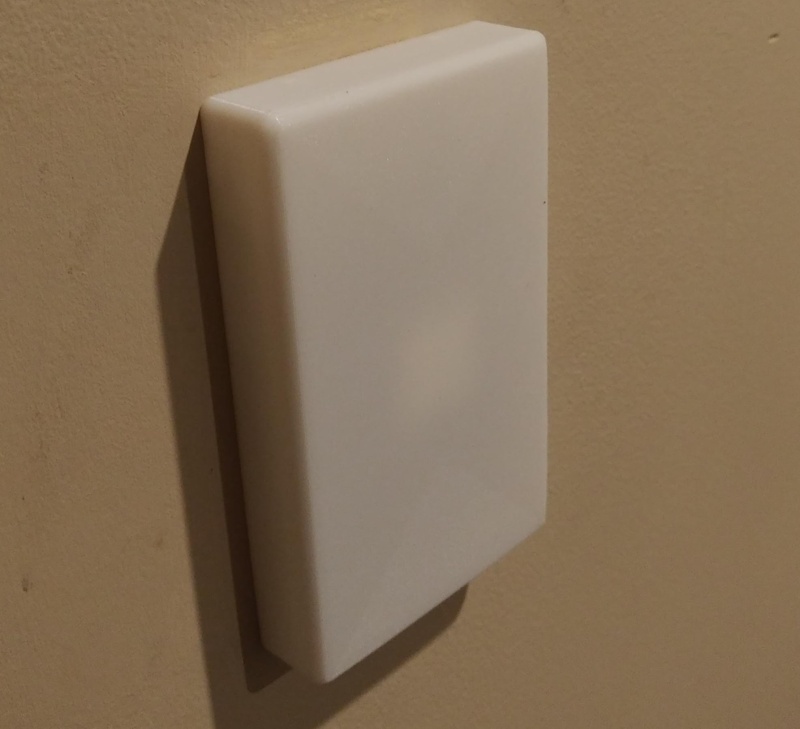
This is my solution for the lightswitch problem:


3D printed solid faced cover, deep enough to cover the switch. Has tabs to fit standard PDL600 switches. Day to day the switch is covered up, but it pops off easily (usually) if you need to flick the switch to reset the bulb.


I have stuck a remote to the front of it, but am currently working on a design with the remote recessed. Still a work in progress. I'm just not happy with the rounded radius of the interior corners...


Dunnersfella
4100 posts

Uber Geek
+1 received by user: 887


  #2311426 5-Sep-2019 19:04
Send private message

alasta:


  • Reliability is reasonably good. The only major issue I have had was one occasion when the system appeared to lose awareness of time and the bridge had to be power cycled.


The bridge is the weak point of the system, I used to run Hue but it was a little flakier than I would have liked.


It's not a pro-level lighting system, but nor does it cost as much and it's certainly retro-fit friendly.


A new, more stable Hub and I'll look at it again... especially if it could fit my down lights.


Shop now at Mighty Ape (affiliate link).
gehenna
8667 posts

Uber Geek
+1 received by user: 3883

Moderator
Trusted
Lifetime subscriber

  #2311432 5-Sep-2019 19:19
Send private message

Interesting, my bridge has been running without issue since day 1


They are reasonably good at releasing software updates for the app/bridge/bulbs.


alasta
6889 posts

Uber Geek
+1 received by user: 3363

Trusted
Subscriber

  #2311459 5-Sep-2019 20:05
Send private message

Yeah, I have been using my system for nearly a year and the glitch that I described above is the only problem that I have had when using the Hue app.


When using Apple's Home app it was a different story. I noticed some quite strange behaviours with that.


michaelmurfy
meow
13579 posts

Uber Geek
+1 received by user: 10910

Moderator
ID Verified
Trusted
Lifetime subscriber

  #2311489 5-Sep-2019 20:36
Send private message

@mdf I'll take 10. This is the perfect solution for me.


Looks like it'll be the right size to slap a Hue Dimmer button on front.


Michael Murphy | https://murfy.nz
Referral Links: Quic Broadband (use R122101E7CV7Q for free setup)

Are you happy with what you get from Geekzone? Please consider supporting us by subscribing.
Opinions are my own and not the views of my employer.


Lizard1977
2133 posts

Uber Geek
+1 received by user: 624

ID Verified

  #2311706 6-Sep-2019 12:09
Send private message

michaelmurfy:


@mdf I'll take 10. This is the perfect solution for me.


Looks like it'll be the right size to slap a Hue Dimmer button on front.


+1.  Any chance you can supply the 3D files for printing?


On the broader question of using Hue, I started with a bridge and a few of the plain white bulbs.  At the time, I wasn't able to find a starter kit like that with bayonet bulbs.  I've gradually expanded my system to various rooms of the house as funds/sales permit.  Generally, I wait for NL to have a 20% off sale, then I go to Mitre 10 and get them to price match with 15% off on top.  It meant I was able to get the older-style white bulbs for about $20 ea, the dimmer switches for $34.  I've added a few colour bulbs for the lounge, and the white ambience bulbs (wider range of warmths) for the bedrooms for about $34.  I also got the bridge using Fly Buys points, so if you have points to use up then that could help you get started. 


I suspect the difference between the two kits from NL are that the more expensive one has colour bulbs, while the other has just white bulbs.


I found that the lights have been great for the kids (5 and 2 years old).  I've been able to mount the dimmer switches in their bedrooms at a level they can reach, which lets them control their own lights.  The removable remote can be a blessing and a curse - it means they can use it from their beds to turn the lights on if they need to, but sometimes the remotes can go astray, or they end up sitting on the couch in the lounge turning the lights through the various colour profiles I've set up.  I've also used the routine programs to have the hallway lights as "nightlights" through the night in case they need to find their way to the toilet.  We also use programs to bring up the lights to help them know when to get up (to varying degrees of success).


Other systems will do all of this, and probably more.  But I like Hue because it is (as others have said), the Apple of the lighting world - simple, easy to use, and just (mostly) works.  I would really miss it if we didn't have it now.


Oh, and integrating it with Alexa has been fun.  My wake word is "computer" (Star Trek fan here) so I can say "computer, turn on the lights."  I have the lights in the kitchen programmed to turn off at 7.45am, and if the kids are still in there eating their breakfast, they start shouting at Alexa "'puter, turn on lights!"


 1 | 2 | 3
View this topic in a long page with up to 500 replies per page Create new topic


Geekzone Live »

Try automatic live updates from Geekzone directly in your browser, without refreshing the page, with Geekzone Live now.


Are you subscribed to our RSS feed? You can download the latest headlines and summaries from our stories directly to your computer or smartphone by using a feed reader.